1. Bubuka
The EZVIZ HB8-4G is a battery-powered, pan and tilt security camera designed for outdoor use. It offers 2K+ resolution, 360-degree coverage, smart human motion detection, and active defense features. This manual provides instructions for setting up, operating, maintaining, and troubleshooting your camera.
2. Eusi Paket
Pastikeun yén sadaya item aya dina pakét anjeun:
- HB8 2K+ Camera
- Citakan Pangeboran
- Kabel USB
- Sekrup Kit
- Guide Instalasi Gancang
3. Setélan
3.1 Ngecas kaméra
The HB8-4G camera is equipped with a large 5200 mAh Lithium Ion battery. Before initial use, fully charge the camera using the provided USB cable. For continuous power, the camera can be connected to an EZVIZ solar panel (sold separately).

Image: The EZVIZ HB8-4G camera highlighting its 5200 mAh battery capacity.
3.2 Nyelapkeun Kartu SIM
This camera operates using a 4G cellular network. Insert a micro SIM card with an active data plan into the designated slot. A Nano to Micro SIM card adapter is included if needed.
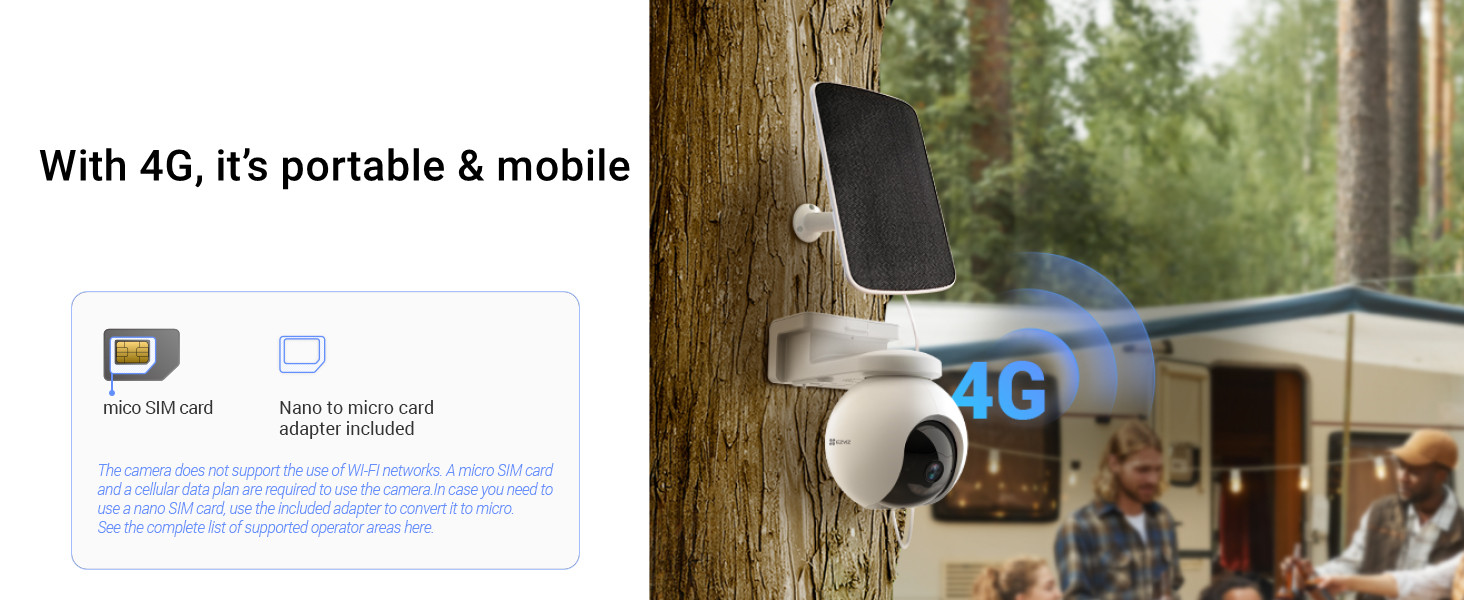
Image: The EZVIZ HB8-4G camera demonstrating its 4G connectivity and SIM card insertion.
3.3 Masang kaméra
The camera is designed for wall mount installation. Use the provided drilling template and screw kit to securely attach the camera to a suitable outdoor surface. Ensure the camera is positioned for optimal coverage and, if using, solar panel exposure.

Image: The EZVIZ HB8-4G camera mounted on an exterior wall, showing its outdoor placement.
3.4 Pamasangan Aplikasi sareng Setelan Awal
Download the EZVIZ app from the Google Play Store or Apple App Store. Follow the in-app instructions to create an account and add your HB8-4G camera. This process typically involves scanning a QR code on the camera.
4. Ngoperasikeun kaméra
4.1 Fungsi Pan sareng Tilt
The camera features pan and tilt capabilities, allowing for 360-degree horizontal and 80-degree vertical rotation. Control the camera's view remotely via the EZVIZ app. You can also set preset locations for quick viewngenalkeun wewengkon husus.

Image: The EZVIZ HB8-4G camera illustrating its 360-degree pan and 80-degree tilt range.
4.2 Smart Human Motion Detection and Tracking
The HB8-4G integrates a PIR sensor and a person-shape detection algorithm to accurately identify human movement, reducing false alarms. Upon detection, the camera can automatically track the person's movement within its field of view.

Image: The camera's smart human motion detection and auto-tracking feature in action.
4.3 Active Defense
When a person is detected, the camera's active defense function can trigger a loud siren and flash two spotlights to deter intruders. You will also receive a notification push to your connected device.

Image: The camera's active defense system with siren and flashing spotlights.
4.4 Visi Peuting Warna
The HB8-4G provides clear color night vision up to 15 meters (49 feet), allowing for detailed monitoring even in low-light conditions.

Image: A comparison showing the clarity of color night vision provided by the camera.
4.5 Obrolan Dua Arah
Utilize the built-in microphone and speaker for two-way communication through the EZVIZ app, allowing you to speak to visitors or deter unwanted guests.
4.6 Panyimpenan Pidéo
The camera includes a 32 GB eMMC storage capacity. It also supports a microSD card up to 512 GB for local storage. Additionally, cloud storage options are available through EZVIZ CloudPlay (subscription may be required).

Image: The camera's storage options, including microSD card and cloud services.
4.7 App Features and Compatibility
The EZVIZ app provides live view, video playback, customizable detection zones, and various settings adjustments. The camera is compatible with smart home ecosystems like Google Assistant and Amazon Alexa.

Image: A smartphone displaying the EZVIZ app interface with live camera feed and timeline.
5. Pangropéa
5.1 Desain Tahan Cuaca
The HB8-4G camera features a weatherproof design, allowing it to withstand various outdoor conditions such as sun, rain, and snow.

Image: The camera's weatherproof design, shown enduring rain.
5.2 Perawatan Batré
To maximize battery life, ensure the camera is regularly charged, especially if not connected to a solar panel. Avoid extreme temperatures that can degrade battery performance.
5.3 beberesih
Périodik ngabersihan lénsa kaméra jeung perumahan ku lemes, damp cloth to ensure clear image quality and proper operation. Do not use harsh chemicals or abrasive materials.
6. Cara ngungkulan
6.1 Masalah konektipitas
- No 4G Signal: Ensure your SIM card is active and has a data plan. Check the SIM card insertion. Verify 4G coverage in the camera's location.
- Kaméra offline: Check battery level. If the battery is low, recharge the camera. Restart the camera by pressing the reset button (refer to the quick installation guide for location).
6.2 Batré Draining Gancang
- Deteksi Gerakan anu Sering: High activity in the camera's view will consume more battery. Adjust motion detection sensitivity or detection zones in the app.
- Hirup View Pamakéan: Aksés anu sering pikeun hirup view via the app will reduce battery life.
- Suhu ekstrim: Cold weather can significantly impact battery performance.
- Panel surya: Ensure the solar panel (if used) is clean and receives adequate sunlight.
6.3 Deteksi Gerakan Teu Jalan
- Pariksa Setélan: Verify that motion detection is enabled in the EZVIZ app and that detection zones are correctly configured.
- Halangan: Pastikeun teu aya halangan fisik anu ngahalangan kaméra view or the PIR sensor.
7. Spésifikasi
| Fitur | Spésifikasi |
|---|---|
| Modél | CS-HB8-R100-1K3FL4GA |
| Warna | Bodas |
| Resolusi | 2K+ / 3MP (1440p Video Capture) |
| Téhnologi konektipitas | Nirkabel (4G LTE) |
| Fitur husus | PTZ Technology, Smart Human Motion Detection, Color Night Vision, Two-Way Talk, Active Defense |
| Pamakéan jero rohangan / outdoor | Luar |
| Sumber Daya | Battery Powered (5200 mAh Lithium Ion) |
| Panyimpenan | 32 GB eMMC, MicroSD Card (up to 512 GB) |
| Tipe Pamasangan | Tembok Gunung |
| Dimensi produk | 18.3 x 11.6 x 16.6 cm |
| Item Beurat | 1.06 kg |
| Format Capture Video | MP4 (komprési H.265) |
8. Garansi jeung Rojongan
8.1 Émbaran jaminan
For warranty details, please refer to the warranty card included in your product packaging or visit the official EZVIZ website. An optional 1-year extended warranty may be available from third-party providers.
8.2 Rojongan Palanggan
For technical assistance or product inquiries, please contact EZVIZ customer support. In India, support is provided by Prama Hikvision India Pvt. Ltd. You can reach them via email at rma@pramahikvision.com.