1. Bubuka
Thank you for choosing the RCA Wave-68 True Wireless Earbuds. These earbuds are designed to provide a high-quality audio experience with features such as Hi-Res Audio, deep bass, and Transparency Mode. They offer a stable Bluetooth 5.2 connection, a built-in microphone for clear calls, and up to 20 hours of battery life with the charging case. This manual will guide you through the setup, operation, and maintenance of your new earbuds.
2. Eusi Paket
Punten parios yén sadaya barang aya dina pakét anjeun:
- Earbud Nirkabel Leres RCA Wave-68 (Kénca sareng Katuhu)
- Portabel Ngecas Case
- Kabel Ngecas USB-C
- Sababaraha Ukuran Eartip
- Manual pamaké
3. Produk Langkungview

Figure 3.1: RCA Wave-68 True Wireless Earbuds and Charging Case. The earbuds are securely placed within the compact charging case, ready for use or recharging.

Figure 3.2: Key Features of a Single Earbud. This diagram highlights the various functionalities integrated into each earbud, such as built-in microphones for calls, touch-sensitive controls for playback and volume, and the true wireless design for freedom of movement. It also indicates the capability for ultra-bass sound and high-quality audio output.
Komponén Earbud:
- Area Kontrol Toél: Pikeun ngatur puteran, telepon, sareng asistén sora.
- Mikropon: For hands-free calling and voice commands.
- Pancing Ceuli: Nyadiakeun pas aman tur nyaman.
- Ngecas Kontak: For recharging the earbuds within the case.
Komponén Kasus Ngecas:
- Port Ngecas (USB-C): For recharging the case.
- Indikator batré LED: Displays the charging status and battery level of the case and earbuds.
- Slot Ngecas Earbud: Nyepeng sareng ngecas earbuds kalayan aman.
4. Setélan
4.1. Ngecas Earbuds jeung Case
Sateuacan dianggo anu munggaran, eusian pinuh earbud sareng wadahna.
- Teundeun earbuds kana wadah ngecas. Pastikeun aranjeunna leres seated dina slot masing-masing.
- Sambungkeun kabel ngecas USB-C ka port ngecas dina case jeung tungtung séjén ka adaptor kakuatan USB (teu kaasup) atawa port USB komputer.
- The LED indicator on the charging case will show the charging status. Once fully charged, the indicator will typically show a solid light or turn off.
- Ngecas pinuh nyadiakeun dugi ka 20 jam total waktos maén sareng wadah ngecas.

Figure 4.1: Earbuds in Open Charging Case. The image displays the earbuds inside the charging case with the lid open, revealing digital displays that indicate the battery levels of both the individual earbuds and the charging case itself.
4.2. Nyapasangkeun sareng Alat Bluetooth
Earbud bakal otomatis asup kana modeu pairing nalika dicabut tina wadah ngecas.
- Pastikeun yén earbuds dieusi.
- Buka wadah pangisi daya teras cabut dua earbud. Duanana bakal otomatis hurung sareng nyobian dipasangkeun.
- Dina alat anjeun (smartphone, tablet, laptop), aktipkeun Bluetooth.
- Milarian pikeun new Bluetooth devices. You should see "RCA Wave-68" in the list of available devices.
- Select "RCA Wave-68" to connect. Once connected, you will hear an audio prompt, and the earbud indicator lights will change (e.g., turn off or flash slowly).
- Upami panyapasangan gagal, pasang deui earbuds kana wadahna, tutup tutupna, antosan sababaraha detik, teras malikan deui léngkah-léngkahna.
5. Parentah Operasi
5.1. Kontrol Toél Dasar
The RCA Wave-68 earbuds feature intuitive touch controls on each earbud. The specific functions are:
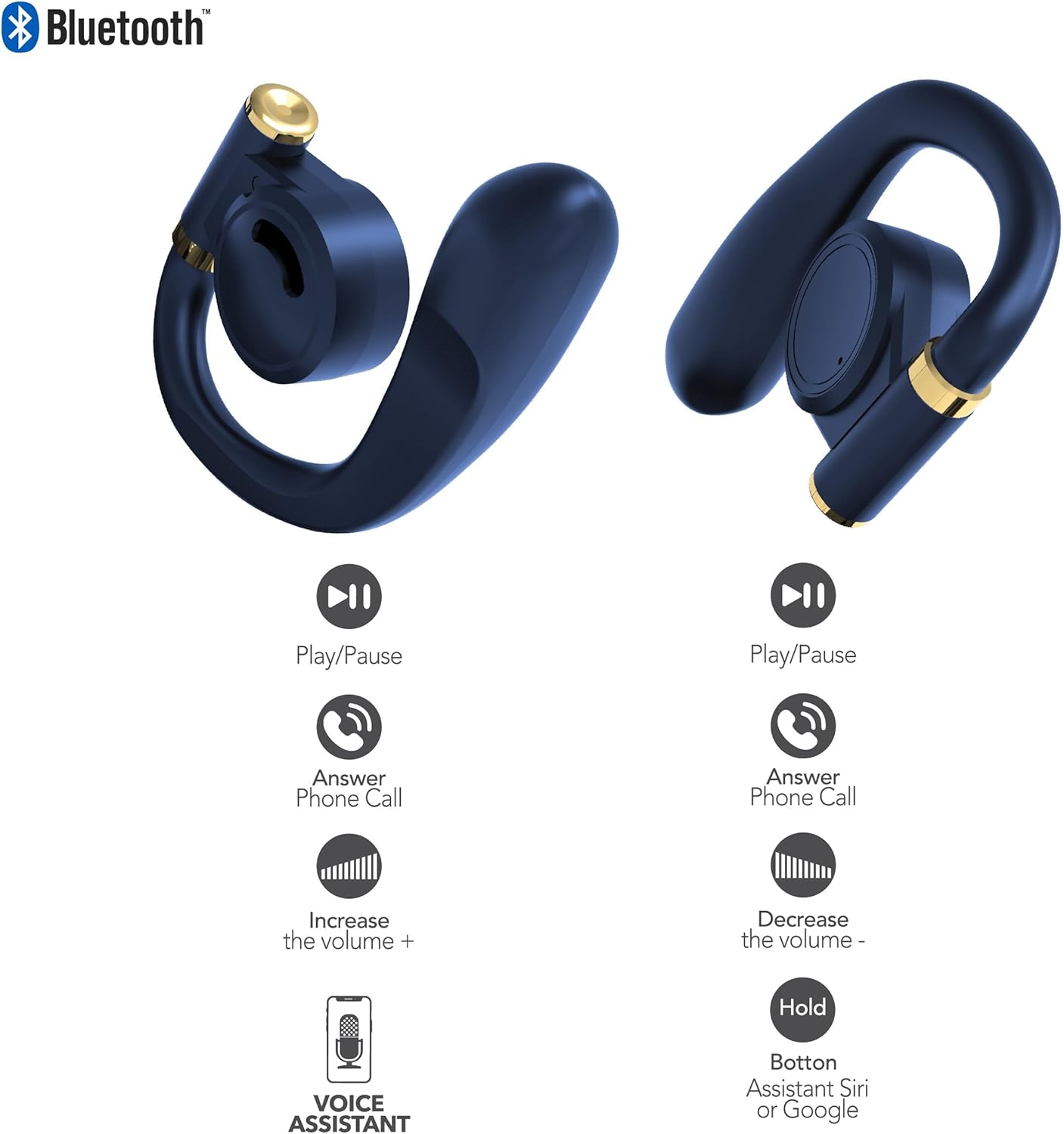
Figure 5.1: Earbud Touch Control Functions. This diagram details the touch-sensitive areas on both the left and right earbuds and their corresponding actions for media playback, call management, volume adjustment, and activating voice assistants.
| Aksi | Earbud kénca | Earbud Katuhu |
|---|---|---|
| Play / Reureuh | Ketok Tunggal | Ketok Tunggal |
| Ngajawab Telepon Telepon | Ketok Tunggal | Ketok Tunggal |
| Ningkatkeun Jilid | Ketok dua kali | N/A |
| Ngurangan Volume | N/A | Ketok dua kali |
| Activate Voice Assistant (Siri/Google) | Tahan | Tahan |
5.2. Modeu Transparansi
Transparency Mode allows you to hear your surroundings while still enjoying your audio. This feature is useful for maintaining awareness in environments like busy streets or public transport.
- Activating Transparency Mode: Refer to your specific earbud control diagram or experiment with a triple tap on either earbud. An audio prompt will confirm the mode change.
- Deactivating Transparency Mode: Repeat the activation gesture.
5.3. Daya Hurung / Pareum
- Daya Hurung: Earbuds otomatis hurung nalika dicabut tina wadah ngecas.
- Pareum listrik: Lebetkeun deui earbud kana wadah ngecas teras tutup. Éta bakal otomatis pegat sareng pareum.
6. Pangropéa
Proper maintenance ensures the longevity and optimal performance of your RCA Wave-68 earbuds.
- beberesih: Regularly clean the earbuds and charging case with a soft, dry, lint-free cloth. Do not use harsh chemicals or abrasive materials. Gently clean the charging contacts on both the earbuds and the case to ensure proper connection.
- Eartips: Remove and clean the eartips periodically with mild soap and water. Ensure they are completely dry before reattaching them to the earbuds.
- Panyimpenan: When not in use, always store the earbuds in their charging case to protect them from dust, dirt, and damage. Store in a cool, dry place away from extreme temperatures.
- Paparan cai: Headphone ieu henteu tahan cai. Ulah nepi ka kakeunaan cai anu kaleuleuwihi, hujan, atanapi késang.
7. Cara ngungkulan
If you encounter issues with your RCA Wave-68 earbuds, try the following solutions:
| Masalah | Solusi anu mungkin |
|---|---|
| Earbuds henteu dipasangkeun sareng alat |
|
| Ngan hiji earbud jalan |
|
| Teu aya sora atanapi volume handap |
|
| Kasus ngecas teu ngecas |
|
8. Spésifikasi
The following are the technical specifications for the RCA Wave-68 True Wireless Earbuds:
| Fitur | Rincian |
|---|---|
| Ngaran modél | ombak |
| Téhnologi konektipitas | Nirkabel |
| Téknologi Komunikasi Nirkabel | Bluetooth |
| Vérsi Bluetooth | 5.3 |
| Alat nu cocog | Laptops, Smart Speakers, Smartphones, Tablets |
| Rentang Frékuénsi | 20 Hz - 20 kHz |
| Métode kontrol | Jarak Jauh (Kontrol Toél) |
| Kahirupan batré | Nepi ka 20 Jam (kalayan wadah ngecas) |
| Tipe Supir Audio | Supir dinamis |
| Wangun Earpiece | Di-ceuli |
| Panempatan Ceuli | Dina Ceuli |
| Faktor Bentuk | Dina Ceuli |
| Kontrol bising | Adaptive Noise Cancellation (Transparency Mode) |
| Fitur husus | Built-In Voice Assistant, Smart Button |
| Dimensi produk | 4.06 x 2.87 x 0.79 inci |
| Item Beurat | 1 pon |
| UPC | 850068964482 |
9. Garansi jeung Rojongan
9.1. Jaminan kawates
RCA warrants this product against defects in material and workmanship for a period of one (1) year from the date of original purchase. This warranty does not cover damage caused by accident, misuse, abuse, improper installation or operation, lack of reasonable care, or unauthorized modification. For detailed warranty terms and conditions, please refer to the warranty card included with your product or visit the official RCA websitus.
9.2. Rojongan Palanggan
If you have any questions, require technical assistance, or need to claim warranty service, please contact RCA customer support through the following channels:
- Websitus: Visit the official RCA support websitus pikeun FAQs, pituduh ngungkulan, jeung formulir kontak.
- Surélék: Refer to your product packaging or the RCA websitus pikeun alamat surélék layanan palanggan.
- Telepon: Check the RCA website for regional customer support phone numbers.
Please have your product model number (Wave-68) and proof of purchase ready when contacting support.


