Bubuka
Welcome to your RCA Wave-68 True Wireless Earbuds. This manual provides detailed instructions on how to set up, operate, maintain, and troubleshoot your earbuds to ensure optimal performance and a seamless audio experience. Please read this manual thoroughly before using your device.
Eusi pakét
- Earbud Nirkabel Leres RCA Wave-68 (Kénca sareng Katuhu)
- Ngecas Case
- Kabel Ngecas USB
- Manual pamaké
Produk Leuwihview
Familiarize yourself with the components of your RCA Wave-68 earbuds and charging case.

Gambar: The RCA Wave-68 earbuds are shown inside their open charging case. The case features a digital display indicating the battery levels of both the case and individual earbuds.
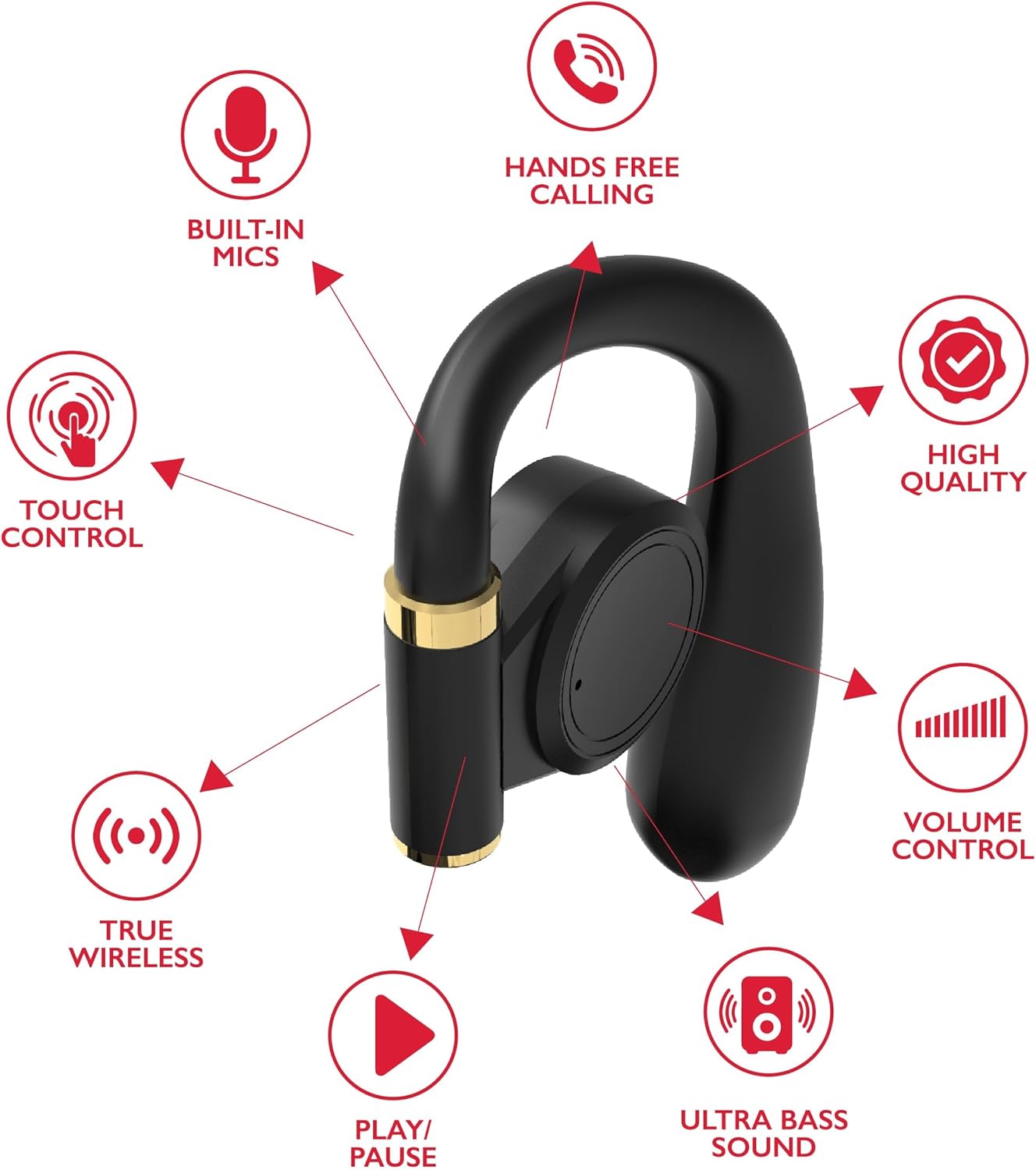
Gambar: A diagram highlights key features of a single RCA Wave-68 earbud, including built-in mics, hands-free calling, touch control, true wireless connectivity, play/pause function, ultra bass sound, volume control, and high-quality audio.
Disetél
1. Ngecas Earbuds jeung Case
Before first use, fully charge the earbuds and charging case. Place the earbuds into the charging case. Connect the USB charging cable to the charging port on the case and to a power source. The digital display on the case will show the charging status. A full charge provides approximately 20 hours of total playtime with the charging case.
2. Papasangan Bluetooth
- Daya Hurung: Open the charging case. The earbuds will automatically power on and enter pairing mode. You may see a blinking light indicator on the earbuds.
- Aktipkeun Bluetooth: Dina alat Anjeun (smartphone, tablet, jsb), aktipkeun Bluetooth.
- Pilih Alat: Milarian pikeun "RCA Wave-68" in the list of available Bluetooth devices and select it to connect.
- Konfirmasi: Once connected, the earbuds will indicate successful pairing, and the light indicator may stop blinking or turn off.
If pairing fails, ensure the earbuds are charged and within range of your device. Turn off Bluetooth on other nearby devices to avoid interference.
Parentah Operasi
Daya Hurung/Pareuman
- Daya Hurung: Buka wadah ngecas, teras earbud bakal otomatis hurung. Alternatipna, pencét sareng tahan area kontrol toél dina kadua earbud salami 3 detik.
- Pareum listrik: Lebetkeun deui earbud kana wadah ngecas teras tutup. Éta bakal otomatis pareum. Alternatipna, pencét sareng tahan area kontrol toél dina dua earbud salami 5 detik.
Toél Kontrol
The RCA Wave-68 earbuds feature intuitive touch controls for managing audio playback, calls, and voice assistant functions.
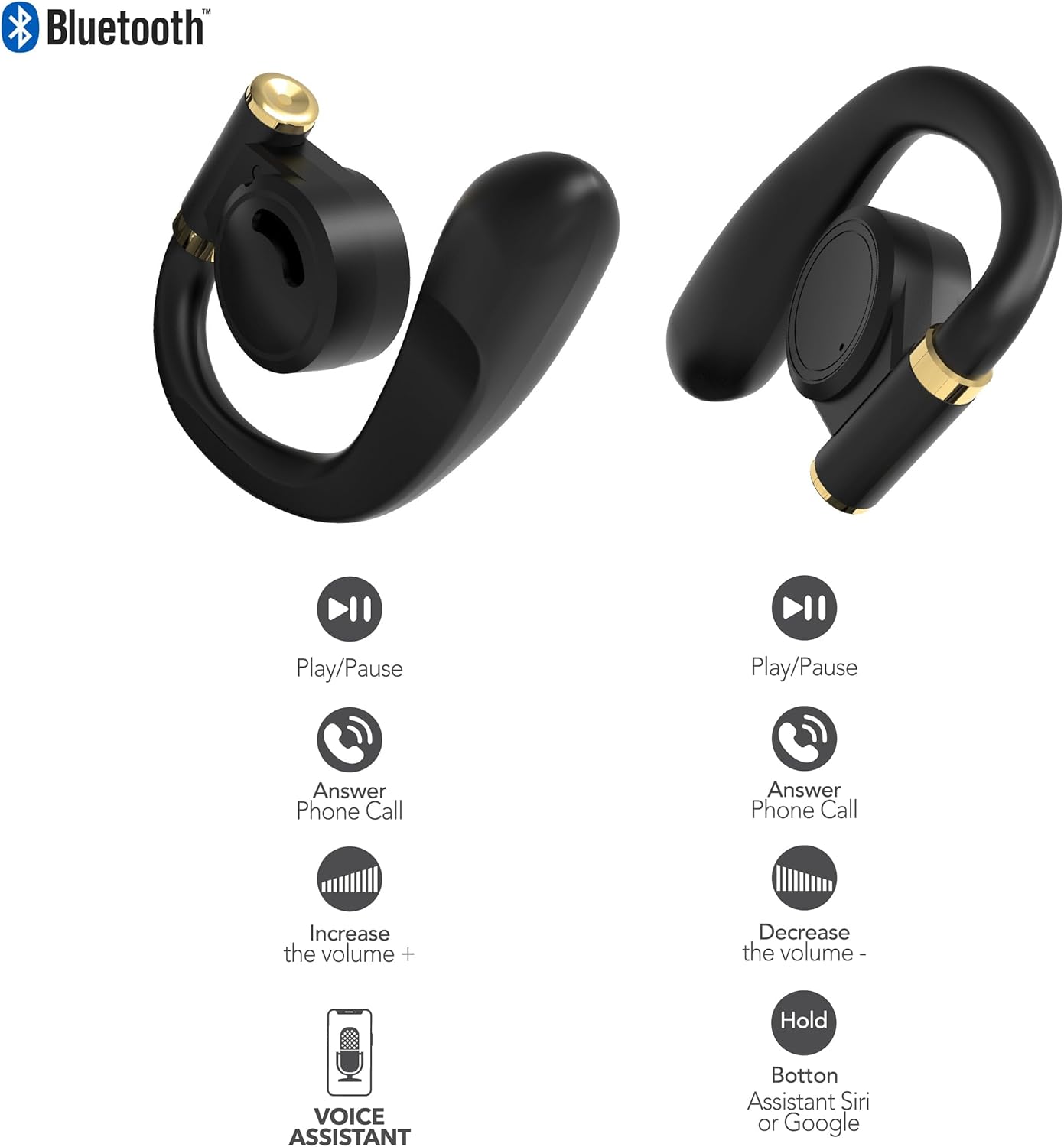
Gambar: This diagram illustrates the touch control functions for both the left and right RCA Wave-68 earbuds, including play/pause, answer phone call, volume increase/decrease, and activating the voice assistant.
- Puter / Reureuh: Ketok tunggal dina boh earbud.
- Lagu salajengna: Ketok dua kali earbud katuhu.
- Lagu Sateuacanna: Ketok dua kali earbud kénca.
- Volume Up: Ketok tilu kali earbud katuhu.
- Volume Turun: Ketok tilu kali earbud kénca.
- Ngajawab / mungkas Telepon: Ketok sakedap boh earbud salami sauran asup atanapi sauran aktip.
- Nolak Telepon: Pencet jeung tahan boh earbud salila 2 detik dina mangsa telepon asup.
- Aktipkeun Asisten Sora (Siri / Asisten Google): Pencét jeung tahan boh earbud salila 3 detik.
Modeu Transparansi
The Transparency Mode allows you to hear your surroundings while still enjoying your audio. This feature is useful for awareness in environments like busy streets or public transport.
- Activate/Deactivate Transparency Mode: Consult your device's Bluetooth settings or specific app if available, or refer to the product's quick start guide for a specific touch control gesture if not listed above.
Pangropéa
beberesih
Pembersihan rutin ngabantosan ngajaga kualitas sora sareng kabersihan.
- Anggo lawon anu lembut, garing, henteu lint pikeun ngusap earbuds sareng wadah ngecas.
- Ulah make cleaners abrasive, alkohol, atawa pangleyur kimiawi.
- Gently remove any earwax or debris from the earbud tips and speaker mesh using a small, clean brush or cotton swab.
Panyimpenan
Lamun teu dipake, nyimpen earbuds dina wadah ngecas maranéhanana pikeun ngajaga eta tina lebu jeung karuksakan.
- Nyimpen dina tiis, tempat garing jauh ti suhu ekstrim.
- Hindarkeun paparan anu berkepanjangan kana sinar panonpoé langsung atanapi kalembaban.
Pamérésan masalah
If you encounter issues with your RCA Wave-68 earbuds, refer to the following common solutions:
- Earbuds not powering on automatically: Ensure the charging case is charged. Place earbuds back in the case, close the lid, then open it again. If issues persist, manually power on by pressing and holding the touch control area for 3 seconds.
- Earbuds teu dipasangkeun: Make sure both earbuds are fully charged. Turn off Bluetooth on your device, then turn it back on. Forget "RCA Wave-68" from your device's Bluetooth list and attempt to pair again. Ensure no other devices are actively connected to the earbuds.
- Taya sora tina hiji earbud: Place both earbuds back into the charging case, close the lid, and then take them out again. This often re-syncs them. Check your device's audio balance settings.
- Charging case not displaying battery info/not charging: Ensure the USB cable is securely connected to both the case and the power source. Try a different USB cable or power adapter. Clean the charging port on the case for any debris.
- Volume lemah atawa kualitas sora goréng: Adjust the volume on both your device and the earbuds. Ensure the earbuds are properly seated in your ears for a good seal. Clean any debris from the earbud speaker mesh.
- Earbud nu murag: Ensure you are using the correct ear tip size for a secure and comfortable fit.
spésifikasi
| Fitur | Rincian |
|---|---|
| Ngaran modél | Gelombang-68 |
| merek | RCA |
| Téhnologi konektipitas | Nirkabel (Bluetooth) |
| Vérsi Bluetooth | 5.3 |
| Kahirupan batré | Nepi ka 20 Jam (kalayan wadah ngecas) |
| Métode kontrol | Toél |
| Panempatan Ceuli | Dina Ceuli |
| Faktor Bentuk | Dina Ceuli |
| Bahan | Plastik, Silikon |
| Fitur husus | Built-In Voice Assistant, Transparency Mode |
| UPC | 850068964468 |
Émbaran Kasalametan
- Ulah ngabongkar atanapi ngarobih earbud atanapi wadah ngecas.
- Ulah nepi ka alat ieu kakeunaan suhu, kalembaban, atawa cairan anu ekstrim.
- Ulah nganggo earbud dina volume anu luhur salami waktos anu lami pikeun nyegah karusakan pangrungu.
- Jauhkeun tina jangkauan barudak sareng piaraan.
- Buang alat sacara tanggung jawab nurutkeun peraturan lokal.
Garansi sareng Rojongan
RCA products are designed for reliability and performance. For warranty information or technical support, please refer to the warranty card included in your package or visit the official RCA support websitus. Punten tahan bukti pameseran anjeun pikeun klaim garansi.


