1. Produk Langkungview
The RCA Wave-68 True Wireless Earbuds provide a high-quality audio experience with advanced features such as Hi-Res Audio, Deep Bass, Transparency Mode, and Bluetooth 5.2 connectivity. Designed for comfort and extended use, these earbuds offer up to 20 hours of battery life with the charging case, making them suitable for various activities.
Eusi pakét
- Earbud Nirkabel Leres RCA Wave-68 (Kénca sareng Katuhu)
- Ngecas Case
- Kabel Ngecas USB
- Manual pamaké
- Customizable Ear Tips (various sizes)
Idéntifikasi komponén

Gambar 1.1: The RCA Wave-68 True Wireless Earbuds shown with their charging case. The earbuds feature an over-ear hook design for a secure fit, and the charging case includes a digital display for battery status.
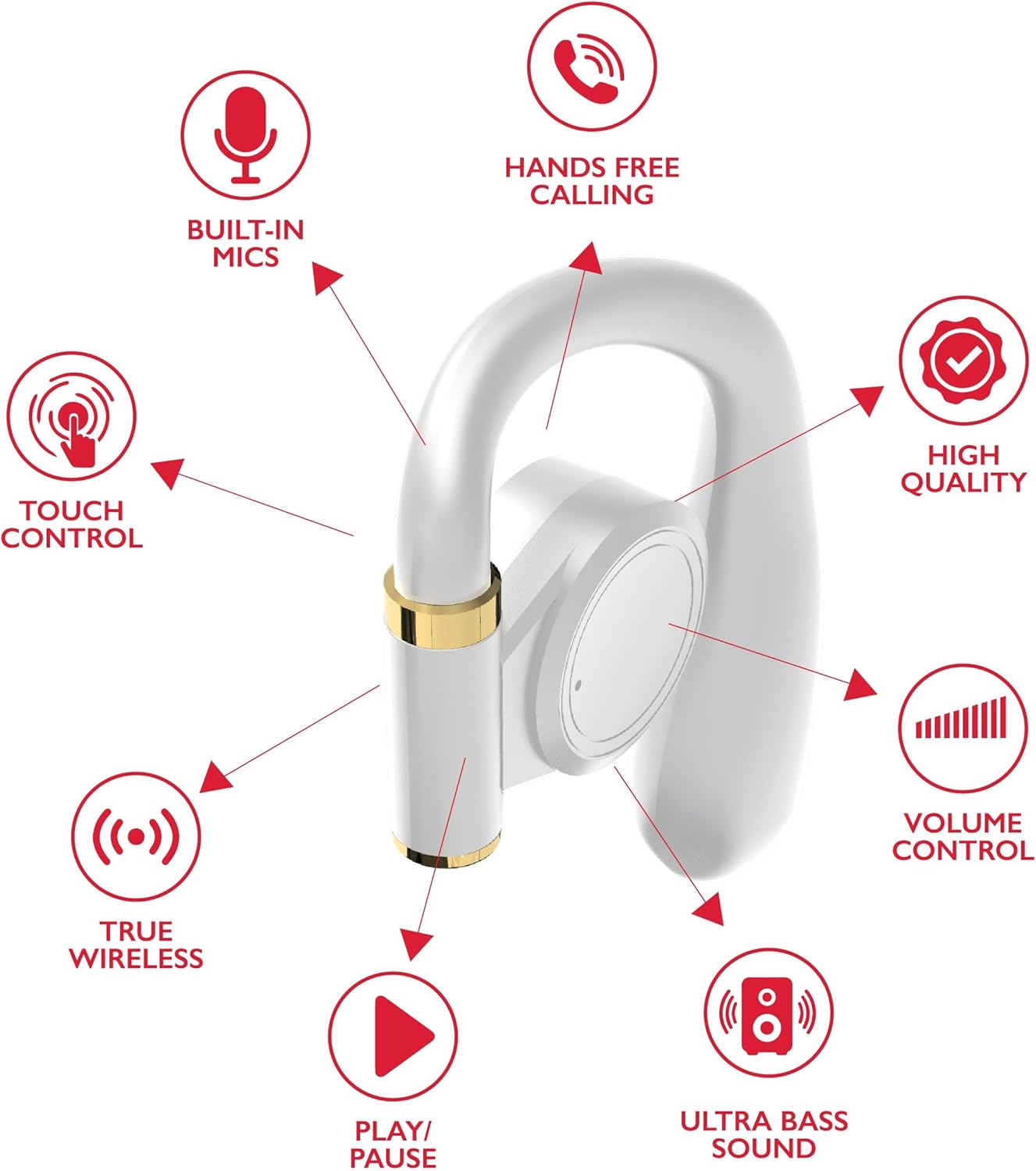
Gambar 1.2: Detailed diagram highlighting key features of a single RCA Wave-68 earbud, including built-in mics, hands-free calling, touch control, true wireless connectivity, play/pause function, ultra bass sound, volume control, and high-quality audio.
2. Setélan
2.1 Ngecas Earbuds sareng Case
Before first use, fully charge the earbuds and the charging case. The charging case provides additional power for the earbuds on the go.
- Connect the provided USB charging cable to the charging port on the case and to a USB power source (e.g., computer, wall adapter).
- The digital display on the charging case will show the battery level. Allow the case to charge until the display indicates 100%.
- Place the earbuds into their respective slots in the charging case. Ensure they are properly seated. The earbuds will begin charging automatically.
- The earbuds' indicator lights will show their charging status (refer to the indicator light section for details).

Gambar 2.1: The RCA Wave-68 earbuds placed inside their charging case with the lid open, showing the digital battery display.
2.2 Nyapasangkeun sareng Alat Bluetooth
The earbuds will automatically enter pairing mode when removed from the charging case for the first time or when disconnected from a previously paired device.
- Ensure the earbuds are charged and removed from the charging case. They will automatically power on and enter pairing mode.
- Dina alat anjeun (smartphone, tablet, laptop), aktipkeun Bluetooth.
- Milarian pikeun alat Bluetooth sadia.
- Select "RCA Wave-68" from the list of found devices.
- Once connected, you will hear an audible confirmation, and the earbud indicator lights will change (refer to the indicator light section for details).
- Headphone bakal otomatis nyambung deui ka alat anu terakhir dipasangkeun nalika dicabut tina casingna, upami Bluetooth diaktipkeun dina alat éta.
3. Parentah Operasi
The RCA Wave-68 earbuds feature intuitive touch controls for managing audio playback, calls, and voice assistant functions.
3.1 Daya Hurung/Pareuman
- Daya Hurung: Remove the earbuds from the charging case. They will power on automatically. Alternatively, press and hold the touch control area on both earbuds for 3 seconds.
- Pareum listrik: Place the earbuds back into the charging case. They will power off automatically. Alternatively, press and hold the touch control area on both earbuds for 5 seconds.
3.2 Puterkeun Musik

Gambar 3.1: Visual guide to the touch controls on the RCA Wave-68 earbuds for functions like Play/Pause, Answer Phone Call, Volume adjustment, and Voice Assistant activation.
- Puter / Reureuh: Ketok tunggal dina boh earbud.
- Lagu salajengna: Ketok dua kali dina earbud katuhu.
- Lagu Sateuacanna: Ketok dua kali dina earbud kénca.
- Volume Up: Ketok tilu kali dina earbud katuhu.
- Volume Turun: Ketok tilu kali dina earbud kénca.
3.3 Manajemén Telepon
- Ngajawab / mungkas Telepon: Ketok sakedap boh earbud salami sauran asup atanapi sauran aktip.
- Nolak Telepon: Press and hold the touch control area on either earbud for 2 seconds during an incoming call.
3.4 Asistén Sora
- Aktipkeun Asisten Sora (Siri / Asisten Google): Press and hold the touch control area on the left earbud for 2 seconds.
3.5 Modeu Transparansi
Transparency Mode allows you to hear your surroundings while listening to audio, enhancing awareness in environments like commuting or exercising outdoors.
- Toggle Transparency Mode: Press and hold the touch control area on the right earbud for 2 seconds. Repeat to switch back to normal mode.
4. Pangropéa
4.1 beberesih
- Rutin ngabersihkeun earbuds sareng wadah ngecas ku lawon anu lemes, garing, teu aya lint.
- Ulah make cleaners abrasive, alkohol, atawa pangleyur kimiawi.
- Cabut kotoran ceuli atawa kokotor tina tungtung ceuli jeung jaring spiker sacara lalaunan maké sikat leutik nu lemes atawa kapas.
- Ensure charging contacts on both earbuds and the case are clean and dry.
4.2 Panyimpenan
- Lamun teu dipake, sok nyimpen earbuds dina wadah ngecas maranéhanana pikeun ngajaga eta jeung tetep dicas.
- Simpen di tempat anu tiis, garing, jauh tina suhu anu ekstrim sareng sinar panonpoé langsung.
5. Cara ngungkulan
| Masalah | Solusi anu mungkin |
|---|---|
| Earbuds teu hurung. | Ensure the earbuds are charged. Place them in the charging case for a few minutes, then remove them. |
| Teu tiasa dipasangkeun sareng alat. |
|
| Taya sora atawa volume low. |
|
| Earbud sering pegat. |
|
| Hiji earbud teu aya sora. |
|
6. Spésifikasi
| Fitur | Rincian |
|---|---|
| Ngaran modél | Gelombang-68 |
| Téhnologi konektipitas | Nirkabel (Bluetooth) |
| Vérsi Bluetooth | 5.3 |
| Kahirupan batré | Nepi ka 20 Jam (kalayan wadah ngecas) |
| Tipe Supir Audio | Supir dinamis |
| Rentang Frékuénsi | 20Hz - 20kHz |
| Tingkat Résistansi Cai | Tahan cai |
| Métode kontrol | Jarak Jauh (Kontrol Toél) |
| Fitur husus | Built-In Voice Assistant, Smart Button, Transparency Mode |
| Alat nu cocog | Laptops, Smart Speakers, Smartphones, Tablets |
| Diménsi | 4.06 x 2.87 x 0.79 inci |
| Item Beurat | 1 pon |
7. Garansi jeung Rojongan
RCA products are designed for reliability and performance. For specific warranty information regarding your RCA Wave-68 True Wireless Earbuds, please refer to the warranty card included in your product packaging or visit the official RCA websitus.
For technical support, troubleshooting assistance, or to inquire about replacement parts, please contact RCA customer service through their official websitus atanapi inpormasi kontak anu disayogikeun dina dokuméntasi produk anjeun.
Sumberdaya Online:
- RCA Official Store on Amazon
- Resmi RCA Websitus (Umum) (Note: Specific product support pages may vary)


