Bubuka
This manual provides detailed instructions for the installation, operation, and maintenance of your HUPEJOS V50-4CH 4-Channel Dash Cam. Please read this manual thoroughly before using the device to ensure proper functionality and safety.
Produk Leuwihview
The HUPEJOS V50-4CH is a compact 4-channel dash camera system designed to provide comprehensive vehicle surveillance. It features front, left, right, and rear cameras, offering 360-degree coverage. Key features include:
- Rekaman 4-Kanal: Simultaneous recording from front, left, right, and rear cameras.
- Resolusi luhur: Front camera records at 2K, rear at 1080p, and left/right at 720p.
- Diwangun-di GPS: Ngarékam data kecepatan sareng lokasi kendaraan.
- Wi-Fi 5GHz: For fast playback and sharing via smartphone app.
- Kontrol sora: Operasi tanpa leungeun pikeun rupa-rupa fungsi.
- G-Sénsor: Automatic locking of important video files during collisions.
- Ngarekam loop: Continuously records, overwriting older files nalika kartu SD pinuh.
- Mode Parkir 24 Jam: Requires a hardwire kit (not included) for continuous surveillance when parked.
- Visi Peuting: Enhanced low-light recording with F1.8 aperture and IR lights.
- Saringan CPL: Reduces glare and reflections for improved image quality.
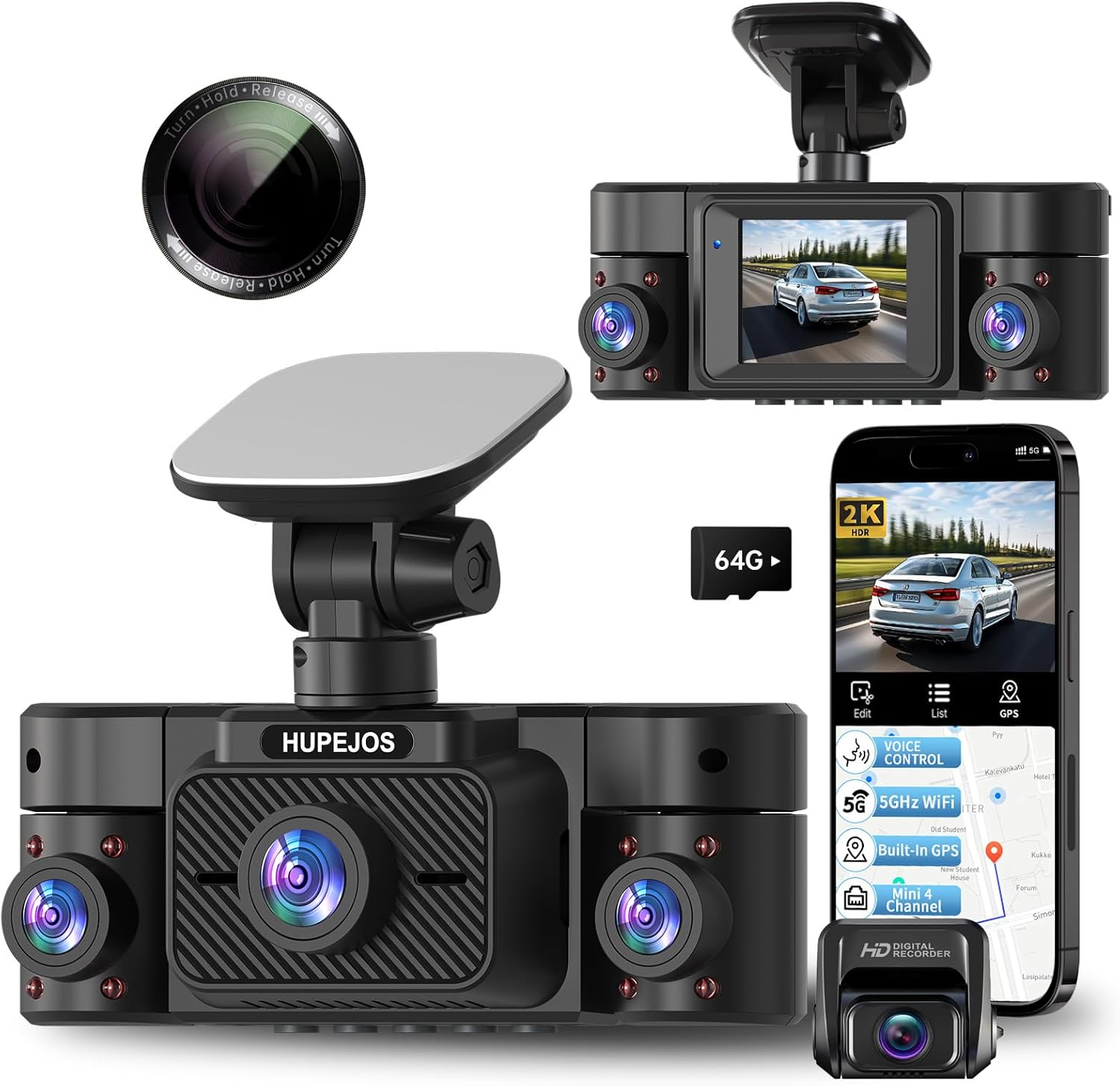
Image: The HUPEJOS V50-4CH dash cam, showing its compact design, multiple camera lenses, and the included CPL filter. A smartphone screen displays the companion app interface with recording and GPS features.

Image: An illustration highlighting the key features of the HUPEJOS V50-4CH dash cam, including 360-degree all-round protection, voice control, 5GHz Wi-Fi, built-in GPS, G-sensor lock, loop recording, 2-inch IPS screen, 4K UHD video recording (note: product description states 2K front, 1080p rear, 720p side), night vision, WDR/HDR, 24-hour parking mode, and included 64GB micro SD card.
Naon dina Box
Saatos unboxing, mangga pariksa yen sakabeh komponen aya:
- Unit Kamera Dasbor HUPEJOS V50-4CH
- Saringan CPL
- Mounting Hardware (e.g., suction cup mount, adhesive mount)
- Carjer mobil
- Kabel USB
- Manual pangguna (dokumén ieu)
- 64GB Micro SD Card (as indicated in feature image)
Setup sareng Instalasi
- Prepare the SD Card: Insert the provided 64GB Micro SD card into the dash cam's SD card slot. It is recommended to format the SD card within the dash cam settings before first use.
- Pasang Dash Cam:
- Bersihkeun bagian kaca hareup tempat dasbor bakal dipasang.
- Attach the mounting hardware (suction cup or adhesive mount) to the dash cam.
- Securely attach the dash cam to the windshield, ensuring it does not obstruct your view. Position it centrally for optimal front camera coverage.
- Adjust the camera angles for the front, left, right, and rear lenses to cover desired areas.
- Sambungan Daya:
- Sambungkeun carjer mobil kana port input daya dasbor kaméra.
- Colokkeun tungtung carjer mobil anu sanés ka stop kontak listrik 12V kendaraan anjeun (stop kontak korek rokok).
- Route the power cable neatly along the windshield and dashboard edges to avoid interference with driving.
- CPL Filter Installation:
- Gently attach the CPL filter to the front camera lens.
- Rotate the CPL filter while observing the screen to reduce glare from the dashboard or reflections from the windshield.

Image: The HUPEJOS V50-4CH dash cam mounted on a car's windshield, demonstrating its compact size and how it integrates into the vehicle's interior without obstructing the driver's view.

Image: A close-up of the CPL filter, showing its design for attachment to the dash cam lens. The text on the filter indicates "Turn Hold Release" for adjustment.
Parentah Operasi
Operasi Dasar
- Hurungkeun/Pareuman: The dash cam will automatically power on and begin recording when the vehicle's ignition is turned on. It will power off automatically when the ignition is turned off.
- Modeu Rekaman: The dash cam supports continuous loop recording. When the memory card is full, the oldest unprotected files bakal ditimpa.
- Pintonan layar: Layar IPS 2 inci nampilkeun langsung views tina kaméra. Anjeun tiasa ngalih antara kaméra anu béda views or display all four simultaneously via the menu settings.
Kontrol sora
The V50-4CH supports voice commands for hands-free operation. Common commands include:
- "Pidéo Mimitian"
- "Eureunkeun Pidéo"
- "Tembongkeun Kaméra Hareup"
- "Aktifkeun WiFi-na"
- "Aktifkeun Layar"
- "Nyokot poto"

Image: A driver interacting with the HUPEJOS V50-4CH dash cam using voice commands, illustrating the hands-free operation feature for safe driving.
Wi-Fi Connectivity and App Usage
The dash cam features built-in 5GHz Wi-Fi for quick connection to your smartphone. Download the dedicated app (refer to the dash cam's screen or packaging for app name/QR code) to:
- View hirup footage.
- Playback dirékam video.
- Unduh pidéo ka telepon anjeun.
- Saluyukeun setélan.
- Bagikeun dahareuntage.

Image: Demonstrates the built-in 5GHz Wi-Fi for fast data transfer to a smartphone and the built-in GPS feature, which allows viewing real-time vehicle speed and tracking data in recordings on a laptop or smartphone.
Fungsi GPS
Modul GPS anu terintegrasi ngarékam data kecepatan sareng lokasi kendaraan anjeun. Inpormasi ieu disematkeun dina pidéo files sarta bisa viewed using the dedicated playback software on a computer or through the smartphone app, providing crucial evidence in case of an incident.
G-Sensor (Rekaman Darurat)
The built-in G-sensor detects sudden impacts or rapid acceleration/deceleration. When triggered, it automatically locks the current video segment, preventing it from being overwritten by loop recording. These emergency files are stored in a separate folder on the SD card.

Image: Illustrates the loop recording function (every 3 minutes, oldest files overwritten), the G-sensor for automatic locking of important files during impacts, and the 24-hour parking mode with radar precision monitoring (requires separate hardwire kit).
24-Mode Parkir Jam
For continuous surveillance when your vehicle is parked, the dash cam supports a 24-hour parking mode. This feature requires a separate hardwire kit (not included, suggested ASIN: B0DMR2SLFH) to provide constant power to the dash cam. In parking mode, the dash cam can detect motion or impacts and record automatically.
CPL Filter Adjustment
The CPL (Circular Polarizing Lens) filter helps reduce reflections and glare from the windshield, dashboard, and other shiny surfaces, improving video clarity and color saturation. To adjust, gently rotate the outer ring of the CPL filter until reflections are minimized on the dash cam's screen. This adjustment is best done during daylight hours.
Pangropéa
- Ngabersihan lensa: Anggo lawon anu lemes sareng henteu ngaganggu pikeun ngabersihkeun lénsa kaméra sacara lembut. Hindarkeun bahan anu kasar atanapi bahan kimia anu keras.
- SD Card Maintenance: Regularly format the SD card (at least once a month) within the dash cam's settings to ensure optimal performance and prevent data corruption. Replace the SD card if you notice frequent errors or reduced performance.
- Pembaruan firmware: Pariksa produsén urang website periodically for firmware updates. Updating the firmware can improve performance and add new features.
- Suhu operasi: Avoid exposing the dash cam to extreme temperatures for extended periods.
Pamérésan masalah
| Masalah | Solusi anu mungkin |
|---|---|
| Dash cam teu hurung. |
|
| Rékaman eureun teu disangka-sangka. |
|
| Kualitas pidéo goréng atanapi buram. |
|
| Masalah sambungan Wi-Fi. |
|
| Kontrol sora teu ngaréspon. |
|
spésifikasi
| Fitur | Rincian |
|---|---|
| Ngaran modél | V50-4CH |
| merek | HUPEJOS |
| Resolusi Capture Video | Front: 2K, Rear: 1080p, Left/Right: 720p |
| Fitur husus | 360 Degree Coverage, 4 Channel Recording, CPL Filter, Built-in GPS, 5GHz Wi-Fi, Voice Control, G-Sensor, Loop Recording, 24-Hour Parking Mode, Night Vision (WDR/HDR, F1.8 aperture, 8 IR lights) |
| Téhnologi konektipitas | USB, Nirkabel (Wi-Fi) |
| Tipe Pamasangan | Dudukan Kaca Depan, Dudukan Dashboard |
| Métode kontrol | Toél, Sora |
| Komponén Kaasup | CPL Filter, Mounting Hardware, Car Charger, USB Cable, 64GB Micro SD Card |
| Warna | Hideung |
| Ukuran (Kira-kira.) | Length: 4.8 Inch, Height: 1.8 Inch |

Image: Illustrates the 4-channel recording capabilities of the HUPEJOS V50-4CH dash cam, showing simultaneous views from the front (2K), rear (1080p), and left/right (720p) cameras, providing comprehensive coverage.

Gambar: A lengkep view of the HUPEJOS V50-4CH dash cam, emphasizing its 360-degree full protection with four cameras. It shows the approximate viewing angles for the front (150°), left (150°), right (150°), and rear cameras.
Garansi sareng Rojongan
For warranty information, technical support, or service inquiries, please refer to the contact details provided on the product packaging or visit the official HUPEJOS websitus. Simpen resi pameseran anjeun salaku bukti pameseran pikeun klaim garansi.