1. Bubuka
This manual provides essential information for the safe and efficient operation of your VIZIO 50-inch 4K UHD LED Smart TV, model V4K50C-08. Please read this manual thoroughly before using your television and retain it for future reference.
The VIZIO V4K50C-08 Smart TV delivers vivid 4K picture quality with Dolby Vision HDR, enhancing detail, contrast, and color. It features WiFi 6 for faster streaming and gaming, and built-in VIZIO Home for instant access to applications, free channels, and on-demand titles.

Gambar 1.1: Hareupeun view of the VIZIO 50-inch 4K UHD LED Smart TV.
2. Émbaran Kasalametan
Always follow basic safety precautions when using this television to reduce the risk of fire, electric shock, and injury to persons. Keep this manual handy for reference.
- Ulah ngalaan alat ieu ka hujan atawa Uap.
- Ulah meungpeuk sagala bukaan ventilasi. Pasang saluyu sareng parentah produsén.
- Entong dipasang di deukeut sumber panas sapertos radiator, register panas, kompor, atanapi aparat sanésna (kalebet ampLiifiers) anu ngahasilkeun panas.
- Nangtayungan kabel listrik tina leumpang atawa diciwit, utamana dina colokan, wadah merenah, jeung titik dimana aranjeunna kaluar tina aparat.
- Ngan anggo kantétan/aksésori anu ditunjuk ku produsén.
- Rujuk sadayana jasa ka tanaga jasa anu mumpuni.
3. Naon dina Box
Your VIZIO 50-inch 4K UHD LED Smart TV package includes the following items:
- VIZIO 50-inch 4K UHD LED Smart TV
- Jauh Sora
- 2 batré AAA (pikeun jauh)
- Kabel Daya
- Stand TV (2 buah)

Image 3.1: Included components and TV dimensions.
4. Setélan
4.1 Ngagantelkeun Stand
- Carefully place the TV face-down on a soft, clean surface to prevent damage.
- Sejajarkeun unggal potongan nangtung sareng slot anu cocog dina handapeun TV.
- Ngamankeun unggal sapotong nangtung kalawan screws disadiakeun. Pastikeun aranjeunna tightened pageuh.
4.2 Nyambungkeun périferal
Connect your external devices to the appropriate ports on the back or side of your VIZIO TV.
- HDMI: For high-definition video and audio devices (e.g., Blu-ray players, gaming consoles). Your TV features multiple HDMI ports, including HDMI 1 (eARC) for enhanced audio return channel functionality.
- USB: Pikeun nyambungkeun alat panyimpenan USB.
- anteneu: Pikeun nyambungkeun anteneu over-the-air.
- Audio Out Optical (S/PDIF): Pikeun nyambungkeun ka soundbar atawa panarima audio.
- Ethernet: Pikeun sambungan jaringan kabel.
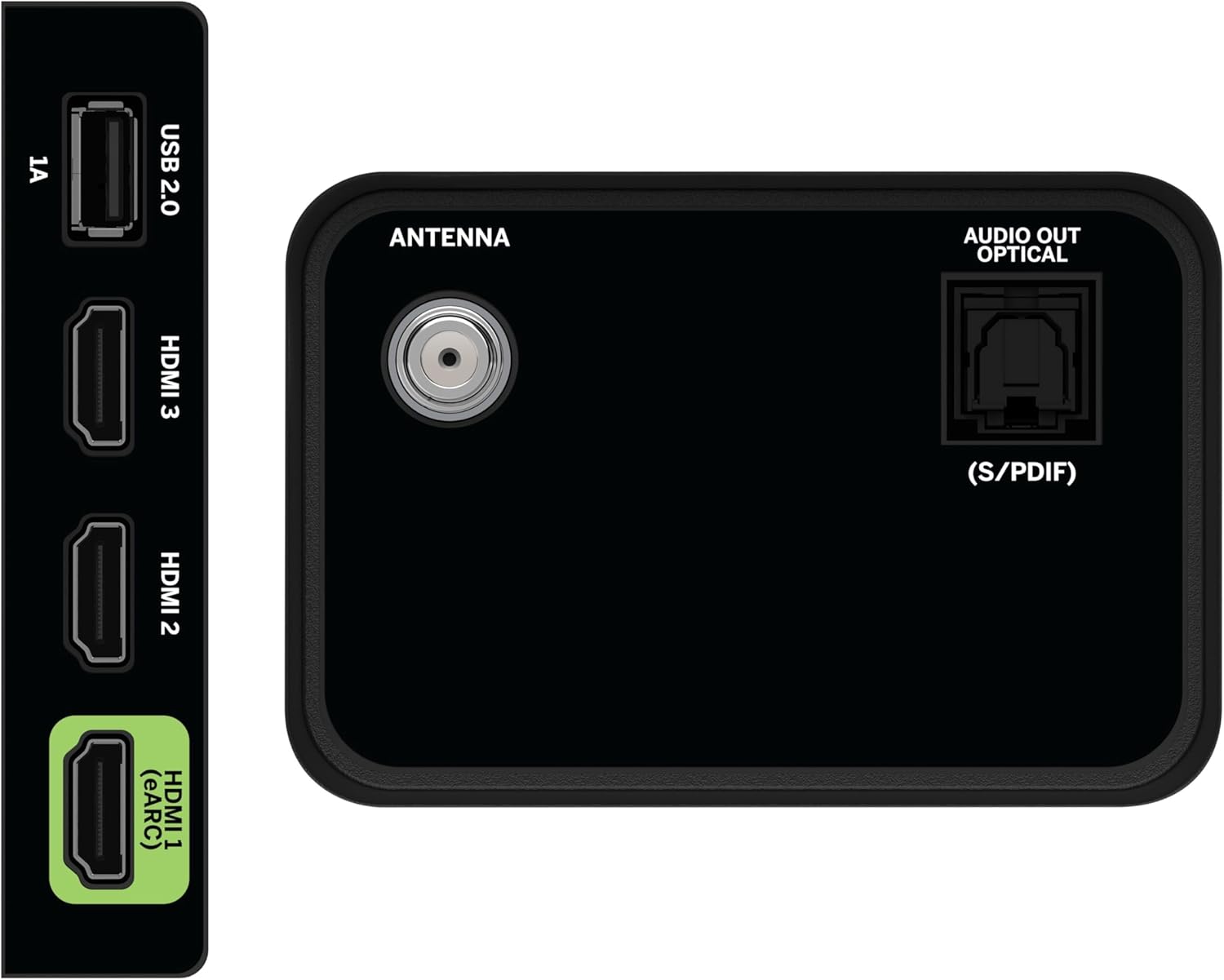
Image 4.1: Rear and side input/output ports.
4.3 Daya Awal Hurung & Sambungan Jaringan
- Colokkeun kabel listrik kana TV teras kana stop kontak listrik.
- Pencét tombol Daya dina remot atanapi dina TV.
- Follow the on-screen prompts to select your language, country, and connect to your Wi-Fi network (WiFi 6 supported for faster performance).
4.4 VIZIO Account Setup
A VIZIO Account is required for Smart TV functionality and product updates. Follow the on-screen instructions to create or log in to your VIZIO Account. This allows access to VIZIO Home, app subscriptions, and free channels.

Image 4.2: VIZIO Account setup via mobile device.
5. Ngoperasikeun TV Anjeun
5.1 Jauh Control Leuwihview
The included Voice Remote provides intuitive control over your TV. It features dedicated buttons for popular streaming apps and voice assistance integration.
- Input: Switch between connected devices.
- kakuatan: Hurungkeun/pareuman TV.
- Pad Navigasi: Anggo tombol arah sareng tombol OK pikeun nganapigasi ménu.
- imah: Access the VIZIO Home screen.
- WatchFree+: Direct access to VIZIO's free streaming service.
- Tombol sora: Aktipkeun paréntah sora.
- Volume/Channel: Saluyukeun volume sareng robih saluran.
- Potong kompas aplikasi: Quick access to pre-installed streaming applications.

Image 5.1: VIZIO Voice Remote and mobile app functionality.
5.2 Navigating VIZIO Home
The VIZIO Home screen is your central hub for all entertainment. It provides quick access to:
- Apps & Inputs: Browse and launch your favorite streaming apps (Netflix, Prime Video, Hulu, Disney+, etc.) and switch between connected inputs.
- TV langsung: Access hundreds of free channels and thousands of free On Demand titles with the built-in WatchFree+ app.
- Trending Now: Discover popular movies and shows.

Image 5.2: The VIZIO Home screen, your destination for easy streaming.
5.3 Setélan Gambar
Your VIZIO TV features Dolby Vision HDR, HDR10+, HDR10, and HLG for a true-to-life picture with a wider range of color and detail. Adjust picture modes (e.g., Calibrated, Vivid, Game) in the settings menu to optimize your viewpangalaman.

Image 5.3: Breathtaking details for a crystal-clear 4K picture with Dolby Vision.
5.4 Setélan Audio
Experience immersive sound with DTS Virtual:X setting. You can also connect Bluetooth headphones for private listening.

Image 5.4: Pair your wireless Bluetooth headphones for uninterrupted audio.
5.5 Fitur pinter
The VIZIO Smart TV supports Apple AirPlay and Google Cast Built-in, allowing you to stream content directly from your compatible devices. WiFi 6 ensures better streaming and gaming performance in a congested smart home environment.
5.6 Fitur kaulinan
For gamers, the TV offers Dolby Vision HDR Gaming for enhanced in-game color. When a console or PC is detected, Auto Low Latency Mode is automatically enabled to reduce input lag.

Image 5.5: Venture into game realism with Dolby Vision HDR.
6. Pangropéa
6.1 Ngabersihan TV Anjeun
- Sok cabut TV samemeh beberesih.
- Anggo lawon anu lemes sareng henteu lint pikeun ngusap layar sareng kabinet.
- Do not use liquid or aerosol cleaners directly on the TV.
6.2 Apdet parangkat lunak
Your VIZIO TV will automatically receive software updates when connected to the internet. Ensure your TV is connected to a network for optimal performance and access to the latest features.
7. Cara ngungkulan
If you encounter issues with your VIZIO TV, try the following common solutions:
- Henteu aya kakuatan: Ensure the power cable is securely connected to both the TV and the outlet. Try a different outlet.
- Taya Gambar/Sora: Pariksa sadaya sambungan kabel (HDMI, audio). Pastikeun sumber input anu bener dipilih.
- Jauh Teu Gawé: Ganti batréna. Pastikeun teu aya halangan antara remote sareng TV.
- Masalah Sambungan Jaringan: Restart your router and modem. Reconnect the TV to the Wi-Fi network via the settings menu.
- Kualitas Gambar goréng: Check the source content resolution. Adjust picture settings in the TV menu.
For further assistance, refer to the VIZIO support websitus atanapi ngahubungan layanan palanggan.
8. Spésifikasi
| Fitur | Spésifikasi |
|---|---|
| merek | VIZIO |
| Nomer modél | V4K50C-08 |
| Ukuran layar | 50 inci |
| Téknologi tampilan | LED |
| Resolusi | 4K UHD |
| Rojongan HDR | Dolby Vision HDR, HDR10+, HDR10, HLG |
| Refresh Laju | HDMI VRR |
| Téhnologi konektipitas | Bluetooth, HDMI, Wi-Fi (WiFi 6) |
| Fitur husus | Apple AirPlay, Bluetooth Headphone compatibility, Built-in apps with VIZIO Home, Closed Captioning, Google Chromecast, Sleep Timer, Voice Assistance Integration, Voice Remote |
| Dimensi produk | 9.68 "D x 43.69" W x 27.57" H |
| Item Beurat | 28.4 pon |
| Rasio Aspék | 16:9 |
9. Garansi jeung Rojongan
For warranty information and customer support, please visit the official VIZIO website or refer to the warranty card included with your product. VIZIO provides award-winning customer support to assist with any questions or issues you may have.


