1. Bubuka
Thank you for choosing the IRONZON Fingerprint Door Lock with Mini G2 Gateway. This smart lock system provides advanced security and convenient access for various environments, including homes, hotels, offices, and apartments. It integrates multiple unlocking methods, including fingerprint recognition, passcodes, traditional keys, and smart app control via the included Mini G2 Gateway.
This manual will guide you through the installation, setup, operation, and maintenance of your new smart door lock, ensuring optimal performance and security.

Image 1.1: The IRONZON Fingerprint Door Lock, Mini G2 Gateway, and a smartphone displaying the control app.
2. Eusi Paket
Mangga pariksa heula sadaya komponén anu aya dina pakét anjeun sateuacan neraskeun pamasangan:
- Front Handle Assembly (with fingerprint sensor and keypad)
- Majelis cecekelan pungkur
- Latch adjustable
- neunggeul piring jeung neunggeul Box
- Pemasangan Screws sareng Spindles
- 2 x kenop mékanis
- Mini G2 Gateway
- USB-C Power Cable for Gateway
- Manual pangguna (dokumén ieu)

Gambar 2.1: Leuwihview of the IRONZON Fingerprint Door Lock and its included accessories.
3. Fitur konci
- Sababaraha Métode Muka konci: Access your door using fingerprint, passcode, mechanical key, or the smart app.
- Fast Biometric Recognition: Unlock the door in under 1 second with advanced fingerprint technology.
- Kadali Jarak Jauh & Pemantauan: The included Mini G2 Gateway enables remote control and real-time status monitoring via the Tuya Smart App (2.4G Wi-Fi required).
- Kodeu Aksés Samentara: Generate and manage temporary passcodes for guests or service personnel.
- Log Kagiatan: View a detailed history of who accessed the door and when through the app.
- Konstruksi awét: All-metal design ensures longevity and blends with modern decor.
- Kancing anu tiasa disaluyukeun: Compatible with most standard door preparations.
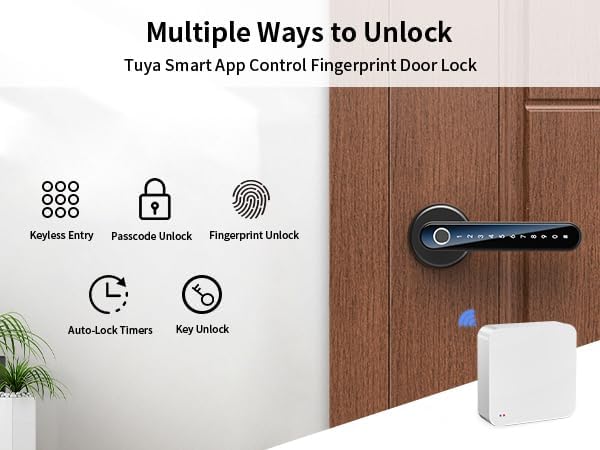
Image 3.1: Visual representation of the various unlocking methods available with the smart door lock.

Image 3.2: The Mini G2 Gateway enables remote control of the door lock from anywhere via the app.
4. Setup Guide
4.1. Pamasangan
Before installation, ensure your door thickness is between 1⅜ inches (35mm) and 1¾ inches (45mm) and the backset distance is between 2⅜ inches (60mm) and 2¾ inches (70mm).
- Nyiapkeun lawang: If replacing an existing lock, remove it. Ensure the door boreholes are clean and correctly sized.
- Pasang Latch: Insert the adjustable latch into the door edge. Ensure the latch bolt faces the correct direction (slanted side towards the door frame). Secure with screws.
- Install the Front Handle: Insert the spindle through the latch. Position the front handle assembly on the exterior side of the door, ensuring the cable passes through the borehole.
- Install the Rear Handle: Connect the cable from the front handle to the rear handle assembly. Align the rear handle with the spindle and mounting posts. Secure with mounting screws from the interior side.
- Selapkeun Batré: Open the battery cover on the rear handle. Insert 4 AAA batteries (not included), ensuring correct polarity. Close the battery cover.
- Operasi tés: Manually test the handle and latch to ensure smooth operation.

Image 4.1: Detailed installation guide and applicable door dimensions for the smart lock.
4.2. Unduh sareng Setélan Aplikasi
The IRONZON Fingerprint Door Lock uses the Tuya Smart App for smart features.
- Unduh App: Milarian pikeun "Tuya Smart" in your smartphone's app store (iOS or Android) and download it.
- Ngadaptar / Asup: Buka aplikasi sareng ngadaptarkeun akun énggal atanapi lebet upami anjeun parantos gaduh.
- Tambahkeun Alat: Tap the "+" icon in the top right corner or select "Add Device." Choose "Security & Video Surveillance" > "Smart Lock" or use the auto-scan feature.
- Pair Lock: Follow the on-screen instructions to put the lock into pairing mode (usually by pressing a button on the interior handle or entering a specific code on the keypad). The app will detect and connect to the lock via Bluetooth.
- Atur Administrator: Once connected, you will be prompted to set up the administrator fingerprint and passcode. This is crucial for initial access and managing other users.
4.3. Mini G2 Gateway Pairing
The Mini G2 Gateway enables remote control and monitoring of your lock via Wi-Fi.
- Power On Gateway: Connect the Mini G2 Gateway to a power source using the provided USB-C cable. The indicator light will flash.
- Add Gateway to App: In the Tuya Smart App, tap "+" to add a new device. Select "Gateway" > "Wireless Gateway (Wi-Fi)" or use auto-scan.
- Nyambung ka Wi-Fi: Follow the app instructions to connect the gateway to your 2.4GHz Wi-Fi network.
- Link Lock to Gateway: Once the gateway is online, navigate to your lock's settings within the Tuya Smart App. Select the option to link it to the newly added gateway. Ensure the gateway is within Bluetooth range of the lock for initial linking.

Image 4.2: Specifications and physical dimensions of the Mini G2 Gateway.
5. Parentah Operasi
5.1. Métode Muka konci
- Muka konci sidik: Place your registered finger firmly on the fingerprint sensor. The lock will unlock if the fingerprint is recognized.
- Passcode Unlocking: Enter your registered passcode on the keypad, followed by the '#' key. The lock will unlock if the passcode is correct.
- Mechanical Key Unlocking: Insert the mechanical key into the keyhole located on the front handle and turn to unlock. This is a backup method for emergencies or battery depletion.
- App Unlocking: Open the Tuya Smart App, select your lock, and tap the unlock icon. This can be done via Bluetooth (close range) or remotely via the Mini G2 Gateway (Wi-Fi).

Image 5.1: The Tuya Smart App provides multiple options for unlocking and managing the door lock.
5.2. User Management (via Tuya Smart App)
The app allows you to manage users, add/delete fingerprints and passcodes, and set access schedules.
- Tambahkeun Pamaké: In the app, navigate to your lock's settings and select "Member Management" or "Users." Follow the prompts to add new users, assigning them fingerprints or passcodes.
- Generate Temporary Codes: Select "Temporary Code" to create time-limited or one-time access codes for guests.
- View Log Kagiatan: Access the "Log" section to review a chronological record of all lock and unlock events, including the method used and the user.
- Kadali jauh: With the gateway connected, you can lock/unlock the door remotely, modify user access, and receive notifications.

Image 5.2: The app allows for remote monitoring of door status, viewing activity logs, and managing access.
6. Pangropéa
6.1. Ngagantian batré
The lock requires 4 AAA batteries. When the battery level is low, the lock will provide an audible warning. Replace batteries promptly to avoid loss of function.
- Locate the battery cover on the interior handle.
- Cabut screw nu ngamankeun panutup batré.
- Remove the old batteries and insert 4 new AAA batteries, ensuring correct polarity.
- Ganti panutup batré jeung amankeun ku screw nu.
Catetan: If batteries completely deplete, you can use the mechanical key or connect a USB-C power bank to the emergency power port on the exterior handle to temporarily power the lock for entry.
6.2. beberesih
Pikeun ngajaga penampilan sareng fungsi konci anjeun:
- Lap beungeut konci ku lawon anu lemes sareng garing.
- Ulah nganggo pembersih abrasif, pangleyur, atanapi bahan kimia anu keras, sabab ieu tiasa ngaruksak lapisan akhir sareng komponén éléktronik.
- Jaga sensor sidik jari sareng keypad tetep bersih sareng bébas tina kokotor pikeun kinerja anu optimal.
7. Cara ngungkulan
| Masalah | Mungkin Cukang lantaranana | Solusi |
|---|---|---|
| Konci teu ngabales. | Batré paéh. | Replace batteries. Use mechanical key or emergency USB-C power. |
| Sidik teu dikenal. | Finger is wet/dirty, sensor is dirty, or fingerprint not properly registered. | Ensure finger and sensor are clean and dry. Re-register fingerprint, trying different angles. |
| Kodeu aksés teu tiasa dianggo. | Incorrect passcode entered, or passcode not registered. | Verify passcode. Ensure '#' is pressed after the code. Register passcode via app. |
| Teu tiasa nyambung ka aplikasi. | Bluetooth/Wi-Fi off, lock/gateway out of range, or pairing issue. | Ensure Bluetooth is on. Move closer to the lock/gateway. Check Wi-Fi connection (2.4GHz only). Re-pair device in app. |
| Gateway not connecting to Wi-Fi. | Sandi Wi-Fi salah, jaringan 5GHz, atanapi sinyal lemah. | Verify Wi-Fi password. Ensure you are connecting to a 2.4GHz network. Move gateway closer to router. |
| Lock makes unexpected sounds or locks automatically. | Auto-lock feature enabled, or internal error. | Check auto-lock settings in the app. If persistent, perform a factory reset (refer to app instructions for reset procedure). |
8. Spésifikasi
| Fitur | Rincian |
|---|---|
| merek | IRONZON |
| Ngaran modél | LOC191GWBUSIR |
| Tipe Konci | Biometric (Fingerprint) |
| Métode Muka konci | Fingerprint, Passcode, Key, App (Bluetooth/Wi-Fi via Gateway) |
| Métode kontrol | Aplikasi, Jauh |
| Sasayogian tanaga | 4 x Batré AAA (teu kalebet) |
| Daya Darurat | Palabuhan USB-C |
| Ketebalan Panto | 1.38 - 1.77 inci (35mm - 45mm) |
| Backset Distance | 2.36 - 2.75 inci (60mm - 70mm) |
| Ukuran barang (L x W x H) | 6.3 x 2.3 x 2.3 inci |
| Item Beurat | 1.94 pon (0.88 Kilogram) |
| Jaringan Gateway | Wi-Fi 2.4G |
| Gateway Power Interface | USB Tipe-C (DC 5V/1A) |
| Gateway Bluetooth | Kakuatan rendah Bluetooth 4.2 |
9. Garansi jeung Rojongan
IRONZON products are designed for reliability and performance. This product comes with a standard manufacturer's warranty against defects in materials and workmanship. Please refer to the warranty card included in your package for specific terms and conditions, including the warranty period and coverage details.
For technical support, troubleshooting assistance, or warranty claims, please contact IRONZON customer service through the following channels:
- Surélék: Refer to your product packaging or the IRONZON official websitus pikeun email kontak panganyarna.
- Dukungan Online: Visit the IRONZON official websitus pikeun FAQs, artikel rojongan, sarta formulir kontak.
When contacting support, please have your product model number (LOC191GWBUSIR) and purchase information readily available.


