1. Bubuka
Thank you for choosing the Smart Tech 24HN01V3CA 24-inch HD LED Smart TV. This compact television is designed to provide high-definition entertainment with integrated smart features, making it ideal for various living spaces. Its practical design and advanced connectivity options ensure a versatile viewpangalaman.
This manual provides essential information for setting up, operating, and maintaining your new television. Please read it thoroughly before use and keep it for future reference.
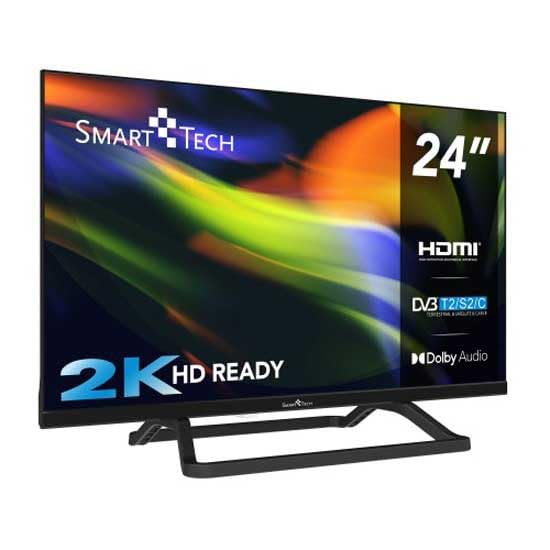
Gambar 1.1: Hareupeun view of the Smart Tech 24-inch HD LED Smart TV with its stand. This image shows the television's display and the included base.
2. Eusi Paket
Punten parios yén sadaya item di handap ieu kalebet dina pakét anjeun:
- Smart Tech 24-inch HD LED Smart TV (Model: 24HN01V3CA)
- Ngadeg TV
- Kadali jauh
- Manual pangguna (dokumén ieu)
- Kabel Daya
If any items are missing or damaged, please contact your retailer or Smart Tech customer support.
3. Émbaran Kasalametan penting
Pikeun mastikeun operasi anu aman sareng nyegah karusakan, punten perhatikeun pancegahan kaamanan ieu:
- Sumber Daya: Sambungkeun TV ngan ka stop kontak AC tina vol nu ditangtukeuntage.
- Ventilasi: Pastikeun ventilasi nyukupan sabudeureun TV. Ulah meungpeuk bukaan ventilasi.
- Cai sareng Uap: Do not expose the TV to rain, moisture, or excessive humidity.
- Sumber Panas: Jauhkeun TV tina sumber panas sapertos radiator, register panas, kompor, atanapi alat-alat sanésna anu ngahasilkeun panas.
- beberesih: Cabut TV sateuacan beberesih. Paké lawon lemes, garing. Ulah make cleaners cair atawa cleaners aerosol.
- panempatan: Place the TV on a stable, level surface. Avoid placing it in direct sunlight or near strong magnetic fields.
- Barudak: Supervise children to ensure they do not climb on the TV or stand.
- Palayanan: Entong nyobian ngalayanan produk ieu nyalira. Rujuk sadayana ngalayanan ka tanaga jasa anu mumpuni.
4. Setélan
4.1 Ngagantelkeun Stand
If you are not wall-mounting your TV, you will need to attach the included stand.
- Teundeun TV sacara saksama dina permukaan anu lemes sareng bersih pikeun nyegah karusakan layar.
- Sejajarkeun stand jeung liang pamasangan di handapeun TV.
- Ngamankeun stand ngagunakeun screws disadiakeun. Pastikeun nangtung napel pageuh.
4.2 Pamasangan Tembok (Pilihan)
This TV supports VESA standard wall mounts. The VESA mounting pattern for this model is 75 x 75 mm. Please use a compatible wall mount kit (sold separately) and follow the instructions provided with the wall mount.
Awas: Wall mounting should be performed by qualified personnel to prevent injury or damage.
4.3 Nyambungkeun Alat éksternal
Your Smart Tech TV offers various ports for connecting external devices such as Blu-ray players, game consoles, sound systems, and USB storage devices.
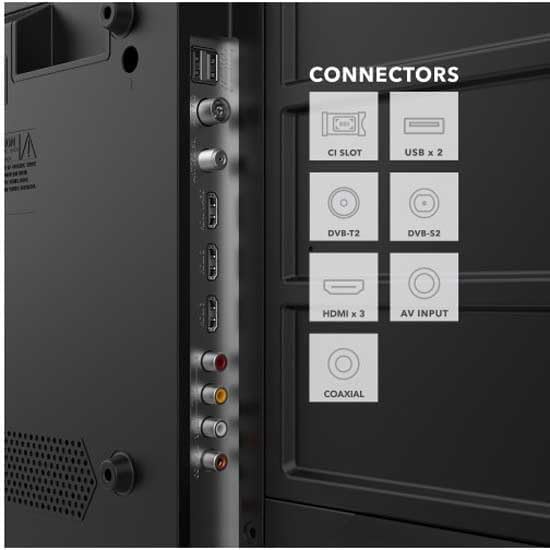
Gambar 4.1: Detil view of the Smart Tech TV's rear panel connectors. This image highlights the HDMI, USB, CI Slot, DVB-T2, DVB-S2, AV Input, and Coaxial ports.
- Port HDMI (x3): Connect high-definition devices like Blu-ray players, game consoles, or set-top boxes.
- Port USB (x1): Sambungkeun alat panyimpen USB pikeun playback média atanapi apdet software.
- DVB-T2/S2/C: Connect an antenna for terrestrial digital TV or a satellite dish for satellite TV.
- Input AV: Sambungkeun alat anu langkung lami nganggo kabel video komposit sareng audio stereo.
- Slot CI: For inserting a Conditional Access Module (CAM) for encrypted channels.
- Koaksial: Pikeun nyambungkeun ka sistem audio éksternal.
4.4 Sambungan Daya
After all connections are made, plug the power cable into the TV's power input and then into a wall outlet.
4.5 Setup Awal
Upon first power-on, the TV will guide you through an initial setup wizard. This typically includes:
- Pilihan basa
- Country/Region selection
- Network connection (Wi-Fi setup for Smart TV features)
- Channel scanning (for DVB-T2/S2/C)
- Setélan zona waktos
5. Ngoperasikeun TV Anjeun
5.1 Jauh Control Leuwihview
The included remote control allows you to access all TV functions. Insert two AAA batteries (not included) into the remote control, observing the correct polarity.
Image 5.1: The Smart Tech TV remote control. This image displays the layout of buttons for power, channel, volume, navigation, and smart TV functions.
- Tombol Daya: Ngahurungkeun atawa mareuman TV.
- Tombol Nomer: Pilih saluran sacara langsung.
- Volume Kaluhur/Turun: Saluyukeun tingkat sora.
- Saluran luhur/handap: Change channels sequentially.
- Tombol Napigasi (Kaluhur/Turun/Kénca/Katuhu/OK): Napigasi ménu sareng konpirmasikeun pilihan.
- Tombol Sumber: Select input sources (HDMI, AV, DVB).
- Tombol TV Smart: Quick access to popular apps like Netflix, YouTube, Amazon Prime (if available on your model).
- Tombol Menu: Access the main settings menu.
- Tombol Kaluar: Exit current menu or application.
5.2 Fungsi Dasar
- Hurungkeun/Pareuman: Pencét tombol Daya dina remot atanapi dina TV.
- Ngarobih Saluran: Use the CH+/- buttons or number buttons.
- Nyaluyukeun Volume: Anggo tombol VOL+/-.
- Milih Sumber Input: Press the Source button and select the desired input (e.g., HDMI 1, USB).
5.3 Fitur TV Smart
Your Smart Tech TV comes with integrated Smart TV capabilities, allowing you to access a world of online content. Ensure your TV is connected to the internet via Wi-Fi during the initial setup.
- Ngaksés Aplikasi: Use the dedicated Smart TV buttons on your remote or navigate to the 'Smart' or 'Apps' section in the main menu.
- Layanan streaming: Enjoy popular streaming platforms like Netflix, YouTube, and Amazon Prime (subscription may be required).
- Web Browser: Kotektak internét langsung tina TV anjeun.
6. Pangropéa
6.1 Ngabersihan TV
Salawasna cabut TV tina stop kontak sateuacan beberesih.
- layar: Lembut usap layar nganggo lawon anu lemes sareng teu aya serat. Pikeun tanda nekad, rada dampen the cloth with water or a specialized screen cleaner (ensure it's suitable for LED screens) and wipe gently. Do not apply pressure.
- Kabinet: Wipe the TV cabinet with a soft, dry cloth. Do not use abrasive cleaners, waxes, or solvents as they can damage the finish.
6.2 Apdet parangkat lunak
Your TV may receive software updates to improve performance and add new features. Ensure your TV is connected to the internet to receive automatic updates, or check for updates manually through the TV's settings menu.
7. Cara ngungkulan
Sateuacan ngahubungi dukungan palanggan, mangga tingal masalah sareng solusi umum ieu:
| Masalah | Mungkin Cukang lantaranana / Solusi |
|---|---|
| Taya kakuatan | Check if the power cable is securely plugged into the TV and the wall outlet. Ensure the wall outlet is working. |
| Henteu aya gambar, tapi aya sora | Pastikeun sumber input anu bener dipilih. Pariksa sambungan kabel ka alat éksternal. |
| Henteu aya sora, tapi aya gambar | Check the volume level and ensure the TV is not muted. Check audio cable connections if using external speakers. |
| Kadali jauh teu jalan | Pariksa sareng gentos batréna. Pastikeun teu aya halangan antara remot sareng sénsor IR TV. |
| Teu bisa nyambung ka Wi-Fi | Pastikeun router Wi-Fi anjeun dihurungkeun sareng dina jangkauan. Lebetkeun deui kecap akses Wi-Fi. Coba balikan deui TV sareng router. |
8. Spésifikasi
| Fitur | Rincian |
|---|---|
| merek | Smart Tech |
| Nomer modél | 24HN01V3CA |
| Ukuran layar | 24 inci |
| Téknologi tampilan | LED |
| Resolusi | 768p (1366 x 768 piksel) |
| Refresh Laju | 120 Hz |
| Fitur husus | Kamampuhan TV Smart |
| Téhnologi konektipitas | HDMI, USB, Nirkabel (Wi-Fi) |
| Internet Applications | Netflix, YouTube, Amazon Prime |
| Total palabuhan HDMI | 3 |
| Total palabuhan USB | 1 |
| Standard VESA Mount | 75 x 75 mm |
| Ukuran produk (D x W x H) | 6 x 53.5 x 31.8 cm |
| Item Beurat | 2.45 kg |
| Saluran Audio | 5.1 Sakuliling Sora |
9. Garansi jeung Rojongan
9.1 Garansi kawates
This Smart Tech 24HN01V3CA TV comes with a limited warranty. Please refer to the warranty card included in your package or visit the official Smart Tech websitus kanggo syarat sareng katangtuan anu lengkep ngeunaan jangkauan garansi, durasi, sareng watesan.
9.2 Rojongan Palanggan
If you encounter any issues that cannot be resolved using the troubleshooting guide, or if you require further assistance, please contact Smart Tech customer support. Contact information can typically be found on the official Smart Tech websitus atawa dina dokuméntasi jaminan Anjeun.
When contacting support, please have your TV model number (24HN01V3CA) and serial number ready.