Bubuka
This manual provides detailed instructions for the proper use and maintenance of your Ulefone Note 18 Pro smartphone. Please read this manual carefully before using your device to ensure optimal performance and longevity. Keep this manual for future reference.
Eusi pakét
Upon unboxing your Ulefone Note 18 Pro, please verify that all the following items are included:
- Smartphone Ulefone Note 18 Pro
- Adaptor kakuatan
- Kabel Tipe-C USB
- Alat Ejector SIM
- Pelindung Layar anu parantos dipasang sateuacanna
- Casing Pelindung TPU
- Pituduh Mimiti Gancang (manual ieu)

Image: Contents of the Ulefone Note 18 Pro retail package.
Disetél
1. Kartu SIM sareng Pamasangan Kartu TF
The Ulefone Note 18 Pro supports dual SIM cards or one SIM card and one TF (microSD) card for expanded storage. Use the provided SIM ejector tool to open the SIM tray.
- Tangtukeun lokasi baki SIM di sisi telepon.
- Selapkeun alat SIM ejector kana liang leutik gigireun baki terus pencét gently dugi baki pops kaluar.
- Lebetkeun kartu Nano-SIM sareng/atanapi kartu TF anjeun kana slot anu ditunjuk dina baki, pastikeun kontak emasna nyanghareup ka handap.
- Taliti dorong baki deui kana telepon nepi ka siram jeung awak alat.

Image: Illustration of the dual SIM/TF card slot.
2. Daya Awal Hurung
Press and hold the Power button located on the side of the device until the Ulefone logo appears on the screen. Follow the on-screen prompts to complete the initial setup, including language selection, Wi-Fi connection, and Google account setup.
3. Ngecas Alat
Before first use, it is recommended to fully charge your Ulefone Note 18 Pro. Connect the USB Type-C cable to the phone's charging port and the other end to the provided power adapter. Plug the adapter into a wall outlet.
The device features an 18W fast charging capability for its 5450mAh battery. A full charge typically takes approximately 3.2 hours.

Gambar: Spésifikasi batré sareng rincian ngecas.
Ngoperasikeun Alat Anjeun
1. Napigasi Dasar
The Ulefone Note 18 Pro operates on Android 14 and utilizes a 6.78-inch HD+ LCD touchscreen for navigation. Use gestures such as tapping, swiping, pinching, and spreading to interact with the interface.
The device also features an Innovative Custom Key, which can be configured for various functions:
- Hiji Klik: Start Sound Recording, Open Flashlight, etc.
- Klik dua kali: Take Screenshots, Open Zello, etc.
- Pencét Panjang: Open SOS, Open Game Mode, etc.
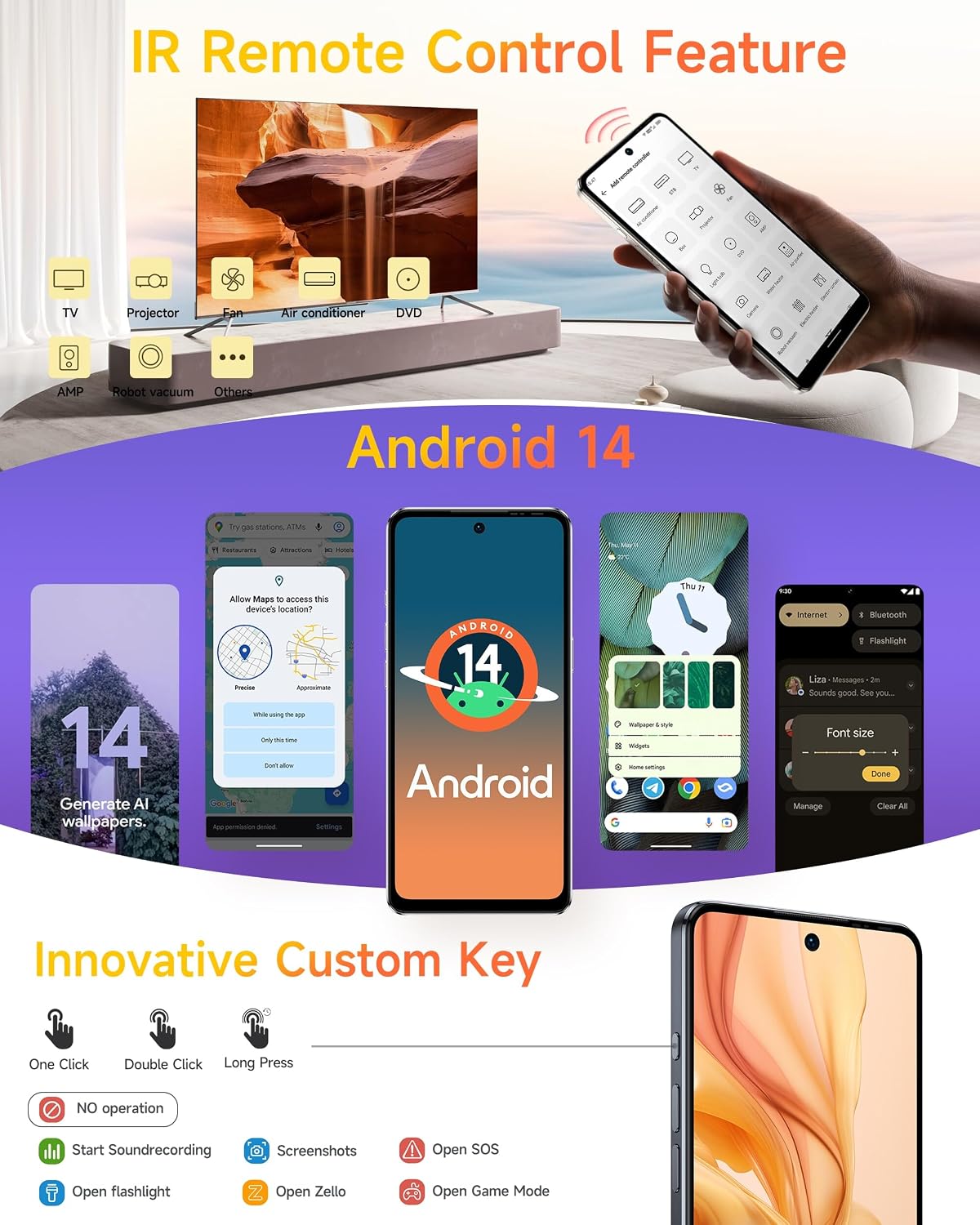
Image: Android 14 interface and Custom Key functionalities.
2. Pamakéan kaméra
Ulefone Note 18 Pro dilengkepan ku sistem kaméra anu serbaguna:
- Kaméra Utama 64MP: Sony IMX682 sensor with f/1.8 aperture.
- Kaméra Ultra-Wide 50MP: 1/2.8" sensor with 117.3° FOV and f/2.2 aperture.
- Kaméra hareup 32MP: Pikeun selfies resolusi luhur sareng telepon pidéo.
To access the camera, tap the Camera icon on your home screen or app drawer. Select your desired mode (Photo, Video, Portrait, etc.) and tap the shutter button to capture images or start/stop recording.

Image: Camera specifications and sample photography.
3. Konektipitas
Alat ngadukung sababaraha pilihan konektipitas:
- 4G LTE: Pikeun data sélulér kecepatan tinggi.
- Wifi: Nyambung ka jaringan nirkabel pikeun aksés internét.
- Bluetooth: Pikeun nyambungkeun ka asesoris nirkabel sapertos headphone atanapi speaker.
- NFC: For contactless payments (G Pay supported) and quick pairing with other NFC-enabled devices.
- Global Navigation: Built-in GPS, GLONASS, BeiDou, and Galileo for accurate location services.
- Radio FM tanpa headset: Enjoy FM radio without needing to plug in headphones as an antenna.

Image: Connectivity features including NFC, GPS, and FM Radio.
4. IR Remote Control Feature
The Ulefone Note 18 Pro includes an IR Blaster, allowing it to function as a universal remote control for various home appliances such as TVs, air conditioners, projectors, and more. Use the pre-installed IR remote app or download a compatible app to configure and control your devices.
Image: IR Remote Control functionality.
5. Fitur Kaamanan
For enhanced security, the Ulefone Note 18 Pro offers:
- Muka konci: Register your face to unlock the device quickly and conveniently.
- ID sidik: The device features a side-mounted fingerprint sensor for secure and fast unlocking. Register your fingerprints in the Security settings.
Image: Face Unlock and Fingerprint ID security options.
Pangropéa
1. Kaperawatan batré
- Avoid exposing the device to extreme temperatures (below 0°C or above 45°C) as this can degrade battery performance.
- Use only the original charger and cable provided with your device to prevent damage and ensure optimal charging.
- Do not leave the device charging for extended periods after it has reached 100% to prolong battery lifespan.
2. Ngabersihan Alat Anjeun
- Gently wipe the screen and back of the phone with a soft, lint-free cloth.
- Pikeun smudges nekad, rada dampen lawon jeung cai atawa leyuran cleaner layar. Hindarkeun bahan kimia anu kasar.
- The device is splash-proof; however, avoid submerging it in water.
Image: Splash-proof design of the device.
3. Apdet parangkat lunak
Regularly check for and install system updates to ensure your device has the latest features, security patches, and performance improvements. You can usually find this option in Settings > System > System update.
Pamérésan masalah
If you encounter issues with your Ulefone Note 18 Pro, refer to the following common solutions:
| Masalah | Solusi anu mungkin |
|---|---|
| Alat moal hurung | Pastikeun batréna tos dicas. Sambungkeun kana carjer sahenteuna 10 menit, teras cobian hurungkeun deui. |
| Aplikasi nabrak atanapi katirisan | Clear the app's cache (Settings > Apps > [App Name] > Storage > Clear cache). If the problem persists, try reinstalling the app or performing a factory reset (backup data first). |
| umur batre goréng | Kurangan kacaangan layar, nonaktipkeun fitur anu teu dianggo (Wi-Fi, Bluetooth, GPS), tutup aplikasi latar tukang, sareng parios aplikasi anu boros daya dina setélan panggunaan batré. |
| Teu bisa nyambung ka Wi-Fi | Restart your router and the phone. Forget the network in phone settings and reconnect. Ensure Wi-Fi is enabled on the phone. |
| Sénsor sidik henteu jalan | Pastikeun ramo anjeun bersih sareng garing. Daptarkeun deui sidik jari anjeun dina Setélan > Kaamanan > Sidik Jari. |
spésifikasi
The Ulefone Note 18 Pro boasts impressive specifications for a smooth user experience:

Image: Processor and Memory details.
| Fitur | Rincian |
|---|---|
| Ngaran modél | Ulefone Note 18 Pro Phone Android 14 Cell Phones Unlocked |
| Sistem operasi | Android 14 |
| Prosesor | MediaTek Helio G91 Octa Core, 2 GHz |
| Ram | 12 GB (6GB fisik + 6GB virtual) |
| Panyimpenan internal | 256 GB |
| Panyimpenan Expandable | Yes, up to 2TB via TF card |
| tampilan | 6.78-inch HD+ LCD, 1512 x 720 resolution, Corning Gorilla Glass, 90Hz Refresh Rate |
| Kaméra tukang | 64 MP Main (Sony IMX682) + 50 MP Ultra-Wide |
| Kaméra hareup | 32 MP |
| Resolusi Capture Video | 4K |
| Kapasitas batré | 5450 mAh (Litium Polimér) |
| Ngecas | Ngecas Gancang 18W, USB Tipe-C |
| Kartu SIM | Dual SIM (Nano-SIM) |
| Konektipitas | 4G LTE, Wi-Fi, Bluetooth, NFC, GPS, GLONASS, BeiDou, Galileo |
| Fitur séjén | IR Remote Control, Fingerprint ID, Face Unlock, Custom Key, Splash Proof, Headset-free FM Radio |
| Diménsi | 16.88 x 7.68 x 0.88 cm |
| Beurat | 211 g |
Garansi sareng Rojongan
Ulefone Note 18 Pro anjeun dilengkepan ku garansi standar ti produsén. Kanggo syarat sareng katangtuan garansi anu lengkep, mangga tingali kartu garansi anu kalebet dina pakét anjeun atanapi kunjungi situs wéb resmi Ulefone. websitus. Kanggo dukungan téknis, bantuan ngungkulan masalah, atanapi patarosan layanan, mangga ngahubungi layanan palanggan Ulefone ngalangkungan saluran resmi na.
Anjeun tiasa mendakan langkung seueur inpormasi sareng sumber dukungan dina Toko Ulefone di Amazon.


