Bubuka
This manual provides essential information for the safe and efficient operation of your Promethean PRM-30 LCD Projector. Please read these instructions thoroughly before using the projector and retain them for future reference.
Émbaran Kasalametan
- Ulah ngahalangan liang ventilasi. Pastikeun aliran hawa di sabudeureun proyéktor cekap.
- Hindarkeun paparan panon langsung kana lensa proyektor nalika lamp dihurungkeun.
- Entong nempatkeun proyektor dina karanjang, nangtung, atanapi méja anu teu stabil.
- Cabut colokan proyektor tina stopkontak sateuacan beberesih.
- Rujuk sadayana jasa ka tanaga jasa anu mumpuni.
Eusi pakét
Pastikeun yén sadaya item aya dina bungkusan:
- Promethean PRM-30 LCD Projector
- Kadali jauh
- Kabel Daya
- Kabel HDMI
- Manual pangguna (dokumén ieu)
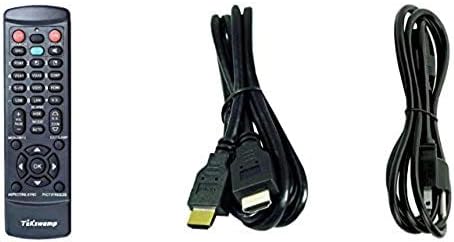
Image: Included accessories, showing the remote control, HDMI cable, and power cable.
Proyéktor Langkungview
Hareup sareng Sisi View
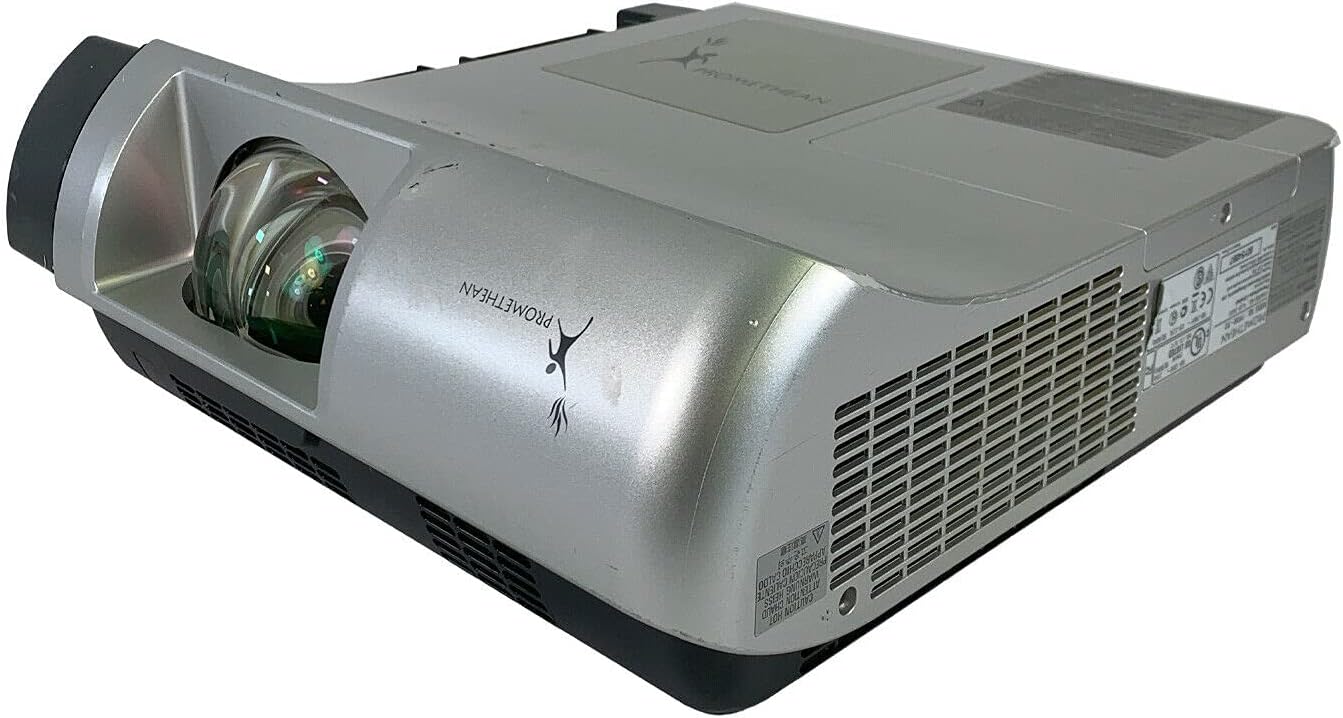
Gambar: Hareup jeung samping view of the Promethean PRM-30 projector, highlighting the lens and ventilation.
Sambungan Panel Rear
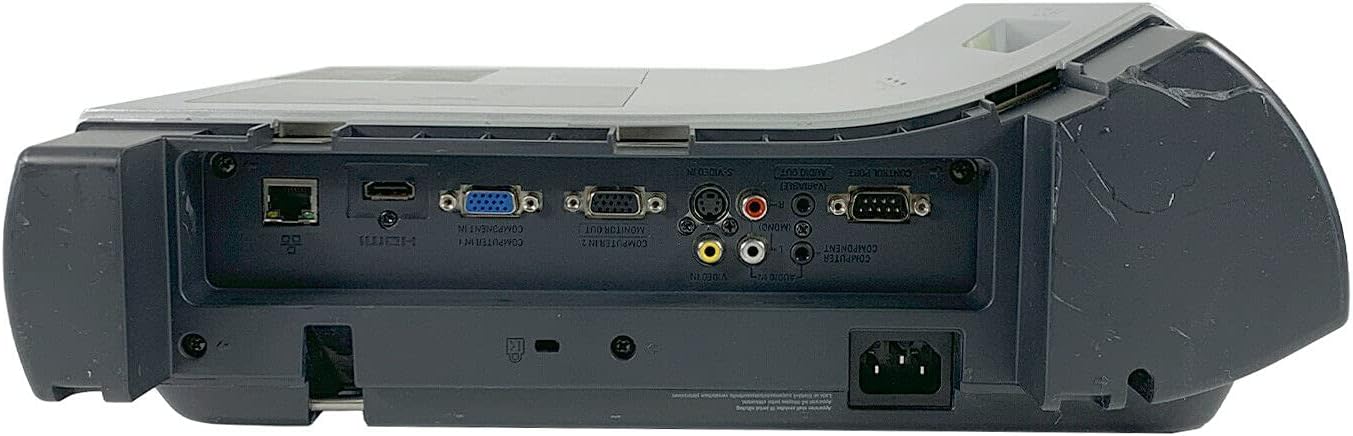
Image: Rear panel of the projector, showing various input and output ports including HDMI, VGA, Composite, LAN, and RS232.
The rear panel provides various connectivity options for your audio and video sources. Refer to the "Connecting Devices" section for detailed instructions.
Top Panel Controls and Indicators

Gambar: Top view of the projector, displaying the control panel buttons and indicator lights for power, lamp, and warning.
The top panel features buttons for power, menu navigation, input selection, and focus/zoom adjustment. Indicator lights provide status information for power, lamp life, and warnings.
Disetél
1. Penempatan Projector
Position the projector on a stable, flat surface or mount it securely for ceiling projection. Ensure the projector is within the optimal throw distance for your screen size. The PRM-30 supports front, rear, ceiling, and table-top projection.
- Table Top Projection: Tempatkeun proyéktor dina tempat anu datar di payuneun layar.
- Proyeksi siling: Mount the projector inverted from the ceiling. Adjust settings in the menu for correct image orientation.
- Proyeksi tukang: Place the projector behind a translucent screen. Adjust settings in the menu for correct image orientation.
2. Alat Sambungkeun
Connect your video and audio sources to the appropriate ports on the projector's rear panel.
- HDMI: For high-definition digital video and audio. Use an HDMI cable to connect to your source device.
- VGA/SVGA D-Sub (Computer In): For analog computer signals. Connect using a VGA cable.
- Composite (RCA): For standard definition video. Connect using RCA cables (yellow for video, red/white for audio).
- S-Video: For enhanced standard definition video.
- LAN (RJ-45): For network control and monitoring.
- RS232 (DB-9pin): Pikeun kontrol serial.
- Jack headphone: For audio output to external headphones or speakers.
3. Sambungan Daya
Connect the power cable to the projector's power inlet and then to a suitable electrical outlet.
Parentah Operasi
Ngahurungkeun/Pareuman
- Pikeun Ngahurungkeun: Press the Power button on the projector's control panel or the remote control. The power indicator light will turn on.
- Pikeun mareuman: Press the Power button again. The projector will enter a cooling down cycle before completely shutting off. Do not unplug the projector during the cooling cycle.
Pilihan Sumber Input
Press the "Input" or "Source" button on the projector or remote control to cycle through available input sources (HDMI, VGA, Composite, S-Video, etc.) until your desired source is displayed.
Pangaturan gambar
- fokus: Puterkeun ring pokus dina lensa proyektor nepi ka gambarna seukeut tur jelas.
- Zum: Adjust the zoom ring on the projector lens to change the image size without moving the projector.
- Koreksi Keystone: If the image appears trapezoidal, use the keystone correction function (usually via menu or dedicated buttons) to square the image.
- Koreksi Warna: Access the projector's on-screen display (OSD) menu to adjust color settings, brightness, and contrast for optimal image quality.
Kaluaran Audio
The projector has built-in speakers. For external audio, connect speakers or headphones to the Headphone Jack or use the audio output from your source device.
Pangropéa
Lamp Panggantian
When the "LAMP REPLACE" indicator illuminates, it is time to replace the projector lamp. Refer to the specific lamp replacement instructions provided with your replacement lamp or consult a qualified technician. Always allow the projector to cool down completely before attempting lamp ngagantian.
Filter hawa beberesih
Regularly clean the air filter to maintain optimal performance and prevent overheating. While this specific unit is noted as having "No Filter Cover", general projector maintenance often involves cleaning air intake areas. Use a soft brush or vacuum cleaner to remove dust from the ventilation grilles.

Gambar: Sisi view of the projector showing the ventilation grille, which should be kept clear of dust.
beberesih umum
Ngusap proyektor casing kalawan lemes, damp cloth. Do not use abrasive cleaners or solvents. For the lens, use a specialized lens cleaning cloth and solution to avoid scratching.
Pamérésan masalah
| Masalah | Mungkin Cukang lantaranana | Solusi |
|---|---|---|
| Henteu aya gambar dina layar |
|
|
| Image is dim or poor quality |
|
|
| Taya sora |
|
|
| Kadali jauh teu jalan |
|
|
spésifikasi
| merek | PROMETHEAN |
| Modél | PRM-30 |
| Tipe tampilan | LCD |
| Caang | 2500 ANSI lumén |
| Babandingan Kontras | 500:1 |
| Resolusi pribumi | 1280x800 |
| Modeu Video HD | 1080 abdi |
| Beurat Projector | 12.57 pon |
| Konektipitas | LAN, Composite: RCA, Network: RJ-45, RS232: DB-9pin, S-Video, Headphone Jack, HDMI Standard, VGA/SVGA D-Sub, Wired |
| Fitur husus | Built-in Speakers, Ceiling Projection, Color Correction, HD Ready, Projection Tilt, Rear Projection, Short Throw Projection, Table Top Projection, Portable |
| Ukuran Paket | 16 x 16 x 8 inci |
Garansi sareng Rojongan
This Promethean PRM-30 projector is offered as a renewed product. Please refer to the seller's (PR Renewed) specific return and warranty policies for details. Typically, renewed products come with a limited warranty or return period.
- Kabijakan pamulangan: This product typically includes a 90-day refund or replacement policy.
- Bantosan Téknis: For technical assistance or warranty claims, please contact the seller, PR Renewed, directly.
- Rencana panyalindungan: Optional extended protection plans may be available for purchase separately.


