1. Bubuka
This manual provides essential information for the safe and efficient operation of your Meizu mblu 21 smartphone. Please read it thoroughly before using the device.
The Meizu mblu 21 features a Prism Edge Design with a radiant gradient and a large immersive 6.79-inch HD display. It is equipped with a 13MP main camera and an 8MP front camera, powered by Android 14. The device includes a 4900mAh battery for extended use and supports 4G LTE connectivity, Dual-Band Wi-Fi, and Bluetooth 5.0.
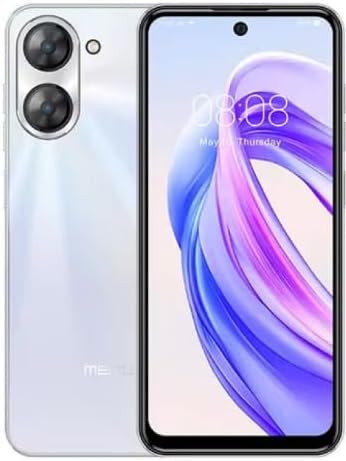
Gambar 1.1: Hareup jeung tukang view of the Meizu mblu 21 smartphone in White Diamond color.
2. Naon dina Box
Pastikeun yén sadaya item aya dina bungkusan:
- Meizu mblu 21 Smartphone
- Adaptor kakuatan
- Kabel USB
- Alat Ejector SIM
- Gancang Mimitian Guide

Figure 2.1: Meizu mblu 21 smartphone alongside its power adapter.
3. Setélan
3.1. Nyelapkeun Kartu SIM sareng Kartu MicroSD
The Meizu mblu 21 supports Dual Nano SIM cards and a MicroSD card for expandable storage. Locate the SIM tray on the side of the device.
- Power off the device before inserting or removing SIM/MicroSD cards.
- Anggo alat ejector SIM anu disayogikeun pikeun muka baki SIM.
- Carefully place the Nano SIM cards and/or MicroSD card into the designated slots on the tray, ensuring correct orientation.
- Gently dorong baki deui kana alat nepi ka siram.
3.2. Daya Awal Hurung sareng Setup Wizard
- Press and hold the Power button until the Meizu logo appears.
- Turutan parentah dina layar pikeun ngalengkepan setelan awal, kalebet milih basa anjeun, nyambung ka jaringan Wi-Fi, sareng nyetél akun Google anjeun.
4. Ngoperasikeun Alat Anjeun
4.1. Tampilan jeung Napigasi
The 6.79-inch HD display features a 90Hz adaptive refresh rate for smooth visuals. Navigate the interface using touch gestures: tap, swipe, pinch-to-zoom.
4.2. Fungsi kaméra
The device is equipped with a 13MP main camera and an 8MP front camera. Open the Camera application to capture photos and videos.
- 13MP Smart Camera: Ideal for capturing everyday moments with sharpness and true-to-life colors.
- Kaméra hareup 8MP: Designed for clear selfies and video calls.
4.3. Fitur Kaamanan
- Side Unlock: A fast and secure fingerprint sensor integrated into the side power button for instant access.
- Smart Face Unlock: Use the front camera to unlock your device quickly and conveniently.
4.4. Konektipitas
Your mblu 21 supports various connectivity options:
- 4G LTE: For mobile data connectivity. In the USA, this device is compatible with T-Mobile. Outside the USA, it works with any carrier worldwide.
- Wi-Fi Dual-Band: Supports both 2.4GHz and 5GHz bands for seamless internet access.
- Bluetooth 5.0: For connecting wireless accessories with improved energy efficiency.
- VoLTE HD Calls: Enjoy sharper, clearer voice calls over LTE networks.

Figure 4.1: Key technology features of the Meizu mblu 21, including Android 14, Dual-Band Wi-Fi, Bluetooth 5.0, and VoLTE.
5. Pangropéa
5.1. Kaperawatan batré
The mblu 21 is equipped with a 4900mAh battery. To maximize battery lifespan:
- Hindarkeun suhu anu ekstrim.
- Use only the provided power adapter or certified compatible chargers.
- Hindarkeun sering-sering ngeusi batre.

Gambar 5.1: Internal view of the Meizu mblu 21, showcasing the 4900mAh battery and internal components.
5.2. Ngabersihan Alat Anjeun
Anggo lawon anu lemes sareng henteu lint pikeun ngabersihan layar sareng awak telepon. Ulah make bahan kimia kasar atawa bahan abrasive.
5.3. Apdet parangkat lunak
Regularly check for and install software updates to ensure optimal performance and security. Updates can be found in the device's settings menu.
6. Cara ngungkulan
If you encounter issues with your Meizu mblu 21, try the following solutions:
- Alat Teu Ngabales: Pencét jeung tahan tombol Daya salila kira 10-15 detik pikeun maksa balikan deui.
- Masalah Konektipitas Jaringan:
- Pastikeun kartu SIM dipasang kalawan bener.
- Hurungkeun sareng mareuman Modeu Pesawat.
- Check network settings (APN, preferred network type).
- Batré gancang ngucur:
- Tutup aplikasi anu henteu dianggo dina latar tukang.
- Ngurangan kacaangan layar.
- Pareuman fitur anu teu perlu sapertos GPS atanapi Bluetooth nalika teu dianggo.
- Masalah Kinerja:
- Clear cache and data of problematic apps.
- Kosongkeun rohangan panyimpenan.
- Consider a factory reset (Note: This will erase all data on your device. Back up important data first.).
7. Spésifikasi
| Fitur | Rincian |
|---|---|
| Ngaran modél | mblu 21 |
| Nomer modél | M416L |
| Sistem operasi | Android 14 |
| Ukuran layar | 6.79 inci |
| Kapasitas Panyimpenan Mémori | 64 GB |
| RAM Mémori Dipasang Ukuran | 4 GB |
| Kapasitas batré | 4900 Miliamp Jam-jaman |
| Kaméra Utama | 13 MP |
| Kaméra hareup | 8 MP |
| Operator Nirkabel (AS) | T-Mobile |
| Téhnologi sélular | 4G LTE |
| Téhnologi konektipitas | 4G, Dual-Band Wi-Fi, Bluetooth 5.0 |
| Item Beurat | 14 ons |
| Ukuran Paket | 7 x 4 x 2 inci |
| Warna | White Diamond |
8. Garansi jeung Rojongan
Your Meizu mblu 21 smartphone comes with a manufacturer's warranty. Please refer to the warranty card included in your product packaging for specific terms and conditions.
For technical support, service, or further inquiries, please contact Meizu customer support through their official channels. Contact information can typically be found on the manufacturer's websitus atanapi dina dokuméntasi produk.


