1. Bubuka
Thank you for choosing the SABRENT 252W 8-Port Desktop Charging Station. This manual provides essential information for the safe and efficient operation of your new device. This powerful charging station is designed to simultaneously charge up to 8 devices, including laptops, smartphones, and tablets, with real-time power monitoring and comprehensive safety features.

Figure 1.1: The SABRENT 252W 8-Port Desktop Charging Station in use, illustrating its compact design and multiple charging capabilities.
2. Eusi Paket
- SABRENT 252W 8-Port Desktop Charging Station
- Kabel Daya
- Pamasangan Kit
- Manual pamaké
3. Parentah Setup
- panempatan: Position the charging station on a stable, flat surface, or utilize the included mounting kit for wall installation. Ensure adequate ventilation around the device.
- Sambungan Daya: Connect the provided power cable to the AC input port on the back of the charging station. Plug the other end into a standard wall outlet. The device features a standard C7 port for the power cord, allowing for flexibility in cable choice and replacement.
- Power-on mimiti: The LCD display will illuminate upon successful power connection, indicating the device is ready for use.

Gambar 3.1: Hareupeun view of the charging station with its power cable, ready for connection.

Figure 3.2: The charging station helps organize and power multiple devices in a workspace.

Figure 3.3: The charging station can be wall-mounted using the included bracket and screws for a secure setup.
4. Parentah Operasi
- Alat Nyambungkeun: The charging station features 4 USB-C ports (up to 100W Max per port) and 4 USB-A ports (up to 18W Max per port). Connect your devices using appropriate USB cables to the available ports.
- Real-Time LCD Display: The built-in color LCD screen provides instant power feedback. Use the button on the front panel to cycle through each of the 8 ports to view current wattage, jilidtage, amperage, and internal temperature. This allows you to monitor the charge delivered to each device.
- Ngecas gancang: The station supports various fast charging protocols, including PD 3.0, PPS, QC 4.0, and QC 3.0. Compatible devices will automatically receive power at their optimal speed.

angka 4.1: Tutup-up view of the charging station's 8 ports, including USB-C and USB-A, with power ratings.
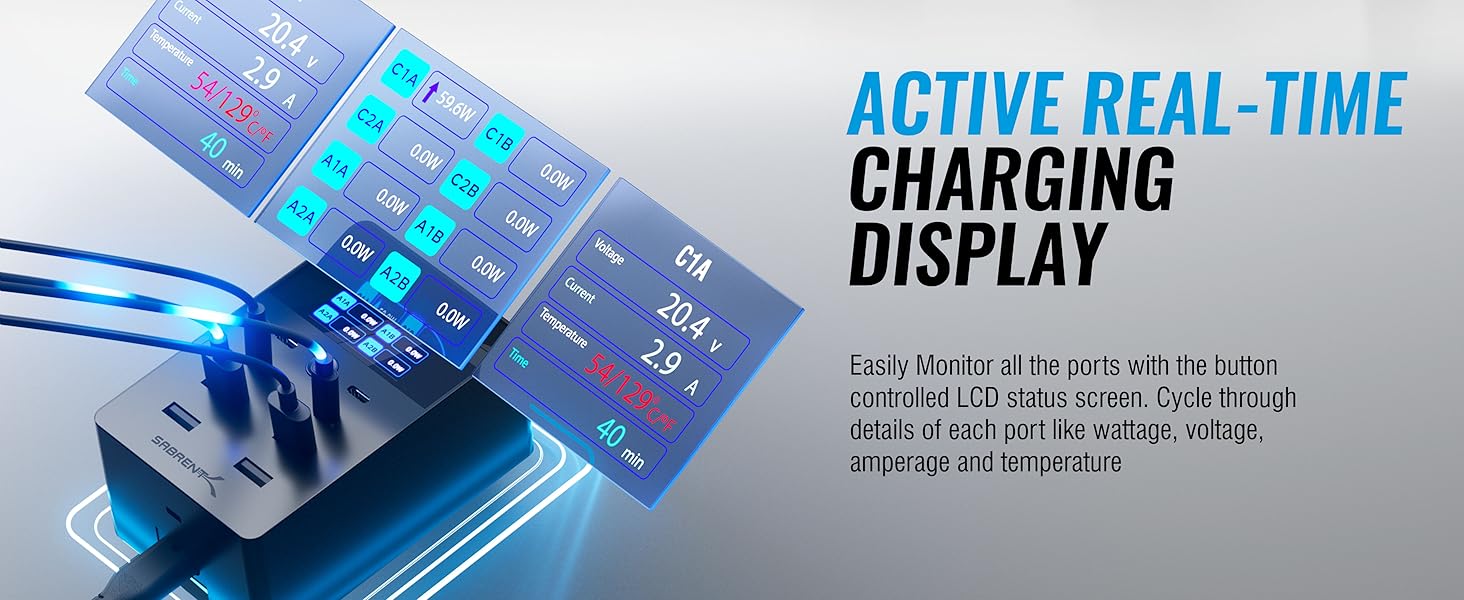
Figure 4.2: The active real-time charging display shows detailed information for each port, including voltage, amperage, and temperature.

Figure 4.3: The charging station utilizes PPS technology for faster, cooler, and more efficient charging by dynamically adjusting power to device needs.
5. Kasalametan sareng Panangtayungan
The SABRENT 252W 8-Port Desktop Charging Station is UL Certified, ensuring maximum safety for both home and office environments. It incorporates comprehensive safeguards to protect your devices and the charging station itself:
- Perlindungan panyebaran: Prevents devices from being overcharged, extending battery lifespan.
- Perlindungan arus leuwih: Guards against excessive current flow, protecting connected devices.
- Perlindungan overheating: Monitors internal temperature and adjusts output or shuts down to prevent overheating.
- Perlindungan Sirkuit pondok: Otomatis mareuman daya upami aya hubungan pondok.

Figure 5.1: The UL Certified charging station provides maximum safety with multiple layers of protection for your devices.
6. Spésifikasi
| Fitur | Rincian |
|---|---|
| Nomer modél | AX-8PTC |
| Total Kaluaran Daya | 252W |
| Port USB-C | 4 (100W Max per port) |
| Port USB-A | 4 (18W Max per port) |
| Total palabuhan USB | 8 |
| tampilan | Color LCD (Wattage, Voltage, Amperage, Temperature) |
| Protokol Ngecas Gancang | PD 3.0, PPS, QC 4.0, QC 3.0 |
| Sertifikasi Kasalametan | UL Certified |
| Dimensi produk | 4.57 x 2.94 x 2.05 inci |
| Item Beurat | 1.58 pon |
| Warna | Hideung |
| Masukan Voltage | 240 volt |
7. Pangropéa
- Jaga stasiun ngecas tetep bersih sareng bébas tina lebu. Anggo lawon anu lemes sareng garing pikeun ngabersihkeun.
- Hindarkeun alat ka suhu ekstrim, kalembaban, atanapi sinar panonpoé langsung.
- Do not attempt to disassemble or repair the charging station yourself. Contact customer support for assistance.
8. Cara ngungkulan
- Alat teu ngecas: Ensure the charging station is properly plugged into a live power outlet. Verify that the USB cable is securely connected to both the charging station and your device. Try a different USB port or cable.
- Ngecas lalaunan: Check if your device supports fast charging protocols (PD, QC). Ensure you are using a compatible cable. If multiple devices are connected, the total power output is shared, which might reduce individual port speeds.
- tampilan LCD teu jalan: Ensure the device is powered on. If the display is off, press the button on the front panel to activate it.
- Overheating indication: If the LCD shows a high internal temperature or a warning, disconnect some devices to reduce the load. Ensure the charging station has adequate ventilation.
9. Garansi jeung Rojongan
SABRENT products are designed and tested in the USA. For warranty information, please refer to the included User Manual or visit the official SABRENT website. For technical support or inquiries, please contact SABRENT customer service.
Video 9.1: An unboxing and initial overview of the SABRENT 252W 8-Port Charger by a seller.
Video 9.2: A brief demonstration of the SABRENT 252W 8-Port Charger's features and functionality by a seller.


