Bubuka
The Kipcush K8 White Noise Machine is designed to create a calming environment for improved sleep and relaxation. It features a variety of soothing sounds, a soft night light, and customizable settings to suit individual preferences. This manual provides detailed instructions for the safe and effective use of your device.
Émbaran Kasalametan
- Do not use near water to prevent electric shock.
- Hindarkeun tingkat polumeu anu luhur pikeun ngajagi dédéngéan.
- Henteu dimaksudkeun pikeun dianggo ku murangkalih tanpa pangawasan sawawa.
- Use only with a compatible 5V power adapter and the provided USB-A to coaxial connector cable.
Eusi pakét
Mangga parios pakét kanggo barang-barang ieu:
- Kipcush K8 White Noise Machine
- USB-A to Coaxial Connector Cable
- Manual pamaké
Catetan: A power adapter is not included and must be supplied by the user (5V recommended).
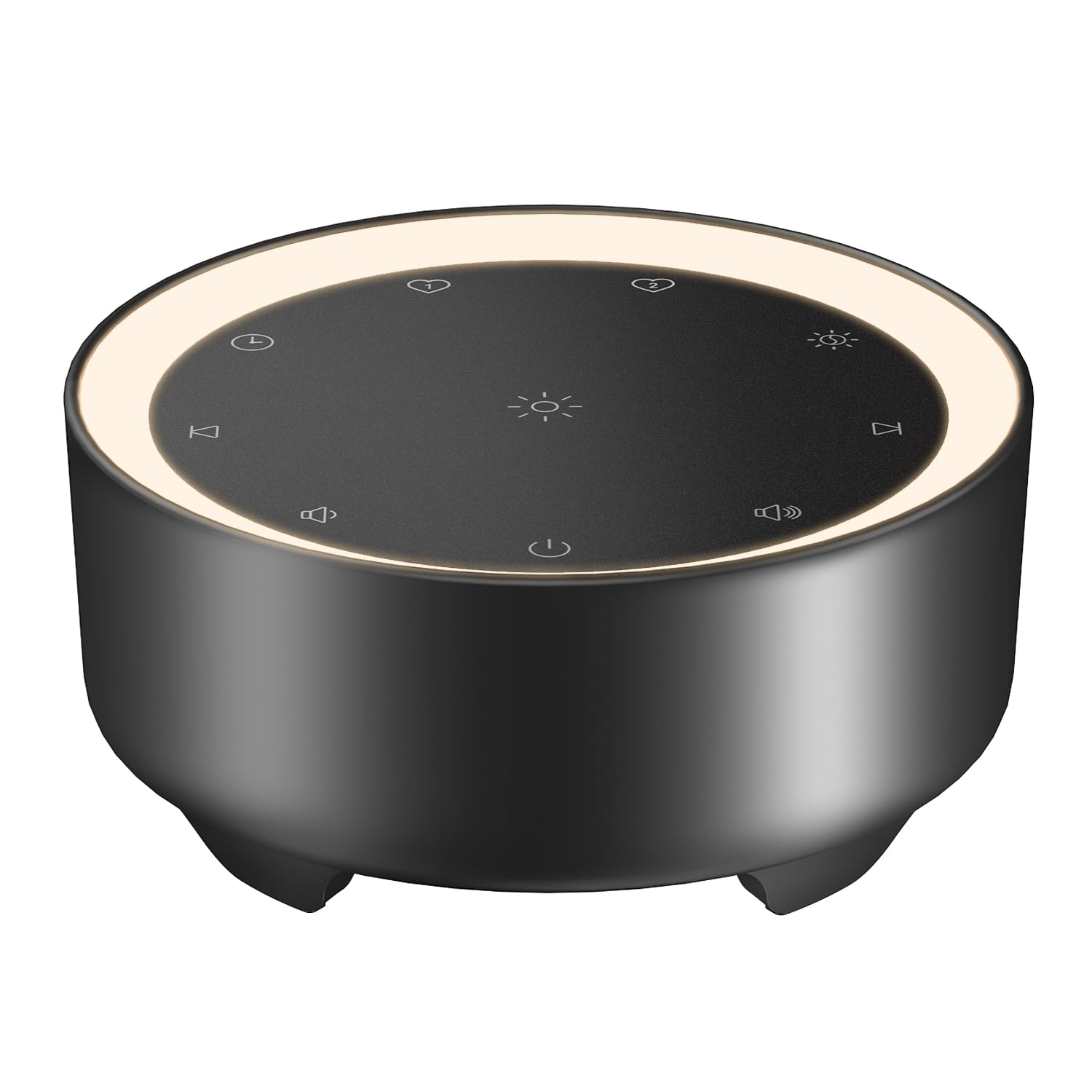
Image: Kipcush K8 White Noise Machine with its USB cable, illustrating the compact design and power connection.
Fitur produk
- 20 Sora-Sora Anu Ngaregepkeun: Includes white noise, fan sounds, nature recordings, and lullabies.
- 2 Customizable Shortcuts: Save your favorite sounds for instant playback.
- Lampu Peuting Nu Caang Lemes: Three adjustable brightness levels for a calm environment.
- Sababaraha Pilihan Timer: 15, 30, 60, 90, 120 minutes, or continuous 8-hour playback.
- Fungsi mémori: Automatically saves last sound, volume, and light settings.
- USB Powered: Flexible use with power banks, laptops, wall chargers, or car USB ports.
- Kompak sareng Portabel: Small size for easy travel and placement.

Image: A visual representation of the 20 distinct sound options, including various white noises, fan sounds, nature sounds like rain and ocean, and lullabies.

Image: The device highlighting its timer functions, offering various durations from 15 minutes to 8 hours for automatic shut-off.
Disetél
- Sambungan Daya: Connect the provided USB-A to coaxial connector cable to the device. Plug the USB-A end into a compatible 5V power adapter (not included), power bank, laptop, or car USB port.
- panempatan: Place the device on a stable, flat surface away from water or excessive heat.
Video: An official Kipcush video demonstrating the white noise sound machine in various usage scenarios, including setup and operation.
Parentah Operasi

Gambar: Detil view of the touch-sensitive control panel with labels for each function.
- Hurungkeun/Pareuman: Ketok dina Tombol Daya (circle with vertical line) to turn the device on or off.
- Pilihan sora: Ketok dina Lagu salajengna (right arrow) or Lagu saméméhna (left arrow) buttons to cycle through the 20 available sounds.
- Penyesuaian volume: Ketok dina Jilid + (speaker with plus) or Volume - (speaker with minus) buttons to adjust the sound level.
- Kontrol Lampu Peuting: Ketok dina Cahaya Peuting (sun icon) button to turn the light on/off and cycle through three brightness levels.
- Setélan Timer: Ketok dina Timer (clock icon) button to select a desired duration (15, 30, 60, 90, 120 minutes, or 8 hours continuous play). The device will automatically turn off after the selected time.
- Customizable Shortcuts (Favorite Sounds):
- To save a favorite sound: While a sound is playing, long-press either karesep 1 (heart icon 1) or karesep 2 (heart icon 2) button until you hear a confirmation tone.
- To play a favorite sound: Tap the corresponding karesep 1 or karesep 2 button for instant playback.
- Fungsi mémori: The device automatically remembers your last sound, volume, and light settings when powered off and will resume these settings upon restart.

Image: The device showcasing the unique Favorite Button feature for quick sound recall.
Pangropéa
- beberesih: Lap alatna ku lawon anu lemes sareng garing. Ulah nganggo pembersih cair atanapi bahan anu kasar.
- Panyimpenan: Simpen alat dina tempat anu tiis sareng garing upami henteu dianggo.
- Perawatan kabel: Avoid bending or twisting the power cable excessively to prevent damage.
Pamérésan masalah
| Masalah | Mungkin Cukang lantaranana | Solusi |
|---|---|---|
| Alat teu hurung. | Teu aya listrik atanapi sambunganna kendor. | Ensure the USB cable is securely connected to both the device and a working 5V power source. Try a different power adapter or USB port. |
| Taya sora. | Volume handap teuing atawa diredam. | Increase the volume using the Volume + button. Ensure a sound is selected. |
| Lampu peuting teu jalan. | Light is off or at lowest setting. | Tap the Night Light button to cycle through brightness levels or turn it on. |
| Alat pareum sacara teu disangka-sangka. | Timer activated. | Check the timer setting. If continuous play is desired, ensure the 8-hour option is selected or no timer is set. |
spésifikasi
- Ngaran modél: K8
- merek: Kipcush
- Sumber Daya: Corded Electric (USB-powered, 5V)
- Bahan: palastik
- warna: Black (as per product variant)
- Ukuran Paket: 4.37 x 4.29 x 2.99 inci
- Beurat barang: 9.14 ons
- Pilihan sora: 20 (White Noise, Fan, Nature, Lullabies)
- Pilihan Timer: 15, 30, 60, 90, 120 minutes, 8 hours continuous
- Lampu Peuting: 3 tingkat kacaangan adjustable
Garansi sareng Rojongan
The Kipcush K8 White Noise Machine comes with a 24-garansi sasih from the date of purchase. This warranty covers manufacturing defects and ensures long-term reliability.
For professional customer support, please contact Kipcush directly through their official channels. Refer to the product packaging or the Kipcush websitus pikeun inpo kontak.


