1. Bubuka
This manual provides essential information for the setup, operation, and maintenance of your CAIWEI 2400 ANSI 4K Smart Projector. Please read it thoroughly before using the product to ensure proper function and longevity.
The CAIWEI 4K Smart Projector features official Netflix and Google TV certification, delivering access to over 10,000 applications. With 2400 ANSI lumens, it provides clear 4K images even in well-lit environments. It supports true 4K UHD decoding, HDR10+, and a 98.9% DCI-P3 wide color gamut for vivid visuals. Integrated dual Hi-Fi Dolby speakers offer immersive audio. Advanced features include ToF laser focus, CMOS camera for auto-focus, short-throw design, and NFC one-tap casting for convenient setup and use.

Image: Key features of the CAIWEI 4K Smart Projector.
2. Eusi Paket
Pastikeun yén sadaya item anu didaptarkeun di handap kalebet kana pakét anjeun:
- Kadali jauh
- Kabel listrik
- Kabel HDMI
- Manual pamaké
3. Setélan
3.1 Nempatkeun Projector
Position the projector on a stable, flat surface or mount it securely. The short-throw lens allows for large screen sizes from shorter distances. Refer to the table below for recommended projection distances based on desired screen size.
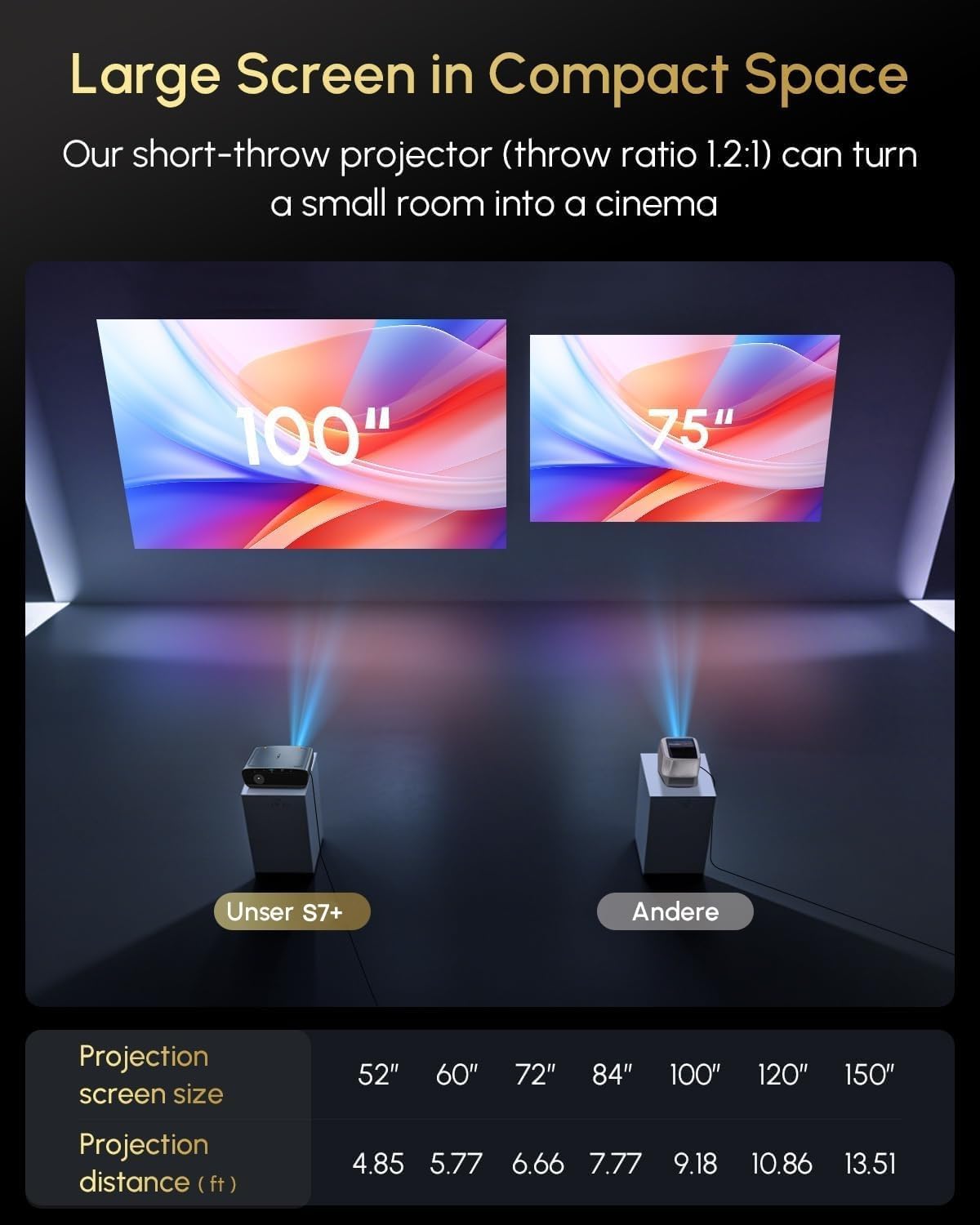
Image: Short-throw capability demonstrating screen size vs. projection distance.
| Ukuran layar proyéksi | Jarak proyéksi (ft) |
|---|---|
| 52" | 4.85 |
| 60" | 5.77 |
| 72" | 6.66 |
| 84" | 7.77 |
| 100" | 9.18 |
| 120" | 10.86 |
| 150" | 13.51 |
3.2 Sambungan Daya
Connect the provided power cord to the projector's power input and then to a suitable electrical outlet.
3.3 Nyala Mimiti sareng Pangaluyuan Otomatis
Upon powering on, the projector will automatically perform focus, keystone correction, and obstacle avoidance using its ToF laser focus and CMOS camera system. This ensures a clear and properly aligned image without manual intervention.

Image: Real-time adaptive system with auto-focus, keystone correction, and obstacle avoidance.
4. Parentah Operasi
4.1 Antarmuka sareng Streaming Google TV
Your projector is equipped with official Google TV, providing access to over 10,000 applications including Netflix, YouTube, Prime Video, Hulu, and Disney+. Navigate the interface using the remote control.

Image: Google TV interface with popular streaming applications.
4.2 Kontrol sora
Utilize the built-in Google Assistant for voice commands. Press the dedicated voice button on your remote control and speak your command, such as "Open Netflix" or "What's the weather?"

Image: Using Google Assistant for voice control.
4.3 Brightness Modes
The projector offers 2400 ANSI lumens for bright, clear images in various lighting conditions. Multiple brightness modes, including 'High Bright' and 'Economic Mode', allow you to optimize the display for daytime viewing, dim lighting, or dark rooms.

Image: Brightness modes for different ambient light conditions.
4.4 Konéktipitas
- Wi-Fi 6: Connect to your home network for seamless streaming and online access.
- Bluetooth 5.4: Connect external audio devices or use the projector as a Bluetooth speaker.
- HDMI ARC: Connect to external sources like gaming consoles or Blu-ray players.
- USB: Play media directly from USB storage devices or connect peripherals.
- NFC One-Tap Casting: Tap your NFC-enabled smartphone to the projector for instant screen mirroring of videos and photos.
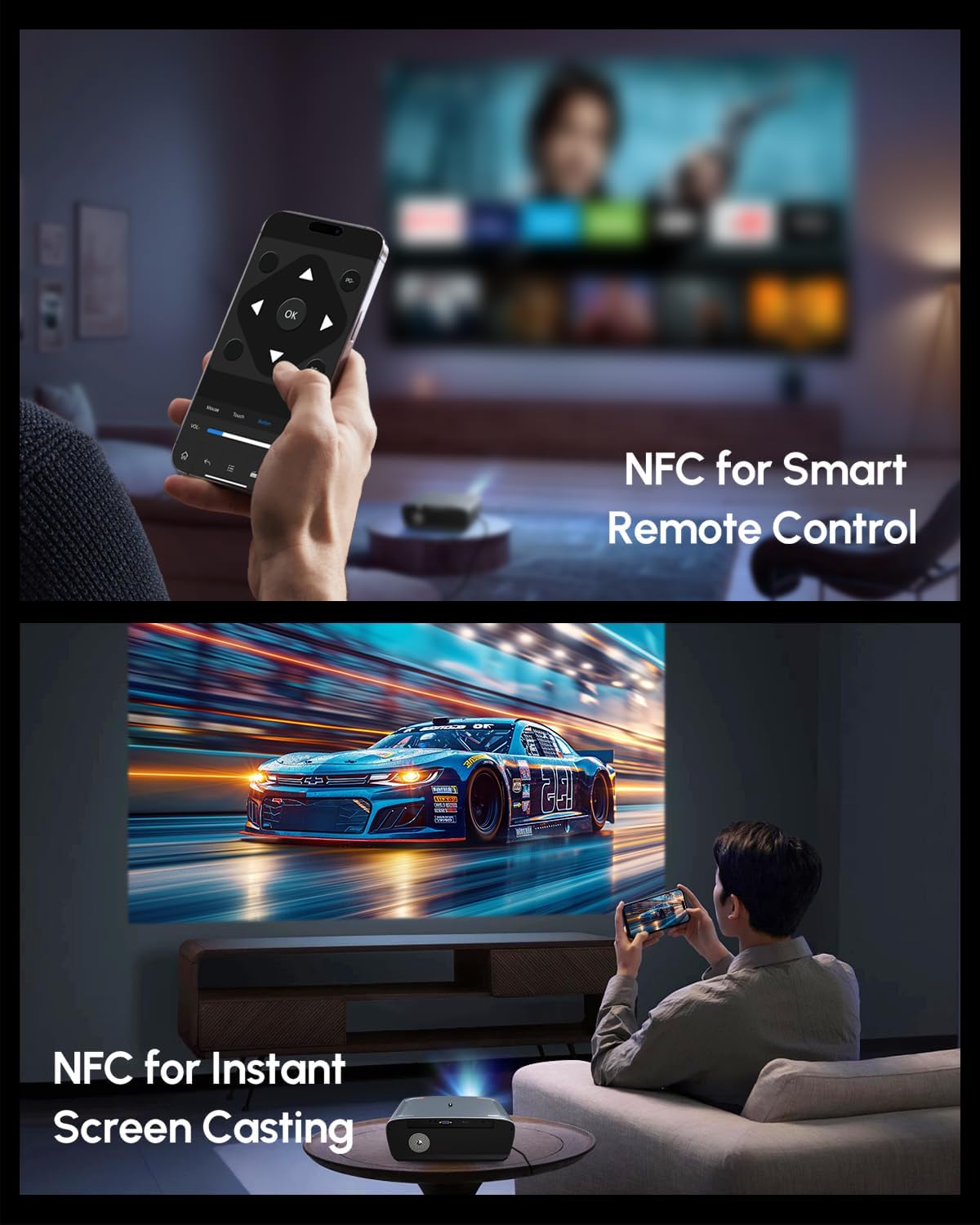
Image: NFC for smart remote control and instant screen casting.
4.5 Audio
The projector features dual Hi-Fi Dolby speakers, providing immersive cinematic sound with deep bass and clear dialogue. The 38W speakers are enhanced with DSP technology for high-fidelity audio.

Image: Immersive stereo sound with Dolby Audio and 38W speakers.
4.6 Kualitas Gambar
Experience true 4K UHD clarity with native 4K decoding and HDR10+ support. The projector reproduces realistic colors with a 98.9% DCI-P3 wide color gamut and an innovative 6-color vivid light source, ensuring sharp details and vibrant visuals.

Image: 4K UHD resolution reproducing realistic colors with HDR10+.
5. Spésifikasi
| Fitur | Rincian |
|---|---|
| merek | CAIWEI |
| Modél | B0DQTN74RH |
| Caang | 2400 ANSI Lumens |
| Resolusi tampilan | 1920 x 1080 (Native), 4K UHD Decoding |
| Fitur husus | Google TV 14.0, Netflix Certified, HDR10+ Support, Dolby Audio Speakers, ToF+CMOS Auto Focus, Short Throw Lens, WiFi6 & Bluetooth 5.2, NFC One-Tap Casting |
| Téhnologi konektipitas | 3.5mm Jack, Bluetooth, HDMI, USB, NFC, Wi-Fi |
| Item Beurat | 8.51 pon |
| Dimensi produk | 12.4 x 9.33 x 5.31 inci |
| Warna | Biru |
| Dianjurkeun Mangpaat | Home Theater, Daytime Viewing, Bright Room Projector, Outdoor Movie, Gaming, Office Presentation, Short Throw Setup, Small Apartment, Business & Education, Golf Simulator |
6. Pangropéa
6.1 beberesih
- Lensa: Anggo lawon anu lemes sareng henteu lint anu dirancang khusus pikeun lensa optik. Hindarkeun bahan abrasive atanapi bahan kimia kasar.
- Luar: Ngusap bagian luar proyektor ku kaén anu lembut sareng garing. Pikeun tanda nekad, a rada damp lawon bisa dipaké, dituturkeun ku ngusap garing.
- Ventilasi: Ensure the ventilation openings are clear of dust and debris to prevent overheating. Use a soft brush or compressed air to gently clean the vents.
6.2 Panyimpenan
Upami teu dianggo salami lami, simpen proyéktor di tempat anu tiis sareng garing, jauh tina sinar panonpoé langsung sareng suhu anu ekstrim. Tutup lénsa ku tutupna pikeun ngajaga tina lebu.
7. Cara ngungkulan
7.1 Taya Gambar Ditémbongkeun
- Pastikeun proyéktor hurung sareng kabel listrikna disambungkeun kalayan pageuh.
- Check the input source. Verify that the correct HDMI or other input is selected.
- Confirm that the connected device (e.g., laptop, streaming stick) is powered on and outputting a signal.
7.2 Gambar Burem
- Allow the automatic focus system to complete its adjustment after powering on or moving the projector.
- Pastikeun lénsa proyektor beresih.
- Verify the projection distance is within the recommended range.
7.3 Taya Sora
- Pariksa setélan volume dina proyéktor sareng alat sumber anu disambungkeun.
- Ensure no external Bluetooth audio device is connected if you intend to use the internal speakers.
- Verify that audio cables (if used) are securely connected.
7.4 Kadali Jauh Teu Ngabales
- Ganti batré dina kadali jauh.
- Pastikeun teu aya halangan antara remot sareng panarima IR proyéktor.
8. Garansi jeung Rojongan
Your CAIWEI projector comes with a 2-year warranty. CAIWEI also provides lifetime technical support and 24/7 customer support for any inquiries or assistance you may need.
For additional protection, optional protection plans are available:
- Rencana Perlindungan 3 Taun: Pamayaran sakali $64.99.
- Ngajaga lengkep: Monthly plan at $16.99/month, covering all eligible past and future purchases.
For support, please contact CAIWEI-Projector, the seller, or refer to the contact information provided in your product documentation.
Image: CAIWEI customer support and warranty details.


