Bubuka
This user manual provides detailed instructions for the Reacher R9BT-RA-DE, a versatile 4-in-1 device designed for convenience and functionality. It integrates a 15W magnetic wireless charger, a digital alarm clock with natural sound options, an FM radio with 40 presets, and a 10W Bluetooth 5.3 speaker. Please read this manual thoroughly to ensure proper setup, operation, and maintenance of your device.

Image: The Reacher R9BT-RA-DE highlighting its four core functionalities: wireless charging, Bluetooth speaker, FM radio, and alarm clock, presented as a stylish clock.
Produk Leuwihview
The Reacher R9BT-RA-DE is engineered to simplify your daily routine by combining multiple essential functions into one elegant unit. Its design features a grey textile body with a wood-look top panel, suitable for various interior styles.
Fitur konci:
- 15W Magnetic Wireless Charging: Fast and secure charging for compatible smartphones, especially iPhone 12-16 series with magnetic alignment.
- Jam Alarm Digital: Features a dimmable LED display (0-100%), 12/24-hour format, 6 natural alarm sounds (bird, sea, beep, wind chimes, piano, radio), and a 9-minute snooze function.
- Radio FM: Stable reception (87.5-108 MHz) with an extendable antenna, supporting up to 40 preset stations and both manual and automatic tuning.
- Speaker Bluetooth 5.3: 10W stereo speakers deliver 360° sound, offering stable connection up to 10 meters for streaming music and podcasts. Automatic time synchronization upon phone connection.
- Desain anu ramah-pamaké: Intuitive button layout on the top panel and rotary controls on the back for volume and display brightness.

Image: The Reacher R9BT-RA-DE in operation, showing a smartphone wirelessly charging on its magnetic pad and the digital clock display.
Disetél
1. Ngabongkar sareng Nempatkeun:
- Taliti piceun alat tina bungkusan na.
- Place the device on a stable, flat surface, such as a bedside table or office desk.
- Pastikeun ventilasi nyukupan di sabudeureun alat.
2. Sambungan Daya:
- Connect the provided power cable to the DC input port on the back of the device.
- Colokkeun tungtung kabel daya anu sanés ka stop kontak témbok standar.
- Layar bakal hurung, nunjukkeun alat parantos dihurungkeun.
3. Setélan Waktos Mimiti:
- Upon initial power-on, the time may need to be set manually or will synchronize automatically when connected via Bluetooth to a smartphone.
- Refer to the "Alarm Clock and Display" section for manual time adjustment instructions.
Parentah Operasi
1. Ngecas Nirkabel:
- Place your Qi-compatible smartphone (e.g., iPhone 12-16 series) on the magnetic charging pad located on the top surface of the device.
- The strong magnet will automatically align your phone for optimal charging.
- Charging will begin automatically. The device supports up to 15W fast charging.
- Ensure your phone case is compatible with MagSafe and is not thicker than 8mm for efficient charging.
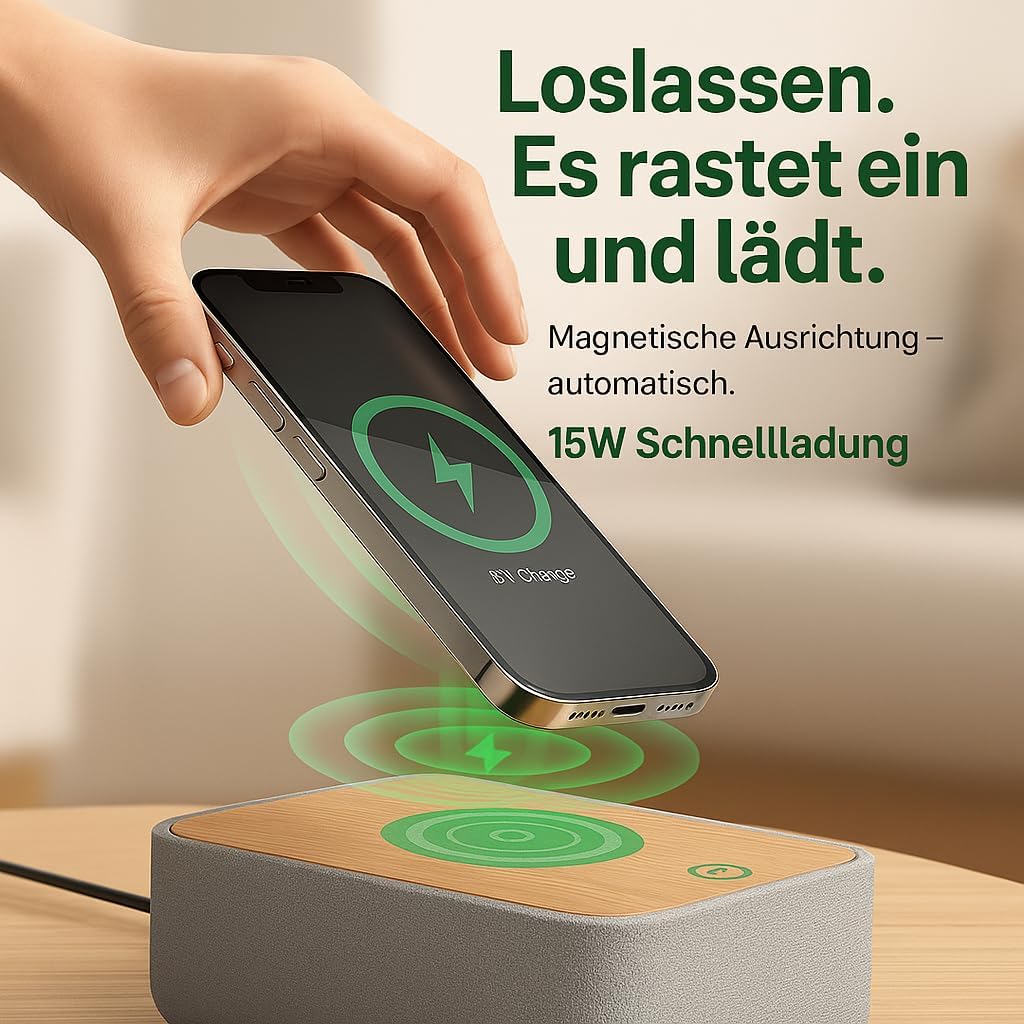
Image: Illustrates the magnetic alignment feature for wireless charging, showing a phone being placed on the charging pad.

Image: Demonstrates the 15W fast wireless charging capability of the device.
2. Radio FM:
- Extend the antenna located at the back of the device for optimal reception.
- Pencét éta FM tombol pikeun pindah ka modeu radio FM.
- Tuning otomatis: Pencét jeung tahan tombol Nyeken button (or similar, refer to device buttons) to automatically scan and save available stations (up to 40 presets).
- Tuning Manual: Ngagunakeun éta Nada +/- buttons (or rotary knob) to manually adjust the frequency (87.5-108 MHz).
- Milih prasetél: Ngagunakeun éta Preset +/- tombol pikeun ngalilingi stasiun anu disimpen.
- Adjust the volume using the rotary knob on the back of the device.

Image: Visual guide to the FM radio features, showing options for manual and automatic tuning, and the capacity for 40 preset stations.
3. Bluetooth Speaker:
- Pencét éta Bluetooth button to enter Bluetooth pairing mode. The Bluetooth icon on the display will flash.
- On your smartphone or other Bluetooth-enabled device, search for "R9BT-RA-DE" (or similar device name) in the Bluetooth settings.
- Select the device to pair. Once connected, the Bluetooth icon will stop flashing and remain solid.
- You can now stream audio from your connected device.
- The device features 10W stereo speakers for 360° sound and Bluetooth 5.3 for stable connection up to 10 meters.
- When connected, the device may automatically synchronize its time with your phone.
- Adjust the volume using the rotary knob on the back of the device (30 volume levels available).
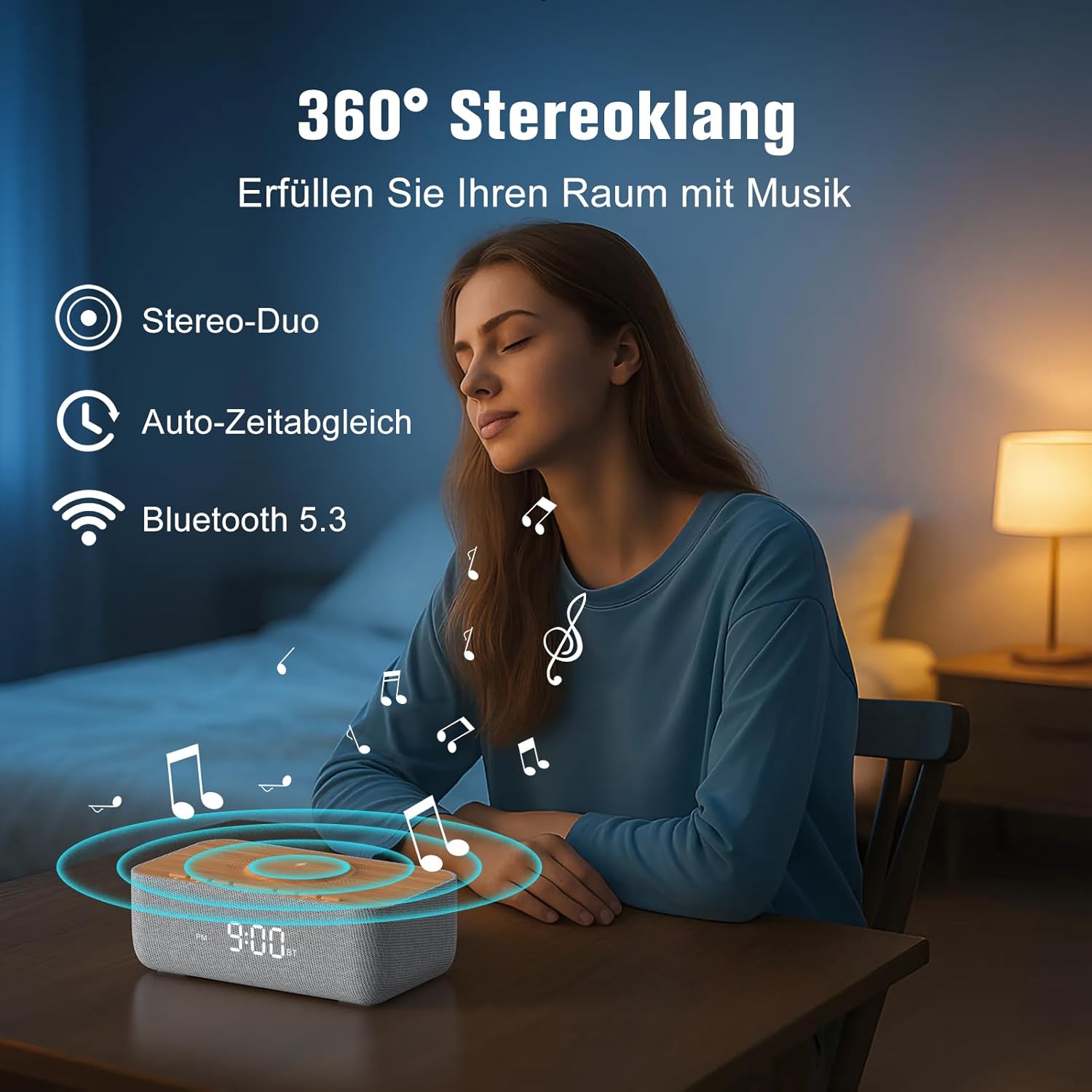
Image: Depicts the device's 360-degree stereo sound capability, Bluetooth 5.3 connectivity, and automatic time synchronization.
4. Alarm Clock and Display:
- Setélan waktos: Pencét éta Waktos Set kancing. Ngagunakeun éta +/- buttons to adjust hours and minutes. Press Waktos Set deui pikeun mastikeun.
- Format 12/24 Jam: Pencét éta 12/24H button to switch between 12-hour (with AM/PM indicator) and 24-hour formats.
- Setélan Alarm: Pencét éta Siapkeun Alarm kancing. Paké +/- pikeun nyetel waktos alarm. Pencét Siapkeun Alarm again. Then, use +/- to select one of the 6 alarm tones (bird, sea, beep, wind chimes, piano, or FM radio). Press Siapkeun Alarm pikeun mastikeun.
- Ngaktipkeun/Nonaktipkeun Alarm: Pencét éta Alarm Hurung / Pareum button to toggle the alarm. An alarm icon will appear on the display when active.
- Fungsi Tungkul Nalika alarm disada, pencét éta Tunda button (usually a large button on top) to temporarily silence it for 9 minutes.
- Ngeureunkeun Alarm: To turn off the alarm for the day, press any button other than Snooze.
- Kacaangan tampilan: Use the rotary knob on the back of the device to adjust the LED display brightness from 0% (off) to 100%.

Image: Illustrates the 0-100% dimmable LED display, showing how the brightness can be adjusted.
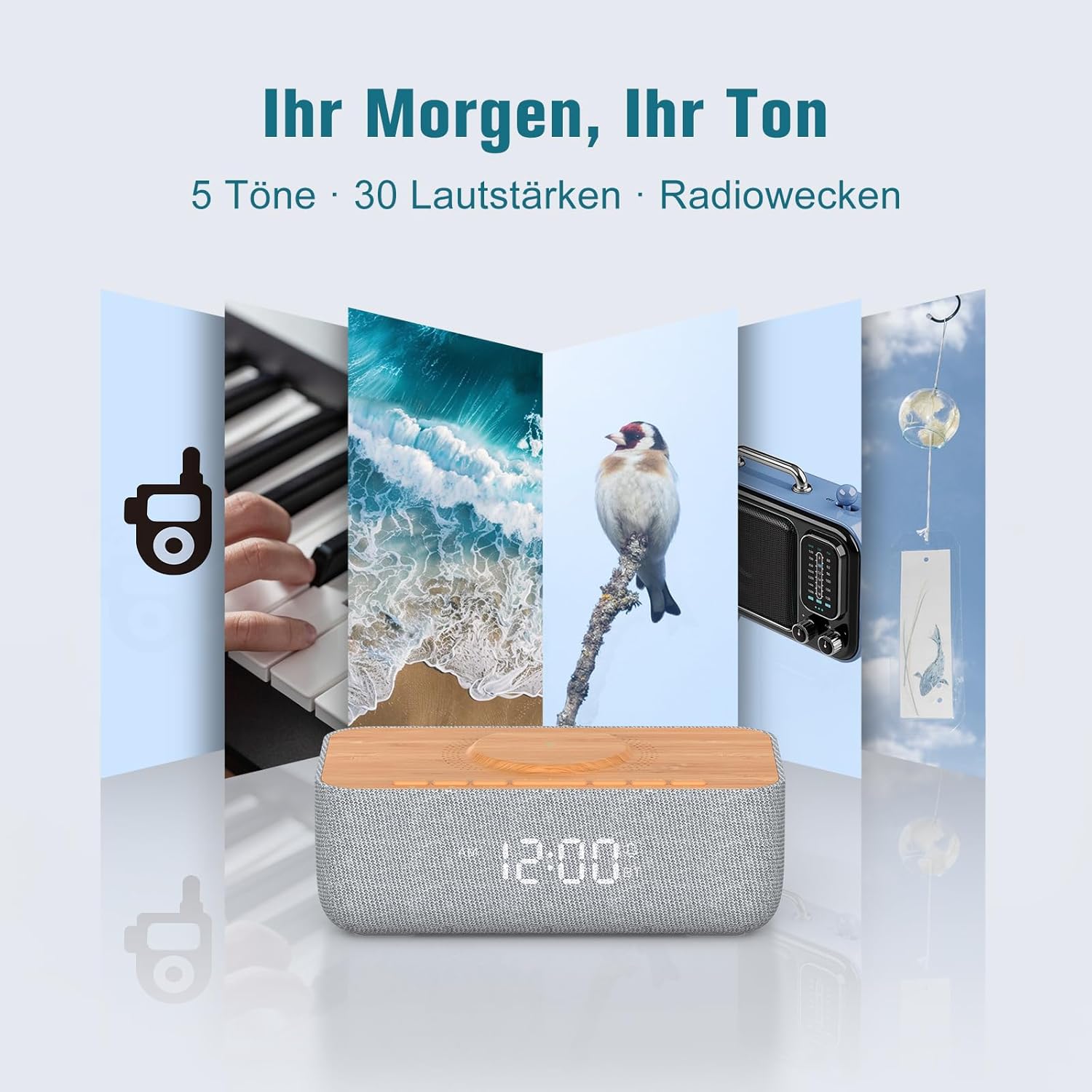
Image: Displays the variety of alarm tones, including natural sounds and FM radio, available on the device.
Pangropéa
- beberesih: Use a soft, dry cloth to wipe the device. Do not use liquid cleaners or abrasive materials.
- Panyimpenan: Upami nyimpen alat kanggo waktos anu lami, cabut tina sumber listrik teras simpen di tempat anu tiis sareng garing.
- Hindarkeun cai: This device is for indoor use only and is not waterproof. Keep it away from water and high humidity.
- Sasayogian tanaga: Only use the provided power adapter or a certified equivalent.
Pamérésan masalah
| Masalah | Mungkin Cukang lantaranana | Solusi |
|---|---|---|
| Alat teu hurung. | Power cable not connected or power outlet not working. | Ensure the power cable is securely connected to both the device and a functional power outlet. |
| Ngecas nirkabel teu jalan. | Phone not Qi-compatible, misaligned, or phone case too thick. | Ensure your phone supports Qi wireless charging. Realign the phone on the charging pad. Remove thick phone cases (over 8mm) or non-MagSafe cases. |
| panarimaan radio FM goréng. | Antenna not extended or environmental interference. | Fully extend the FM antenna. Try repositioning the device or antenna for better signal. |
| Bluetooth teu nyambung. | Device not in pairing mode, out of range, or already connected to another device. | Ensure the device is in Bluetooth pairing mode (flashing icon). Move your phone closer. Disconnect from other Bluetooth devices. |
| Alarm volume too low/high. | Volume not adjusted correctly. | Adjust the volume using the rotary knob on the back of the device. Note that some alarm tones may have a gradual volume increase. |
| Pintonan caang teuing / taram. | Setélan kacaangan perlu adjustment. | Use the rotary knob on the back of the device to adjust the display brightness. |
spésifikasi
| merek | REACHER |
| Nomer modél | R9BT-RA-DE |
| Warna | Kulawu / Coklat |
| Ukuran produk (L x W x H) | 25 x 12.5 x 8.05 cm |
| Item Beurat | 700 gram |
| Kaluaran Ngecas Nirkabel | Nepi ka 15W |
| Kasaluyuan ngecas nirkabel | Qi-compatible smartphones, iPhone 12-16 series (magnetic alignment) |
| Frékuénsi Radio FM Range | 87.5 - 108 MHz |
| Prasetél Radio FM | Up to 40 stations |
| Vérsi Bluetooth | 5.3 |
| Rentang Bluetooth | Nepi ka 10 méter |
| Kaluaran Speaker | Stereo 10W |
| Tipe tampilan | LED digital |
| Kacaangan tampilan | 0-100% Bisa diredupkeun |
| Nada Alarm | 6 (Bird, Sea, Beep, Wind Chimes, Piano, FM Radio) |
| Lilana Snooze | 9 menit |
| Sumber Daya | Kabel Listrik |
| Bahan Pigura | Wood (top panel) |
| Batré Kaasup | No |
Garansi sareng Rojongan
For warranty information and customer support, please refer to the documentation included with your purchase or visit the official REACHER website. If you encounter any issues not covered in this manual, please contact REACHER customer service for assistance.
Product is certified CE and RoHS compliant, with integrated overcurrent and short-circuit protection.