1. Bubuka
This manual provides comprehensive instructions for the Mycket portable DAB/DAB+/FM radio, Model D009. It covers setup, operation, maintenance, and troubleshooting to ensure optimal performance and longevity of your device. Please read this manual carefully before using the product.
The Mycket D009 radio features advanced signal reception technology for clear audio, Bluetooth 5.0 for wireless streaming, USB playback, AUX-in connectivity, a dual alarm clock, and a sleep timer. Its integrated rechargeable battery offers portability for use in various environments.
2. Parentah Kasalametan
- Ulah ngalaan alat ka hujan, beueus, atawa suhu ekstrim.
- Hindarkeun ragrag atanapi ngagentoskeun alat kana tabrakan anu kuat.
- Ulah ngabongkar atanapi nyobian ngalereskeun alat sorangan. Rujuk sadayana jasa ka tanaga anu mumpuni.
- Jauhkeun alat tina sumber panas sapertos radiator, register panas, kompor, atanapi aparat sanésna (kalebet ampLiifiers) anu ngahasilkeun panas.
- Use only the specified charging cable and power adapter (5V via USB) to charge the device.
- Ensure proper ventilation around the device during operation and charging.
- Buang batré sareng komponén éléktronik sacara tanggung jawab dumasar kana peraturan lokal.
3. Produk Langkungview
3.1 Eusi pakét
- 1 x Mycket Portable DAB Radio (Model D009)
- 1 x Kabel Ngecas USB
- 1 x Manual Pamaké
3.2 Tata Letak sareng Kontrol Alat
Familiarize yourself with the main components and controls of your Mycket radio.

Gambar 1: Hareupeun view of the Mycket D009 portable DAB radio, showing the speaker grille, LCD display, control buttons (MODE, OK, O/M, FAV, 1-4), and the telescopic antenna extended. The right side shows the DC 5V USB-C port, reset button, and headphone jack.
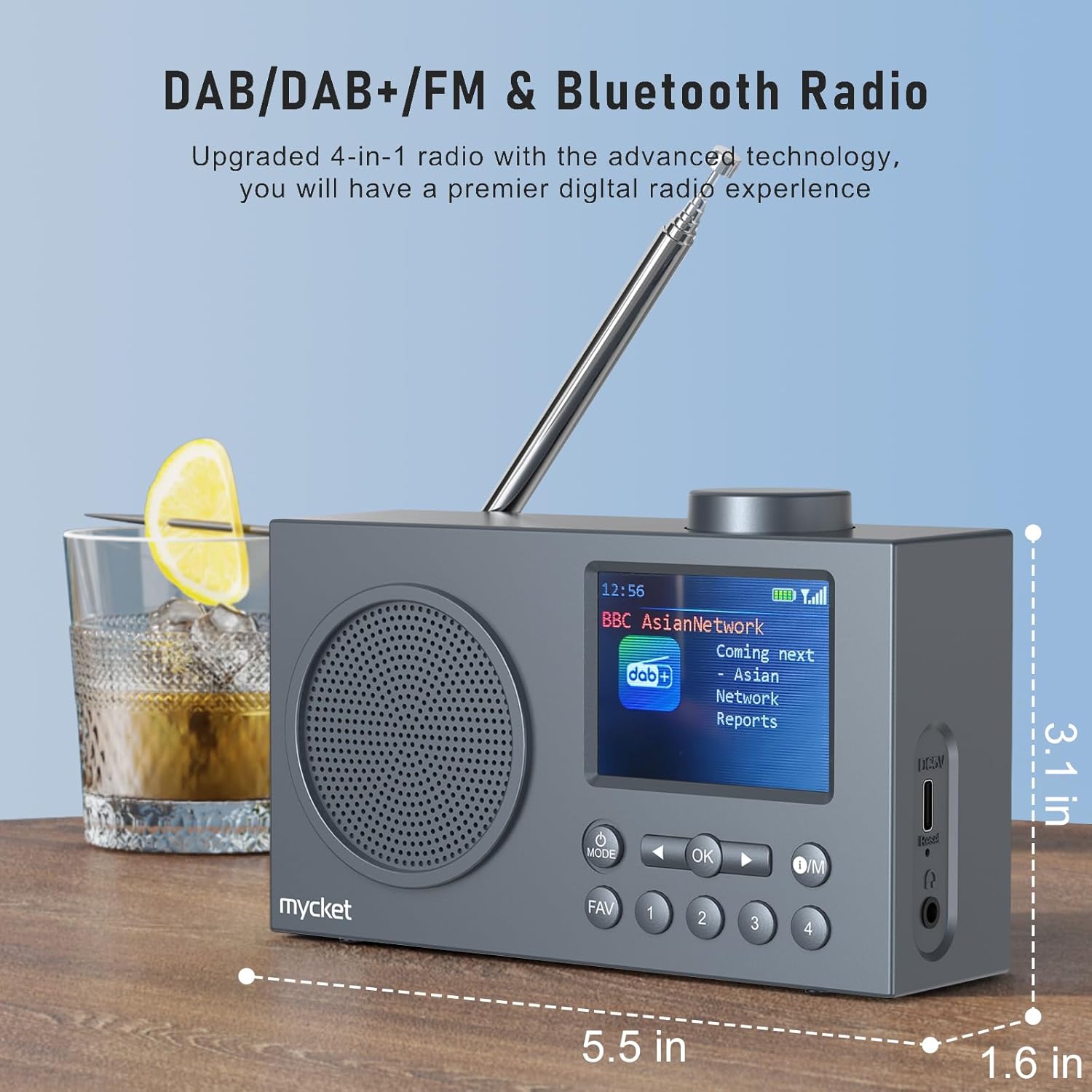
Gambar 2: Samping view of the Mycket D009 radio illustrating its compact dimensions: approximately 5.5 inches (length), 1.6 inches (width), and 3.1 inches (height). The image also highlights its DAB/DAB+/FM and Bluetooth capabilities.
- tampilan: 2.4-inch TFT color display for station information, time, and settings.
- Speaker: Integrated Hi-Fi speaker for audio output.
- Antena Teleskopik: Pikeun panarimaan sinyal radio optimal.
- Tombol MODE: Switches between DAB, FM, Bluetooth, USB, and AUX modes.
- Tombol OK: Confirms selections atawa asupkeun ménu.
- O/M Button: Power On/Off and Menu access.
- Tombol FAV: Accesses favorite presets.
- Tombol Jumlah (1-4): Direct access to stored presets.
- Tombol Navigasi (Kénca/Katuhu): Navigates menus or tunes stations.
- Jilid Kenop: Saluyukeun volume audio.
- DC 5V USB-C Port: Pikeun ngecas batré internal.
- Tombol Reset: Resets the device (use a thin object to press).
- Jack Headphone 3.5mm: Pikeun déngékeun pribadi.
4. Setélan
4.1 Ngecas Batré
The radio is equipped with a built-in 2200mAh lithium battery. Before first use, fully charge the device.
- Connect the provided USB charging cable to the DC 5V USB-C port on the side of the radio.
- Sambungkeun ujung kabel USB nu sejen ka adaptor kakuatan USB nu cocog (teu kaasup) atawa port USB komputer.
- The charging indicator on the display will show the charging status. A full charge typically takes approximately 2.5 hours and provides up to 12 hours of playback time at 70% volume.

Gambar 3: The Mycket D009 radio display showing a full battery indicator, emphasizing its long playback time on a single charge.
4.2 Adjustment anteneu
Pikeun panarimaan radio anu optimal, panjangkeun anteneu teleskopik sacara pinuh. Saluyukeun posisina pikeun kualitas sinyal anu pangsaéna.
4.3 Daya Awal Hurung
Pencét jeung tahan tombol O/M button to power on the radio. The display will light up, and the device will typically start in the last used mode or initiate a DAB scan if it's the first use.
5. Parentah Operasi
5.1 Ngalihkeun Modeu
Pencét éta MODÉ button repeatedly to cycle through available modes: DAB, FM, Bluetooth, USB, and AUX.
5.2 Operasi Radio DAB/DAB+
- Pindah ka modeu DAB nganggo MODÉ kancing.
- The radio will automatically perform a full scan for available DAB/DAB+ stations upon first use or if no stations are found. To initiate a manual scan, press and hold the OK button, then select "Full Scan" from the menu.
- Once the scan is complete, use the navigation buttons (Left/Right) to browse through the list of available stations.
- Pencét OK to select and listen to a station.

Gambar 4: The Mycket D009 radio display showing a DAB station and highlighting the auto-scan and 40 preset features (20 DAB & 20 FM).
5.2.1 Storing DAB Presets
The radio supports up to 20 DAB presets.
- Setel ka stasiun DAB anu dipikahoyong.
- Press and hold one of the number buttons (1-4) atawa nu FAV button to save the current station to a preset slot. Follow the on-screen prompts to select a slot if using the FAV button.
- To recall a preset, briefly press the corresponding number button or the FAV button and select from the list.
5.3 Operasi Radio FM
- Pindah ka modeu FM nganggo MODÉ kancing.
- Pikeun nyeken otomatis stasiun FM, pencét terus tahan tombol OK button. The radio will scan and store available stations.
- To manually tune, use the navigation buttons (Left/Right) to adjust the frequency.
- Pencét OK to confirm the station.
5.3.1 Storing FM Presets
The radio supports up to 20 FM presets, similar to DAB presets.
- Ngepaskeun ka stasiun FM nu dipikahoyong.
- Press and hold one of the number buttons (1-4) atawa nu FAV button to save the current station.
- To recall a preset, briefly press the corresponding number button or the FAV button and select from the list.
5.4 Bluetooth 5.0 Ngapasangkeun
Connect your smartphone or tablet to the radio via Bluetooth for wireless audio streaming.
- Pindah ka modeu Bluetooth nganggo MODÉ button. The radio display will show "Bluetooth Pairing" or similar.
- Dina alat sélulér anjeun, aktipkeun Bluetooth sareng milarian alat anu sayogi.
- Select "Mycket D009" from the list of devices.
- Once paired, the radio will confirm the connection, and you can play audio from your device through the radio.

Gambar 5: The Mycket D009 radio displaying "Playing" in Bluetooth mode, next to a smartphone showing "Mycket D009" as a connected Bluetooth device.
5.5 Playback USB
Puter audio MP3 files langsung ti USB drive.
- Selapkeun USB drive nu ngandung MP3 files kana port USB.
- Switch to USB mode using the MODÉ kancing.
- The radio will automatically detect and begin playing MP3 files. Use the navigation buttons to skip tracks.
5.6 Sambungan AUX-in
Sambungkeun alat audio éksternal nganggo kabel audio 3.5mm (teu kaasup).
- Connect one end of a 3.5mm audio cable to the AUX-in port on the radio.
- Sambungkeun tungtung nu sejen ka jack headphone atawa kaluaran audio tina alat éksternal Anjeun.
- Pindah ka modeu AUX ngagunakeun MODÉ kancing.
- Kontrol playback tina alat éksternal anjeun.
5.7 Fungsi Jam Alarm
Setel dugi ka dua alarm anu mandiri.
- Pencét jeung tahan tombol O/M tombol pikeun ngasupkeun ménu.
- Navigate to "Alarm Settings" using the navigation buttons and press OK.
- Pilih Alarm 1 atanapi Alarm 2.
- Set the alarm time, source (DAB, FM, or Buzzer), and volume.
- Konfirmasi setélan ku mencét OK.
5.8 Fungsi Timer Saré
Setel radio supados otomatis pareum saatos jangka waktu anu ditangtukeun.
- Pencét jeung tahan tombol O/M tombol pikeun ngasupkeun ménu.
- Navigate to "Sleep Timer" and press OK.
- Select the desired duration (e.g., 15, 30, 60 minutes).
- The radio will automatically power off after the set time.
5.9 Paké headphone
Connect 3.5mm headphones to the headphone jack for private listening. The internal speaker will be muted automatically.
6. Pangropéa
- beberesih: Anggo lawon anu garing sareng lemes pikeun ngabersihan bagian luar radio. Ulah make cleaners abrasive atawa pangleyur.
- Perawatan batré: Pikeun manjangkeun umur batre, ulah miceun batre pinuh. Ngeusi batre alat sacara rutin, sanajan henteu dianggo kanggo waktos anu lami.
- Panyimpenan: Simpen radio dina tempat anu tiis sareng garing jauh tina sinar panonpoé langsung sareng suhu anu ekstrim.
7. Cara ngungkulan
| Masalah | Mungkin Cukang lantaranana | Solusi |
|---|---|---|
| Henteu aya kakuatan / Radio henteu hurung. | Batré béak. | Ngecas radio nganggo kabel USB anu disayogikeun. |
| Panarimaan radio anu goréng (DAB/FM). | Antenna not fully extended or positioned correctly. Weak signal area. | Fully extend and adjust the telescopic antenna. Try moving the radio to a different location. Perform a full scan for stations. |
| Papasangan Bluetooth gagal. | Radio not in Bluetooth mode. Device too far. Bluetooth not enabled on external device. | Ensure the radio is in Bluetooth mode. Keep devices within range (approx. 10 meters). Enable Bluetooth on your external device and search for "Mycket D009". |
| Taya sora tina speaker. | Volume too low. Headphones connected. | Naékkeun volume. Cabut headphone upami sanés kanggo ngadangukeun sacara pribadi. |
| playback USB teu jalan. | USB drive not inserted correctly. Incompatible file formatna. | Ensure USB drive is fully inserted. Check that files dina format MP3. |
| Alat teu ngaréspon. | glitch software samentara. | Press the reset button on the side of the radio using a thin object (e.g., a paperclip). |
8. Spésifikasi
| merek | Pisan |
| Modél | D009 |
| Modeu Radio | DAB, DAB+, FM |
| Vérsi Bluetooth | 5.0 |
| Pilihan Playback | FM, DAB, DAB+, Bluetooth, USB MP3, AUX-in |
| Speaker Kaluaran Power | 5 Watt |
| Unit Speaker | 4 Ω10 W 78 mm x 1 |
| tampilan | 2.4 inci TFT Warna LCD |
| Prasetél | 40 (20 DAB, 20 FM) |
| Jenis Batré | Built-in Lithium-ion (18650) |
| Kapasitas batré | 2200 mAh (3.7V - 2.2 Ah) |
| Waktu Playback | Approx. 8-9 hours at 70% volume (up to 12 hours) |
| Waktu Ngecas | Kira-kira. 2.5 jam |
| Input kakuatan | 5V via USB |
| Dimensi (Produk) | Kira-kira 14 cm (P) x 4 cm (L) x 7.8 cm (T) |
| Sambungan Kaluaran | 3.5mm Headphone Jack |
9. Garansi jeung Rojongan
Mycket products are designed for reliability and performance. This product comes with:
- Garansi 12 Bulan: Enjoy a hassle-free 12-month warranty from the date of purchase.
- Rojongan Palanggan: For any questions, issues, or support needs, please contact Mycket customer service.
Punten tahan bukti pameseran anjeun pikeun klaim garansi.


