1. Bubuka
Thank you for choosing the Janwold 4K UHD Dash Camera. This manual provides essential information for setting up, operating, and maintaining your dash camera. Please read it thoroughly before use to ensure proper functionality and safety.
The Janwold DC308S is a dual dash camera system designed to record high-quality video of your journeys, offering advanced features for enhanced driving safety and evidence collection.
2. Eusi Paket
Pastikeun yén sadaya item aya dina pakét anjeun:
- Janwold 4K UHD Front Dash Camera
- Kaméra tukang
- 64GB Kartu MicroSD
- Carjer mobil
- Kabel Sambungan kaméra pungkur
- Pry Tool (for cable management)
- Manual pamaké

This image displays the main components included with the Janwold DC308S dash camera system, including the front camera unit, the rear camera, a 64GB memory card, and the car charger.
3. Fitur konci
- 4K + 1080P Dual Recording: Records video up to Ultra HD 4K resolution for the front camera and 1080P for the rear camera. This allows for clear capture of details such as license plates. The front camera features a 170-degree wide angle, and the rear camera has a 150-degree wide angle.
- Visi Peuting: Equipped with an F1.8 large aperture and an 8-layer optical lens, the high-sensitivity sensor enhances light capture in low-light environments for improved night recording clarity.
- Bracket Magnét: Facilitates easy installation and removal of the main dash camera unit from its base for data export, lens cleaning, or equipment replacement.
- Reliable Safety Features: Includes loop recording, G-sensor emergency lock, built-in Wi-Fi, built-in GPS, and 24-hour parking mode for continuous monitoring and critical footage pelestarian.
- 3-inch IPS UHD Full Screen: Provides a clear and intuitive split-screen interface. Supports mobile phone Wi-Fi connection and GPS positioning.

This image illustrates the wide-angle views of both the front (170 degrees, 4K UHD) and rear (150 degrees, 1080P HD) cameras, highlighting their ability to capture a broad perspective of the road.

This graphic summarizes the main functionalities of the dash cam, including its 4K resolution, Wi-Fi and GPS connectivity, advanced night vision, parking monitoring, included 64GB card, and loop recording capability.
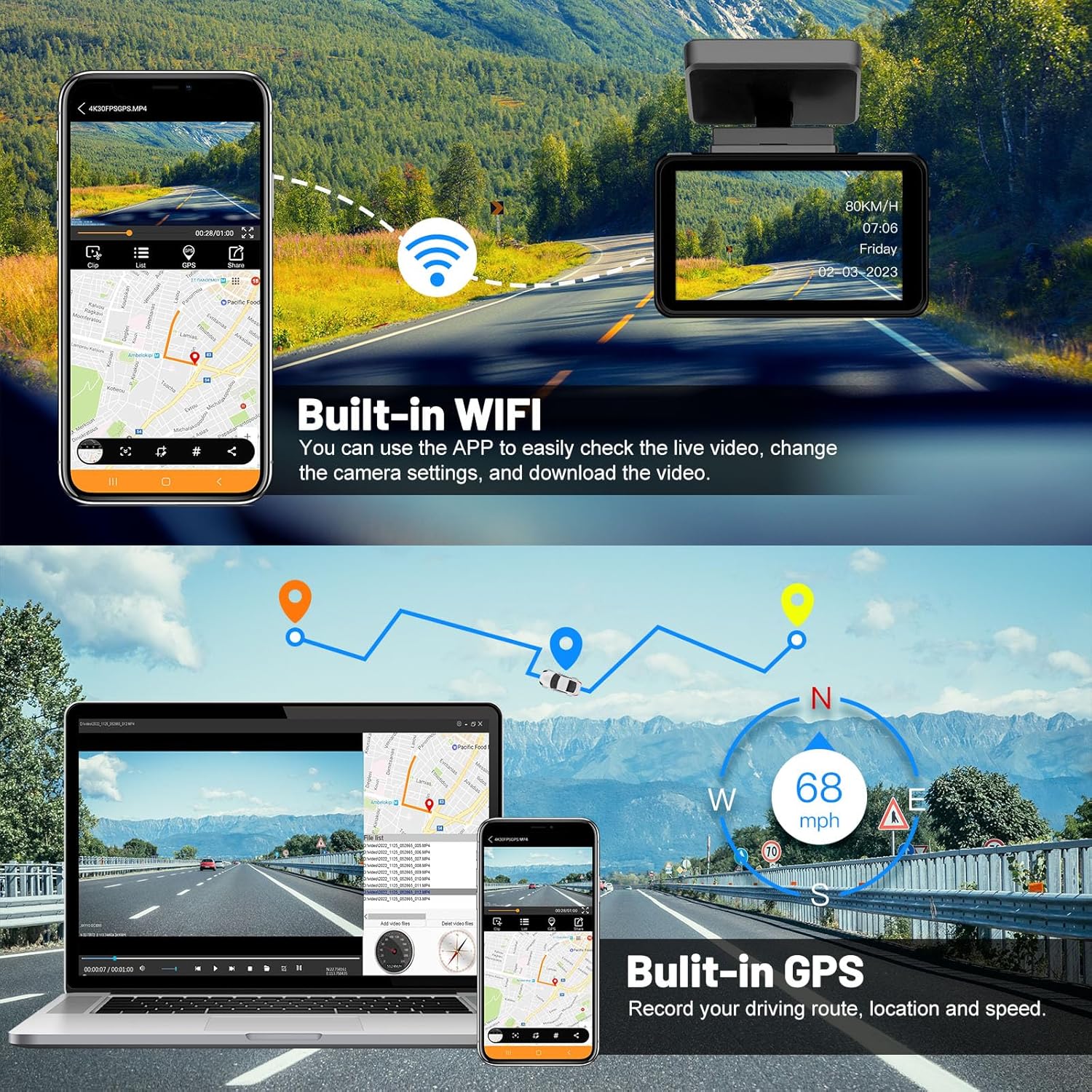
This image illustrates the integrated Wi-Fi, allowing users to connect to a mobile app for live viewing, settings adjustments, and video downloads. It also highlights the built-in GPS for recording driving routes, location, and speed.
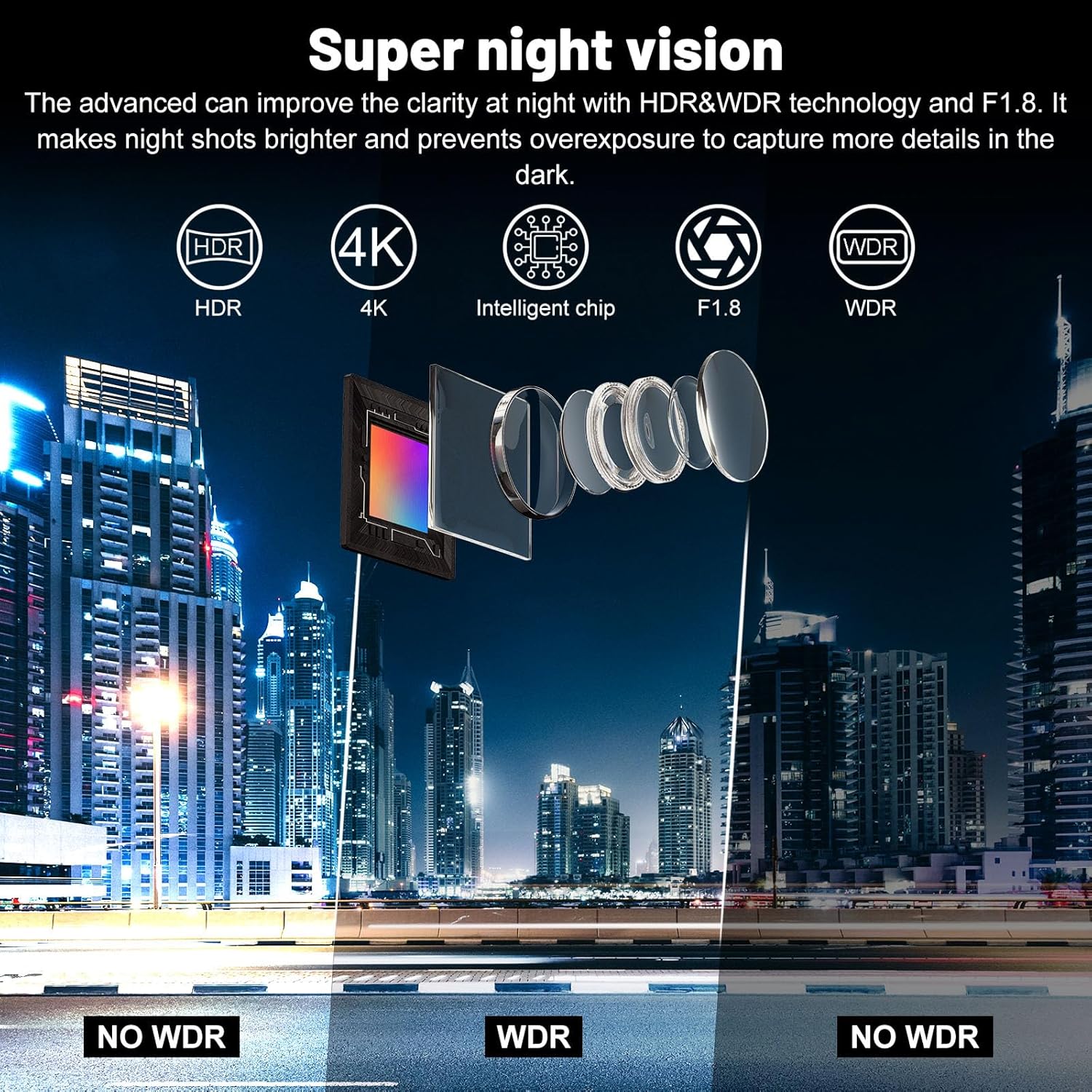
This visual explains the "Super Night Vision" feature, detailing how HDR, 4K resolution, an intelligent chip, F1.8 aperture, and WDR (Wide Dynamic Range) technology work together to improve clarity in low-light conditions, making night shots brighter and preventing overexposure.

This image demonstrates the G-Sensor, which locks video upon collision, the 24-hour parking monitoring that records 1-minute videos when vibration is detected, and the loop recording feature that automatically overwrites old, unlocked recordings when the memory card is full.
4. Setup jeung Instalasi
4.1 Pamasangan Kaméra Hareup
- Clean the windshield area where the dash camera will be mounted.
- Attach the magnetic mount to the windshield.
- Slide the main dash camera unit onto the magnetic mount until it clicks into place.
- Saluyukeun sudut kaméra pikeun mastikeun a jelas view tina jalan.
4.2 Pamasangan kaméra pungkur
- Mount the rear camera on the rear windshield or license plate area.
- Route the rear camera connection cable from the rear of the vehicle to the front dash camera. Use the included pry tool to tuck the cable neatly along the vehicle's interior trim.
- Connect the rear camera cable to the designated port on the front dash camera.
- For reversing assistance, connect the red wire of the rear camera to the positive pole of the reversing light.

This diagram illustrates the straightforward installation process, highlighting the adjustable magnetic mount for the main dash cam unit and the routing of the rear camera connection cable.
4.3 Sambungan Daya
- Insert the included 64GB MicroSD card into the dash camera's card slot.
- Connect the car charger to the dash camera and plug it into your vehicle's cigarette lighter socket.
- The dash camera will automatically power on and begin recording when the vehicle's ignition is turned on.
5. Operasi
5.1 Rekaman Dasar
Once powered on, the dash camera will automatically start continuous loop recording. Video segments are saved to the MicroSD card. When the card is full, the oldest unlocked videos will be overwritten.
5.2 G-Sensor (Konci Darurat)
The built-in G-sensor detects sudden movements or collisions. When triggered, it automatically locks the current video segment to prevent it from being overwritten by loop recording.
5.3 24-Hour Parking Mode
In parking mode, the dash camera detects vehicle vibrations and automatically records a 1-minute video. This feature requires a continuous power supply (hardwire kit, sold separately, may be needed for continuous power when the vehicle is off).

This image demonstrates the 24-hour parking monitor, which utilizes time-lapse recording at 1 frame per second to continuously monitor your car without consuming excessive storage capacity.
5.4 Konéktivitas Wi-Fi sareng Kontrol Aplikasi
The built-in Wi-Fi allows you to connect your smartphone to the dash camera via a dedicated app. Through the app, you can:
- View hirup footage.
- Robah setélan kaméra.
- Download recorded videos to your phone.
5.5 Fungsi GPS
The integrated GPS module records your driving route, location, and speed, providing valuable data that can be viewed barengan foo video Anjeuntage.
5.6 Kontrol Sora Smart
The dash camera supports 11 voice commands, allowing hands-free operation for functions such as turning on Wi-Fi, locking videos, turning on the screen, and taking photos.

This image highlights the smart voice control feature, listing examples of commands like "Turn on Wi-Fi," "Lock the video," "Turn on screen," and "Take photo," enabling hands-free operation while driving.
5.7 Backup Rear Camera Function
The rear camera supports reversing assistance. When the reversing light is activated (and the red wire is correctly connected), the recorder automatically switches to a full-screen image of the rear camera to aid in parking maneuvers.

This image shows the dash cam's screen displaying the rear camera feed with parking guidelines, indicating its function as a backup camera when reversing.
6. Pangropéa
- beberesih: Use a soft, dry cloth to clean the camera lens and screen. Avoid abrasive cleaners.
- Kartu MicroSD: Format the MicroSD card regularly (e.g., once a month) to ensure optimal performance and prevent data corruption. Back up important files saméméh pormat.
- Pembaruan firmware: Pariksa produsén urang websitus périodik pikeun apdet firmware pikeun mastikeun alat Anjeun boga fitur panganyarna na bug fixes.
7. Cara ngungkulan
- Kaméra teu hurung:
- Ensure the car charger is securely connected to both the camera and the vehicle's power outlet.
- Pariksa naha stop kontak kendaraan parantos fungsina.
- Masalah rékaman:
- Ensure a MicroSD card is inserted and properly formatted.
- Check if the MicroSD card is full; if so, format it or replace it.
- Use a high-speed (Class 10 or U3) MicroSD card from a reputable brand.
- Masalah sambungan Wi-Fi:
- Ensure Wi-Fi is enabled on the dash camera and your smartphone.
- Restart both the dash camera and your smartphone.
- Ensure you are within close proximity to the dash camera.
- GPS teu jalan:
- Pastikeun kaméra dasbor gaduh gambar anu jelas view langit pikeun panarimaan satelit.
- Butuh sababaraha menit pikeun sinyal GPS kaala.
8. Spésifikasi
| Fitur | Rincian |
|---|---|
| Dimensi produk | 0.78 "D x 3.62" W x 1.67" H |
| Item Beurat | 1.1 pon |
| Téhnologi konektipitas | Wifi |
| Fitur husus | Built-In GPS, Built-In WiFi |
| Resolusi Capture Video | 1080p, 4K |
| Komponén Kaasup | Carjer mobil |
| Tipe Pamasangan | Kaca Depan |
| Warna | Hideung |
| Produsén | Janwold |
| Ngaran modél | DC308S |
| Jinis Layanan Kandaraan | mobil |
9. Video produk
No relevant product videos for the Janwold 4K UHD Dash Camera DC308S were provided in the available product data.
10. Garansi jeung Rojongan
The Janwold 4K UHD Dash Camera comes with a manufacturer's warranty. For detailed warranty information, technical support, or customer service inquiries, please refer to the contact information provided on the product packaging or the official Janwold websitus.
Janwold offers customer-focused support, including 24/7 technical assistance, to ensure a smooth user experience.
