1. Bubuka
The VOLTCRAFT PSW 2000-12-G Pure Sine Wave Inverter is designed to convert 12V DC power from a battery into stable 230V AC pure sine wave power. This type of output is essential for operating sensitive electronic devices that require a clean and consistent power supply, such as televisions, computers, and audio systems, without interference or damage. Its microcontroller-controlled electronics ensure reliable performance and protection under various conditions, including overload and short circuits.
2. Parentah Kasalametan
Mangga baca sareng pahami sadaya pitunjuk kaamanan sateuacan ngoperasikeun inverter. Upami henteu nuturkeun pitunjuk ieu tiasa nyababkeun sengatan listrik, kahuruan, atanapi tatu parah.
- Ventilasi: Ensure the inverter is installed in a well-ventilated area. Do not block ventilation openings.
- Lingkungan garing: Operate the inverter only in dry conditions. Avoid exposure to water, rain, or excessive humidity.
- Bener Voltage: Connect the inverter only to a 12V DC power source. Do not connect to a 24V or higher DC source.
- Bahan anu gampang kaduruk: Do not operate the inverter near flammable liquids, gases, or other combustible materials.
- Pamasangan profésional: For permanent installations, it is recommended to consult a qualified electrician.
- Grounding: Mastikeun inverter bener grounded nurutkeun kode listrik lokal.
- Barudak jeung Pets: Keep the inverter out of reach of children and pets.
- Pembongkaran: Do not attempt to disassemble or modify the inverter. Refer all servicing to qualified personnel.
3. Eusi Paket
Pastikeun yén sadaya barang aya sareng henteu ruksak nalika dibongkar.
- VOLTCRAFT PSW 2000-12-G Pure Sine Wave Inverter
- Instruksi Manual
- DC Connection Cables (if included)
4. Produk Langkungview
The VOLTCRAFT PSW 2000-12-G inverter features a robust design with multiple output options and cooling mechanisms.

Gambar 1: Hareup-luhureun view of the VOLTCRAFT PSW 2000-12-G inverter, showing the two AC outlets, USB port, and power button on the front panel.

Gambar 2: Puncak view of the inverter, highlighting the VOLTCRAFT branding and model number on its blue casing.
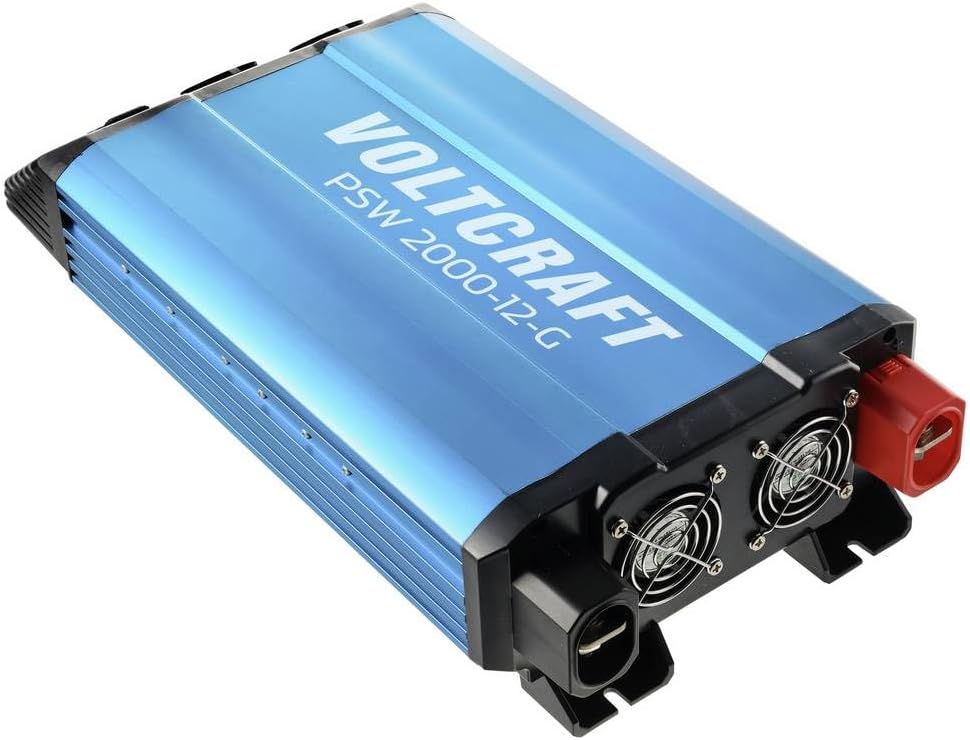
Gambar 3: Rear-top view of the inverter, displaying the cooling fans and the robust DC input terminals (red for positive, black for negative).

Gambar 4: Samping view of the inverter, showing the heat sink fins for efficient thermal management.
5. Setélan
Proper setup is crucial for safe and efficient operation of your inverter.
5.1. Lokasi
- Pilih tempat anu tiis, garing, sareng gaduh ventilasi anu saé.
- Hindarkeun sinar panonpoé langsung, sumber panas, sareng kalembaban.
- Pastikeun aya rohangan anu cekap di sakitar inverter pikeun aliran hawa, khususna di sakitar kipas pendingin.
- Mount the inverter securely on a stable, non-flammable surface.
5.2. Sambungan Input DC
Connect the inverter to a 12V DC battery or power source.
- Pastikeun saklar kakuatan inverter dina posisi OFF.
- Use appropriate gauge cables for the power rating (2000W) to minimize voltage drop and prevent overheating.
- Nyambungkeun BEureum positive (+) cable to the positive (+) terminal of the inverter and then to the positive (+) terminal of the battery.
- Nyambungkeun HIDEUNG negative (-) cable to the negative (-) terminal of the inverter and then to the negative (-) terminal of the battery.
- Ensure all connections are tight and secure to prevent loose contacts and sparking.
5.3. Grounding
Connect the inverter's chassis ground terminal to a reliable earth ground. This is a critical safety measure.
6. Parentah Operasi
6.1. Ngahurungkeun
- After ensuring all DC connections are secure, switch the inverter's power button to the ON position.
- The indicator light should illuminate, indicating the inverter is operational.
- The cooling fan may activate briefly during startup or when under load.
6.2. Nyambungkeun Alat AC
- Plug your 230V AC devices into the AC outlets on the front panel of the inverter.
- Ensure the total power consumption of all connected devices does not exceed the inverter's continuous power rating (2000W).
- For devices with high inrush current (e.g., motors, refrigerators), connect them one at a time.
6.3. Kaluaran USB
The inverter includes a USB port for charging compatible devices. Simply connect your USB device to the port.
6.4. Powering Pareum
- Disconnect all AC devices from the inverter outlets.
- Switch the inverter's power button to the OFF position.
- For long-term storage or maintenance, disconnect the DC input cables from the battery.
7. Pangropéa
Pangropéa rutin ngajamin kinerja optimal sareng umur panjang inverter anjeun.
- beberesih: Bersihkeun bagian luar inverter sacara berkala nganggo lawon anu garing sareng lemes. Pastikeun liang ventilasi bébas tina lebu sareng kokotor. Entong nganggo pembersih cair.
- Sambungan: Regularly check all DC input connections for tightness. Loose connections can cause overheating and power loss.
- Pangropéa batré: Ensure your 12V DC battery is properly maintained and charged according to its manufacturer's instructions. A healthy battery is crucial for inverter performance.
- Panyimpenan: Upami nyimpen inverter kanggo waktos anu lami, pegatkeun tina batréna teras simpen di tempat anu tiis sareng garing.
8. Cara ngungkulan
Bagian ieu ngabahas masalah umum anu anjeun tingali.
| Masalah | Mungkin Cukang lantaranana | Solusi |
|---|---|---|
| Inverter henteu hurung | No DC input power; Loose battery connections; Low battery voltage; Blown fuse (internal) | Pariksa sambungan batré jeung voltage; Ensure battery is charged; Consult a technician for internal fuse replacement. |
| Taya kaluaran AC | Kaleuwihan beban; Suhu anu kaleuleuwihi; Vol input handap/luhurtage; Faulty AC device | Reduce connected load; Allow inverter to cool; Check battery voltage; Test AC device on another power source. |
| Inverter pareum | Overload protection activated; Over-temperature protection activated; Low battery voltage pareum | Reduce load; Allow inverter to cool; Recharge or replace battery. |
| Kipas angin muter terus/ribut | Suhu internal anu luhur; Beban beurat | Ensure adequate ventilation; Reduce load if possible. This is normal operation under certain conditions. |
9. Spésifikasi
| Fitur | Spésifikasi |
|---|---|
| merek | VOLTCRAFT |
| Modél | PSW 2000-12-G |
| Produsén Bagian Jumlah | VC-14490410 |
| Masukan Voltage | 12V DC |
| Kaluaran Voltage | 230V AC |
| Bentuk gelombang kaluaran | Galura murni |
| Daya Terus-terusan | 2000W |
| Beurat | 2.5 kg |
| Fitur panyalindungan | Overload, Short Circuit, Over-temperature, Low/High Voltage |
10. Garansi jeung Rojongan
The VOLTCRAFT PSW 2000-12-G Pure Sine Wave Inverter comes with a minimum 2-year warranty from the date of purchase, covering manufacturing defects. For technical support, warranty claims, or service inquiries, please contact your retailer or the VOLTCRAFT customer service department. Please have your model number (PSW 2000-12-G) and proof of purchase available when contacting support.