1. Bubuka
This manual provides essential information for setting up, operating, and maintaining your DOOGEE Note 58 Android 15 Unlocked Cellphone. Please read this guide thoroughly to ensure proper usage and to maximize your device's capabilities.

Gambar 1.1: Hareup jeung pungkur view of the DOOGEE Note 58 cellphone.
2. Eusi Paket
Pastikeun yén sadaya item aya dina pakét produk anjeun:
- DOOGEE Note 58 Cellphone
- Adaptor kakuatan
- Kabel USB
- Manual pamaké
- Screen Protector Accessories

Figure 2.1: Included accessories with the DOOGEE Note 58 cellphone.
3. Alat Leuwihview
3.1 Physical Design
The DOOGEE Note 58 features a slim design, measuring approximately 8.66mm in thickness, making it lightweight and comfortable to hold.

Gambar 3.1: Sisi view ngagambarkeun pro rampingfile tina alat.

Figure 3.2: Visual representation of the phone's 8.6mm ultra-thin body.
3.2 Palabuhan sarta Tombol
The device includes standard ports and buttons for connectivity and control:
- Palabuhan USB-C: Pikeun ngecas sareng mindahkeun data.
- Slot Kartu SIM/TF: Supports dual SIM cards and expandable storage.
- Tombol Daya: Pikeun ngahurungkeun/mareuman alat sareng ngonci/muka konci layar.
- Tombol Volume: Pikeun nyaluyukeun tingkat audio.

Gambar 3.3: Handap view of the device, detailing the USB-C port and speaker grille.
4. Setup Awal
4.1 Nyelapkeun Kartu SIM sareng TF
The DOOGEE Note 58 supports two Nano-SIM cards and one TF (microSD) card for expanded storage. Use the provided SIM ejector tool to open the card tray.

Figure 4.1: The SIM card tray, designed for dual SIM and TF card expansion.
4.2 Ngahurungkeun sareng Konfigurasi Dasar
Press and hold the power button to turn on your device. Follow the on-screen prompts to select your language, connect to a Wi-Fi network, and complete the initial setup process.
Video 4.1: Hiji leuwihview of the DOOGEE Note 58, including initial boot-up and setup screens.
5. Ngoperasikeun Alat Anjeun
5.1 Sistem Android 15
The DOOGEE Note 58 operates on the Android 15 system, offering enhanced security, privacy controls, and a user-friendly interface. Key features include:
- Papan klip Super: Advanced clipboard functionalities.
- Modeu Layar Terbagi: Multitask efficiently by running two apps simultaneously.
- Modeu Sistem Ganda: Provides separate environments for different uses.

Gambar 5.1: Kelamples of Android 15 system features on the DOOGEE Note 58.
5.2 Pintonan
The device features a 6.75-inch HD+ IPS Waterdrop display with a 90Hz refresh rate for smooth visuals. The 720 x 1600 resolution and in-cell technology provide clear and vibrant images.
Gambar 5.2: Layar HD+ 6.75 inci anu nuju dianggo.

Figure 5.3: Detailed specifications of the device's display.
5.3 Performance sarta Panyimpenan
Powered by the UNISOC T7250 octa-core processor, the device ensures efficient performance. It comes with 32GB RAM (8GB physical + 24GB expandable) and 128GB of internal storage, expandable up to 2TB via a TF card.

Figure 5.4: The UNISOC T7250 Octa-core processor, central to the phone's performance.

Figure 5.5: Illustration of the 32GB RAM configuration, including extended RAM.

Figure 5.6: Storage options, including 128GB internal and up to 2TB expandable storage.
6. Fitur kaméra
The DOOGEE Note 58 is equipped with a 16MP AI main camera and an 8MP front camera, supporting various photography modes for diverse shooting conditions.
- Kaméra utama: 16MP with AI enhancements, supporting autofocus and rear flashes.
- Kaméra hareup: 8MP pikeun selfies sareng telepon pidéo.
- Modeu shooting: HDR, Night Mode, Time-Lapse, Portrait, Panorama, Pro Mode, Beauty Mode, Filters, Smile Shutter, Audio Note.
- Ngarékam pidéo: Supports 1080p video capture.

Figure 6.1: The rear camera module of the DOOGEE Note 58.

Figure 6.2: Specifications of the 16MP main camera.

Figure 6.3: Specifications of the 8MP front-mounted camera.
Video 6.1: Demonstration of the 16MP AI main camera and its versatile photography modes.
7. Konéktivitas sareng Kaamanan
7.1 Network and Wireless
The DOOGEE Note 58 supports 4G dual SIM functionality, allowing for two SIM cards to be active simultaneously. It is compatible with GSM carriers like T-Mobile and supports various network bands (GSM:B2/3/5/8, WCDMA: B1/2/4/5/8, TDD: B38/40/41, EDGE/GPRS, FDD: B1/2/3/4/5/7/8/18/19/20/25/26/28A/28B/6). Wi-Fi connectivity is also available.
7.2 Navigation and NFC
The device includes GPS, GLONASS, Galileo, and Beidou for precise navigation. NFC with Google Pay enables convenient contactless payments.

Figure 7.1: Using NFC for mobile payments.

Figure 7.2: The device's navigation capabilities.
7.3 Fitur Kaamanan
The device supports Face Unlock for quick and secure access. It also features Widevine L1 support, enabling high-quality 1080P streaming for various content platforms.

Figure 7.3: Face Unlock in action.
8. Manajemén batré
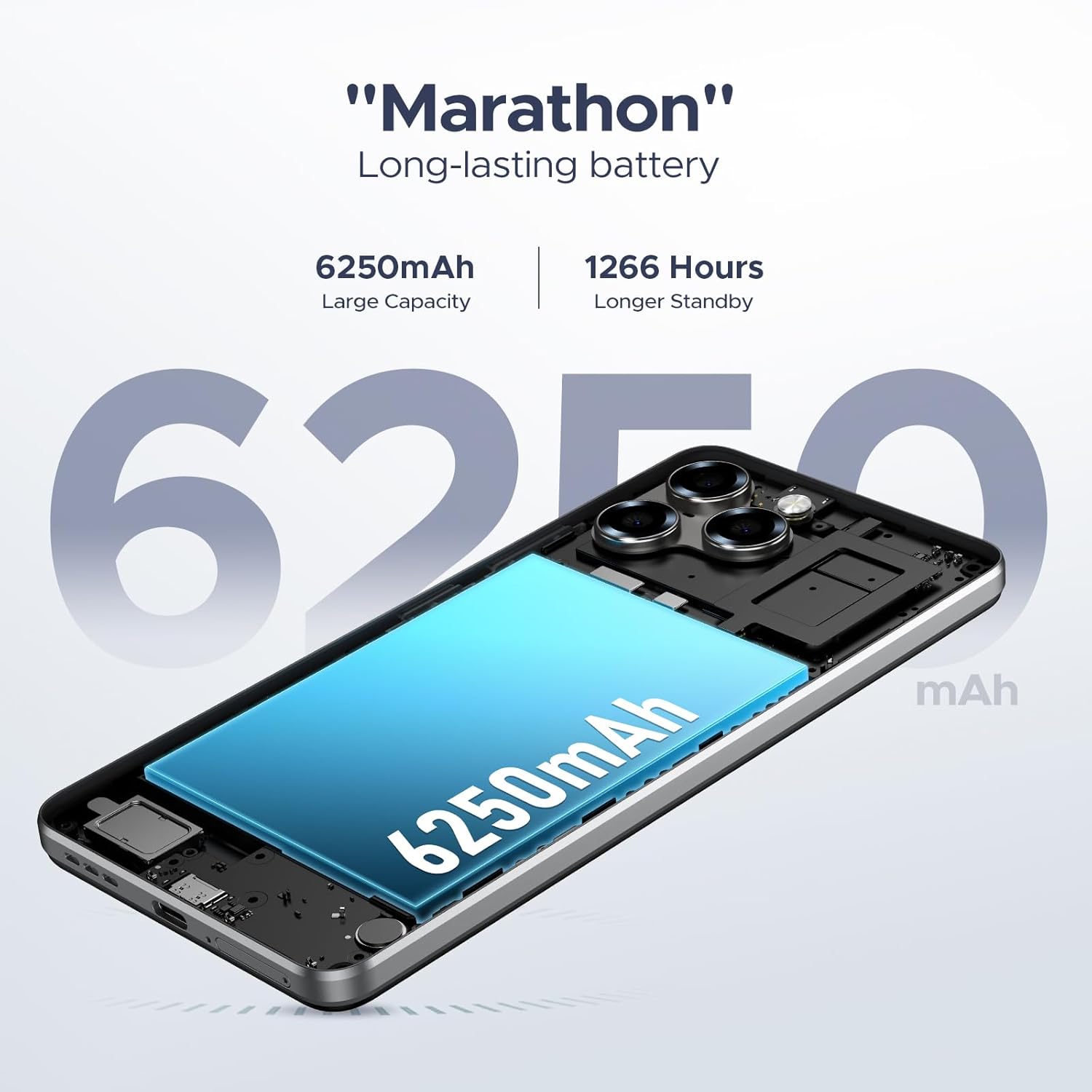
The DOOGEE Note 58 is equipped with a 6250mAh long-lasting battery. It also supports OTG reverse charging, allowing you to use your phone to power other compatible devices.

Figure 8.1: Estimated battery life for various activities.

Figure 8.2: The OTG reverse charging feature.
9. Pangropéa
To ensure the longevity and optimal performance of your DOOGEE Note 58, follow these maintenance guidelines:
- beberesih: Anggo lawon anu lemes sareng henteu lint pikeun ngabersihan layar sareng awak. Hindarkeun bahan kimia anu kasar.
- Apdet parangkat lunak: Rutin parios sareng pasang apdet sistem pikeun kauntungan tina fitur panganyarna, patch kaamanan, sareng perbaikan kinerja.
- Manajemén Panyimpenan: Périodik ulangview and manage your device's storage. Delete unnecessary files and apps, or utilize the expandable TF card slot for additional space.
- Suhu: Avoid exposing the device to extreme temperatures, direct sunlight, or very humid conditions.
10. Cara ngungkulan
Upami anjeun ngalaman masalah sareng DOOGEE Note 58 anjeun, tingali solusi umum ieu:
- Alat teu hurung: Ensure the battery is charged. Connect the device to its charger for at least 30 minutes before attempting to power it on again.
- Layar teu ngaréspon: Try restarting the device by holding down the power button for approximately 10-15 seconds until it reboots.
- Kacilakaan Aplikasi: Clear the cache and data for the problematic app in the device settings, or uninstall and reinstall the app.
- Konektipitas Jaringan Lemah: Check if your SIM card is properly inserted. Ensure you are within network coverage. Try toggling Airplane Mode on and off.
- Batré gancang ngucur: Reduce screen brightness, close unused apps running in the background, and disable unnecessary features like GPS or Wi-Fi when not in use.
Pikeun masalah anu langkung rumit, mangga ngahubungi dukungan palanggan.
11. Spésifikasi
| Fitur | Spésifikasi |
|---|---|
| Ngaran modél | DOOGEE Note 58 Phone |
| Sistem operasi | Android 15 |
| Prosesor | UNISOC T7250 Octa-core |
| Ram | 32GB (8GB + 24GB tiasa dilegakeun) |
| Panyimpenan internal | 128GB |
| Panyimpenan Expandable | Nepi ka 2TB via kartu TF |
| Ukuran layar | 6.75 inci |
| Tipe tampilan | Layar Tetesan Cai HD+ IPS |
| Refresh Laju | 90Hz |
| Kaméra Utama | AI 16MP |
| Kaméra hareup | 8MP |
| Kapasitas batré | 6250 mah |
| Konektipitas | 4G Dual SIM, Wi-Fi, NFC, GPS, GLONASS, Galileo, Beidou |
| Fitur husus | Face Unlock, OTG Reverse Charging, Widevine L1 |
| Dimensi (Pakét) | 7.6 x 4.06 x 2.13 inci |
| Item Beurat | 14.9 ons |
12. Garansi jeung Rojongan
Your DOOGEE Note 58 comes with a limited warranty. Please refer to the warranty card included in your package for specific terms and conditions. For technical support, service inquiries, or further assistance, please visit the official DOOGEE websitus atanapi ngahubungan layanan palanggan maranéhna.
Sumberdaya Online:
- Toko Resmi DOOGEE: Toko DOOGEE di Amazon


