1. Bubuka
This manual provides detailed instructions for the setup, operation, maintenance, and troubleshooting of your Transformers TF-Crystal 85 Keys Mechanical Keyboard. Please read this manual thoroughly before using the product to ensure proper functionality and longevity.
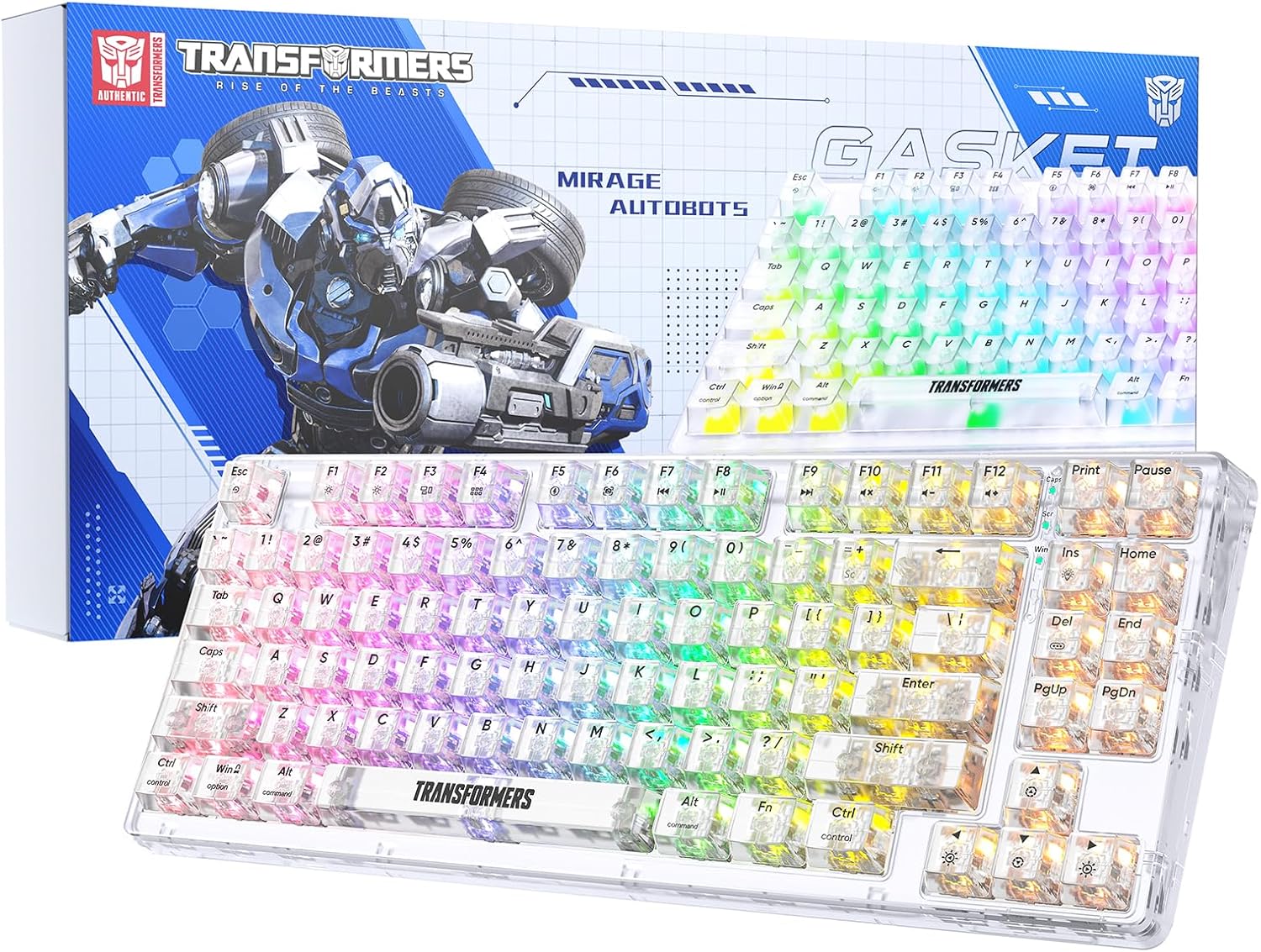
Image 1.1: Transformers TF-Crystal 85 Keys Mechanical Keyboard with its packaging, showcasing the transparent design and RGB lighting.
2. Produk Langkungview
2.1 Fitur konci
- 85-Layout konci: Compact 75% design retaining essential functions, arrow, and navigation keys.
- Konektipitas Tri-Mode: Supports Bluetooth 5.0, 2.4GHz wireless, and USB-C wired connections.
- PCB anu tiasa ditukeurkeun panas: Compatible with most 3-pin and 5-pin mechanical switches, allowing for easy customization and replacement.
- Linear Switches: Pre-lubricated switches with a 50 million keystroke lifespan for durability and smooth operation.
- Struktur Gasket: Incorporates high-quality gasket materials and a silicone pad to absorb vibrations and reduce typing noise.
- Lampu tukang RGB anu tiasa disaluyukeun: Features 20 built-in backlight modes, 16.8 million color options, and dynamic music rhythm effects.
- Programmable Driver: Enables macro customization, key function remapping, and advanced lighting control.
- Hirup batré anu panjang: Equipped with a 4000mAh battery, providing up to 240 hours of continuous use in 2.4GHz mode without backlighting.
- Kasaluyuan lega: Supports Mac, Windows, iOS, Android, PC, Laptop, Smartphone, Tablet, Switch, Xbox, and PlayStation.
- Desain transparan: Features transparent keycaps and base for enhanced aesthetic appeal.
3. Setélan
3.1 Ngecas kibor
Before initial use, fully charge the keyboard. Connect the provided USB-C cable to the keyboard's USB-C port and the other end to a powered USB port (e.g., computer, wall adapter). The charging indicator will show the charging status.
3.2 Connecting via 2.4GHz Wireless Mode
- Panggihan panarima USB 2.4GHz, biasana disimpen dina kompartemen dina kibor.
- Colokkeun panarima USB ka port USB nu sadia dina komputer Anjeun.
- Toggle the mode switch on the keyboard to the 2.4G posisi.
- The keyboard will automatically connect to your device.
3.3 Connecting via Bluetooth 5.0 Mode
- Toggle the mode switch on the keyboard to the BT posisi.
- Pencét jeung tahan fn+1 (atawa fn+2, fn+3) for 3-5 seconds until the indicator light flashes rapidly, indicating pairing mode.
- Dina alat anjeun (komputer, tablet, smartphone), aktipkeun Bluetooth sareng milarian alat anyar.
- Select "TF-Crystal 85" from the list of available devices to pair.
- Once paired, the indicator light will stop flashing and remain solid. You can pair up to three Bluetooth devices using fn+1, fn+2, jeung fn+3.
3.4 Connecting via USB-C Wired Mode
- Sambungkeun kabel USB-C anu disayogikeun kana port USB-C kibor.
- Sambungkeun ujung kabel USB-C nu sejen ka port USB nu sadia dina komputer Anjeun.
- The keyboard will automatically switch to wired mode and function without battery power.

Image 3.1: Diagram illustrating the three connection modes: Bluetooth 5.0, 2.4GHz wireless, and USB-C wired, compatible with various devices.
4. Parentah Operasi
4.1 Ngalihkeun Antara Modeu
Use the physical switch located on the keyboard to select between BT (Bluetooth), 2.4G (2.4GHz wireless), and USB-C (wired) modes.
4.2 RGB Backlight Control
Kibor ieu ngagaduhan lampu latar RGB anu tiasa disaluyukeun. Anggo kombinasi tombol ieu pikeun nyaluyukeun:
- Fn + Ins: Cycle through 20 different backlight effects.
- Fn + Del: Switch backlight colors within certain modes.
- Fn + ↑ / ↓: Adjust backlight brightness (5 levels).
- Fn + ← / →: Adjust backlight effect speed (5 levels).
- Fn + Esc (hold for 3s): Reset backlight settings to default.

Image 4.1: Visual guide for controlling RGB backlight effects, brightness, and speed using Fn key combinations.
4.3 Programmable Driver Usage
The keyboard includes a programmable driver for advanced customization. This driver allows you to:
- Éditan Makro: Record and edit complex key sequences.
- Key Redefinition: Customize the function of individual keys.
- RGB Effect Customization: Fine-tune lighting modes, colors, and speeds, including music rhythm lighting effects.
Refer to the software's dedicated user interface for detailed instructions on using these features.

Image 4.2: Screenshot of the programmable driver interface, showing options for macro editing, RGB effects, and key redefinition.
4.4 Saklar Hot-Swapping
The TF-Crystal 85 keyboard features a hot-swappable PCB, allowing you to change mechanical switches without soldering. This supports most 3-pin and 5-pin mechanical switches.
- Pareuman keyboard atawa pegatkeun sambungan tina alat Anjeun.
- Anggo penarik keycap anu disayogikeun pikeun nyabut keycap anu dipikahoyong sacara ati-ati.
- Use the provided switch puller to gently grip the switch from its top and bottom clips, then pull it straight up to remove it.
- Sejajarkeun pin saklar anyar jeung liang dina PCB. Pastikeun pinna lempeng.
- Pencét saklar anyar lalaunan kana tempatna dugi ka ngaklik pageuh. Tong dipaksa.
- Pasang deui tutup konci na.

Image 4.3: Illustration of the hot-swappable feature, showing how to remove and insert 3-pin/5-pin switches and the linear switch specifications.
5. Pangropéa
5.1 Ngabersihan kibor
- Cabut sambungan kibor tina sadaya sumber daya sateuacan dibersihkeun.
- Make kaen nu lemes, teu aya lint rada dampku cai atawa solusi beberesih hampang pikeun ngusap keycaps na chassis.
- Pikeun lebu jeung lebu antara kenop, make hawa dikomprés atawa sikat leutik.
- Avoid using harsh chemicals or abrasive materials that could damage the keyboard's surface.
5.2 Perawatan Batré
- Hindarkeun sering-sering ngeusi batre.
- Simpen kibor di tempat anu tiis sareng garing upami henteu dianggo kanggo waktos anu lami.
- If the keyboard will not be used for a long time, charge it to about 50% before storage.
6. Cara ngungkulan
| Masalah | Mungkin Cukang lantaranana | Solusi |
|---|---|---|
| Kibor teu ngaréspon dina modeu nirkabel. | Low battery, incorrect mode selected, receiver not connected, Bluetooth not paired. | Charge the keyboard. Ensure the mode switch is set correctly (2.4G or BT). Re-insert the 2.4G receiver. Re-pair Bluetooth. |
| Konci teu kadaptar atanapi ngetik dua kali. | Faulty switch, debris under keycap, software issue. | Clean under the keycap. Try hot-swapping the switch with a known working one. Restart your computer. |
| RGB backlight not working or incorrect. | Backlight turned off, incorrect settings, software conflict. | Atur kacaangan nganggo Fn + ↑. Cycle modes with Fn + Ins. Reset backlight with Fn + Esc (hold 3s). Check programmable driver settings. |
| Kibor teu ngecas. | Faulty USB-C cable, power source issue, keyboard port damage. | Try a different USB-C cable. Use a different USB port or power adapter. Ensure the cable is fully inserted. |
7. Spésifikasi
| Fitur | Rincian |
|---|---|
| Nomer modél | TF-Crystal 85 |
| Layout konci | 85 Konci (75% Kompak) |
| Konektipitas | Bluetooth 5.0, Nirkabel 2.4GHz, Kabel USB-C |
| Pindah Tipe | Pre-lubricated Linear Mechanical Switches |
| Ganti Umur Umur | 50 Juta Keystrokes |
| Panas-Swappable | Sumuhun (3-pin/5-pin cocog) |
| Lampu tukang | RGB (20 modeu, 16.8 juta warna) |
| Kapasitas batré | 4000 mah |
| Battery Life (2.4G, no light) | Nepi ka 240 jam |
| Battery Life (Backlit ON) | Kurang leuwih 22 jam |
| Ukuran (L x W x H) | 34.7 cm x 14 cm x 4.5 cm |
| Kasaluyuan | Mac, Windows, iOS, Android, PC, Laptop, Smartphone, Tablet, Switch, Xbox, PlayStation |

Image 7.1: Visual representation of the keyboard's battery life: 240 hours with backlight off, 22 hours with backlight on, powered by a 4000mAh battery.
8. Garansi jeung Rojongan
Transformers is committed to providing exceptional customer service. If you encounter any problems with your TF-Crystal 85 Keys Mechanical Keyboard, our after-sales support team is available to assist you. This includes technical support, exchanges, or installation guidance.
Please contact our customer service for assistance. We guarantee a hassle-free service experience.


