1. Bubuka
This manual provides essential information for the proper use and maintenance of your BNCF Bpad 10 Android 14 Tablet. Please read it thoroughly before operating your device to ensure optimal performance and longevity. The Bpad 10 is designed for a seamless user experience, powered by a Snapdragon 685 processor and running Android 14.
2. Eusi Paket
Pastikeun yén sadaya barang anu didaptarkeun di handap aya dina bungkusan produk anjeun:
- BNCF Bpad 10 Tablet
- Manual pamaké
- Charging Adapter (5V/2A)
- Type-C Cable (5V/2A)
- SIM Card Ejector Pin

Figure 2.1: Package Contents and Tablet Components Overview
3. Produk Langkungview
The BNCF Bpad 10 features a sleek design with strategically placed components for ease of use.

Figure 3.1: BNCF Bpad 10 Tablet Front and Rear View
3.1 Komponén fisik
- Slot MicroSD: Pikeun panyimpenan anu tiasa dilegaan.
- Tipe-C Port: Pikeun ngecas sareng mindahkeun data.
- Tombol Volume: Saluyukeun volume audio.
- Tombol Daya: Turn the device on/off or lock/unlock the screen.
- Panyatur: Dual stereo speakers for audio output.
- Mikropon: Pikeun input sora.
- Kaméra tukang: Kaméra utama pikeun poto sareng pidéo.
- Kaméra hareup: Pikeun nelepon video sareng selfies.
4. Setélan
4.1 Ngecas Awal
Before first use, fully charge your BNCF Bpad 10 tablet using the provided Type-C cable and charging adapter. Connect the Type-C cable to the tablet's charging port and the adapter to a power outlet. The charging indicator will show the charging status.
4.2 Powering on / Pareum
- Pikeun Ngahurungkeun: Press and hold the Power Button until the BNCF logo appears on the screen.
- Pikeun mareuman: Press and hold the Power Button until the power options menu appears, then select 'Power Off'.
- Pikeun ngamimitian deui: Press and hold the Power Button until the power options menu appears, then select 'Restart'.
4.3 Konfigurasi Awal
Upon first power-on, the tablet will guide you through the initial setup process. This includes selecting your language, connecting to a Wi-Fi network, setting up your Google account, and configuring security options like facial recognition.
5. Parentah Operasi
5.1 Fitur Android 14
Your Bpad 10 runs on Android 14, offering enhanced multitasking, security, and user-friendly features:
- Pangenal raray: Securely unlock your device using your face.
- Pamisah-layar: Use two applications simultaneously by dividing the screen.
- Smart Projection: Alihkeun layar tablet anjeun ka tampilan éksternal anu cocog.
- Potret Layar Tilu Ramo: Capture screenshots quickly by swiping down with three fingers.
- Kadali kolot: Manage and monitor device usage for children.
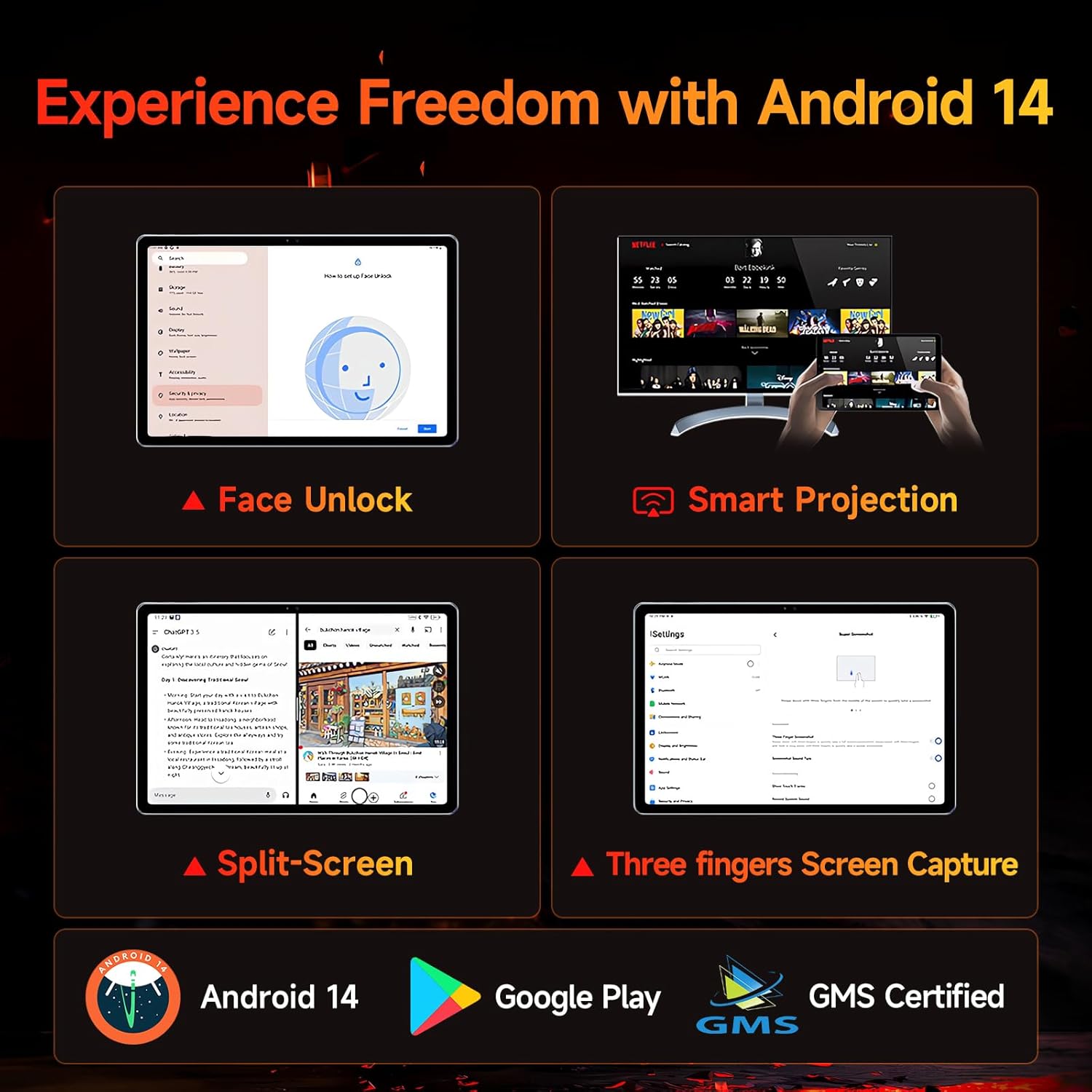
Figure 5.1: Android 14 User Interface and Features
5.2 Kinerja
The Bpad 10 is equipped with a 6nm Snapdragon 685 processor (2.8GHz) and Adreno 610 GPU, ensuring efficient performance for various tasks. A 6-Axis Gyro Sensor enhances gaming and video recording stability.

Figure 5.2: Snapdragon 685 Processor Details
5.3 Tampilan sareng Audio
Experience clear visuals and immersive sound with the Bpad 10:
- tampilan: 10.1-inch FHD IPS screen with 1920x1200 resolution and a 60Hz refresh rate. It features 400 Nits brightness and Incell technology for improved touch accuracy.
- Widevine L1: Supports HD streaming on platforms like Netflix and Prime Video.
- Audio: Dual stereo speakers provide a cinematic audio experience.

Figure 5.3: Display and Widevine L1 Capabilities
5.4 Kaméra
The tablet is equipped with 5MP front and 5MP rear cameras, suitable for capturing photos, 4K videos, and conducting HD video calls.
5.5 Konéktipitas
Stay connected with the following features:
- Wifi: Supports 2.4G/5G dual-band Wi-Fi for stable internet access.
- Bluetooth 5.0: Pikeun nyambungkeun asesoris nirkabel.
- GPS: Pikeun layanan navigasi sareng lokasi.
- Aula sénsor: Enables smart on/off functionality with compatible covers.
5.6 Storage and Battery
The Bpad 10 offers ample storage and long-lasting power:
- RAM: 12GB (4GB physical + 8GB virtual) for smooth multitasking.
- ROM: 128GB UFS storage, expandable up to 1TB via MicroSD card.
- Batré: 6500mAh battery supporting 18W PD fast charging for extended use.

Figure 5.4: Storage and Battery Specifications
6. Pangropéa
To ensure the longevity and optimal performance of your BNCF Bpad 10 tablet, follow these maintenance guidelines:
- beberesih: Anggo lawon anu lemes sareng henteu lint pikeun ngabersihan layar sareng awak. Hindarkeun bahan abrasive atanapi bahan kimia kasar.
- Suhu: Operasikeun tablet dina kisaran suhu anu disarankeun. Hindarkeun panas atanapi tiis anu ekstrim.
- Paparan cai: Keep the tablet away from water and high humidity. It is not waterproof.
- Panyimpenan: Store the tablet in a dry, cool place when not in use.
- Apdet parangkat lunak: Pariksa sareng pasang apdet sistem sacara rutin pikeun mastikeun paningkatan kaamanan sareng kinerja.
7. Cara ngungkulan
If you encounter issues with your BNCF Bpad 10, refer to the following common troubleshooting steps:
| Masalah | Solusi anu mungkin |
|---|---|
| Tablet teu hurung | Pastikeun batréna tos dicas. Sambungkeun carjer teras antosan sababaraha menit sateuacan nyobian ngahurungkeun deui. Upami teu aya réspon, laksanakeun restart paksa ku cara mencét tombol daya salami 10-15 detik. |
| kinerja lalaunan | Close unnecessary background applications. Clear cache for frequently used apps. Restart the tablet. Ensure sufficient storage space is available. |
| Masalah konektipitas Wi-Fi | Balikan deui router Wi-Fi anjeun. Pohokeun jaringan dina tablet anjeun teras sambungkeun deui. Pastikeun tablet aya dina jangkauan sinyal Wi-Fi. |
| Layar teu ngaréspon | Restart the tablet. Ensure the screen is clean and free from moisture or debris. |
| Batré gancang boros | Reduce screen brightness. Close background apps. Disable unused features like Bluetooth or GPS. Check for apps consuming excessive power in battery settings. |
8. Spésifikasi
Key technical specifications for the BNCF Bpad 10 tablet:
| Fitur | Spésifikasi |
|---|---|
| Ukuran layar | 10.1 inci |
| Resolusi layar | 1920 x 1200 piksel (FHD) |
| Sistem operasi | Android 14 |
| Prosesor | Qualcomm Snapdragon 685 (2.8GHz) |
| Ram | 12GB (4GB + 8GB Virtual) |
| Ukuran Mémori Flash | 128 GB UFS (Expandable to 1TB) |
| Kaméra | 5MP Hareup, 5MP Rear |
| Kapasitas batré | 6500 mah |
| Ngecas | Ngecas Gancang PD 18W |
| Tipe Wireless | 802.11b/g (2.4G/5G WiFi), Bluetooth 5.0 |
| Item Beurat | 1.07 pon (kira-kira 485g) |
| Dimensi produk | 7.9 x 4.9 x 0.3 inci (kira-kira 20.1 x 12.4 x 0.76 cm) |
| Warna | kulawu |
9. Garansi jeung Rojongan
BNCF is committed to providing quality products and customer satisfaction.
9.1 Kawijakan Jaminan
BNCF offers a one-year warranty for its products. For tablets purchased from the BNCF Official Flagship Store, customers benefit from a 12-month free repair warranty and lifetime technical support.
9.2 Rojongan Palanggan
If you encounter any issues or have inquiries regarding your BNCF Bpad 10 tablet, please contact BNCF customer service. You can expect a response within 24 hours. They can assist with troubleshooting, returns, or exchange services.
- Kontak: Please refer to the contact information provided on the BNCF official websitus atanapi platform pameseran Anjeun.
- FAQs:
- Are you specialized in tablets? Yes, BNCF is dedicated to designing and manufacturing innovative tablets, prioritizing quality, performance, and user experience.
- What is the RMA policy for this tablet? We offer a one-year warranty. You can expect a response from us within 24 hours for any issues or inquiries.
- If my products have issues, what should I do? Please leave us a message, and we will use our expertise to solve the problem for you, or provide a return or exchange service.


