1. Bubuka
Thank you for choosing the Baseus 45W USB C Charger Block. This device is designed to provide efficient and fast charging for a wide range of compatible electronic devices. Please read this manual carefully to ensure proper usage and to maximize the product's lifespan.

Image 1.1: Two Baseus 45W USB C Charger Blocks and two USB-C to USB-C cables included in the package.
2. Fitur Produk
- Ngecas Gancang 45W: Equipped with PPS/PD 3.0 technology, this charger delivers rapid power, capable of charging compatible devices like the iPhone 16 series and Galaxy S24 quickly. For Super Fast Charge 2.0, a 5A charging cable is required.
- Desain kompak & portabel: The charger block is significantly smaller than standard chargers, making it ideal for travel and saving space on power strips.
- Quad Thermal Management: Advanced cooling features including graphene application, scientific thermal layout, polymer silicon-based design, and 720K/h charging status monitoring ensure optimal heat dissipation and device protection.
- Powered by GaN6 Technology: Utilizes GaN6 chip technology for a 92% energy conversion rate, resulting in higher efficiency, lower operating temperatures, and a smaller physical size.
- Kasaluyuan lega: Supports multiple fast charging protocols including PD3.0, PPS, QC3.0, FCP, SCP, and AFC, ensuring compatibility with a broad range of devices.

Image 2.1: Illustration of the 45W Super Fast Charging capability, showing a Samsung S24 Ultra reaching 61% charge in 30 minutes.

Image 2.2: Visual comparison demonstrating the compact size of the Baseus 45W charger, which is 46.66% smaller than typical chargers.

Gambar 2.3: Detil view of the Quad Thermal Management system, including graphene cooling and scientific thermal layout.

Image 2.4: Illustration of the GaN6 technology, showing a 92% energy conversion rate for enhanced efficiency.
3. Setélan
- Ngabongkar: Carefully remove the charger block and USB-C cable(s) from the packaging.
- mariksa: Check the charger and cable for any visible damage. Do not use if damaged.
- Nyambung ka Daya: Plug the Baseus 45W USB C Charger Block into a standard wall outlet. Ensure the outlet is easily accessible.
4. Parentah Operasi
- Sambungkeun kabel: Insert one end of the USB-C cable into the USB-C port on the charger block.
- Sambungkeun Alat: Insert the other end of the USB-C cable into the charging port of your compatible electronic device.
- Mimitian Ngecas: The device should automatically begin charging. Monitor your device's screen for charging indicators.
- Pegatkeun sambungan: Once charging is complete, safely disconnect the cable from your device, then from the charger block, and finally unplug the charger from the wall outlet.

Gambar 4.1: Example of the charger in use for office charging, powering a smartphone and a laptop.

Gambar 4.2: Example of the charger in use for home charging, providing power for leisure activities.
5. Kasaluyuan
The Baseus 45W USB C Charger Block is compatible with a wide range of devices supporting USB-C charging and various fast charging protocols. Compatible devices include, but are not limited to:
- Smartphone: iPhone 12-16 Series (including Pro, Pro Max models), Galaxy S20-S24 Series, OnePlus 8 Pro, Google Pixel 6-8, Sony Xperia 5, Android phones.
- Tablet: iPad (various models).
- Laptop: MacBook Pro 2023, Lenovo ThinkPad T14, Dell XPS 13.
- Wearables & Accessories: Apple Watch, AirPods 2-3.

Image 5.1: Visual representation of the universal compatibility of the Baseus USB-C charger with various devices.
6. Émbaran Kasalametan
Your safety is a priority. The Baseus 45W USB C Charger Block incorporates multiple protection features to ensure safe and reliable charging:
- Protection Circuit pondok
- Protection surge kilat
- Protection éléktrostatik
- Protection Leuwih-Ayeuna
- Overload Protection
- Langkung-Voltage panyalindungan
- Low Leakage Current Protection
- Flame-Retardant Shell
- Voltage Stabilization Protection
- Low EMI Protection
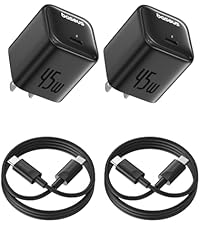
Image 6.1: Visual summary of the 10-point safety protection features integrated into the charger.
7. Spésifikasi
| Fitur | Spésifikasi |
|---|---|
| Nomer modél | CCGAN45SECS |
| merek | Baseus |
| Wattage | 45 Watt |
| Total palabuhan USB | 1 (USB Tipe C) |
| Masukan Voltage | 240 volt |
| Ampumur | 2.24 Amps |
| Fitur husus | Fast Charging, GaN6 Technology, Quad Thermal Management |
| Téhnologi konektipitas | USB |
| Item Beurat | 8.8 ons |
| Ukuran Paket | 7.05 x 4.37 x 1.54 inci |
| Komponén Kaasup | Kabel USB-C |
8. Cara ngungkulan
- Alat teu ngecas:
- Pastikeun carjer tos aman dicolokkeun kana stop kontak tembok anu tiasa dianggo.
- Verify the USB-C cable is firmly connected to both the charger and your device.
- Cobi nganggo kabel USB-C anu béda pikeun nyingkahan masalah kabelna.
- Uji carjer nganggo alat anu cocog sareng anu sanés pikeun mastikeun fungsi carjer.
- Ngecas lalaunan:
- Ensure your device supports 45W fast charging and the PPS/PD 3.0 protocol.
- For Super Fast Charge 2.0, use a 5A rated USB-C to USB-C cable.
- Tutup aplikasi anu teu perlu dina alat anjeun pikeun ngirangan konsumsi daya nalika ngecas.
- Avoid using your device intensively while charging for optimal speed.
- Charger karasa haneut:
- Biasana carjer jadi panas nalika dioperasikeun, khususna nalika ngecas gancang.
- Upami carjer janten panas teuing upami dirampa, langsung pegatkeun sambunganna teras hubungi dukungan palanggan.
9. Pangropéa
- beberesih: Pegatkeun sambungan carjer ti stop kontak samemeh beberesih. Paké kaen lemes, garing pikeun ngusap beungeut cai. Ulah make cleaners cair atawa aerosol.
- Panyimpenan: Simpen carjer dina tempat anu tiis sareng garing jauh tina sinar panonpoé langsung sareng suhu anu ekstrim.
- Penanganan: Hindarkeun ngaragragkeun carjer atanapi kéngingkeun dampak anu kuat. Ulah nyobian ngabongkar atawa ngaropéa carjer.
10. Garansi jeung Rojongan
Baseus products are manufactured with high-quality standards. For warranty information, technical support, or any product-related inquiries, please refer to the warranty card included with your purchase or visit the official Baseus website. You may also contact Baseus customer service directly for assistance.


