1. Bubuka
Thank you for choosing the Shokz Opencomm2 2025 Wireless Earphones. These open-ear bone conduction headphones are designed for clear communication and comfortable listening, particularly in professional and active environments. This manual provides essential information for the proper use, setup, and maintenance of your device.

Image: The Shokz Opencomm2 2025 Wireless Earphones, showcasing their flexible, open-ear design and integrated microphone boom.
2. Produk Langkungview
2.1 Naon dina Box
- Shokz Opencomm2 2025 Wireless Earphones
- Kabel Ngecas USB-C
- Mawa Kasus
- Pitunjuk pangguna (dokumén ieu)
- Legal Statement & Warranty Card

Image: Contents of the Shokz Opencomm2 2025 package, including the earphones, charging cable, carrying case, and documentation.
2.2 Komponen Earphone
Familiarize yourself with the key components of your Opencomm2 earphones:
- Transduser konduksi tulang: These rest on your cheekbones, delivering audio without blocking your ear canals.
- Mikropon Boom: Adjustable boom for clear voice pickup.
- Tombol multi-fungsi: For power, pairing, play/pause, and call management.
- Tombol Volume: For adjusting volume and track control.
- Port ngecas USB-C: Pikeun ngecas alat.

Gambar: A close-up view of the Shokz Opencomm2 earphone's right side, highlighting the multi-function button, volume controls, and the USB-C charging port.
3. Setélan
3.1 Ngecas Earphone
- Connect the USB-C charging cable to the charging port on the earphones.
- Sambungkeun tungtung kabel anu sanés ka adaptor kakuatan USB (teu kalebet) atanapi port USB komputer.
- Indikator LED bakal némbongkeun status ngecas. Ngecas pinuh peryogi waktos sakitar 1.5 jam.
3.2 Nyapasangkeun sareng Alat
- Pastikeun earphone-na pareum.
- Press and hold the multi-function button for 5-7 seconds until the LED indicator flashes red and blue alternately, indicating pairing mode.
- On your device (e.g., smartphone, computer), enable Bluetooth and search for available devices.
- Select "Opencomm2" from the list of found devices.
- Once connected, the LED indicator will flash blue once every few seconds, and you will hear a voice prompt "Connected".
4. Parentah Operasi
4.1 Maké Earphone
Place the flexible band behind your head, with the bone conduction transducers resting comfortably on your cheekbones, just in front of your ears. Adjust the microphone boom so it is positioned near your mouth for optimal voice clarity.
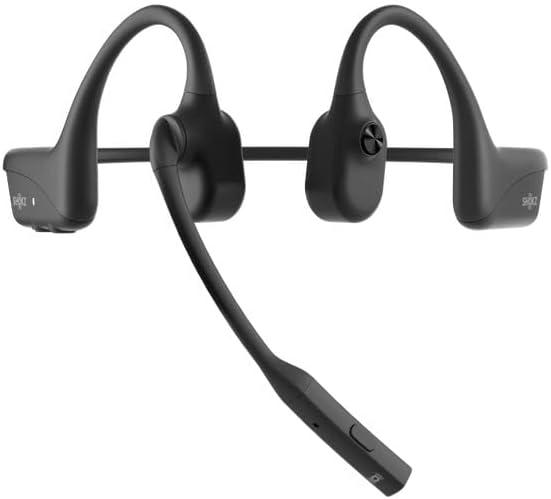
Image: The Shokz Opencomm2 2025 earphones positioned on a head, demonstrating the correct placement of the bone conduction transducers and microphone boom.
4.2 Kadali Dasar
- Hurungkeun/Pareuman: Pencet jeung tahan tombol multi-fungsi salami 2 detik.
- Puter / Reureuh: Pencét tombol multi-fungsi sakali.
- Volume Kaluhur/Turun: Press the respective volume buttons.
- Lagu salajengna: Pencét terus tahan tombol Volume + salami 2 detik.
- Lagu Sateuacanna: Pencét terus tahan tombol Volume - salami 2 detik.
- Ngajawab / mungkas Telepon: Pencét tombol multi-fungsi sakali.
- Nolak Telepon: Pencet jeung tahan tombol multi-fungsi salami 2 detik.
- Mikropon bisu: During a call, press the multi-function button twice.
5. Pangropéa
5.1 beberesih
Lap earphone ku kaén nu lemes,amp cloth. Do not use harsh chemicals or abrasive cleaners. Ensure the charging port is dry before charging.
5.2 Panyimpenan
Store the earphones in their carrying case when not in use to protect them from dust and damage. Avoid storing in extreme temperatures.
5.3 Tahan cai
The Opencomm2 earphones are water resistant, meaning they can withstand sweat and light splashes. They are not designed for submersion in water. Do not charge if wet.
6. Cara ngungkulan
- Henteu aya kakuatan: Ensure the earphones are fully charged. Connect to a power source and check the LED indicator.
- Teu Bisa Dipasangkeun: Ensure the earphones are in pairing mode (red and blue flashing LED). Turn off and on your device's Bluetooth, then try pairing again. Move closer to your device.
- Henteu aya sora: Check the volume levels on both the earphones and your connected device. Ensure the earphones are properly connected via Bluetooth.
- Kualitas Telepon goréng: Ensure the microphone boom is positioned correctly near your mouth. Check for environmental noise interference.
- Sambungan Intermittent: Move closer to your connected device. Avoid obstacles between the earphones and the device.
7. Spésifikasi
| Fitur | Spésifikasi |
|---|---|
| Ngaran modél | Opencomm2 |
| Konektipitas | Nirkabel (Bluetooth 5.0) |
| Rentang Bluetooth | Nepi ka 10 méter (33 suku) |
| Tipe Supir Audio | Supir Konduksi Tulang |
| Réspon Frékuénsi | 20 Hz - 20 kHz (Resonant Mode) |
| Sensitipitas | 96 dB |
| Impedansi | 32 ohm |
| Waktu Ngecas | Kurang leuwih 1.5 jam |
| Item Beurat | 35 Gram (1.23 ons) |
| Tingkat Résistansi Cai | Tahan cai |
| Mikropon | Mikropon Boom |
| Port ngecas | USB-C |
8. Garansi jeung Rojongan
Your Shokz Opencomm2 2025 Wireless Earphones come with a limited warranty. Please refer to the included Warranty Card for detailed terms and conditions. For technical support, product registration, or further assistance, please visit the official SHOKZ websitus atanapi ngahubungan departemén layanan palanggan maranéhna.
Dukungan Online: Visit the SHOKZ Store on Amazon