1. Bubuka
Thank you for choosing the Shokz OpenDots ONE Ear Cuff Wireless Earphones. These open-ear earphones are designed to provide a comfortable listening experience while keeping you aware of your surroundings. This manual provides detailed instructions for setup, operation, maintenance, and troubleshooting to ensure optimal performance.

Image 1.1: Shokz OpenDots ONE earphones and charging case.
The Shokz OpenDots ONE features:
- Open-ear ear-cuff design for pressure-free comfort and situational awareness.
- Dolby Audio support for immersive, high-quality sound with 16mm equivalent dual-driver system and Bassphere technology.
- Up to 40 hours of total battery life with the charging case, including quick charge functionality.
- Bluetooth 5.4 for stable multipoint connection.
- IP54 water resistance for protection against sweat and light splashes.
- Dedicated app for sound customization, touch control settings, and finding lost earphones.
- AI noise-canceling microphone for clear calls.
- DirectPitch technology to minimize sound leakage and enhance privacy.

Gambar 1.2: Leuwihview of key features including lightweight design, Dolby Audio, 40-hour battery, IP54 rating, and wireless charging.
2. Setélan
2.1. Ngecas Earphone jeung Case
Saméméh dipaké munggaran, eusian pinuh ku earphone jeung wadah ngecas.
- USB-C ngecas: Connect the provided USB-C cable to the charging case and a power source. The indicator light on the case will show charging status. A full charge takes approximately 60 minutes.
- Ngecas nirkabel: Place the charging case on a compatible wireless charging pad. The indicator light will confirm charging.
- Ngecas gancang: Muatan gancang 10 menit nyayogikeun kirang langkung 2 jam playback.

Image 2.1: The charging case connected via USB-C, illustrating the 40-hour total playback and quick charge feature.

Image 2.2: The charging case placed on a wireless charging pad, demonstrating wireless charging capability.
2.2. Nyapasangkeun sareng Alat Anjeun
- Open the charging case. The earphones will automatically enter pairing mode, indicated by a flashing LED light.
- Dina alat anjeun (smartphone, tablet, komputer), buka setélan Bluetooth.
- Select "Shokz OpenDots ONE" from the list of available devices.
- Once connected, the LED indicator on the earphones will stop flashing.
2.3. Ngagem Earphone
The OpenDots ONE features an ear-cuff design that rests gently on your ear without blocking the ear canal. They are designed to be worn without distinguishing between left and right, as the earphones automatically detect orientation.
- Gently place the earphone over your ear, ensuring the speaker rests comfortably near your ear canal.
- The flexible JointArc structure adapts to various ear shapes for a secure and comfortable fit.
- The design is compatible with glasses and masks, preventing interference.
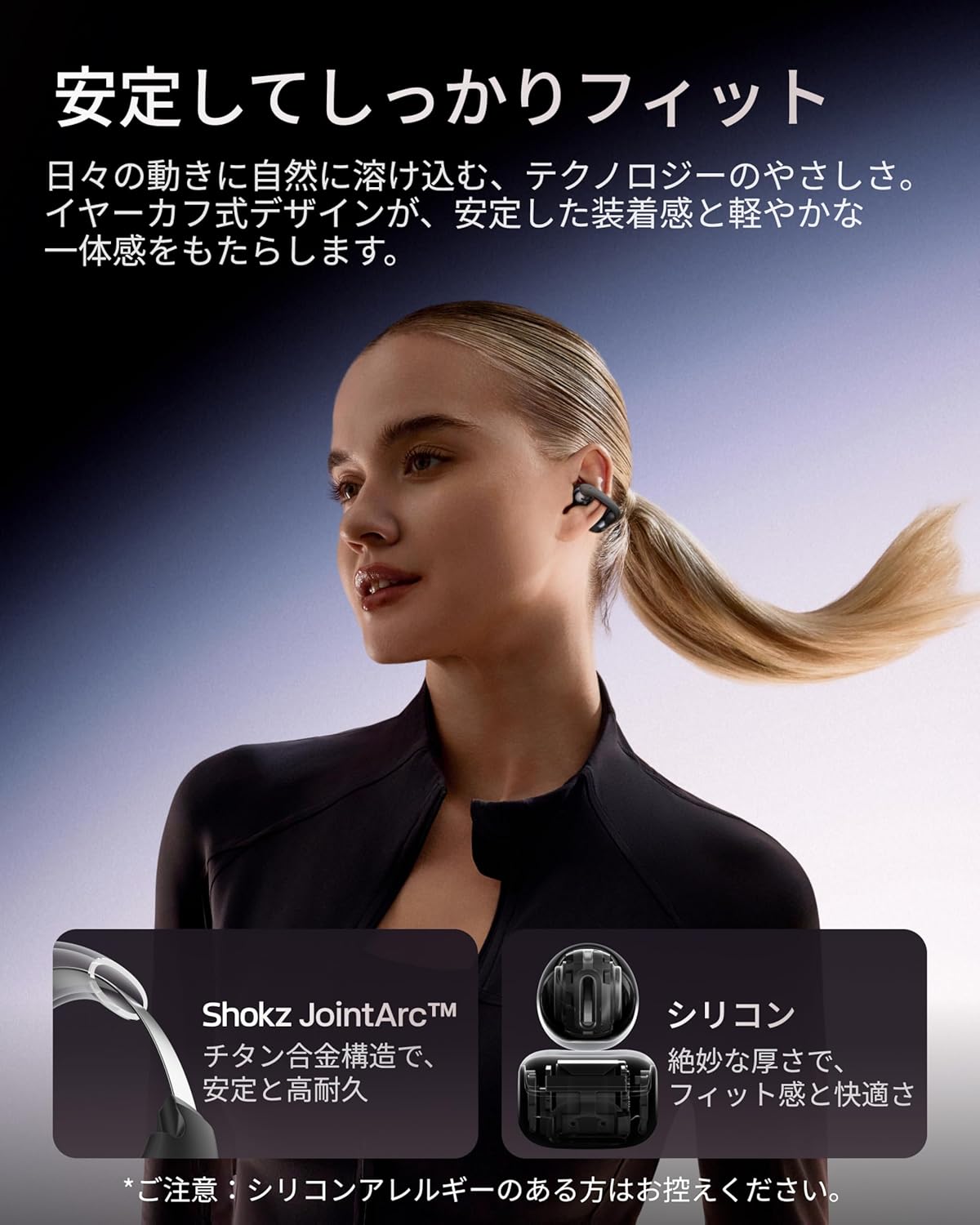
Image 2.3: A woman wearing the Shokz OpenDots ONE earphones, demonstrating the secure and comfortable ear-cuff fit.

Image 2.4: Visual guide for correct earphone placement and common incorrect wearing methods.
3. Ngoperasikeun Earphone
3.1. Kontrol Toél Dasar
The OpenDots ONE features intuitive touch controls on each earphone. You can customize these controls via the Shokz app.
- Puter / Reureuh: Double-tap the battery compartment or JointArc area.
- Volume Kaluhur/Turun: Touch and hold the top or bottom of the battery compartment.
- Lagu salajengna: Triple-tap (customizable).
- Lagu Sateuacanna: Quadruple-tap (customizable).
- Ngajawab / mungkas Telepon: Ketok dua kali.
- Nolak Telepon: Toel jeung tahan.
- Aktipkeun Asisten Sora: Triple-tap (customizable).
3.2. Shokz App Features
Download the dedicated Shokz app for enhanced control and customization.
- Kustomisasi sora: Choose from 4 preset EQ modes (Standard, Vocal, Bass Boost, Private) and 2 custom modes to adjust the sound profile.
- Touch Control Settings: Customize touch gestures to your preference.
- Find My Earphones: Locate misplaced earphones.
- Pembaruan firmware: Keep your earphones updated with the latest features and improvements.
- Prompt Volume Adjustment: Control the volume of system prompts.
- Mode Pribadi: Enhance sound leakage prevention for increased privacy.

Image 3.1: The Shokz app interface, showing options for EQ settings and other customizations.
3.3. Sambungan Multipoint
The OpenDots ONE supports multipoint connection, allowing you to connect to two Bluetooth devices simultaneously. This enables seamless switching between devices, for example, from a laptop for music to a phone for a call.
- Ensure both devices are paired with your OpenDots ONE.
- The earphones will automatically switch audio source based on activity (e.g., incoming call).
4. Pangropéa
4.1. beberesih
- Lap earphone sareng wadah ngecas nganggo lawon anu lemes, garing, sareng henteu buluan.
- Ulah make cleaners abrasive, pangleyur, atawa sprays aerosol.
- Ulah meunang Uap kana sagala bukaan.
4.2. Panyimpenan
- Simpen earphone dina wadah ngecas nalika henteu dianggo pikeun ngajagi sareng tetep dicas.
- Hindarkeun nyimpen dina suhu ekstrim atanapi kalembaban anu luhur.
4.3. Tahan cai (IP54)
The OpenDots ONE earphones are rated IP54, meaning they are resistant to dust and splashing water from any direction. This makes them suitable for exercise and outdoor activities in light rain. However, they are not designed for submersion in water or exposure to pressurized water jets.
- Ulah ngahaja ngalelepkeun earphone kana cai.
- If the earphones get wet, wipe them dry before placing them back in the charging case.
5. Cara ngungkulan
5.1. Taya Sora atawa Intermittent Audio
- Pastikeun yén earphone dicas.
- Check that the earphones are properly paired and connected to your device.
- Verify the volume levels on both the earphones and your connected device.
- Caketkeun alat anjeun pikeun mastikeun sambungan Bluetooth anu stabil.
- Coba pegatkeun sambungan teras sambungkeun deui sambungan Bluetooth.
5.2. Masalah Pasangan
- Ensure the earphones are in pairing mode (flashing LED).
- Pareuman Bluetooth dina alat anu caket dieu pikeun ngahindarkeun gangguan.
- Poho alat tina setelan Bluetooth telepon anjeun teras cobian pasangkeun deui.
- Perform a factory reset (refer to the Shokz app or official support for instructions).
5.3. Masalah Ngecas
- Pastikeun yén kabel USB-C disambungkeun sacara aman ka casing sareng sumber listrik.
- Upami nganggo ngecas nirkabel, pastikeun wadahna dipasang kalayan leres dina bantalan ngecas.
- Coba kabel ngecas atawa adaptor kakuatan béda.
- Bersihkeun kontak ngecas dina earphone sareng jero wadahna nganggo swab katun garing.
5.4. Sound Leakage
While DirectPitch technology significantly reduces sound leakage, some leakage may occur at very high volumes or in very quiet environments. To minimize this:
- Turunkeun polumeu.
- Activate "Private Mode" in the Shokz app.
6. Spésifikasi
| Fitur | Rincian |
|---|---|
| Ngaran modél | OpenDots ONE |
| Rujukan Produsén | SHOKZ E310 |
| Téhnologi konektipitas | Nirkabel |
| Téknologi Komunikasi Nirkabel | Bluetooth 5.4 |
| Réspon Frékuénsi | 2400 MHz |
| Sensitipitas | 97.5 dB |
| Panempatan Ceuli | Buka-Ceuli |
| Faktor Bentuk Headphone | Buka-Ceuli |
| Warna | Hideung |
| Tingkat Résistansi Cai | IP54 (Tahan Cai) |
| Daya Tahan Batré (Earphone) | Nepi ka 10 Jam |
| Total Kahirupan Batré (kalayan Case) | Nepi ka 40 Jam |
| Waktu Ngecas | Kira-kira. 60 menit |
| Charging Style | USB-C, Ngecas Nirkabel |
| Tipe Kontrol | Call Control, Volume Control, Media Control |
| Métode kontrol | Aplikasi, Toél |
| Beurat produk | 65 gram |
| Bahan | Titanium Alloy, Silicone, PC |
| Dianjurkeun Mangpaat | Exercise, Entertainment, Sports, Training, Running, Work, Meetings, Daily Use, Commuting |
| Alat nu cocog | Alat anu diaktipkeun Bluetooth |
| Komponén Kaasup | OpenDots ONE Earphones ×1, OpenDots ONE Charging Case ×1, USB-C Charging Cable ×1 |
7. Garansi jeung Rojongan
7.1. Émbaran jaminan
For specific warranty details, please refer to the warranty card included with your product or visit the official Shokz website. Typically, Shokz products come with a limited warranty covering manufacturing defects.
7.2. Rojongan Palanggan
If you encounter any issues not covered in this manual or require further assistance, please contact Shokz customer support through their official website or the dedicated Shokz app. You can also visit the Shokz Official Store on Amazon pikeun sumber tambahan.


