1. Produk Langkungview
The Jectse Digital Binoculars with Camera combine the functionality of binoculars with a digital camera, allowing users to observe distant objects and capture high-resolution photos and videos. This device features an 8X digital zoom, a 2.4-inch color display, and supports up to 48MP images and 1080P videos.

Gambar 1.1: Hareupeun view of the Jectse Digital Binoculars with Camera, showcasing its compact design and integrated screen.
2. Eusi Paket
Punten parios yén sadaya barang aya dina pakét:
- 1 x Jectse Digital Binoculars Camera
- 1 x USB Cable (Type C)
- 1 x Manual Instruksi
3. Setélan
3.1. Pamasangan batré
- Panggihan kompartemen batré dina alat.
- Buka panutup kompartemen batré.
- Insert four (4) AA batteries (not included), ensuring correct polarity (+/-).
- Tutup panutup kompartemen batré aman.
3.2. Pamasangan Kartu Mémori
A memory card is required to save photos and videos.
- Locate the memory card slot, typically near the USB-C port.
- Insert a small memory card or mini storage card (up to 32GB, not included) into the slot until it clicks into place.
- Pikeun nyabut, dorong kartu ka jero dugi ka kaluar.

Gambar 3.1: Tukangeun view of the binoculars, highlighting the Type-C interface and the 1/4 inch screw interface for tripod mounting.
3.3. Attaching to a Tripod (Optional)
The binoculars feature a 1/4 inch screw interface for stable positioning on desktop stands, tripods, and other filming equipment.
- Locate the 1/4 inch screw interface on the bottom of the device.
- Align the binoculars with the tripod's mounting screw.
- Rotate the binoculars clockwise until securely fastened to the tripod.

Image 3.2: The digital binoculars mounted on a tripod, demonstrating its compatibility with universal mounts for stable observation and shooting.
4. Parentah Operasi
4.1. Daya Hurung / Pareum
- To power on: Press and hold the power button (usually marked with a power symbol) until the screen illuminates.
- To power off: Press and hold the power button again until the screen turns off.
4.2. Viewing and Zoom
- Look through the eyepiece or view the image on the 2.4-inch color display screen.
- Use the zoom buttons (often marked with '+' and '-') to adjust the 8X digital zoom level for detailed observations.

Image 4.1: A child using the Jectse Digital Binoculars with Camera for outdoor activities like bird watching, demonstrating its user-friendly design.
4.3. Nyokot Poto
- Ensure a memory card is inserted.
- Navigate to photo mode using the mode button (if available).
- Bingkai subjek anjeun dina layar.
- Press the shutter button (usually a dedicated button or the 'OK' button) to capture a 48MP image.
4.4. Ngarékam Pidéo
- Ensure a memory card is inserted.
- Navigate to video mode using the mode button.
- Press the record button (often marked with a red dot or video camera icon) to start recording 1080P video.
- Pencét deui tombol rékaman pikeun ngeureunkeun ngarékam.
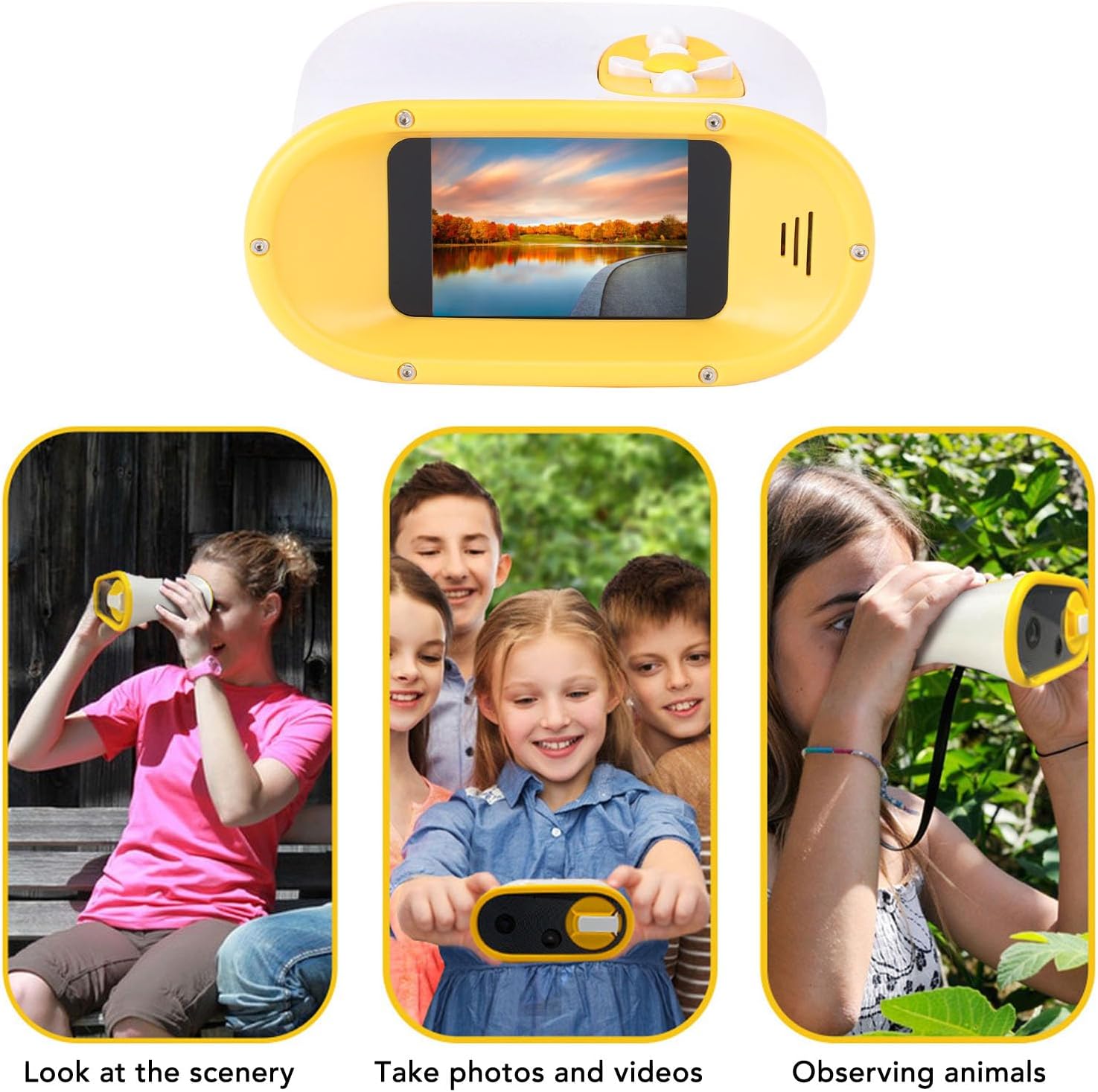
Image 4.2: Illustrates the versatile applications of the binoculars, including observing scenery, capturing photos and videos, and watching animals.
4.5. Date and Time Stamping
The device allows for adding date and time stamps to photos and videos.
- Access the settings menu (refer to the on-screen interface for navigation).
- Locate the 'Date/Time' or 'Stamp' option.
- Enable or disable the date and time stamp feature as desired.

Gambar 4.3: Luhur view of the binoculars, displaying the intuitive control buttons for easy operation.
5. Pangropéa
5.1. beberesih
- Use a soft, dry cloth to clean the exterior of the binoculars.
- Pikeun lénsa sareng layar, paké lawon beberesih lensa khusus sareng solusi pikeun nyegah goresan.
- Ulah make cleaners abrasive atawa pangleyur.
5.2. Panyimpenan
- Simpen alat dina tempat anu tiis sareng garing jauh tina sinar panonpoé langsung sareng suhu anu ekstrim.
- Cabut batré upami alat moal dianggo kanggo waktos anu panjang pikeun nyegah bocor.
6. Cara ngungkulan
6.1. Alat Teu Dihurungkeun
- Solusi: Check if the AA batteries are correctly inserted and have sufficient charge. Replace with new batteries if necessary.
6.2. Cannot Take Photos or Record Videos
- Solusi: Ensure a compatible memory card (up to 32GB) is inserted and has available storage space. Format the memory card if it's new or causing issues (this will erase all data).
6.3. Poor Image/Video Quality
- Solusi: Ensure the lens is clean. Adjust the focus if available. Ensure adequate lighting conditions.
7. Spésifikasi
| Barang | Spésifikasi |
| Nomer modél | Jectseyhd7rfvm1c-11 |
| tampilan | 2.4 Warna layar inci |
| Zum Digital | 8X |
| Resolusi Gambar Maksimum | 48 megapiksel |
| Format Gambar | JPG |
| Resolusi Pidéo Maksimum | 1080P |
| Format pidéo | AVI |
| Jenis Batré | 4x AA Battery (Not Included) |
| Dukungan Kartu Panyimpenan | Small Memory Card or Mini Storage Card, up to 32GB (Not Included) |
| Panganteur | Tipe C |
| Pilihan Pamasangan | 1/4 inch screw interface (for tripods) |
| Diménsi | 5.51 x 4.72 x 3.15 inci |
| Item Beurat | 8.8 ons |
| Produsén | Jectse |
8. Garansi jeung Rojongan
For warranty information, technical support, or service inquiries, please refer to the official Jectse websitus atanapi ngahubungan pangecér Anjeun. Simpen resi pameseran anjeun pikeun klaim jaminan.
You can visit the Jectse store for more information: Jectse Store


