1. Produk Langkungview
The SmallRig Magnetic 67mm VND Filter ND64-ND400 is an adjustable neutral density filter designed for precise exposure control in various lighting conditions. It offers 6 to 9 stops of light reduction, making it suitable for both professional videography and photography. The filter features a dual compatibility system, allowing for magnetic attachment to SmallRig phone cages with a 67mm filter ring or threaded attachment to 67mm camera lenses via an included adapter. Constructed with high-quality optical glass and multi-layer coatings, it ensures clear image quality and accurate color reproduction.

Image 1.1: SmallRig Magnetic 67mm VND Filter attached to a smartphone in a cage, demonstrating its primary use case.
2. Eusi Paket
- VND Filter ND64-ND400 × 1
- Threaded Adapter × 1
- Kain Pembersih × 1
- Carrying Box × 1
- Parentah Operasi × 1

Image 2.1: The complete package contents, including the VND filter, threaded adapter, cleaning cloth, carrying box, and operating instructions.
3. Setélan
3.1 Attaching to SmallRig Phone Cages
- Ensure your SmallRig phone cage is equipped with a 67mm filter ring (e.g., models 4993/5010).
- Align the magnetic VND filter with the 67mm filter ring on your phone cage.
- The filter will magnetically snap into place, providing a quick and secure attachment.
3.2 Attaching to 67mm Camera Lenses
- Take the included threaded adapter.
- Screw the threaded adapter onto the front of your 67mm camera lens.
- Once the adapter is securely attached, align the magnetic VND filter with the adapter.
- The filter will magnetically attach to the threaded adapter.

Image 3.1: Demonstrates the seamless magnetic attachment of the filter to a compatible phone cage.

Image 3.2: Illustrates the dual compatibility, showing magnetic attachment to a phone cage and threaded attachment to a camera lens.
4. Parentah Operasi
4.1 Adjusting the VND Filter
- Once the filter is attached, rotate the outer ring of the filter to adjust the neutral density level.
- The filter provides an adjustable range from ND64 (6 stops) to ND400 (9 stops) of light reduction.
- Observe your camera's live view or viewfinder to achieve the desired exposure and motion blur effects.
4.2 Secure Rotation and Hard Stops
The filter is designed with hard stops at both the ND64 and ND400 ends of its rotation range. This prevents accidental over-adjustment or misalignment, ensuring consistent performance. A rotation-lock mechanism further secures your chosen setting during dynamic shooting scenarios.
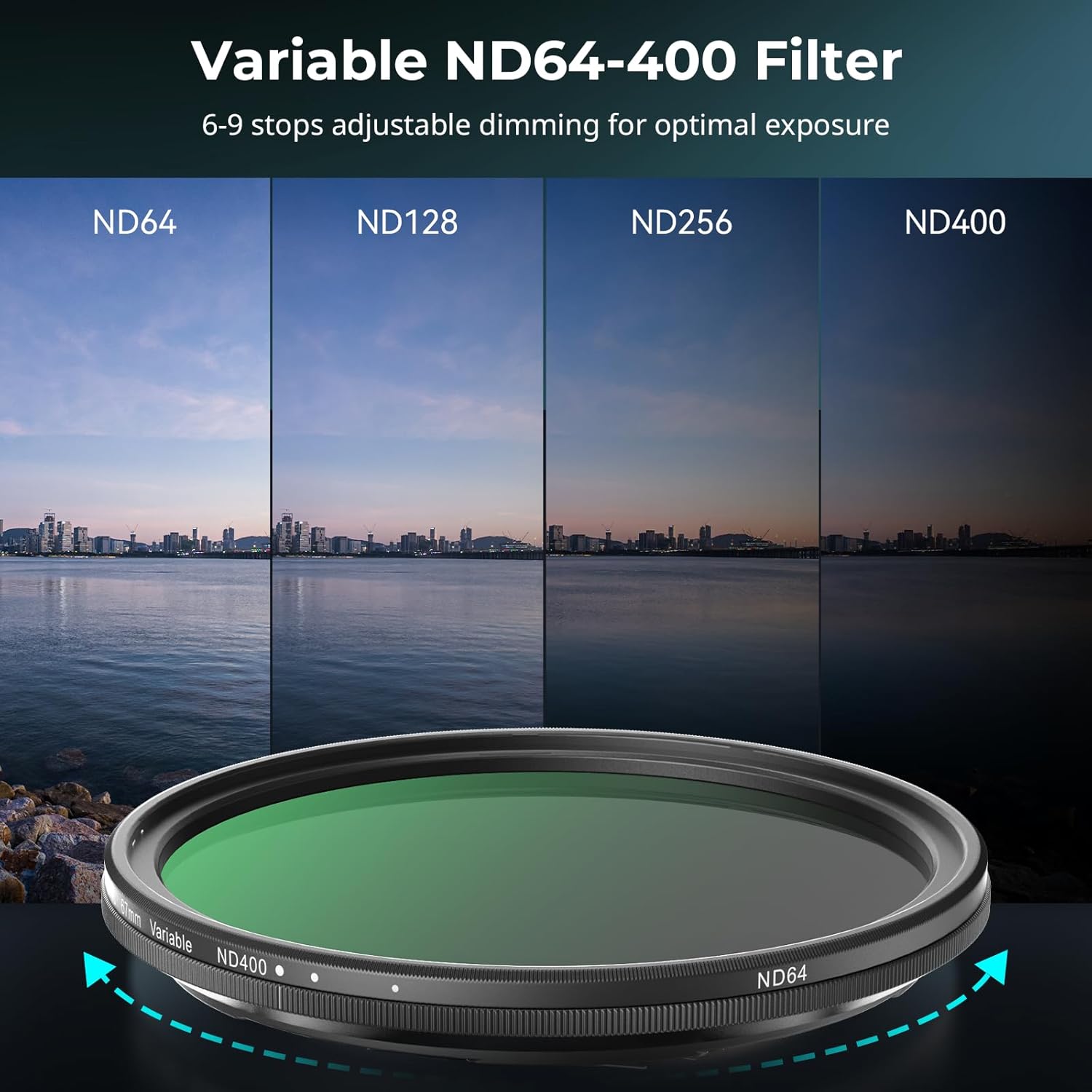
Image 4.1: Shows the effect of different ND stops (ND64, ND128, ND256, ND400) on an outdoor scene.

Image 4.2: Highlights the hard stops at the minimum (ND64) and maximum (ND400) rotation points of the filter.
4.3 Optical Performance
The filter utilizes premium optical glass with dual-sided multi-layer coatings. This construction ensures crystal-clear 4K/8K video quality, eliminates the common "X" cross shadows found in some VND filters, and minimizes color shift for true-to-life color reproduction and sharpness.
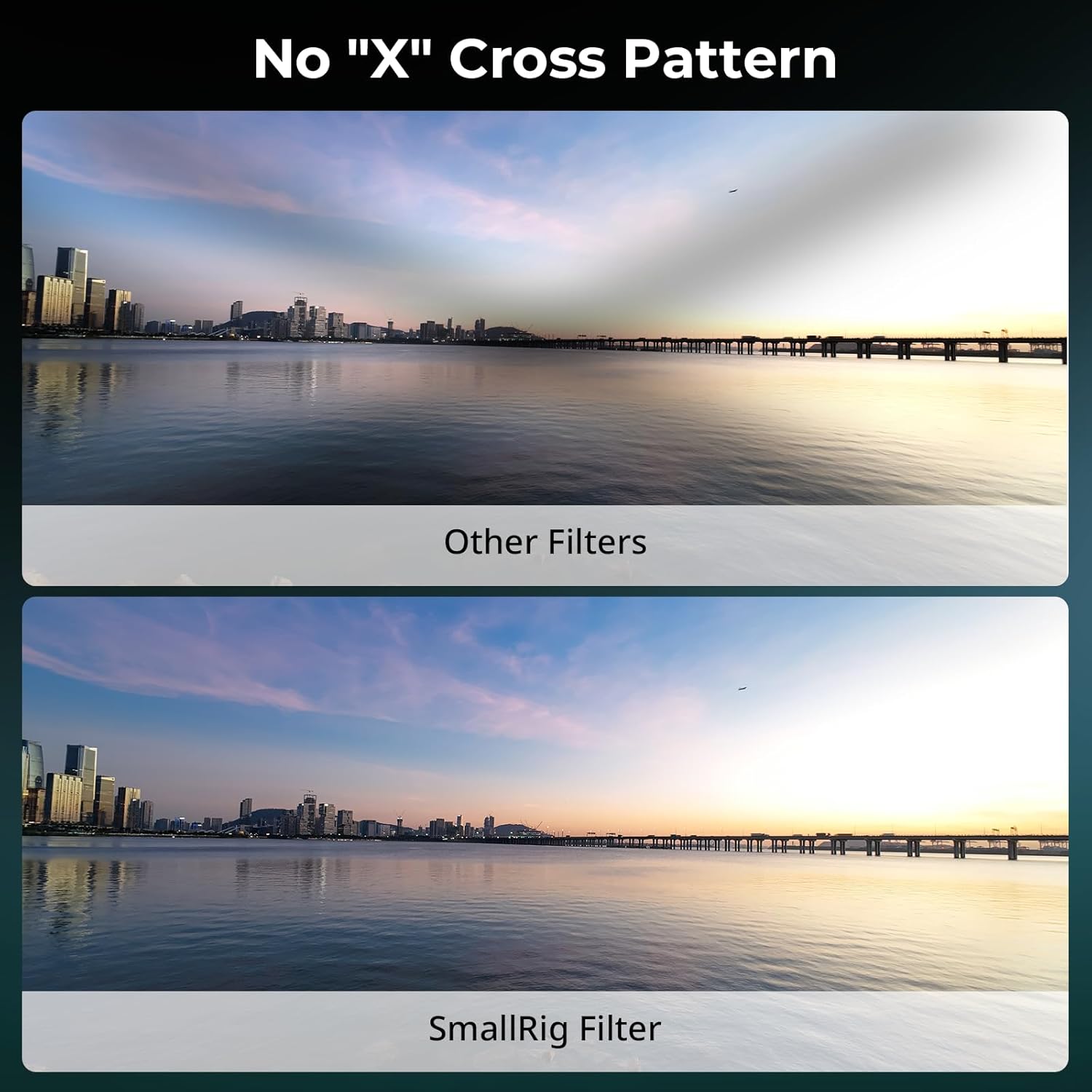
Image 4.3: Compares a scene shot with a generic filter showing an 'X' cross pattern versus the SmallRig filter without this artifact.

Image 4.4: Illustrates the ultra-clear optical glass and dual-sided multi-layer coatings for high resolution and accurate color.
5. Pangropéa
5.1 beberesih
Use the provided cleaning cloth to gently wipe the filter surface. For stubborn smudges or dust, use a lens cleaning solution specifically designed for optical glass and a clean microfiber cloth. Avoid using abrasive materials or harsh chemicals that could damage the coatings.
5.2 Panyimpenan
When not in use, store the VND filter in its included carrying box to protect it from dust, scratches, and impacts. Ensure the filter is clean and dry before storage.
6. Cara ngungkulan
6.1 Vignetting
This filter is optimized to minimize vignetting, especially for wide-angle shots. However, it cannot guarantee the complete absence of vignetting in all shooting conditions or with all camera settings. If you experience vignetting, try adjusting your focal length, aperture, or camera settings.
6.2 Filter Attachment Issues
If attaching to a camera lens, ensure the threaded adapter is correctly and securely screwed onto the lens before magnetically attaching the VND filter. The magnetic attachment is designed for quick changes but requires a stable base.
7. Spésifikasi
| Fitur | Rincian |
|---|---|
| Dimensi produk | 77.0mm (Diameter) x 9.0mm (Thickness) / 3.03"L x 3.03"W x 0.35"H |
| Item Beurat | 41.0 ± 5.0g / 1.45 ounces |
| Bahan | Aluminium, Kaca |
| Poto Filter Ukuran Thread | 67 milimeter |
| Pedaran palapis | Multi Lapisan |
| Jenis Éfék Filter Poto | Variable Neutral Density |
| Tingkat Résistansi Cai | Tahan cai |
| Produsén | Leutik |
| Nomer Modél Item | 5169 |

Image 7.1: Detailed dimensions of the SmallRig 67mm VND filter.
8. Garansi jeung Rojongan
For warranty information and customer support, please refer to the official SmallRig websitus atanapi hubungi pangecér anjeun. Simpen resi pameseran anjeun pikeun klaim garansi naon waé.


