1. Bubuka
The GMKtec NucBox K10 is a high-performance mini PC designed for a wide range of applications, from demanding computing tasks to immersive entertainment. It features an Intel Core i9-13900HK processor, DDR5 RAM, and versatile connectivity options, all within a compact form factor. This manual provides essential information for setting up, operating, maintaining, and troubleshooting your NucBox K10.

Figure 1: The GMKtec NucBox K10 Mini PC, a compact and powerful computing device.
2. Setup Guide
2.1 Eusi pakét
Sateuacan anjeun ngawitan, pastikeun sadaya item aya dina pakét:
- GMKtec K10 Mini PC Main Unit
- Adaptor kakuatan
- Kabel HDMI
- User Manual (Japanese, for reference)

Figure 2: Contents of the GMKtec NucBox K10 Mini PC package, including the main unit, power adapter, and HDMI cable.
2.2 Nyambungkeun périferal
Connect your monitor, keyboard, and mouse to the appropriate ports on the mini PC. The NucBox K10 supports multiple display outputs, including HDMI and DisplayPort, for up to four screens.

Figure 3: Detailed diagram of the GMKtec NucBox K10 Mini PC's various ports and interfaces, including USB, HDMI, DP, Type-C, RJ45, and COM ports.
2.3 Kakuatan Hurung
Connect the power adapter to the DC IN port on the mini PC and then plug it into a power outlet. Press the power button located on the front of the device to turn it on. The system will boot into Windows 11 Pro.
3. Parentah Operasi
3.1 Initial Setup and Windows 11 Pro
Your NucBox K10 comes with Windows 11 Pro pre-installed. Follow the on-screen instructions for initial setup, including language, region, and network configuration. Windows Defender is pre-installed for real-time protection.
3.2 Konektipitas jaringan
The mini PC supports both wired and wireless network connections:
- LAN kabel: Connect an Ethernet cable to the 2.5G RJ45 port for high-speed internet access.
- Wi-Fi 6: The device is equipped with Wi-Fi 6 for fast and stable wireless communication up to 2.4Gbps. Connect to your preferred Wi-Fi network through Windows settings.
- Bluetooth 5.2: Use Bluetooth 5.2 to connect wireless peripherals such as mice, keyboards, and headphones.

Figure 4: The GMKtec NucBox K10 Mini PC features advanced WiFi 6 and 2.5G LAN for high-speed and stable network connectivity.
3.3 Multi-Display Output
The NucBox K10 supports up to four displays simultaneously, with resolutions up to 4K@60Hz via HDMI 2.0 and 8K@60Hz via DisplayPort 1.4. Connect your monitors to the available HDMI, DisplayPort, and Type-C (DP/DATA) ports. Configure display settings within Windows to extend or duplicate your desktop.

Figure 5: A user operating the GMKtec NucBox K10 Mini PC with a multi-monitor setup, demonstrating its 4K/8K display output capabilities.
4. Pangropéa
4.1 Sistim cooling
The NucBox K10 is equipped with an efficient cooling fan system to maintain optimal operating temperatures. Ensure proper airflow around the device and keep ventilation openings clear of obstructions. Regular cleaning of dust from the vents can help maintain cooling performance.
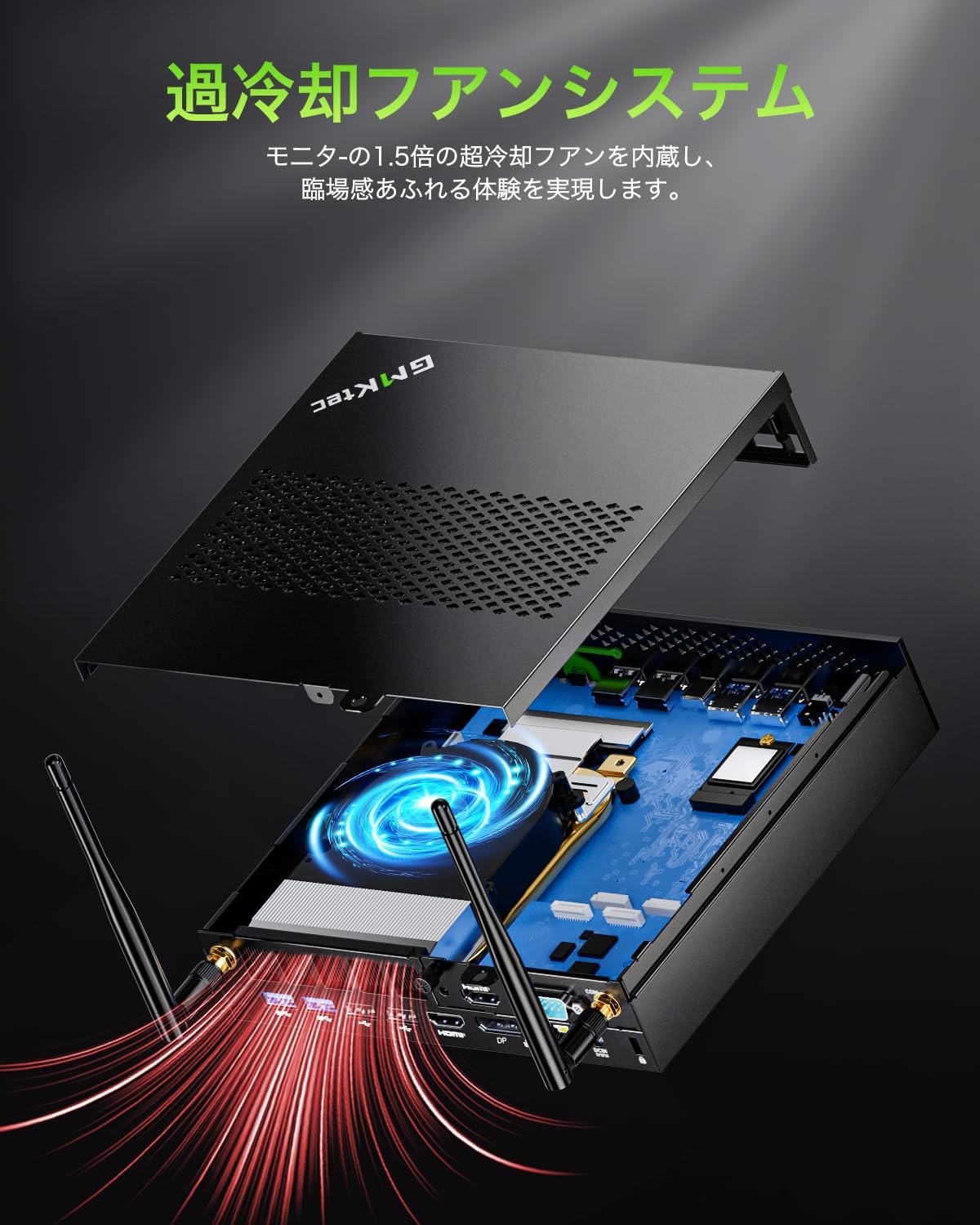
Gambar 6: Internal view of the GMKtec NucBox K10 Mini PC, highlighting its integrated cooling fan system for efficient heat dissipation.
4.2 Panyimpenan sareng Ékspansi Mémori
The NucBox K10 supports expansion of both RAM and SSD storage:
- RAM: The device comes with 32GB DDR5 RAM (2x16GB) and can be expanded up to 96GB.
- SSD: It includes a 1TB M.2 2280 PCIe 4.0 SSD. Storage can be expanded up to 12TB using additional M.2 2280 slots.
For expansion, consult a qualified technician or refer to detailed upgrade guides available online to avoid damaging the device.

Figure 7: Diagram illustrating the expandable RAM (DDR5 SO-DIMM) and SSD (NVMe M.2 2280) slots within the GMKtec NucBox K10 Mini PC.
5. Cara ngungkulan
5.1 Isu umum jeung Solusi
- Henteu aya kakuatan: Ensure the power adapter is securely connected to both the mini PC and a working power outlet. Check if the power button light is on.
- Henteu aya tampilan: Verify that the HDMI or DisplayPort cable is firmly connected to both the mini PC and the monitor. Ensure the monitor is powered on and set to the correct input source. Try a different cable or monitor if possible.
- Masalah Konektipitas Jaringan: For Wi-Fi, check if the Wi-Fi adapter is enabled in Windows settings and if you are connected to the correct network. For wired LAN, ensure the Ethernet cable is properly connected and your router is functioning.
- Periferal Teu Dipikawanoh: If a USB device (keyboard, mouse, external drive) is not working, try connecting it to a different USB port. Ensure device drivers are up to date in Windows Device Manager.
- Performance Lambat: Close unnecessary applications. Check Task Manager for high CPU or RAM usage. Ensure sufficient free space on the SSD.
5.2 Keyboard Layout (Japanese Specific)
If you are using a Japanese keyboard, the initial Windows setup might default to an English keyboard layout. To change this, navigate to Windows Settings > Time & Language > Language & Region, and add or adjust the Japanese keyboard layout to ensure correct character input.
6. Spésifikasi
| Fitur | Spésifikasi |
|---|---|
| merek | GMKtec |
| Modél | NucBox K10 |
| Prosesor | Intel Core i9-13900HK (14 Cores, 20 Threads, up to 5.4 GHz) |
| Grafika | Intel Iris Xe Graphics eligible (up to 1.5GHz) |
| Ram | 32GB DDR5 (2x16GB), expandable up to 96GB |
| Panyimpenan | 1TB M.2 2280 PCIe 4.0 SSD, expandable up to 12TB |
| Sistem operasi | Windows 11 Pro (also supports Linux, Ubuntu, Windows 10) |
| Kaluaran Video | 2x HDMI 2.0 (4K@60Hz), 1x DisplayPort 1.4 (8K@60Hz), 1x Type-C (DP/DATA) - Supports up to 4 displays |
| palabuhan USB | 8x USB-A ports (mix of USB 3.2 and USB 2.0), 1x Type-C (USB 3.2 Gen2) |
| Jaringan | 2.5G RJ45 LAN, Wi-Fi 6, Bluetooth 5.2 |
| Palabuhan anu sanés | 3.5mm Audio Jack (Headphone/Mic), COM Port (Serial), Kensington Lock Slot |
| Diménsi | 18.8 x 17.8 x 3.89 cm |
| Beurat | 1.06 kg |

Figure 8: The GMKtec NucBox K10 features integrated Intel Iris Xe Graphics for efficient visual processing.
7. Garansi jeung Rojongan
7.1 Émbaran jaminan
The GMKtec NucBox K10 Mini PC is PSE (Electrical Appliance and Material Safety Act) certified and has undergone strict quality tests. It comes with a 1-year manufacturer's warranty. In the unlikely event of a malfunction, repair or replacement services will be provided.
7.2 Rojongan Palanggan
For technical assistance, warranty claims, or any product-related inquiries, please contact GMKtec customer support. Refer to the contact information provided on the official GMKtec websitus atanapi dokuméntasi pameseran Anjeun.


