1. Bubuka
This manual provides detailed instructions for the operation and maintenance of your Monster Open Touch Pro 100 Wireless Earbuds. Please read this manual thoroughly before use to ensure proper functionality and to maximize your listening experience.
2. Eusi Paket
Pastikeun yén sadaya item aya dina pakét anjeun:
- Monster Open Touch Pro 100 Wireless Earbuds (Left and Right)
- Casing Pangisi Daya nganggo Layar Toél
- Kabel Ngecas USB (Tipe-C)
- Manual pangguna (dokumén ieu)
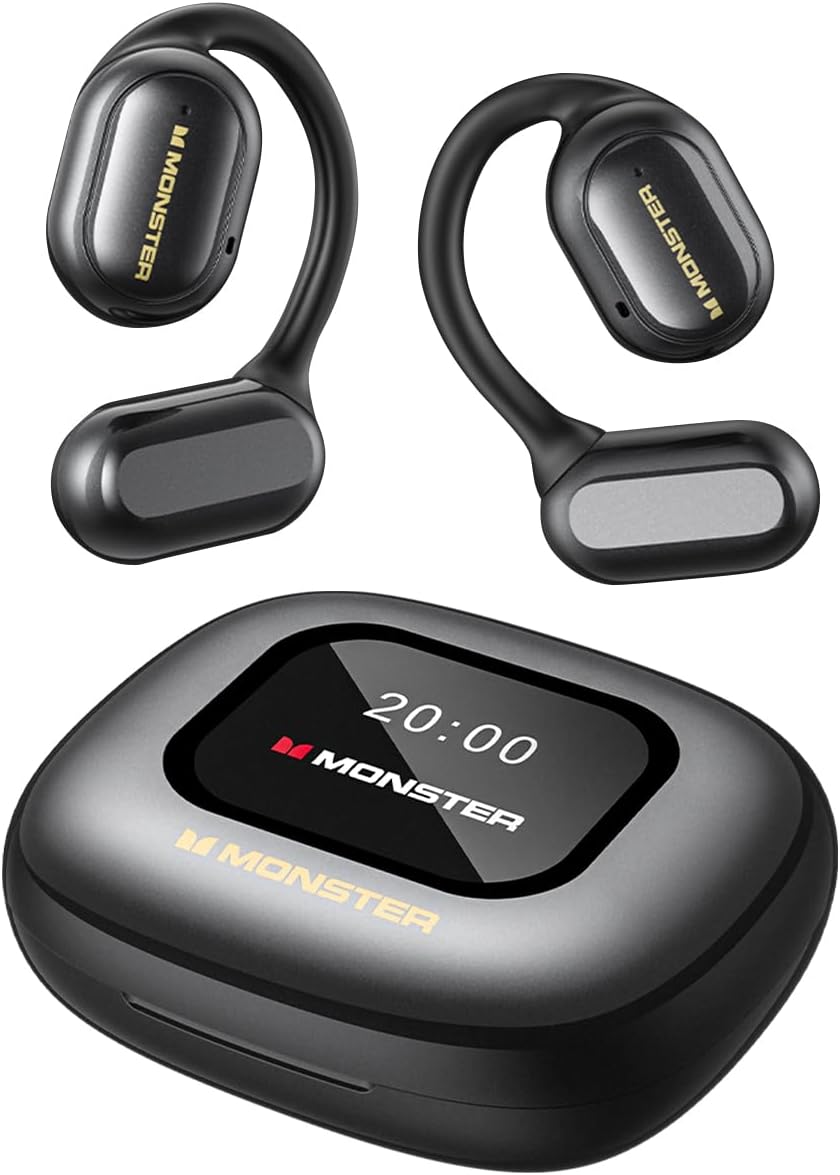
Image: The Monster Open Touch Pro 100 wireless earbuds and their charging case, illustrating the complete product package.
3. Produk Langkungview
3.1 Komponén Earbud
- Desain Ceuli Buka: Ngamungkinkeun kasadaran kana lingkungan sabudeureun.
- Kait Ceuli: Ergonomic curved design for secure and comfortable wear.
- Supir Dinamis 16.2mm: For clear sound quality.
- Mikropon: For Environmental Noise Cancellation (ENC) during calls.
- Ngecas Kontak: Pikeun ngecas di jero wadahna.

Image: A man wearing the Monster Open Touch Pro 100 earbud, demonstrating its open-ear design and comfortable fit.
3.2 Charging Case Features
- LED Full-Color Smart Touch Screen: For control over music, settings, and more.
- Slot Kartu TF: Supports independent MP3 playback (TF card not included).
- Port ngecas USB-C: For recharging the case.

Image: The Monster Open Touch Pro 100 charging case displaying its LED full-color smart touch screen, showing various control options.
4. Setélan
4.1 Ngecas Awal
Before first use, fully charge the earbuds and the charging case. Place the earbuds into the charging case and connect the USB-C cable to the charging port on the case, then connect the other end to a USB power source (e.g., computer, wall adapter).
The LED screen on the charging case will indicate the charging status. A full charge typically takes approximately 1.5-2 hours for the case and earbuds.
4.2 Powering on / Pareum
- Daya Hurung: Buka wadah ngecas. Earbuds bakal otomatis hurung tur asup kana mode papasangan.
- Pareum listrik: Lebetkeun deui earbud kana wadah ngecas teras tutup. Éta bakal otomatis pegat sareng pareum.
4.3 Nyapasangkeun Bluetooth
- Pastikeun earbud parantos dicas sareng dihurungkeun (buka wadahna).
- Dina alat anjeun (smartphone, tablet, laptop), aktipkeun Bluetooth.
- Milarian pikeun available Bluetooth devices and select "Monster Open Touch Pro 100".
- Saatos nyambung, earbud bakal nunjukkeun pasangan anu suksés, sareng alat bakal nunjukkeun yén éta parantos nyambung.
Earbuds bakal otomatis nyoba nyambungkeun deui ka alat nu dipasangkeun panungtungan lamun dipiceun tina wadahna.
5. Parentah Operasi
5.1 Kadali Toel Earbud
The earbuds feature touch-sensitive areas for controlling playback and calls:
- Puter / Reureuh: Single click on either L/R earbud.
- Lagu salajengna: Double click on the Right earbud.
- Lagu saméméhna: Triple click on the Left earbud.
- Ngajawab Telepon: Double click on either L/R earbud.
- Ngagantung Telepon: Tahan salila 3 detik dina earbud L/R.
- Aktipkeun Asisten Sora: Tahan salila 2 detik dina earbud L/R.

Image: A visual guide to the touch controls on the Monster Open Touch Pro 100 earbuds, detailing actions for play/pause, track skipping, call management, and voice assistant activation.
5.2 Charging Case Touch Screen Functions
The full-color touch screen on the charging case provides advanced controls:
- Kontrol Puteran Musik: Play, pause, skip tracks, adjust volume directly from the screen.
- Modeu EQ: Select from multiple equalizer presets (e.g., Rock and Roll, Pop, Normal, Jazz, Classic) to customize your audio experience.
- Pindah Basa: Change the system language of the case interface.
- Rana kaméra: Use the case as a remote shutter button for your smartphone camera.
- Manggihan Earphone abdi: Panggihan earbud anu leungit ku cara ngaktipkeun sinyal sora.
- Setélan: Access additional device settings.

Image: The Monster Open Touch Pro 100 charging case screen displaying the language selection interface, allowing users to switch between languages.

Image: The Monster Open Touch Pro 100 charging case screen displaying various equalizer modes such as Rock and Roll, Pop, Normal, Jazz, and Classic.
5.3 Independent MP3 Mode (TF Card)
The charging case features a TF card slot, allowing the earbuds to function as an independent MP3 player without requiring a connected phone or network.
- Insert a TF card (not included) with your music files into the designated slot on the charging case.
- On the touch screen, navigate to the "SD Music" option.
- Select and play your desired music directly from the TF card.
Note: Hot-swapping of the TF card is not supported. Ensure the device is powered off or in a safe state before inserting or removing the TF card.

Image: The Monster Open Touch Pro 100 charging case with a TF card being inserted, highlighting its independent MP3 playback capability.
6. Pangropéa
6.1 beberesih
- Ngusap earbuds sareng wadah ngecas ku lawon anu lemes, garing, teu aya serat.
- Ulah make cleaners abrasive, alkohol, atawa pangleyur kimiawi.
- Keep charging contacts clean and dry to ensure proper charging.
6.2 Tahan cai
The earbuds are rated IPX5 waterproof, meaning they are protected against low-pressure water jets from any direction. This makes them suitable for workouts and light rain.
Important: The charging case is NOT waterproof. Avoid exposing the charging case to water or moisture.

Image: A woman exercising while wearing the Monster Open Touch Pro 100 earbuds, illustrating their IPX5 waterproof performance against sweat and light moisture.
6.3 Panyimpenan
Nalika henteu dianggo, simpen earbuds dina wadah ngecasna pikeun ngajagi aranjeunna sareng mastikeun tetep dicas. Nyimpen dina tiis, tempat garing jauh ti suhu ekstrim.
7. Cara ngungkulan
| Masalah | Mungkin Cukang lantaranana | Solusi |
|---|---|---|
| Earbuds teu dipasangkeun | Headphone teu dina modeu pairing; Bluetooth pareum dina alat; di luar jangkauan. | Ensure case is open and earbuds are powered on. Turn Bluetooth off and on on your device. Move closer to your device. |
| Taya sora tina earbuds | Volume teuing leutik; earbud teu nyambung; média dieureunkeun. | Increase volume on device and earbuds. Reconnect earbuds. Check media playback status. |
| Kasus ngecas teu ngecas | Cable not connected properly; faulty cable/adapter; dirty charging port. | Ensure USB-C cable is securely connected. Try a different cable or power adapter. Clean the charging port gently. |
| Earbuds teu ngecas bisi | Earbuds not seated correctly; dirty charging contacts. | Adjust earbuds in case to ensure proper contact. Clean earbud and case charging contacts. |
| Layar rampa teu ngaréspon | Gangguan parangkat lunak samentawis; batré lemah. | Restart the charging case (if possible, by closing and reopening). Ensure the case is sufficiently charged. |
8. Spésifikasi
| Fitur | Rincian |
|---|---|
| Ngaran modél | Monster Open Touch Pro 100 |
| Téhnologi konektipitas | Nirkabel (Bluetooth) |
| Vérsi Bluetooth | 5.4 |
| Panempatan Ceuli | Buka Ceuli |
| Tipe Supir Audio | Supir dinamis (16.2mm) |
| Fitur Control Noise | Pembatalan Noise Lingkungan (ENC) |
| Métode kontrol | Toél |
| Fitur husus | LED Full-Color Smart Screen, TF Card Support, IPX5 Waterproof (earbuds only) |
| Kahirupan Batré (Earbuds) | Nepi ka 8 jam (sakali muatan) |
| Total Time Playback | Dugi ka 30 jam (kalayan ngeusi batre) |
| Bahan | Silicone (ear hooks) |
| Item Beurat | 7.4 ons |
| Alat nu cocog | Smartphone, Laptop, Tablet, Spiker Pinter |
9. Garansi jeung Rojongan
Kanggo inpormasi garansi sareng dukungan palanggan, mangga tingali dokuméntasi anu kalebet dina pameseran anjeun atanapi kunjungi situs resmi Monster. websitus. Simpen bukti pameseran anjeun pikeun klaim garansi.
Pabrikan: Raksasa


