1. Bubuka
Thank you for choosing the FL ESPORTS GEO 65 HE Gaming Keyboard. This 60% mechanical keyboard features Hall Effect magnetic switches, rapid trigger functionality, and adjustable actuation for a highly customizable gaming experience. This manual provides detailed instructions for setup, operation, maintenance, and troubleshooting to ensure optimal performance.
2. Eusi Paket
Punten parios yén sadaya barang aya dina pakét anjeun:
- FL ESPORTS GEO 65 HE Gaming Keyboard
- USB-C ka USB-A Cable
- Keycap Puller
- Pindah Puller
- Manual pamaké

Image: Contents of the FL ESPORTS GEO 65 HE keyboard package, showing the keyboard, USB-C cable, keycap puller, and switch puller.
3. Setélan
- Sambungkeun kibor: Plug the USB-C end of the provided cable into the keyboard and the USB-A end into an available USB port on your computer. The keyboard will automatically be recognized by your operating system.
- Pasang Parangkat Lunak (Opsional tapi Disarankeun): For full customization of RGB lighting, key remapping, macros, and performance settings (including rapid trigger and actuation point adjustment), download and install the official FL ESPORTS software from the manufacturer's websitus.

Gambar: Leuwihview of the FL ESPORTS keyboard's features, including the software interface for customization and performance settings.
4. Parentah Operasi
4.1 Fungsi Konci Dasar
The GEO 65 HE features a compact 60% layout. Many standard functions are accessed via the Fn key in combination with other keys. Refer to the keyboard's keycaps for secondary functions (e.g., arrow keys, function row).
4.2 Hall Effect Switches and Rapid Trigger
This keyboard utilizes Hall Effect magnetic switches, allowing for precise control over actuation and rapid trigger functionality. Rapid Trigger enables keys to reset instantly upon release, allowing for faster repeated inputs.
- Aktuasi anu tiasa disaluyukeun: The actuation point (the distance a key needs to travel to register an input) can be customized via the software. This allows you to set a shallow actuation for quick responses or a deeper one for more deliberate presses.
- Rapid pemicu: This feature can be enabled and configured through the software, allowing you to set the reset sensitivity for individual keys.
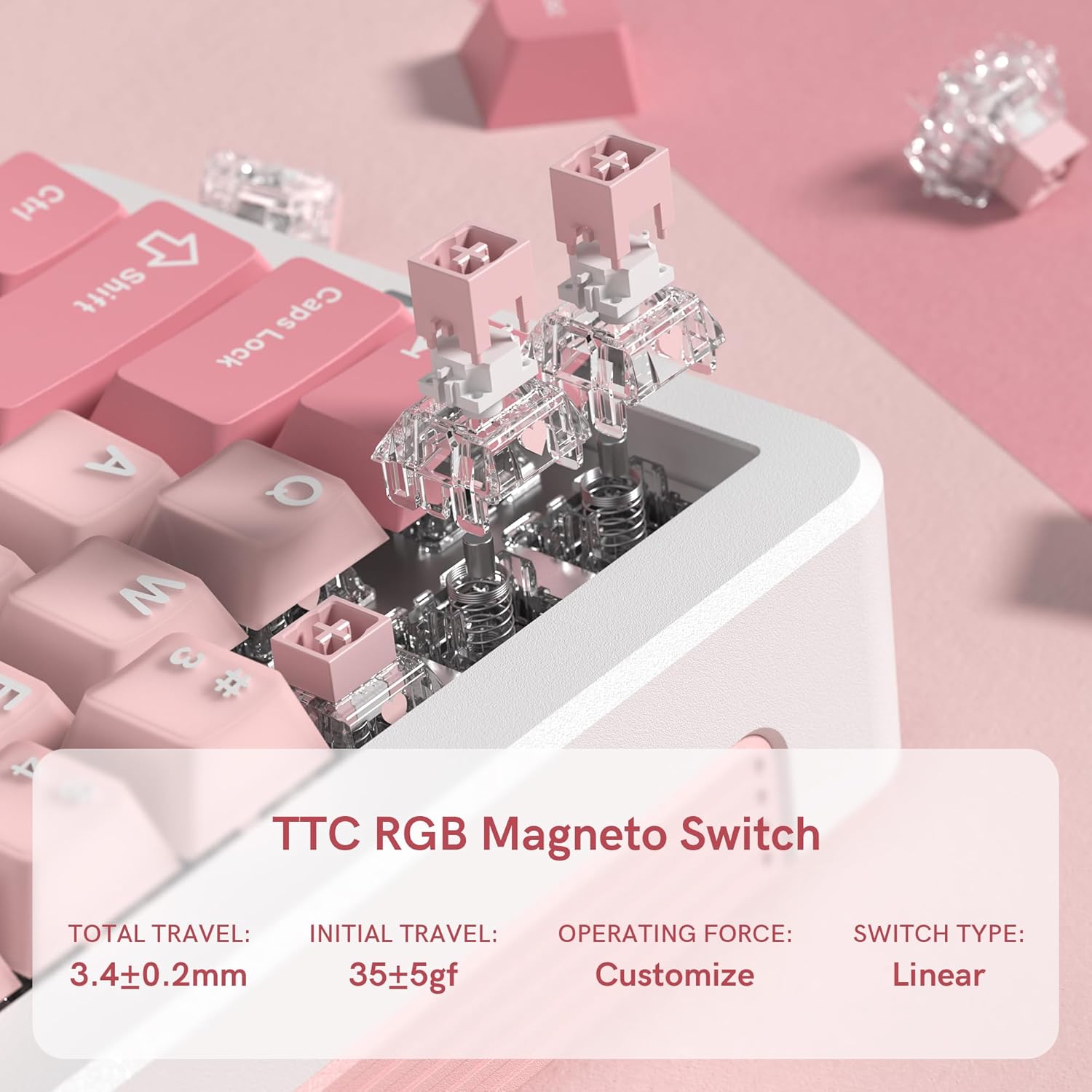
Gambar: A close-up view of the TTC RGB Magneto Switches, highlighting their design and key specifications such as total travel and operating force.
4.3 Kustomisasi Lampu RGB
The keyboard features per-key RGB lighting. Lighting effects, colors, and brightness can be adjusted using the FL ESPORTS software. Some basic lighting modes may be accessible via Fn key combinations.
4.4 Konfigurasi Parangkat Lunak
The dedicated software provides comprehensive control over your keyboard:
- Remapping konci: Assign custom functions to any key.
- Manajemén makro: Create and assign complex macros for gaming or productivity.
- Setélan kinerja: Fine-tune actuation points, rapid trigger sensitivity, and polling rate.
- Setélan cahaya: Customize RGB effects, colors, and brightness.
- Pembaruan firmware: Keep your keyboard updated with the latest features and improvements.

Image: Multiple screenshots illustrating the FL ESPORTS software interface, showing options for key configuration, lighting settings, performance adjustments, and macro management.
5. Pangropéa
5.1 beberesih
Pikeun ngajaga penampilan sareng fungsionalitas keyboard anjeun:
- Anggo lawon anu lemes sareng garing pikeun ngusap permukaan kibor.
- Pikeun beberesih anu langkung jero, anggo penarik keycap anu disayogikeun pikeun nyabut keycap sareng bersihan handapeunna nganggo udara anu dikomprés atanapi sikat alit.
- Hindarkeun ngagunakeun bahan kimia anu kasar atanapi bahan abrasive.
5.2 Keycap and Switch Removal
The keyboard supports hot-swappable switches. Use the provided tools for safe removal:
- Ngahapus Keycap: Gently attach the keycap puller to the keycap and pull straight up.
- Ngalihkeun Saklar: After removing the keycap, use the switch puller to grasp the top and bottom clips of the switch and pull straight up. Ensure the switch is properly aligned when reinserting.
6. Cara ngungkulan
- Keyboard Teu Ngabales:
- Pastikeun kabel USB-C disambungkeun sacara aman ka kibor sareng komputer.
- Coba sambungkeun ka port USB anu béda.
- Balikan deui komputer anjeun.
- Lampu RGB Teu Jalan/Salah:
- Check the lighting settings in the FL ESPORTS software.
- Pastikeun firmware kibor parantos mutahir.
- Konci Henteu Ngadaptar atanapi Ngetik Ganda:
- Bersihkeun sakuriling saklar anu kapangaruhan pikeun miceun kokotor naon waé.
- If the issue persists, consider replacing the switch using the provided switch puller.
- Verify actuation settings in the software.
- Parangkat Lunak Henteu Ngadeteksi Kibor:
- Ensure the software is the latest version.
- Coba pasang deui parangkat lunak.
- Temporarily disable any antivirus or firewall software that might be interfering.
7. Spésifikasi
| Fitur | Spésifikasi |
|---|---|
| Modél | GEO 65 HE |
| merek | FL ESPORTS |
| Tata perenah kibor | 60% (QWERTY) |
| Pindah Tipe | Hall Effect Magnetic Switches (TTC RGB Magneto Switch) |
| Aktuasi | Bisa diatur |
| Fitur husus | Rapid Trigger, Aluminum Alloy Case, RGB Backlighting, PBT Keycaps |
| Konektipitas | USB-C (Kabel) |
| Alat nu cocog | PC (Windows/Mac) |
| Laju Polling | 8KHz |
| Laju Scan | 256K |
| Latency Lemah | 0.125 ms |
| Rapid Trigger (RT) | 0.005 mm |
| Zero Dead Zone | 0 |
| Item Beurat | 1.2 pon |
| Ukuran Paket | 10 x 2.7 x 2 inci |
| Keyboard Dimensions (Approx.) | 323.3mm (L) x 118.3mm (W) x 34mm (H) |
Gambar: luhur jeung samping views of the FL ESPORTS GEO 65 HE keyboard with approximate dimensions indicated in millimeters.
8. Garansi jeung Rojongan
For warranty information and technical support, please refer to the official FL ESPORTS website or contact their customer service directly. Standard return policies typically allow for returns within 30 days of purchase. Extended protection plans may be available from your retailer.


