1. Bubuka
This manual provides essential information for the safe and effective operation of your ION Audio Retro Glow Boombox. This device combines classic audio playback with modern connectivity, featuring an AM/FM radio, cassette player/recorder, Bluetooth 5.3, USB, and SD card playback capabilities. Please read this manual thoroughly before use and retain it for future reference.
2. Émbaran Kasalametan
- Ulah ngalaan unit ka cai atawa Uap.
- Hindarkeun nempatkeun unit caket sumber panas atanapi dina sinar panonpoé langsung.
- Mastikeun ventilasi ditangtoskeun; ulah ngahalangan sagala bukaan ventilasi.
- Paké ngan kantétan / asesoris dieusian ku produsén.
- Cabut colokan unit nalika badai kilat atanapi nalika henteu dianggo kanggo waktos anu lami.
- Rujuk sadayana jasa ka tanaga jasa anu mumpuni.
3. Naon Kaasup
Saatos ngabongkar bungkusan, pastikeun sadaya barang anu didaptarkeun di handap aya sareng dina kaayaan anu saé:
- ION Audio Retro Glow Boombox
- Kabel Daya
- Pitunjuk Gancang
4. Produk Langkungview
The Retro Glow Boombox features a translucent housing with multi-colored LED lights that synchronize with music. It includes dual full-range speakers for robust audio output.
Panel hareup

Gambar 1: Hareupeun view of the Retro Glow Boombox, showcasing the cassette deck, radio tuner, and illuminated dual speakers.
Kadali Top

Gambar 2: Detil view of the top panel, including volume, bass, treble controls, cassette function buttons (Pause, Stop/Eject, F.FWD, REW, Play, REC), and mode selectors (Tape, Aux, Radio, Bluetooth/USB/SD).
Side Panel and Rear
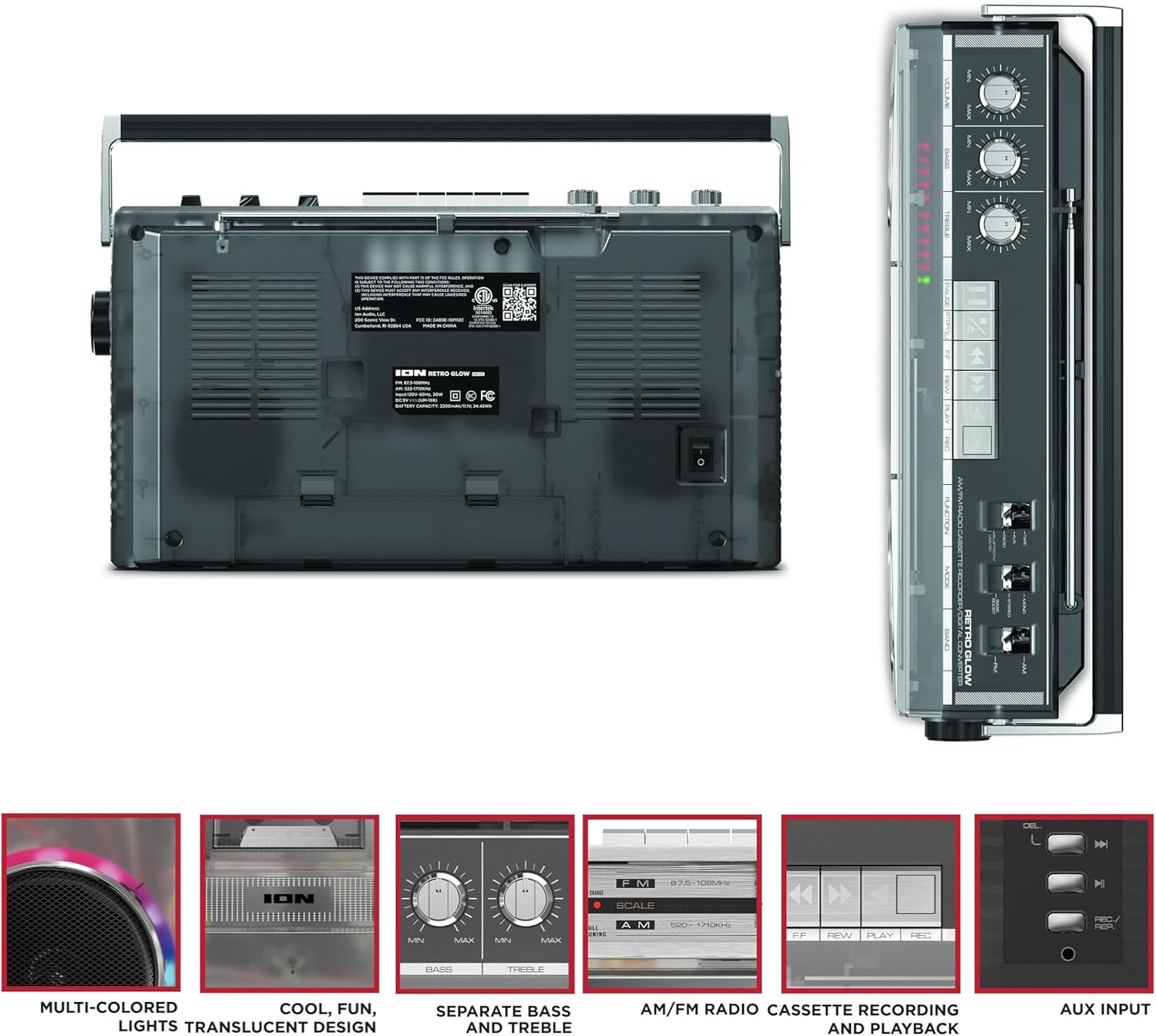
Figure 3: Side panel illustrating the USB port, SD card slot, and playback control buttons. The rear panel includes the power input and battery compartment.
5. Setélan
Powering the Boombox
The Retro Glow Boombox can be powered via the included AC power cable or by batteries for portable use.
- Daya AC: Connect the power cable to the AC input on the rear of the unit and then to a wall outlet.
- Daya Batré: Open the battery compartment on the rear and insert the required batteries (type and quantity specified in specifications).

Gambar 4: Tukangeun view of the boombox, highlighting the power input and the battery compartment for portable operation.
6. Parentah Operasi
Operasi Umum
- Hurungkeun/Pareuman: Use the power switch to turn the unit on or off.
- Kontrol volume: Adjust the 'VOLUME' knob on the top panel to increase or decrease the sound level.
- Kontrol nada: Use the 'BASS' and 'TREBLE' knobs to customize the audio output to your preference.
- Lampu LED: The multi-colored LED lights around the speakers dance in sync with the music. Refer to the Quickstart Guide for specific controls to change light modes or turn them off.
Radio Functionality
- Switch the 'FUNCTION' selector to 'RADIO'.
- Select 'AM' or 'FM' using the 'BAND' switch.
- Extend the telescopic antenna for optimal FM reception. For AM, rotate the unit for best reception.
- Use the 'TUNING' knob to scan for stations.
Cassette Player/Recorder
- Playback: Press the 'STOP/EJ' button to open the cassette door. Insert a cassette tape and close the door. Press 'PLAY' to begin playback.
- Ngarékam: To record from the radio, built-in microphone, or an external source (via Aux input), ensure a blank cassette is inserted. Select the desired source using the 'FUNCTION' switch. Press the 'REC' button (often simultaneously with 'PLAY') to start recording.
- Maju gancang / Mundur: Use the 'F.FWD' and 'REW' buttons for tape navigation.
Konektipitas Bluetooth
- Switch the 'FUNCTION' selector to 'BLUETOOTH/USB/SD'. The unit will enter pairing mode.
- On your Bluetooth-enabled device, search for 'Retro Glow Boombox' and select it to pair.
- Once paired, you can stream audio wirelessly to the boombox.
USB and SD Card Playback
- Insert a USB drive or SD card into the respective slot on the side panel.
- Switch the 'FUNCTION' selector to 'BLUETOOTH/USB/SD'. The unit should automatically detect and begin playing audio files ti média diselapkeun.
- Use the playback control buttons (play/pause, skip forward/backward) on the side panel to manage your audio.
Input bantu
- Connect an external audio device (e.g., smartphone, MP3 player) to the 'AUX' input using a 3.5mm audio cable (not included).
- Switch the 'FUNCTION' selector to 'AUX'. Audio from your external device will play through the boombox speakers.
7. Pangropéa
- beberesih: Anggo kaén anu garing sareng lemes pikeun ngabersihan bagian luar unit. Ulah make cleaners abrasive atawa pangleyur.
- Perawatan Dek Kaset: Regularly clean the tape heads and pinch rollers with a cotton swab lightly dampdilebur ku alkohol isopropil pikeun mastikeun kualitas sora anu optimal sareng nyegah karusakan pita.
- Panyimpenan: When not in use, store the boombox in a cool, dry place away from direct sunlight and extreme temperatures.
8. Cara ngungkulan
Taya Daya
- Ensure the power cable is securely connected to both the unit and a working power outlet.
- If using batteries, check if they are inserted correctly and are not depleted.
Taya Sora
- Check the volume level on the boombox and the connected audio source (if applicable).
- Ensure the correct function mode (Radio, Tape, Bluetooth, USB/SD, Aux) is selected.
- For cassette playback, verify the tape is inserted correctly and the heads are clean.
Masalah Nyapasangkeun Bluetooth
- Make sure the boombox is in Bluetooth pairing mode.
- Ensure your Bluetooth device is within range (typically 30 feet or 10 meters).
- Coba cabut pasangan sareng pasangkeun deui alat.
9. Spésifikasi
| Dimensi produk | 9.25 x 16.25 x 5.25 inci |
| Item Beurat | 8.93 pon |
| Téhnologi konektipitas | Bluetooth 5.3, USB, SD Card, Aux Input |
| Tipe Speaker | Stereo, Full-Range |
| Sumber Daya | AC Power Cable, Rechargeable Battery (approx. 10-hour life) |
| Fitur husus | AM/FM Radio, Cassette Player/Recorder, Multi-colored LED Lights, Retro VU Meters, Separate Bass and Treble Controls |
10. Garansi jeung Rojongan
For warranty information or technical support, please refer to the Quickstart Guide included with your product or visit the official ION Audio websitus. Simpen resi pameseran anjeun salaku bukti pameseran tiasa diperyogikeun pikeun klaim garansi.


