1. Bubuka
This manual provides essential information for the safe operation, installation, maintenance, and troubleshooting of your Shinco 120 Pints Energy Star Dehumidifier. Please read this manual thoroughly before using the appliance and retain it for future reference. Proper use ensures optimal performance and extends the lifespan of your dehumidifier.
Émbaran Kasalametan
- Always operate the unit on a level surface to prevent water spillage.
- Pastikeun stop kontak kakuatan cocog voltage syarat unit.
- Ulah ngahalangan jalan asup atawa kaluarna hawa. Jaga jarak sahenteuna 8 inci (20 cm) di sabudeureun unit.
- Cabut dehumidifier sateuacan ngabersihkeun atanapi ngalakukeun perawatan naon waé.
- Jauhkeun barudak sareng piaraan tina unit salami operasi.
2. Produk Langkungview
The Shinco 120 Pints Energy Star Dehumidifier is designed to efficiently remove excess moisture from large spaces up to 6,000 Sq.Ft, helping to create a healthier and more comfortable environment. It features Wi-Fi connectivity for remote control, auto defrost, and continuous drainage options.

Figure 2.1: Shinco Dehumidifier with Wi-Fi connectivity and smartphone app interface.
Fitur konci
- Kapasitas luhur: Removes up to 120 pints of moisture per day (under 95°F, 90%RH conditions).
- Daérah Cakupan ageung: Suitable for spaces up to 6,000 Sq.Ft.
- Kontrol Pinter Wi-Fi: Remote operation via smartphone app.
- Kalembaban anu tiasa disaluyukeun: Settings from 30% to 80% in 5% increments.
- Sababaraha Pilihan Drainase: Manual water tank (5L/1.32Gal) or continuous drainage with included hose.
- Timer 24 Jam: Programmable operation for energy efficiency.
- Otomatis Defrost: Prevents coil freezing in low temperatures.
- Konci Budak: Disables control panel buttons to prevent accidental changes.
- Saringan anu tiasa dicuci: Gampang pikeun ngabersihan sareng ngajaga.
3. Setélan
Unpacking sarta panempatan
- Sacara saksama piceun dehumidifier tina bungkusanna.
- Teundeun unit tegak dina permukaan anu rata.
- Ensure there is at least 8 inches (20 cm) of space around the unit for proper airflow. Do not place it against a wall or furniture that could obstruct the air intake or exhaust.
- Hindarkeun nempatkeun unit caket sumber panas atanapi dina sinar panonpoé langsung.
Sambungan Daya
Plug the power cord into a grounded electrical outlet. The unit will beep once, and the display will illuminate briefly.
Pilihan drainase
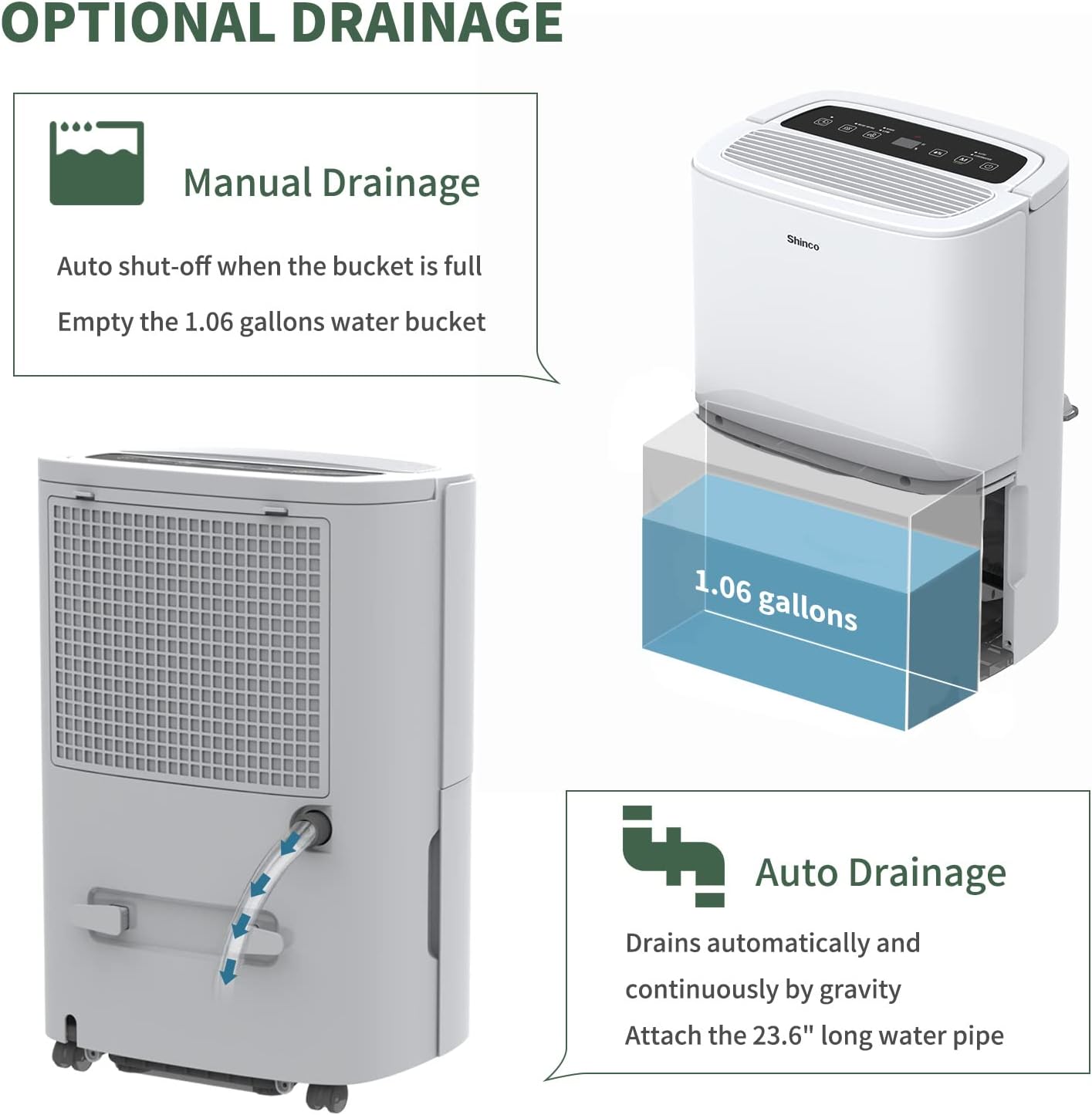
Figure 3.1: Manual and continuous drainage methods.
Your dehumidifier offers two methods for water removal:
- Drainase Manual (Tangki Cai): The unit collects water in its internal 5-liter (1.32-gallon) water tank. When the tank is full, the unit will automatically shut off, display "FL" (Full) on the screen, and an alarm will sound. The tank must be manually emptied.
- Drainase Kontinyu (Selang Drainase): For extended operation without manual emptying, attach the included 23.6-inch drain hose to the continuous drain port on the back of the unit. Ensure the hose is sloped downwards to a suitable floor drain or larger container to allow gravity drainage. Do not elevate the hose above the drain port.
4. Parentah Operasi
Kontrol Panel Langkungview

Figure 4.1: Digital control panel layout.
- Tombol Daya: Hurungkeun unit ON atawa OFF.
- Tombol Mode: Cycles through operating modes (Auto, Continuous). Press and hold for 3 seconds to activate/deactivate Child Lock.
- Humidity Setting Buttons (%): Adjusts the desired humidity level (30% to 80%).
- Tombol Laju Kipas: Selects fan speed (High, Low).
- Tombol Timer: Nyetél otomatis hurung atawa otomatis pareum (1-24 jam).
- Inside Drying Button: Activates the internal drying function, useful before storage.
Nyetel kalembaban anu dipikahoyong
- Pencét tombol Daya pikeun ngahurungkeun unit.
- Use the Humidity Setting buttons (%) to select your desired humidity level. The display will show the target humidity. The unit will operate until the room humidity reaches this level, then cycle on and off to maintain it.
Pangaluyuan Kacepetan Kipas
Press the Fan Speed button to toggle between High and Low fan speeds. Higher fan speed results in faster dehumidification.
Fungsi Timer

Figure 4.2: 24-hour programmable timer function.
The timer allows you to set a specific duration (1-24 hours) for the unit to either turn on or turn off automatically.
- Timer otomatis-pareum: While the unit is running, press the Timer button and use the Humidity Setting buttons to set the desired number of hours until the unit turns off.
- Timer otomatis-otomatis: While the unit is off, press the Timer button and use the Humidity Setting buttons to set the desired number of hours until the unit turns on.
Modeu Operasi

Figure 4.3: Available operating modes and child lock feature.
- Auto Dehumidify Mode: The unit automatically senses the room's humidity and adjusts its operation to maintain the preset humidity level. If the humidity drops more than 5% below the target, the compressor and fan will stop. If it rises more than 5% above, they will resume.
- Modeu Garing Kontinyu: The unit runs continuously regardless of the humidity level, providing maximum dehumidification. This mode is suitable for drying clothes or in very damp kaayaan.
Budak Konci
To prevent accidental changes to settings, press and hold the Mode button for 3 seconds to activate or deactivate the Child Lock function. When active, all other buttons on the control panel will be unresponsive.
Wi-Fi Smart Control

Figure 4.4: Wi-Fi connectivity for remote control.
The dehumidifier can be controlled remotely using a smartphone app. Refer to the separate Wi-Fi setup guide for detailed instructions on connecting your device to your home Wi-Fi network and using the app to adjust settings, monitor humidity, and schedule operations.
5. Pangropéa
Pangropéa rutin mastikeun operasi dehumidifier anjeun anu efisien sareng awét.
Ngabersihan Saringan Udara

Figure 5.1: Washable air filter location and other design elements.
Saringan hawa kedah dibersihkeun unggal dua minggu atanapi langkung sering gumantung kana panggunaan sareng kualitas hawa.
- Cabut dehumidifier tina stop kontak listrik.
- Cabut saringan ti tukang unit.
- Ngumbah saringan ku cai haneut, sabun. Bilas nepi ka tuntas.
- Ngidinan saringan ka hawa garing lengkep sateuacan dipasang deui. Ulah make dryer atawa panas langsung.
Ngosongkeun Tangki Cai
When the water tank is full, the unit will stop operating and display "FL".
- Tarik kaluar tangki cai ti hareup unit lalaunan.
- Kosongkeun cai anu dikumpulkeun sacara saksama.
- Slide the empty water tank back into the unit until it clicks into place. The unit will resume operation if not in continuous drainage mode.
Ngabersihan Unit Luar
Ngusap bagian luar tina dehumidifier ku lemes, damp lawon. Ulah nganggo bahan kimia anu kasar, bahan abrasif, atanapi pangleyur, sabab ieu tiasa ngaruksak permukaan.
Panyimpenan
Upami unit henteu dianggo kanggo waktos anu panjang:
- Kosongkeun tangki cai sareng pastikeun bersih sareng garing.
- Press the "Inside Drying" button to run the internal drying function, which helps prevent mold and mildew growth inside the unit.
- Ngabersihan saringan hawa sareng pasang deui.
- Cabut colokan kabel listrik jeung coil eta rapih.
- Cover the unit with a plastic bag or its original packaging to protect it from dust.
- Store the dehumidifier in an upright position in a cool, dry place.
6. Cara ngungkulan
Sateuacan ngahubungi dukungan palanggan, mangga tingal pituduh ngungkulan ieu di handap pikeun masalah umum.
| Masalah | Mungkin Cukang lantaranana | Solusi |
|---|---|---|
| Dehumidifier teu hurung. | No power; Power cord not plugged in; Child Lock active. | Ensure unit is plugged into a working outlet; Check circuit breaker; Deactivate Child Lock by pressing and holding Mode button for 3 seconds. |
| Taya cai dikumpulkeun atawa dehumidification cukup. | Humidity level already low; Air filter clogged; Room temperature too low; Air inlets/outlets blocked; Unit too small for space. | Adjust desired humidity lower; Clean air filter; Ensure room temperature is above 41°F (5°C); Clear obstructions; Consider a larger capacity unit if space exceeds 6,000 Sq.Ft. |
| "FL" code displayed and unit stops. | Tangki cai pinuh atanapi dipasangna teu leres. | Empty the water tank; Reinstall the water tank correctly until it clicks into place. |
| Unit freezing up (ice on coils). | Low room temperature; Air filter clogged. | The unit has an Auto Defrost function. If freezing persists, ensure room temperature is not too low (below 41°F/5°C) and clean the air filter. You can also manually activate the "Inside Drying" function to help defrost. |
| Unit ribut. | Unit henteu dina permukaan anu rata; Saringan hawa mampet; Bagian anu leupas. | Ensure unit is on a stable, level surface; Clean air filter; Check for any loose components. |
| Masalah konektipitas Wi-Fi. | Sandi Wi-Fi salah; Router jauh teuing; App teu diropéa. | Verify Wi-Fi password; Move unit closer to router; Update smartphone app; Refer to Wi-Fi setup guide. |
7. Spésifikasi
Technical specifications for the Shinco 120 Pints Energy Star Dehumidifier (Model B0DZX4B1MK).
| Fitur | Rincian |
|---|---|
| merek | Shinco |
| Ngaran modél | B0DZX4B1MK |
| Kapasitas Dehumidification | 120 Pints/Day (under 95°F, 90%RH) / 50 Pints per Day (DOE Standard) |
| Panutup Wewengkon Lantai | Nepi ka 6,000 suku pasagi |
| Volume tank | 5 Liter (1.32 galon) |
| Dimensi produk | 9.45 "D x 13.5" W x 20.1" H |
| Item Beurat | 30.8 pon |
| Warna | Bodas |
| Bahan | palastik |
| Jumlah Speeds | 2 (Luhur, Handap) |
| Modeu Operasi | Terus, Auto |
| Fitur husus | Adjustable Humidity Control, Anti-Spill, Automatic Defrost, Automatic Moisture Removal, Automatic Restart, Automatic Shutoff, Bucket Storage, Child Lock, Continuous Draining, Detachable, Digital Display, Ergonomic Handle, Portable, Quiet Operation, Removable Tank, Timer, Washable Filter, Wi-Fi |
| Komponén Kaasup | Dehumidifier, Drain hose |
8. Garansi jeung Rojongan
For warranty information and customer support, please refer to the documentation included with your product or contact Shinco customer service directly. Keep your purchase receipt as proof of purchase for warranty claims.


