1. Bubuka
This user manual provides comprehensive instructions for the TABWEE T20 Android Tablet. It covers setup, operation, maintenance, and troubleshooting to help you maximize your device's performance and ensure a smooth user experience. Please read this manual thoroughly before using your tablet.
2. Eusi Paket
Pastikeun yén sadaya item anu didaptarkeun di handap aya dina pakét anjeun:
- TABWEE T20 Android Tablet
- Keyboard anu tiasa dicabut
- Stylus Pen
- Beurit
- Kasus pelindung
- Tablet Stand
- Pelindung Layar (sateuacan dipasang atanapi misah)
- Kabel Ngecas USB Tipe-C
- Adaptor Daya (5V/2A)
- Manual pangguna (dokumén ieu)
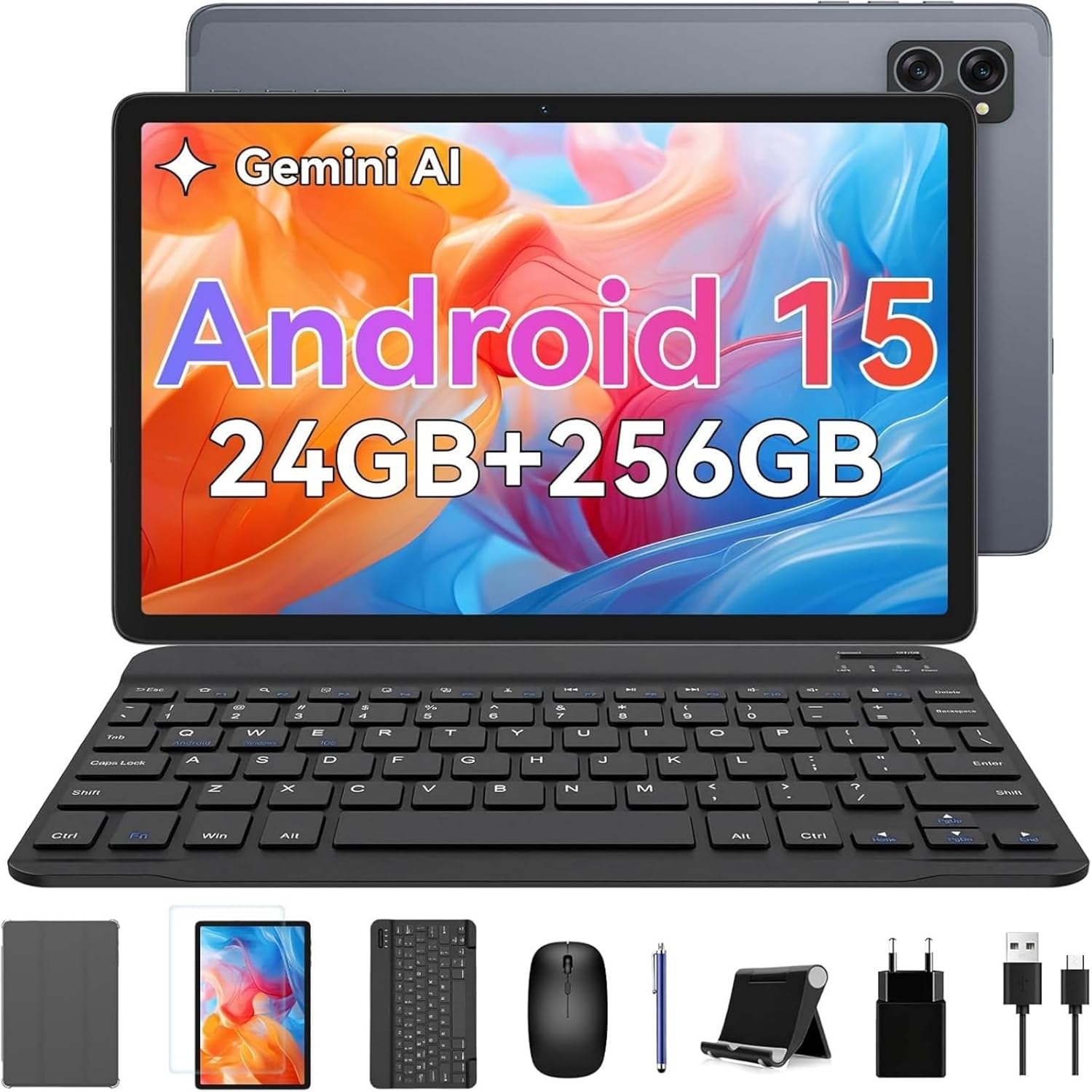
Image: The TABWEE T20 tablet displayed with its full set of accessories, including the detachable keyboard, mouse, stylus, protective case, tablet stand, charging cable, and power adapter.
3. Produk Langkungview
3.1 Fitur konci
- Sistem operasi: Android 15 with Gemini AI 2.0
- Prosesor: Octa-Core Unisoc T606, 1.6 GHz
- Mémori (RAM): 24 GB (8GB built-in + up to 16GB expansion)
- Panyimpenan (ROM): 256 GB internal, expandable up to 2 TB via TF card
- tampilan: 10.1-inch HD+ IPS (1280 x 800 pixels), Widevine L1 support, 350 nits brightness
- Kaméra: 5 MP Front Camera, 8 MP Rear Camera
- Batré: 5000 mAh, providing extended usage times
- Konektipitas: Dual-band 2.4G/5G Wi-Fi (802.11ac/b/g/n), Bluetooth 5, GPS
- Audio: Dual smart speakers for stereo sound, 3.5mm headphone jack
- Kaamanan: ID raray
- ukuran: 24.64 x 15.49 x 0.76 cm (L x W x H)
- beurat: Kira-kira 412 gram
3.2 Tablet Layout
Familiarize yourself with the physical components of your TABWEE T20 Tablet.


Image: Left: Rear view of the TABWEE T20 tablet, highlighting its camera array and slim profile. Right: Front view of the tablet in use, demonstrating the vibrant display.
- Kaméra hareup: Located at the top center when held vertically, used for video calls and selfies.
- Kaméra tukang: Located on the back, used for taking photos and videos.
- Tombol Daya: Typically on the side, used to turn the tablet on/off or wake/sleep the screen.
- Tombol Volume: Padeukeut jeung tombol daya, dipaké pikeun nyaluyukeun polumeu audio.
- Port USB Tipe-C: Pikeun ngecas sareng mindahkeun data.
- Jack Headphone 3.5mm: Pikeun nyambungkeun headphone kabel.
- Speaker Grilles: Dual speakers for enhanced audio output.
- Slot Kartu MicroSD: For expanding storage with a TF card.
4. Setélan
4.1 Ngecas Awal
Before first use, fully charge your tablet. Connect the USB Type-C cable to the tablet's charging port and the other end to the power adapter. Plug the adapter into a wall outlet. The charging indicator will show the charging status. A full charge typically takes a few hours.
4.2 Daya Hurung/Pareuman
- Pikeun Ngahurungkeun: Press and hold the Power button until the TABWEE logo appears on the screen.
- Pikeun mareuman: Press and hold the Power button until a power menu appears. Select "Power off" and confirm.
- Pikeun Saré / Hudang: Briefly press the Power button to turn the screen off/on without powering down the tablet.
4.3 Wizard Setup Awal
Saatos dihurungkeun pikeun anu munggaran, tablet bakal nungtun anjeun dina prosés setelan awal:
- Pilih pikaresep Anjeun Basa.
- Nyambung ka a jaringan Wi-Fi to enable internet access.
- Sign in with your Akun Google or create a new one. This is essential for downloading apps from the Google Play Store and syncing data.
- Disetél ID raray for convenient and secure unlocking.
- Review sareng nampi sarat sareng kaayaan.
- Complete the setup to access the Android home screen.
4.4 Inserting a TF (MicroSD) Card
To expand the tablet's storage up to 2TB:
- Tangtukeun lokasi slot kartu TF di sisi tablet.
- Gently selapkeun kartu TF kana slot jeung kontak emas nyanghareup ka handap nepi ka clicks kana tempat.
- The tablet will detect the new storage. You may be prompted to format it for internal or portable storage.
4.5 Asesoris Panyambung (Kibor, Mouse, Stylus)
The included keyboard and mouse connect via Bluetooth. The stylus may connect via Bluetooth or be passive, depending on its type.
Bluetooth Keyboard and Mouse:
- Ensure the keyboard/mouse are charged and powered on.
- Dina tablet anjeun, buka Setélan > Alat disambungkeun > Bluetooth.
- Turn on Bluetooth. The tablet will scan for available devices.
- Select the keyboard or mouse from the list of available devices (e.g., "Bluetooth Keyboard", "Bluetooth Mouse").
- Turutan sagala ajakan dina layar pikeun ngalengkepan papasangan.
Stylus Pen:
If your stylus is Bluetooth-enabled, follow the same Bluetooth pairing steps as for the keyboard/mouse. If it's a passive stylus, no pairing is required; simply use it directly on the screen.
5. Ngoperasikeun Tablet anjeun
5.1 Napigasi Dasar
- Ketok: Pilih hiji item atawa buka aplikasi.
- Toel jeung tahan: Aksés ménu kontekstual atanapi pindahkeun ikon.
- Gesek: Scroll through pages, home screens, or menus.
- Ciwit-pikeun-Zoom: Ngadeukeutkeun atanapi ngaleutikan poto, peta, atanapi web kaca.
5.2 Fitur Android 15
Your TABWEE T20 runs on Android 15, offering enhanced performance and features:
- Gemini AI 2.0: Utilize the integrated AI for smart suggestions, personalized settings, and intelligent automation.
- Modeu Pisah Layar: Run two apps simultaneously side-by-side for improved multitasking. To activate, open an app, swipe up from the bottom to view recent apps, tap the app icon at the top of its card, and select "Split screen".
- Multi-User Modes: Jieun pro pangguna anu misahfiles for different family members or work/personal use, ensuring data privacy and customized experiences. Access via Setélan > Sistim > Sababaraha pamaké.
- Enhanced Privacy & Security: Benefit from advanced encryption, granular permission management, and private notification modes.
5.3 Sambungan Wi-Fi
Pikeun nyambung ka jaringan Wi-Fi:
- Pindah ka Setélan > Jaringan & internét > Internét.
- Pastikeun Wi-Fi parantos diaktipkeun.
- Pilih jaringan anu dipikahoyong tina daptar.
- Lebetkeun kecap akses upami dipenta teras ketok Nyambung.
5.4 Pamakéan kaméra
Tablet ieu dilengkepan kaméra hareup 5MP sareng kaméra tukang 8MP.
- Buka na Kaméra aplikasi.
- Ketok ikon switch kaméra pikeun pindah antara kaméra hareup jeung pungkur.
- Ketok tombol jepret pikeun nyandak poto atanapi ngamimitian/ngeureunkeun ngarékam pidéo.
- Access settings within the camera app to adjust modes, resolution, and other parameters.
5.5 Media Playback and Widevine L1
The TABWEE T20 supports Widevine L1, allowing you to stream high-definition content from popular streaming services like Netflix, Amazon Prime Video, and Disney+ in full HD resolution.
- Download your preferred streaming apps from the Google Play Store.
- Ensure a stable internet connection for optimal streaming quality.
- Utilize the dual smart speakers for an immersive audio experience, or connect headphones via the 3.5mm jack or Bluetooth.
6. Pangropéa
6.1 Ngabersihan Tablet Anjeun
- Use a soft, lint-free cloth (e.g., microfiber) to clean the screen and body.
- Pikeun smudges nekad, rada dampen lawon kalawan cai atawa cleaner layar dirancang pikeun éléktronika.
- Ulah make bahan kimia kasar, bahan abrasive, atawa Uap kaleuleuwihan.
6.2 Apdet parangkat lunak
Rutin pariksa sareng pasang apdet parangkat lunak pikeun mastikeun kinerja optimal, kaamanan, sareng aksés ka fitur anyar.
- Pindah ka Setélan > Sistim > Pembaruan sistem.
- Ketok Pariksa apdet.
- If an update is available, follow the on-screen instructions to download and install it. Ensure your tablet has sufficient battery life or is connected to power during updates.
6.3 Manajemén Panyimpenan
To maintain smooth operation, periodically manage your tablet's storage:
- Pindah ka Setélan > Panyimpenan ka view pamakéan gudang.
- Copot aplikasi anu teu dianggo.
- Hapus data cache pikeun aplikasi.
- Mindahkeun badag files (poto, video) kana kartu TF atawa neundeun awan.
6.4 Perawatan Batré
- Hindarkeun suhu anu ekstrim, sabab tiasa ngirangan umur batre.
- Ulah ngantep batré lengkep solokan remen.
- Paké carjer aslina tur kabel disadiakeun.
7. Cara ngungkulan
| Masalah | Solusi anu mungkin |
|---|---|
| Tablet teu hurung. | Ensure the tablet is charged. Connect to the charger and wait a few minutes before attempting to power on again. If unresponsive, press and hold the Power button for 10-15 seconds to force a restart. |
| Masalah sambungan Wi-Fi. | Balikan deui tablet sareng router Wi-Fi anjeun. Pohokeun jaringan dina setélan Wi-Fi teras sambungkeun deui. Pastikeun anjeun aya dina jangkauan sinyal Wi-Fi. |
| Performa laun atanapi aplikasi nabrak. | Close unused apps running in the background. Clear app cache (Settings > Apps > [App Name] > Storage & cache > Clear cache). Ensure sufficient free storage space. Restart the tablet. |
| Layar rampa teu ngaréspon. | Pareuman terus-terusan tablet. Upami masalahna masih aya, pastikeun layarna bersih sareng bébas tina kokotor. |
| Batré gancang boros. | Reduce screen brightness. Close background apps. Disable Wi-Fi/Bluetooth/GPS when not in use. Check battery usage in Settings to identify power-hungry apps. |
| Cannot connect Bluetooth accessories. | Ensure the accessory is in pairing mode and charged. Turn Bluetooth off and on again on the tablet. Restart both devices. |
| Tablet freezes or crashes frequently. | Perform a factory reset as a last resort. Perhatosan: Ieu bakal mupus sadaya data dina tablet anjeun. Nyadangkeun data penting sateuacan neraskeun. Pindah ka Setélan > Sistim > Reset pilihan > Hapus sadaya data (reset pabrik). |
8. Spésifikasi
| Fitur | Rincian |
|---|---|
| merek | TABWEE |
| Ngaran modél | Tabwee Tablet T20 2025 |
| Nomer modél | TABWEE T20 Tablette |
| Sistem operasi | Android 15 & Gemini AI 2.0 |
| Prosesor | Unisoc Octa-Core, 1.6 GHz |
| Ram | 24 GB (8GB built-in + 16GB virtual) |
| Panyimpenan internal | 256 GB |
| Panyimpenan Expandable | Up to 2 TB via Micro SD (TF) card |
| Ukuran layar | 10.1 inci |
| Resolusi tampilan | 1280 x 800 Piksel (HD+ IPS) |
| Chipset Grafik | Unisoc T606 (Integrated) |
| Kaméra hareup | 5 MP |
| Kaméra tukang | 8 MP |
| Kapasitas batré | 5000 mAh (Litium-Polimer) |
| Konektipitas | Wi-Fi (802.11a/b/g/n/ac, 2.4G/5G), Bluetooth 5, GPS |
| Palabuhan | USB Type-C, 3.5mm Audio Jack, Micro SD Slot |
| Ukuran (L x W x H) | 24.64 x 15.49 x 0.76 cm |
| Beurat | 412 gram |
| Fitur husus | Stereo Speakers, Expandable Storage, USB OTG Support, Detachable Keyboard Support, Stylus Support |
9. Garansi jeung Rojongan
9.1 Garansi Produk
The TABWEE T20 Tablet comes with a 24-garansi sasih ti tanggal dibeuli. Garansi ieu nyertakeun cacad manufaktur sareng gangguan dina panggunaan normal. Punten tahan bukti pameseran anjeun pikeun klaim garansi.
Garansi henteu nutupan karusakan anu disababkeun ku:
- Kacilakaan, nyalahgunakeun, atawa nyiksa.
- Perbaikan atanapi modifikasi anu teu sah.
- Operating the device outside the specified environmental conditions.
- Biasa pakean.
9.2 Rojongan Palanggan
For technical assistance, troubleshooting, or warranty inquiries, please contact TABWEE customer support:
- Surélék: Refer to the contact information provided on the official TABWEE website or your purchase platform (e.g., Amazon seller contact).
- Dukungan Online: Visit the official TABWEE websitus pikeun FAQs, artikel rojongan, sarta formulir kontak.
TABWEE is committed to providing professional technical support and excellent customer service to resolve any issues you may encounter.


