1. Bubuka
The ERICKHILL EMF02 is a portable 3-in-1 Electromagnetic Field (EMF) detector designed to accurately measure Electric Fields (EF), Magnetic Fields (MF), and Radio Frequency (RF) radiation. This device provides real-time data and alerts to help users identify and understand electromagnetic environments in various settings.
The EMF02 is equipped with a clear display, rechargeable battery, and multiple alarm modes for user convenience and safety awareness.
2. Eusi Paket
Pastikeun yén sadaya item anu didaptarkeun di handap aya dina pakét anjeun:
- 1 × ERICKHILL EMF02 EMF Meter
- 1 × Charging Cable (Type-C)
- 1 × Storage Case
- 1 × Buku Panduan

Figure 1: ERICKHILL EMF02 EMF Detector and included accessories.
3. Produk Langkungview
The ERICKHILL EMF02 is designed for precise and interference-free measurement of electromagnetic fields. It features a 3.1-inch LCD screen for clear data display and a rechargeable battery for extended use.
3.1 Fitur konci
- Deteksi 3-in-1: Measures Electric Fields (EF), Magnetic Fields (MF), and Radio Frequency (RF) radiation.
- Interference-Free Measurement: Measures one field type at a time to ensure accuracy.
- Tampilan High-Definition: 3.1-inch LCD screen with clear, easy-to-read display.
- Batré anu tiasa dicas deui: 1200mAh battery with Type-C fast charging.
- Hemat Daya: 15-minute auto-shutoff and low battery alert.
- Alarm Sora & Lampu: Tri-color backlight (green/yellow/red) and audible alarm for high radiation levels.
- Modeu ramah-pamaké: MAX and Peak modes to capture and hold readings.
- Fungsi mute: Ngamungkinkeun operasi anu teu aya sora.
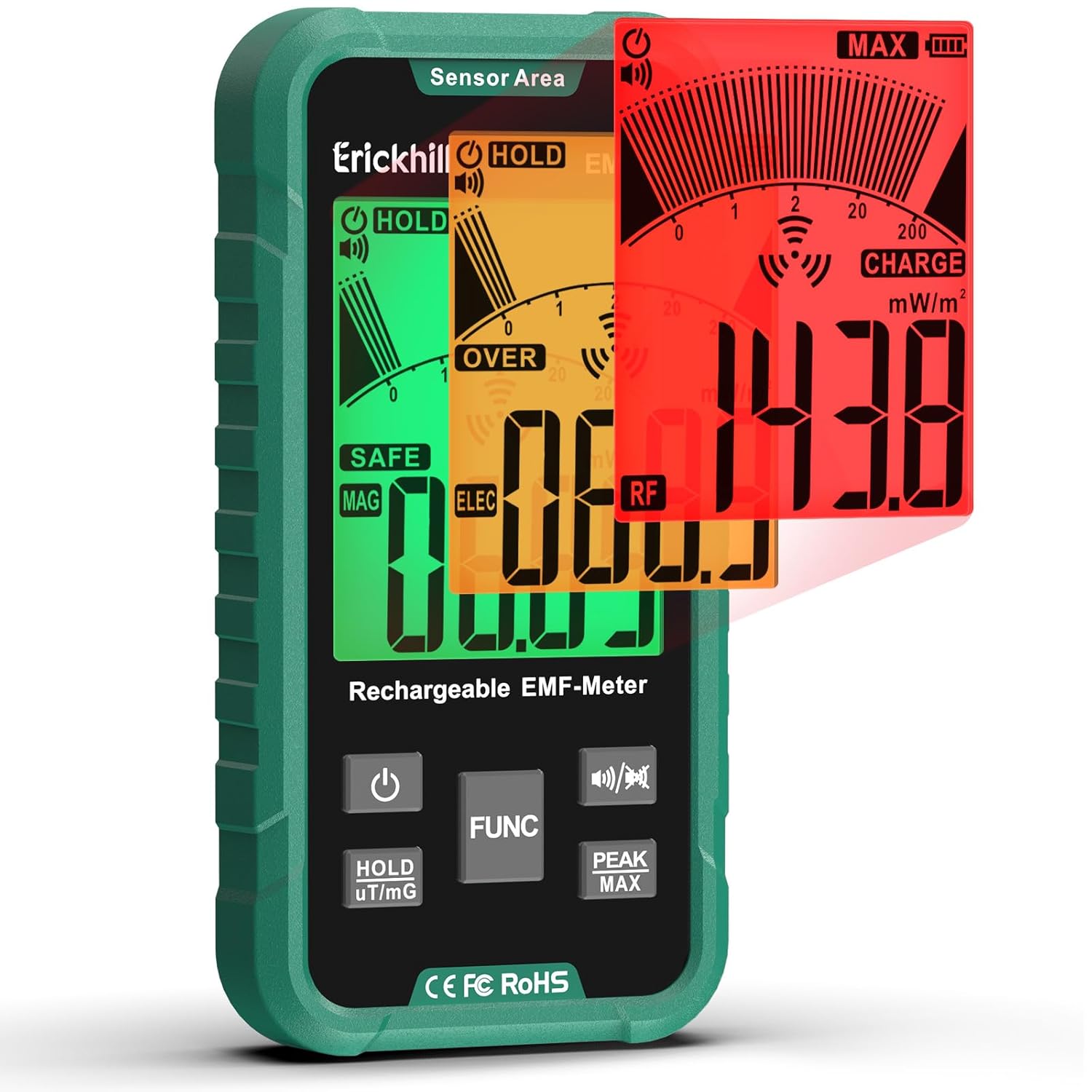
Figure 2: ERICKHILL EMF02 Detector with its multi-color display indicating different radiation levels.

Gambar 3: Leuwihview of the ERICKHILL EMF02's display and button functions.
4. Setélan
4.1 Ngecas Alat
The EMF02 comes with a built-in 1200mAh rechargeable Lithium Polymer battery. Before first use, or when the low battery alert is displayed, charge the device using the provided Type-C charging cable.
- Connect the Type-C end of the charging cable to the charging port on the EMF02.
- Sambungkeun tungtung USB-A tina kabel ngecas ka adaptor kakuatan USB nu cocog (teu kaasup) atawa port USB komputer.
- Indikator batré dina tampilan bakal nembongkeun status ngecas.

Figure 4: The EMF02 detector connected to a Type-C charging cable.
4.2 Powering on / Pareum
- Pikeun ngahurungkeun: Pencét jeung tahan kenop Tombol Daya (⑂) until the display lights up.
- Pikeun mareuman: Pencét jeung tahan tombol Tombol Daya (⑂) until the display turns off. The device also features a 15-minute auto-shutoff to conserve battery.
5. Parentah Operasi
5.1 Switching Measurement Modes (FUNC Button)
The EMF02 can measure Electric Fields (EF), Magnetic Fields (MF), and Radio Frequency (RF). Press the Tombol FUNC pikeun ngaliwat modeu-modeu éta:
- Modeu RF: Detects radiation from mobile phones, Wi-Fi routers, 5G signals, etc. (Units: mW/m²)
- EF Mode: Detects electric fields from household appliances like microwaves, smart meters, TVs. (Units: V/m)
- Modeu MF: Detects magnetic fields from motors, power tools, refrigerators. (Units: µT, mG)

Figure 5: The EMF02 detector highlighting its 3-in-1 detection capabilities and measurement ranges.

Figure 6: Common household appliances and their associated EMF types (MF, RF, EF).
5.2 Interpreting Readings (3-Color Sound-Light Alarm)
The device uses a tri-color backlight and an audible alarm to indicate radiation levels:
- héjo: Safe levels.
- Koneng: Cautionary levels.
- Beureum: High radiation levels. An audible alarm will also activate (if not muted).
Alarm thresholds:
- EF exceeds 40 V/m
- MF exceeds 0.12 µT (or 1.2 mG)
- RF exceeds 10 mW/m²
5.3 MAX and Peak Modes (PEAK MAX Button)
Pencét éta PEAK MAX Button to toggle between MAX and Peak modes:
- Modeu MAX: Displays the current maximum reading since the mode was activated.
- Mode puncak: Captures and holds the highest instantaneous reading.
5.4 Data Hold (HOLD uT/mG Button)
Pencét éta HOLD uT/mG Button to freeze the current reading on the display. Press again to release and resume real-time measurement. This button also allows switching between µT and mG units in MF mode.
5.5 Mute Function (Speaker Button)
Pencét éta Tombol Speaker (🔊/🔇) to toggle the audible alarm on or off. This is useful for silent operation in quiet environments.
5.6 Practical Applications
The EMF02 can be used to test various electronic devices and environments:
- Oven gelombang mikro: Test for EF and RF leakage.
- Wi-Fi Routers: Measure RF emissions.
- Laptop/Komputer: Check for EF and RF radiation.
- Power Lines/Appliances: Detect EF and MF.

Figure 7: Measuring Radio Frequency (RF) emissions from a Wi-Fi router.

Gambar 8: Kelamples of EMF testing, including cell towers, fans, and computers.
Video 1: An official ERICKHILL video demonstrating the EMF Detector's features and usage.
6. Spésifikasi
| Fitur | Rincian |
|---|---|
| Nomer modél | EMF02 |
| Modeu deteksi | Electric Field (EF), Magnetic Field (MF), Radio Frequency (RF) |
| Rentang Medan Listrik | 1 V/m - 2000 V/m |
| Range Médan Magnét | 0.01 µT - 200.0 µT (0.1 mG - 2000 mG) |
| Rentang RF | 0.001 mW/m² - 200.0 mW/m² |
| tampilan | 3.1-inch LCD with 3-color backlight |
| Batré | 1200mAh Lithium Polymer (rechargeable via Type-C) |
| Otomatis-Pareuman | 15 menit (bisa diatur) |
| Diménsi | 7.01 x 3.98 x 2.24 inci |
| Beurat | 10.55 ons |
| Produsén | ERICKHILL |
7. Pangropéa
- Tetep alat beresih jeung garing. Ngagunakeun lemes, damp lawon pikeun beberesih.
- Hindarkeun alat ka suhu ekstrim, kalembaban, atanapi sinar panonpoé langsung.
- Simpen alat dina wadah pelindungna nalika teu dianggo pikeun nyegah karusakan.
- Ensure the battery is charged regularly, especially if stored for long periods, to maintain battery health.
8. Cara ngungkulan
8.1 Alat Henteu Hurungkeun
- Check battery level. Recharge the device if the battery is low or depleted.
- Pastikeun tombol daya dipencet sareng dicekel leres.
8.2 Bacaan teu akurat
- Ensure the sensor area (top of the device) is not obstructed during measurement.
- Verify that the correct measurement mode (EF, MF, RF) is selected for the type of field being tested.
- Avoid strong interference sources nearby that are not the target of measurement.
8.3 No Audible Alarm
- Check if the mute function is activated. Press the Tombol Speaker (🔊/🔇) to toggle the sound on.
- Ensure radiation levels exceed the set alarm thresholds.
9. Garansi jeung Rojongan
ERICKHILL provides the following support for your EMF02 detector:
- Garansi 3 Taun: Ngawengku cacad manufaktur sareng gangguan fungsi dina panggunaan normal.
- 24H Guaranteed Reply: Contact support via the user manual for prompt assistance.
- 30-Day Free Return Policy: For eligible returns within 30 days of purchase.
For further assistance or inquiries, please refer to the contact information provided in your physical user manual or visit the official ERICKHILL websitus.


