1. Bubuka
Thank you for choosing the ASD 12 Inch Smart RGBW Flush Mount Ceiling Light. This fixture combines a stylish minimalist design with efficient, versatile lighting solutions. Featuring multicolor RGBW capabilities, smart app control, and remote operation, it offers a wide range of lighting effects for your space. This manual provides essential information for safe installation, effective operation, and proper maintenance of your new lighting fixture.

Figure 1.1: ASD 12 Inch Smart RGBW Flush Mount Ceiling Light with accessories.
3. Eusi Paket
Pariksa yén sadaya komponén aya sateuacan ngamimitian pamasangan:
- ASD 12 Inch Smart RGBW Flush Mount Ceiling Light Fixture (4 units)
- Kadali jauh
- Pemasangan Hardware (sekrup, mur kawat)
- Instruksi Manual
4. Spésifikasi
| Fitur | Rincian |
|---|
| merek | ASD |
| Ngaran modél | LOFT |
| Nomer Bagian | A-LFM12D20SRGBW-N-4p |
| Warna | 12" | Nickel | RGBW |
| Bahan | Baja Paduan, Akrilik |
| Gaya | Modern |
| Dimensi produk | 11.3 "L x 11.3" W x 3.4" H |
| Mangpaat husus | Pamakéan jero rohangan wungkul |
| Sumber Daya | Kawat kabel |
| Tipe Sumber Cahaya | LED |
| Tipe rengse | Dicét |
| Bahan Teduh | palastik |
| Voltage | 120 volt |
| Wattage | 20 watt |
| Tipe Pamasangan | Flushmount |
| Rata Kahirupan | 50,000 Jam |
| Fitur husus | 1064/1220LM, Remote Control, RGBW, Smart App, CCT Adjustable 2700-6500K |

Gambar 4.1: Diménsi produk sareng fitur konci.
5. Pamasangan
Follow these steps to install your ASD Smart RGBW Flush Mount Ceiling Light:
- Nyiapkeun pikeun Instalasi: Turn off power at the circuit breaker before starting. Ensure the mounting surface is clean and stable.
- Remove the Lens: Gently remove the lens from the fixture by rotating it clockwise. This will expose the mounting holes and wiring connections.
- Pasang Perlengkapan: Attach the fixture's base to the electrical outlet box using the provided screws. Ensure it is securely fastened.
- Sambungan Kawat: Connect the wires: Black to Black (Live), White to White (Neutral), and Ground to Ground. Secure all connections with wire nuts. Carefully tuck all wires back into the outlet box.
- Pasang lensa: Once wiring is complete and secure, attach the lens by aligning it with the fixture and rotating it counter-clockwise until it locks into place.
- Mulangkeun Daya: Hurungkeun deui kakuatan dina circuit breaker.
- Download ASD SMART App: For smart control features, download the "ASD SMART" application from your smartphone's app store. Scan the QR codes below or click the links to download.
Google Play Store (Android)
Apple App Store (ios) - Add Fixture to App: Follow the in-app instructions to add your new ceiling light to the ASD SMART app. This typically involves putting the light into pairing mode and connecting it to your Wi-Fi network.

Figure 5.1: Initial installation steps: removing the lens and wiring.
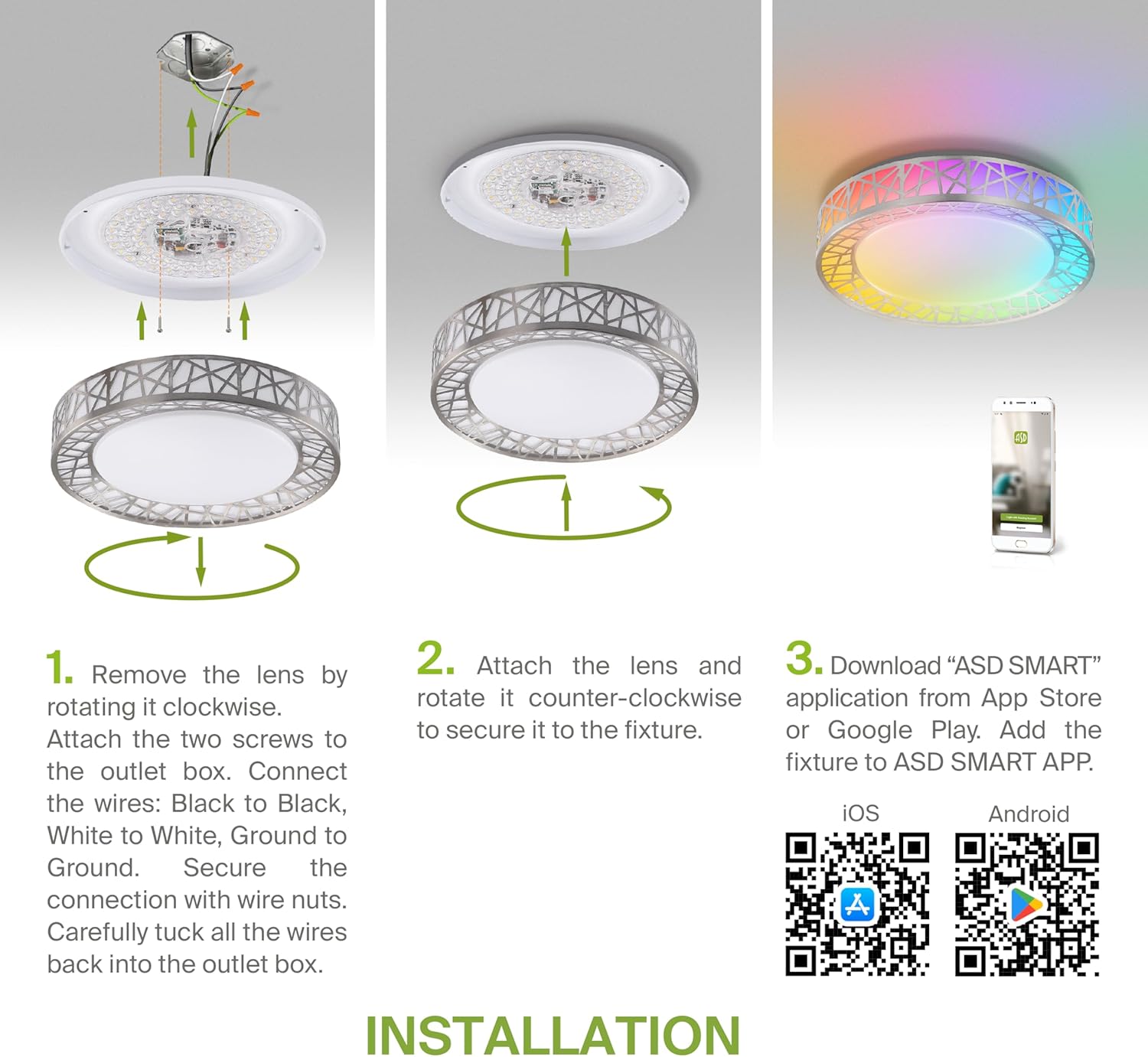
Figure 5.2: Complete installation overview including app download.
6. Parentah Operasi
Your ASD Smart RGBW Flush Mount Ceiling Light offers multiple control methods:
6.1 Jauh Jauh
Remot kontrol anu kalebet ngamungkinkeun fungsi dasar:
- Hurung/Pareuman: Hurungkeun atawa pareuman lampu.
- Dimming: Adjust brightness levels smoothly.
- Penyesuaian CCT: Change color temperature (e.g., from warm white to cool white).
- Pilihan Warna RGB: Cycle through or select specific RGB colors.
6.2 ASD SMART App Control
The ASD SMART app provides full control and advanced features:
- 16.7 Juta Warna: Choose any color from the full RGBW spectrum.
- Smooth Dimming & CCT: Precisely adjust brightness and color temperature (2700K-6500K).
- Pola Pencahayaan: Select pre-set or custom lighting scenes and effects.
- Pangkelompok: Control multiple fixtures simultaneously.
- Jadwal: Set timers for lights to turn on/off or change settings automatically.

Figure 6.1: RGBW color capabilities.

Figure 6.2: Control via remote and smart app.

Figure 6.3: Seamless dimming functionality.
6.3 Kontrol Sora (Alexa & Asisten Google)
The fixture is compatible with Amazon Alexa and Google Assistant for convenient voice commands:
- Ensure your ASD SMART app is linked to your Alexa or Google Home account.
- Use commands such as "Alexa, turn on the living room light" or "Hey Google, set the bedroom light to blue."

Figure 6.4: Compatibility with Alexa and Google Assistant.
7. Pangropéa
To ensure the longevity and optimal performance of your ceiling light:
- beberesih: Cabut daya sateuacan dibersihkeun. Lap perlengkapan nganggo lawon anu lemes sareng garing. Entong nganggo pembersih atanapi pelarut anu abrasif.
- Ngagantian bohlam: This fixture uses integrated LED technology and does not require bulb replacement.
8. Cara ngungkulan
Upami anjeun ngalaman masalah sareng lampu siling anjeun, tingali masalah sareng solusi umum ieu:
| Masalah | Mungkin Cukang lantaranana | Solusi |
|---|
| Lampu teu hurung | Teu aya listrik, kabelna kendor, saklarna rusak | Pariksa circuit breaker. Pastikeun sadaya sambungan kabel aman. Nguji switch témbok. |
| Kadali jauh teu jalan | Dead battery, out of range, interference | Replace remote battery. Ensure you are within range. Remove any obstructions. |
| App cannot connect to light | Incorrect Wi-Fi password, light not in pairing mode, 5GHz Wi-Fi network | Verify Wi-Fi password. Reset light to pairing mode (refer to app instructions). Ensure you are on a 2.4GHz Wi-Fi network. |
| Kadali sora teu ngabales | App not linked to voice assistant, incorrect device name | Check linking in ASD SMART app and voice assistant app. Verify device name in voice assistant app. |
9. Garansi jeung Rojongan
ASD nyadiakeun a 5-taun jaminan kawates for this product, guaranteeing top quality and safety. The fixture is ETL certified, ensuring compliance with North American safety standards.
For technical support, warranty claims, or any questions not covered in this manual, please contact ASD customer service. Refer to the product packaging or the official ASD websitus pikeun inpo kontak.


