Buku Panduan Pangguna Pedal Vibrato Chorus Analog Warm Audio WA-C1
Model: WA-C1
Bubuka
The Warm Audio WA-C1 is an all-analog chorus and vibrato pedal designed to deliver classic modulated tones. This manual provides detailed instructions for setting up, operating, and maintaining your WA-C1 pedal to ensure optimal performance.
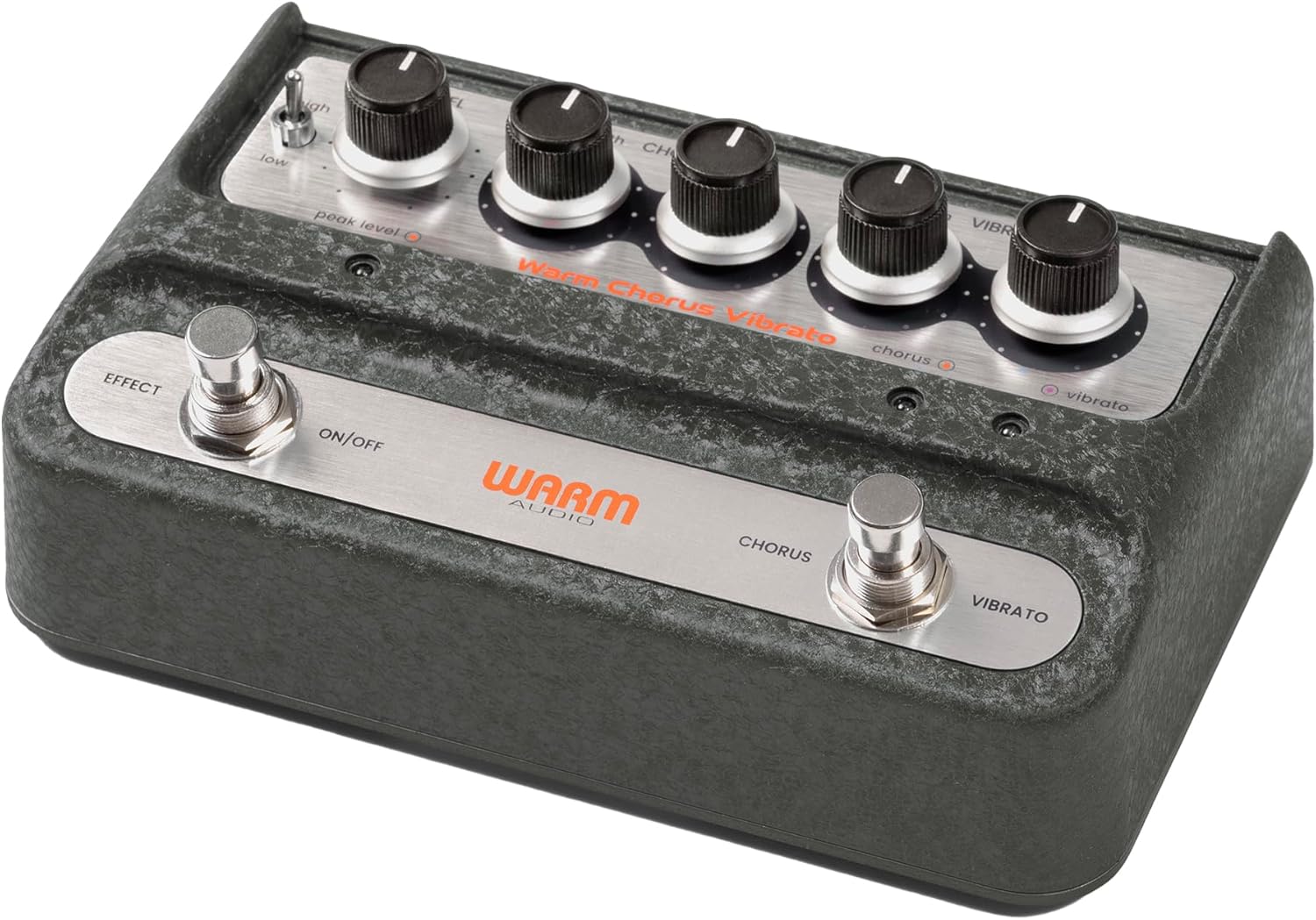
Gambar: Gemblengna view of the Warm Audio WA-C1 Analog Chorus Vibrato pedal.
Parentah Kasalametan penting
- Baca petunjuk ieu sacara saksama sateuacan dianggo.
- Tetep parentah ieu pikeun rujukan hareup.
- Perhatikeun sadaya peringatan dina produk sareng dina manual ieu.
- Entong nganggo alat ieu caket cai.
- Ngabersihan ngan ku kaén garing.
- Ulah meungpeuk sagala bukaan ventilasi. Pasang saluyu sareng parentah produsén.
- Entong dipasang di deukeut sumber panas sapertos radiator, register panas, kompor, atanapi aparat sanésna (kalebet ampLiifiers) anu ngahasilkeun panas.
- Ngan anggo kantétan/aksésori anu ditunjuk ku produsén.
- Cabut colokan alat ieu nalika badai kilat atanapi nalika henteu dianggo kanggo waktos anu lami.
- Rujuk sadayana jasa ka tanaga jasa anu mumpuni. Diperlukeun ngalayanan nalika aparatur ruksak ku cara naon waé, sapertos kabel catu daya atanapi colokan rusak, cairan tumpah atanapi barang murag kana aparatur, aparatur parantos kakeunaan hujan atanapi lembab, henteu beroperasi normal. , atawa geus turun.
Fitur
- Faithful recreation of a classic all-analog chorus/vibrato circuit.
- Premium all-analog preamp for responsive tone.
- Independent Depth and Rate controls for Chorus.
- Authentic Vibrato section.
- Switchable Hi-Z input for optimizing guitar clarity.
- Mono and Stereo output options.
Kontrol sareng Sambungan
Kadali Panel hareup

Gambar: luhur-handap view of the WA-C1 pedal's front panel, showing all control knobs and footswitches.
- TINGKAT Knob: Nyaluyukeun volume kaluaran sakabéh pedal.
- DEPTH (Chorus) Knob: Controls the intensity or sweep range of the chorus effect.
- RATE (Chorus) Knob: Controls the speed of the chorus modulation.
- DEPTH (Vibrato) Knob: Controls the intensity or sweep range of the vibrato effect.
- RATE (Vibrato) Knob: Controls the speed of the vibrato modulation.
- EFFECT ON/OFF Footswitch: Engages or bypasses the entire pedal effect. The associated LED indicates the effect status.
- CHORUS/VIBRATO Footswitch: Toggles between Chorus and Vibrato modes when the effect is active. The associated LEDs indicate the selected mode.
- HIGH/LOW Switch: A two-position switch that adjusts the input gain, allowing for optimal signal handling from various instruments.
- PEAK LEVEL LED: Illuminates to indicate signal clipping or excessive input level. Adjust the HIGH/LOW switch or input signal to prevent clipping.
Sambungan Panel Rear

Gambar: Tukangeun view of the WA-C1 pedal, showing the power input, Hi-Z switch, input jack, and output jacks.
- POWER 9V Input: Connect a standard 9V DC power adapter (center negative, 2.1mm barrel connector). Ensure the power supply meets the pedal's requirements.
- Saklar HI-Z: This switch adjusts the input impedance. Set to 'ON' for higher impedance instruments like guitars to enhance clarity in the high-end. Set to 'OFF' for lower impedance sources like keyboards.
- INPUT Jack: Connect your instrument (guitar, keyboard, etc.) to this 1/4-inch mono input.
- STEREO OUTPUT Jack: Use this 1/4-inch output for a stereo signal path, typically connecting to two amplifiers or a stereo effects loop.
- MONO OUTPUT Jack: Use this 1/4-inch output for a mono signal path, connecting to a single amplifier or the next pedal in your chain.
Disetél
- Sambungan Daya: Connect a compatible 9V DC (center negative) power adapter to the POWER 9V input on the rear panel. Do not use an incompatible power supply.
- Sambungan Instrumen: Connect your instrument to the INPUT jack on the rear panel using a standard 1/4-inch instrument cable.
- Sambungan Kaluaran:
- For mono operation, connect the MONO OUTPUT jack to your amplifier atawa pedal salajengna dina ranté sinyal anjeun.
- For stereo operation, connect both the MONO OUTPUT and STEREO OUTPUT jacks to two separate amplampu latar atawa alat input stereo.
- Saklar Hi-Z: If using a guitar, set the HI-Z switch to 'ON' for optimal high-end clarity. For other instruments like keyboards, set it to 'OFF'.
- Setélan Awal: Start with all DEPTH and RATE knobs at their minimum (fully counter-clockwise) and the LEVEL knob at noon (12 o'clock) for initial sound adjustments.
Parentah Operasi
- Ningkatkeun Pangaruh: Press the EFFECT ON/OFF footswitch to activate the pedal. The corresponding LED will illuminate.
- Pilihan Mode: With the effect active, press the CHORUS/VIBRATO footswitch to toggle between Chorus and Vibrato modes. The respective LED will indicate the active mode.
- Adjusting Chorus: In Chorus mode, use the DEPTH (Chorus) and RATE (Chorus) knobs to dial in your desired modulation intensity and speed.
- Adjusting Vibrato: In Vibrato mode, use the DEPTH (Vibrato) and RATE (Vibrato) knobs to dial in your desired modulation intensity and speed.
- Tingkat Kaluaran: Use the LEVEL knob to adjust the overall output volume of the pedal. Ensure it matches or slightly boosts your bypassed signal level.
- Keuntungan Input: If your instrument's signal is too hot or too weak, use the HIGH/LOW switch to optimize the input gain. Monitor the PEAK LEVEL LED to avoid clipping.
Pangropéa
- beberesih: Clean the pedal's exterior with a soft, dry cloth. Do not use liquid cleaners or solvents.
- Panyimpenan: Simpen pedal di tempat anu garing sareng tiis, jauh tina sinar panonpoé langsung sareng suhu anu ekstrim.
- Sasayogian tanaga: Always use the correct 9V DC (center negative) power supply. Incorrect power can damage the unit and void the warranty.
- Footswitches and Jacks: Periodically check connections for any loose cables or debris.
Pamérésan masalah
| Masalah | Mungkin Cukang lantaranana | Solusi |
|---|---|---|
| Teu aya sora nalika pedal dipencet. |
|
|
| Effect is too subtle or too intense. |
|
|
| Distortion or unwanted noise. |
|
|
spésifikasi
- model: WA-C1
- Jenis Pangaruh: Analog Chorus / Vibrato
- Format Sinyal: Analog
- Sarat kakuatan: 9V DC, Center Negative (Power adapter not included)
- Input: 1/4-inch Mono Jack
- Kaluaran: 1/4-inch Mono Jack, 1/4-inch Stereo Jack
- Kadali: Level, Chorus Depth, Chorus Rate, Vibrato Depth, Vibrato Rate, High/Low Switch, Hi-Z Switch
- ukuran: Kira-kira 8 x 5.25 x 4 inci (Ukuran Paket)
- beurat: Kira-kira 2 pon (Beurat Barang)
Garansi sareng Rojongan
Warm Audio products are designed for reliability and performance. For warranty information and technical support, please refer to the official Warm Audio websitus atanapi ngahubungan dealer otorisasi Anjeun. Simpen resi pameseran anjeun salaku bukti pameseran pikeun klaim garansi.
Pikeun pitulung salajengna, mangga buka: www.warmaudio.com/support


