1. Bubuka
Welcome to the user manual for your new ASUS Zen AIO 23.8" FHD Touchscreen Desktop Computer. This manual provides essential information for setting up, operating, maintaining, and troubleshooting your device. Please read this manual thoroughly to ensure proper use and to maximize the performance and longevity of your computer.
The ASUS Zen AIO is an all-in-one desktop solution designed for efficiency and user experience, featuring a 23.8-inch Full HD touchscreen display, an AMD Ryzen 7 5825U processor, 16GB DDR4 RAM, and a 512GB PCIe NVMe M.2 SSD, running on Windows 11 Pro.
2. Produk Langkungview
2.1. Eusi Paket
- ASUS Zen AIO Desktop Computer
- Kibor nirkabel
- Mouse nirkabel
- Adaptor kakuatan
- Manual pangguna (dokumén ieu)
2.2. Idéntifikasi komponén
Familiarize yourself with the various components and ports of your ASUS Zen AIO.

Gambar 2.1: Hareupeun View. The ASUS Zen AIO features a 23.8-inch Full HD touchscreen display with a narrow bezel, and a speaker bar integrated below the screen. The webcam is located at the top center of the display.
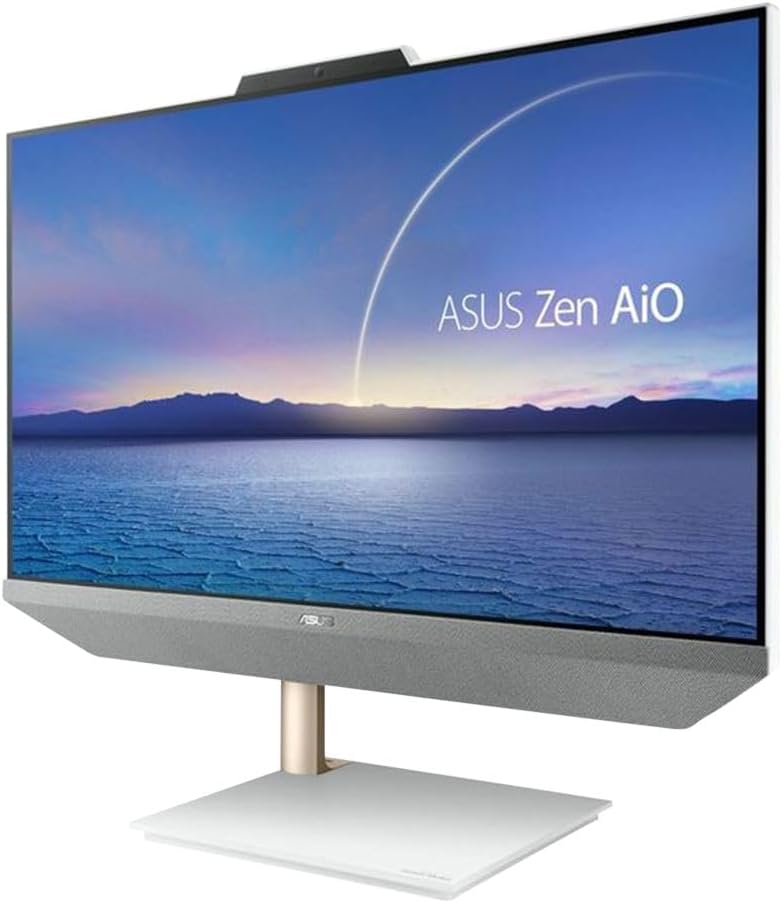
Gambar 2.2: Angled View. This image shows the ASUS Zen AIO from an angled perspective, highlighting the slim profile and the elegant stand design.

Gambar 2.3: Sisi View kalawan Ports. The side of the ASUS Zen AIO features various connectivity options for peripherals and external devices.

Gambar 2.4: Balik View. The rear of the ASUS Zen AIO shows the ASUS logo and the main port cluster for power and additional connections.

Figure 2.5: Included Peripherals. The ASUS Zen AIO comes with a matching wireless keyboard and mouse for immediate use.
2.3. Tampilan sareng Fitur Audio

Figure 2.6: Display Features. The 23.8-inch Full HD (1920x1080) WVA Anti-Glare Touch Screen offers a 93% screen-to-body ratio, 100% sRGB color gamut, IPS-level wide-view technology, and a 7.7 mm thin bezel for an immersive visual experience. It supports 10-point multi-touch input.

Figure 2.7: Audio Features. The ASUS Zen AIO is equipped with array microphones for clear voice input and Harman/Kardon certified upward-facing speakers with a 300cc chamber for rich audio output.
3. Setélan
3.1. Unpacking na panempatan
- Carefully remove the ASUS Zen AIO and its accessories from the packaging.
- Place the computer on a stable, flat surface with adequate ventilation. Ensure there is enough space around the device for heat dissipation.
- Avoid placing the computer in direct sunlight or near heat sources.
3.2. Nyambungkeun Power
- Connect the power adapter to the power input port on the back of the ASUS Zen AIO.
- Colokkeun kabel listrik kana stop kontak listrik grounded.
3.3. Nyambungkeun périferal
- Kibor jeung Beurit Nirkabel: The included keyboard and mouse are pre-paired. Insert the USB receiver (usually found in the mouse or keyboard battery compartment) into an available USB port on the computer. Ensure batteries are installed in both devices.
- Alat éksternal: Connect any other external devices (e.g., external hard drives, printers) to the appropriate USB ports.
- Sambungan jaringan: For a wired network connection, connect an Ethernet cable from your router or modem to the LAN RJ-45 port on the back of the computer. For Wi-Fi, the device supports Wi-Fi 6 (802.11ax) and will guide you through setup during the initial Windows configuration.
3.4. Mimiti Power On jeung Windows Setup
- Pencét tombol daya, biasana ayana di sisi atanapi tukang layar.
- Follow the on-screen instructions to complete the Windows 11 Pro setup process. This includes selecting your region, connecting to a network, creating a user account, and configuring privacy settings.
4. Parentah Operasi
4.1. Ngagunakeun Layar rampa
- Ketok: Sarua jeung hiji klik mouse.
- Ketok dua kali: Sarua jeung klik dua kali.
- Pencét jeung tahan: Sarua jeung hiji-klik katuhu.
- Gesek: Move your finger across the screen to scroll or navigate.
- Ciwit-pikeun-zum: Pake dua ramo pikeun ngazum gede atawa leutik eusi.
4.2. Windows 11 Pro Basics
- Mimitian Menu: Access applications, settings, and power options from the Start button on the taskbar.
- Taskbar: Pin frequently used applications for quick access.
- Pusat Aksi: Access quick settings and notifications by clicking the icons on the far right of the taskbar.
- Multitasking: Use Snap Layouts to organize multiple windows on your screen efficiently.
4.3. Manajemén kakuatan
- Pareuman: Go to Start > Power > Shut down.
- Uihan deui: Buka Mimitian > Daya > Mimitian Deui.
- Saré: Go to Start > Power > Sleep.
5. Pangropéa
5.1. Ngabersihan Alat
- layar: Make kaen nu lemes, teu aya lint rada dampened with water or a screen cleaner specifically designed for LCD/LED displays. Do not spray cleaner directly onto the screen.
- Sasis: Wipe the exterior surfaces with a soft, dry cloth. Avoid abrasive cleaners or solvents.
- Ventilasi: Periodically check and clean the ventilation openings to prevent dust buildup, which can affect performance and lead to overheating. Use compressed air if necessary.
5.2. Apdet parangkat lunak
Regularly update your Windows operating system and drivers to ensure optimal performance, security, and compatibility.
- Pembaruan Windows: Go to Start > Settings > Windows Update.
- Pembaruan supir: Kunjungi dukungan resmi ASUS website for the latest drivers for your Zen AIO model.
6. Cara ngungkulan
This section addresses common issues you might encounter with your ASUS Zen AIO.
6.1. Taya Daya
- Ensure the power adapter is securely connected to both the computer and a working electrical outlet.
- Nguji stop kontak jeung alat sejen pikeun mastikeun eta boga kakuatan.
- Pariksa adaptor kakuatan pikeun karusakan anu katingali.
6.2. Isu tampilan
- Upami layar kosong, pastikeun komputer hurung sareng sanés dina modeu sare.
- Adjust the display brightness settings in Windows.
- If using an external monitor, ensure the correct input source is selected on the external monitor.
6.3. Peripheral Not Responding
- Wireless Keyboard/Mouse: Check battery levels and ensure the USB receiver is properly inserted into a functional USB port. Try a different USB port.
- Alat USB anu sanés: Try connecting the device to a different USB port. Restart the computer.
6.4. Performance Lalaunan
- Tutup aplikasi anu teu perlu jalan di latar tukang.
- Pastikeun Windows sareng supirna parantos diropéa.
- Pariksa malware atawa virus ngagunakeun software antipirus reputable.
- Pastikeun rohangan kosong anu cekap dina SSD.
7. Spésifikasi
Below are the detailed technical specifications for the ASUS Zen AIO Desktop Computer.
| Fitur | Spésifikasi |
|---|---|
| Ngaran modél | Zen AIO |
| Sistem operasi | Windows 11 Pro |
| CPU | AMD Ryzen 7 5825U (2.0GHz, Up to 4.5GHz), Eight-Core, 16 Threads |
| Grafika | AMD Radeon Grafika |
| Ram | 16GB DDR4 |
| Panyimpenan | 512GB PCIe 3.0 x4 NVMe M.2 SSD |
| tampilan | 23.8" Full HD (1920x1080) WVA Anti-Glare Touch Screen |
| Webkaméra | 720 p |
| Audio | Built-in Speaker, Built-in Microphone (Array Microphones), Harman/Kardon certified |
| LAN | Gigabit LAN (10/100/1000Mbps) |
| WLAN | 2x2 Wi-Fi 6 802.11ax |
| Bluetooth | Bluetooth 5.2 |
| Ports (Back Panel) |
|
| Sasayogian tanaga | 90 Watt External Adapter |
| Ukuran (L x W x H) | 21.30 x 17.83 x 0.55 inci |
| Beurat | 15.43 pon |
8. Garansi jeung Rojongan
Your ASUS Zen AIO Desktop Computer comes with a standard manufacturer's warranty. Please refer to the warranty card included in your package for specific terms and conditions, including warranty period and coverage details.
Kanggo dukungan téknis, unduhan driver, FAQ, sareng bantosan salajengna, mangga buka dukungan resmi ASUS. websitus: www.asus.com/support/.
When contacting support, please have your product model (Zen AIO) and serial number ready. The serial number is typically located on a sticker on the back or bottom of the device.


