1. Bubuka
This manual provides instructions for the operation and maintenance of your RUIZU X02 Ultra Slim MP3 Music Player. Please read this manual thoroughly before using the device to ensure proper functionality and to maximize your user experience. The RUIZU X02 is a portable digital music player designed for audio playback, FM radio, voice recording, video viewing, and text reading.
2. Eusi Paket
Pastikeun yén sadaya item anu didaptarkeun di handap aya dina pakét anjeun:
- RUIZU X02 MP3 Player
- Manual pamaké
- Earphone
- USB Ngecas / Kabel Data
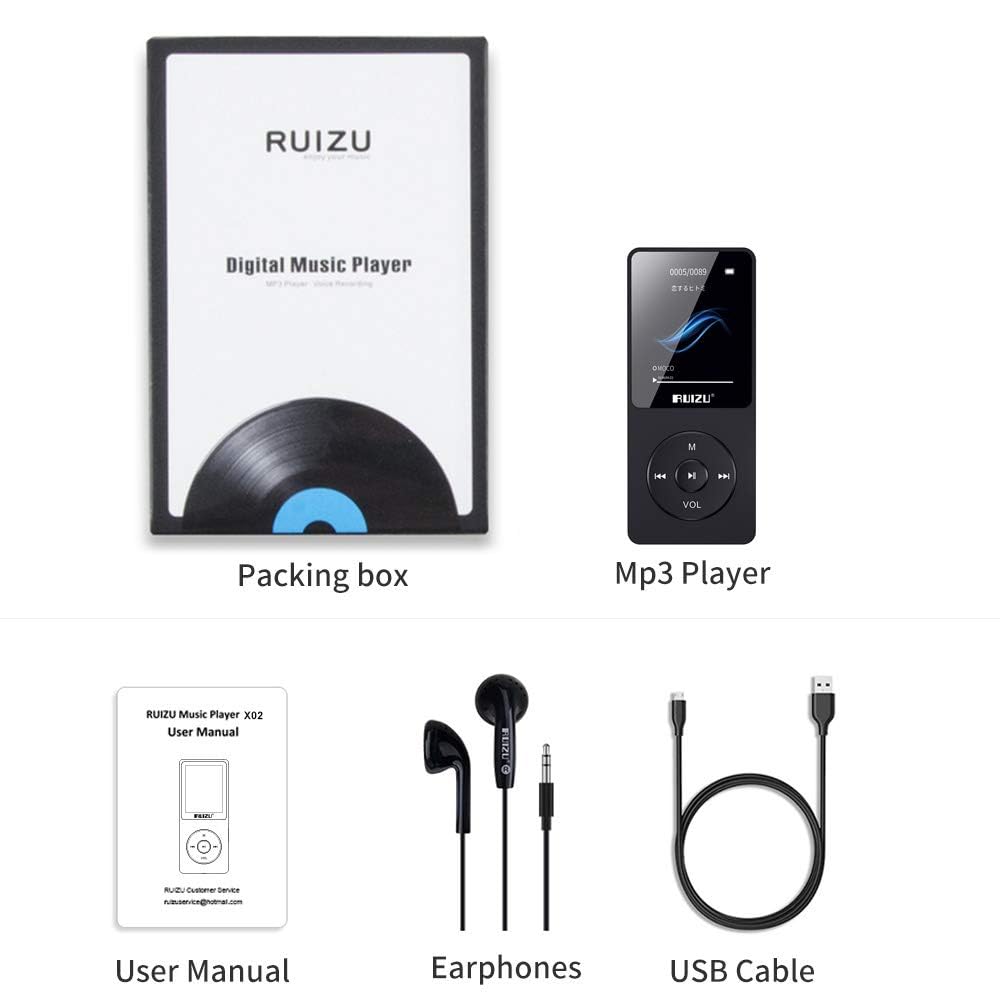
Image: Contents of the RUIZU X02 MP3 Player package, showing the player, user manual, earphones, and a USB cable.
3. Produk Langkungview
The RUIZU X02 is an ultra-slim and lightweight device, weighing approximately 30g, designed for portability.

Image: The RUIZU X02 MP3 Player held in a hand, illustrating its compact and lightweight design.
Tata perenah alat
Familiarize yourself with the buttons and ports on your device:
- Layar tampilan: Shows menus, playback information, and other content.
- Tombol M: Menu/Return button.
- Tombol Puter/Reureuh: Center button for playback control and selection.
- Tombol Saméméhna/Mundurkeun: Navigate backward or rewind during playback.
- Tombol Salajengna/Maju Gancang: Navigate forward or fast forward during playback.
- Tombol VOL: Kontrol volume.
- Jack headphone: Port 3.5mm pikeun earphone.
- Port USB: Pikeun ngecas sareng mindahkeun data.
- Saklar kakuatan: ON/OFF slider.
- Slot Kartu SD Mikro: Pikeun panyimpenan anu tiasa dilegaan.
4. Setélan
4.1 Ngecas Alat
Before first use, fully charge the MP3 player. A full charge typically takes 2-3 hours.
- Connect the small end of the USB cable to the player's USB port.
- Sambungkeun tungtung kabel USB anu ageung kana adaptor daya USB (henteu kalebet) atanapi port USB komputer.
- Indikator batré dina layar bakal nembongkeun status ngecas.
- Saatos dicas pinuh, pegatkeun sambungan kabel USB.
The device offers up to 80 hours of playback on a single charge.

Image: The RUIZU X02 MP3 Player screen indicating extended battery life of up to 80 hours.
4.2 Daya Hurung/Pareuman
- Pikeun ngahurungkeun, geser saklar daya ka posisi "ON".
- Pikeun mareuman, geser saklar daya ka posisi "OFF".
4.3 Nyelapkeun Kartu Micro SD
The RUIZU X02 has 8GB of built-in memory and supports expandable storage up to 128GB via a Micro SD card.
- Pilari slot kartu Micro SD di sisi pamuter.
- Lebetkeun kartu Micro SD kana slotna lalaunan dugi ka ngaklik kana tempatna. Pastikeun kartuna diposisikeun kalayan leres.
- Pikeun nyabutna, pencét kartu sacara lalaunan ka jero dugi ka kaluar.

Image: The RUIZU X02 MP3 Player shown with a Micro SD card, indicating its expandable storage capability.
5. Operasi dasar
5.1 Napigasi
- Ngagunakeun éta saméméhna jeung Teras tombol pikeun ngagulung pilihan menu.
- Pencét éta Play / Reureuh button (center) to select an option or confirm an action.
- Pencét éta M button to go back to the previous menu or to access context-sensitive options during playback.
5.2 Puterkeun Musik
- Tina ménu utama, pilih "Musik".
- Browse your music by Artist, Album, Songs, or Playlists.
- Pilih lagu teras pencét Play / Reureuh tombol pikeun ngamimitian playback.
- Salila playback:
- Pencét Play / Reureuh pikeun ngareureuhkeun atawa neruskeun.
- Pencét saméméhna or Teras pikeun skip lagu.
- Pencét lila saméméhna or Teras pikeun mundur atawa maju gancang.
The RUIZU X02 supports multiple audio formats including MP3, WMA, APE, WAV, and FLAC.
5.3 Volume adjustment
Pikeun nyaluyukeun polumeu:
- Pencét panjang VOL button to activate volume adjustment mode.
- While in volume adjustment mode, press the saméméhna button to decrease volume or the Teras tombol pikeun ngaronjatkeun polumeu.
5.4 Konci layar / muka konci
To prevent accidental button presses:
- Pencét panjang M button to lock or unlock the screen.
5.5 Resume Playback
The player is designed to resume music playback from where it was last stopped, even after being turned off and on again.

Image: Visual guide for screen lock/unlock (long press M), resuming playback (automatic), and volume adjustment (long press VOL then use Previous/Next).
6. Fitur canggih
6.1 Radio FM
The RUIZU X02 includes a built-in FM radio tuner.
- Ensure earphones are connected, as they act as the antenna.
- Tina ménu utama, pilih "Radio FM".
- Use the menu options to auto-scan for stations or manually tune.
- Pencét saméméhna or Teras to switch between saved stations or adjust frequency.

Image: The RUIZU X02 MP3 Player screen showing the FM Radio interface with frequency indicators.
6.2 Recorder sora
Rekam audio nganggo mikropon anu tos dipasang.
- From the main menu, select "Recorder".
- Choose "Start Voice Recording" to begin.
- Pencét Play / Reureuh to pause/resume recording.
- Pencét M to save the recording and exit.
6.3 Puterkeun Pidéo
The device supports video playback. Ensure video files are in a compatible format (e.g., AMV) and resolution for the 1.8-inch LCD screen.
- Tina ménu utama, pilih "Pidéo".
- Browse and select your video file.
- Pencét Play / Reureuh pikeun ngamimitian playback.
6.4 Text Reading
View téks files (e.g., TXT format) on the device.
- From the main menu, select "E-book" or "Text".
- Browse and select your text file.
- Use the navigation buttons to scroll through the text.
7. Nyambungkeun ka Komputer
To transfer music, videos, text files, or other data to your RUIZU X02:
- Pastikeun pamuter diaktipkeun.
- Sambungkeun pamuter ka komputer anjeun nganggo kabel USB anu disayogikeun.
- Pamuter éta bakal némbongan salaku drive disk anu tiasa dicabut dina komputer anjeun.
- Séred jeung leupaskeun files into the appropriate folders on the player (e.g., "Music" for audio files).
- sakali file transfer is complete, safely eject the removable disk from your computer before disconnecting the USB cable.
8. Pangropéa
- beberesih: Anggo kaén anu lemes sareng garing pikeun ngabersihan alat. Hindarkeun pembersih cair atanapi bahan abrasive.
- Panyimpenan: Nyimpen pamuter dina tiis, tempat garing jauh ti sinar panonpoé langsung jeung hawa ekstrim.
- Perawatan batré: Pikeun manjangkeun umur batre, ulah miceun batre pinuh. Ngeusi batre alat sacara rutin, sanajan henteu dianggo kanggo waktos anu lami.
- Paparan cai: Alat ieu henteu tahan cai. Hindarkeun kakeunaan cai atanapi kalembaban anu luhur.
9. Cara ngungkulan
| Masalah | Solusi |
|---|---|
| Alat teu hurung. | Ensure the battery is charged. Connect to a power source and try again. Check the power switch is in the "ON" position. |
| Teu bisa mindahkeun files ka pamaén. | Ensure the USB cable is securely connected to both the player and the computer. Try a different USB port or cable. Ensure the player is recognized as a removable disk. |
| Taya sora tina earphone. | Check if earphones are properly plugged in. Ensure volume is not set to zero or muted. Try a different pair of earphones to rule out faulty earphones. |
| Layar henteu ngaréspon atanapi beku. | Try turning the device off and then on again using the power switch. If unresponsive, allow the battery to fully discharge and then recharge. |
| Radio FM teu jalan. | Ensure earphones are plugged in, as they serve as the antenna. Try auto-scanning for stations again. |
10. Spésifikasi
- model: X02
- Pabrikan: RUIZU
- ukuran: 0.79 x 3.71 x 8.99 cm
- beurat: Kira-kira 30 g
- tampilan: 1.8 inci LCD
- Panyimpenan internal: 8 GB
- Panyimpenan anu tiasa dilegakeun: Nepi ka 128 GB via kartu Micro SD
- Batré: 420mAh Litium Polimér
- Waktu Playback: Up to 80 hours (audio)
- Waktu Ngecas: 2-3 jam
- Format Audio anu Dirojong: MP3, WMA, APE, WAV, FLAC, M4A, DRM, ACELP, OGG
- Fitur husus: FM Radio, Voice Recorder, Video Playback, Text Reading
- Konektipitas: USB (Note: Does not support Bluetooth function)
11. Garansi jeung Rojongan
Produk ieu dilengkepan ku garansi 7 dinten ti tanggal pameseran. Mangga simpen bukti pameseran anjeun kanggo klaim garansi.
For technical support or warranty inquiries, please refer to the contact information provided with your purchase documentation or visit the official RUIZU support websitus.


