1. Bubuka
Thank you for choosing the KEJOG Mini Projector. This manual provides essential information for the safe and efficient operation of your device. Please read it thoroughly before use and retain it for future reference.
The KEJOG Mini Projector features native 1080P resolution with 4K compatibility, electric focus, a 180-degree adjustable stand, and Bluetooth connectivity, offering a versatile entertainment experience.
2. Émbaran Kasalametan
- Kasalametan listrik: Ensure the power supply matches the projector's requirements. Do not expose the projector to rain or moisture. Avoid using damaged power cords or plugs.
- Ventilasi: Ulah ngahalangan liang ventilasi. Pastikeun aya rohangan anu cekap di sakitar proyéktor pikeun aliran hawa anu leres pikeun nyegah panas teuing.
- Penanganan: Handle the projector with care. Avoid dropping or subjecting it to strong impacts. Do not look directly into the lens when the projector is operating, as the bright light can cause eye strain.
- beberesih: Cabut daya sateuacan dibersihkeun. Anggo lawon anu lemes sareng garing pikeun ngabersihkeun bagian luarna. Pikeun lénsa, anggo lawon khusus pikeun ngabersihkeun lénsa.
- Lingkungan Operasi: Operate the projector in a clean, dust-free environment. Avoid extreme temperatures.
3. Eusi Paket
Pastikeun yén sadaya item anu didaptarkeun di handap kalebet kana pakét anjeun:
- Proyektor Mini KEJOG
- Kadali jauh
- Kabel listrik
- Kabel HDMI
- Manual pamaké
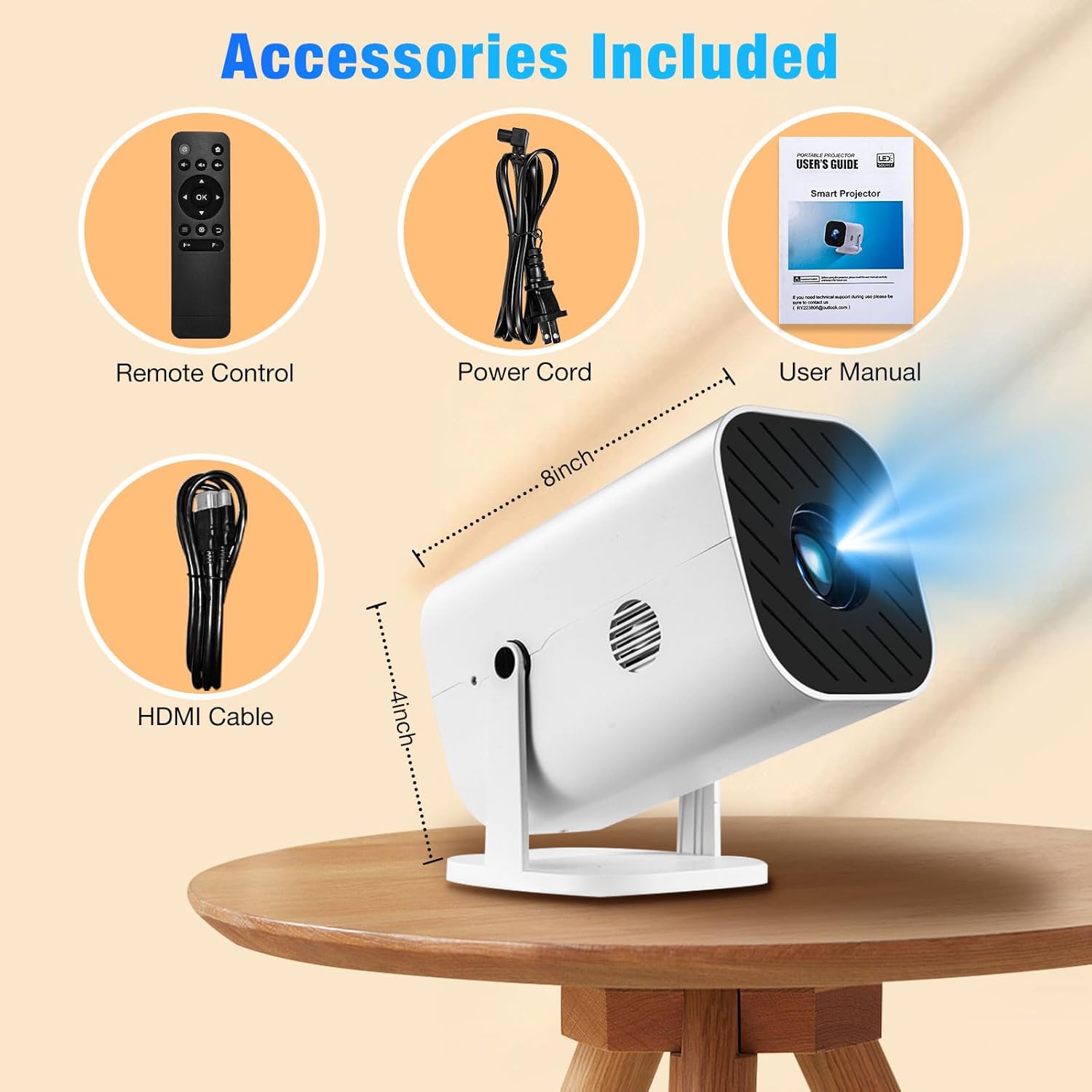
This image displays all items included in the KEJOG Mini Projector package: the projector unit, a remote control, a power cord, an HDMI cable, and the user manual. The dimensions of the projector (approximately 8 inches long and 4 inches high) are also indicated.
4. Produk Langkungview
The KEJOG Mini Projector is designed for portability and ease of use, featuring a compact form factor and versatile projection capabilities.

This image displays the KEJOG Mini Projector from a front-side angle, showcasing its compact design and the lens. In the background, a projected image of a dolphin illustrates the projector's capabilities, with feature callouts for 4K support, Bluetooth 5.3, Electric Focus, and 8500 Lumens.
Fitur konci:
- Fokus listrik: Adjust image clarity with the remote control.
- Pangadeg anu tiasa disaluyukeun 180°: Project onto walls, ceilings, or floors from various angles.
- Speaker Diwangun-di: Nyayogikeun kaluaran audio anu terintegrasi.
- Bluetooth 5.2: Connect external audio devices wirelessly.
- Native 1080P, 4K Compatible: Delivers high-resolution visuals.
- Konektipitas Wide: HDMI, USB, and 3.5mm audio jack for various devices.
5. Setélan
5.1 Nempatkeun
Position the projector on a stable, flat surface. Utilize the 180° adjustable stand to direct the projection onto your desired surface (wall, ceiling, or floor). The optimal projection distance ranges from 4.9ft to 18.4ft, allowing for screen sizes between 47 inches and 200 inches.

This image showcases the KEJOG Mini Projector's integrated 180-degree adjustable bracket. It illustrates how the projector can be tilted to various angles (0°, 45°, 90°, 135°, 180°) for multi-angle projection on walls, ceilings, or floors, emphasizing its compact and portable design.
5.2 Sambungan Daya
- Sambungkeun kabel daya anu disayogikeun kana port input daya proyektor.
- Colokkeun tungtung kabel listrik anu sanésna kana stop kontak listrik standar.
5.3 Nyambungkeun Alat
Proyektor ngadukung sababaraha sumber input:
- HDMI: Connect devices such as laptops, gaming consoles (PS5, Switch), TV sticks, DVD players, and set-top boxes using the included HDMI cable.
- USB: Selapkeun drive USB pikeun muterkeun média files langsung.
- Kaluaran Audio (Jack 3.5mm): Sambungkeun speaker éksternal atawa headphone pikeun audio ditingkatkeun.
- Smartphone Wired Connection: For Android phones and iPhones, an HDMI adapter cable (not included) is required to mirror your device's screen.

This image details the wide range of connectivity options for the KEJOG Mini Projector. It highlights Audio output (for speakers/headsets), HDMI input (for iPhones/Android, Tablets/Laptops, PS5, TV Sticks), and USB input (for USB disks). Popular streaming service logos are also displayed, indicating compatibility.

This image illustrates how to connect a smartphone to the KEJOG Mini Projector using an HDMI adapter cable (not included). A gaming scene is projected onto a wall, while the phone's screen mirrors the content, demonstrating wired connectivity for mobile devices.
6. Parentah Operasi
6.1 Daya Hurung/Pareuman
Pencét tombol daya dina proyektor atawa kadali jauh pikeun ngahurungkeun atawa mareuman alat.
6.2 Electric Focus Adjustment
To achieve a clear image, use the 'F+' and 'F-' buttons on the remote control to adjust the electric focus. This allows for precise image sharpening without manual lens manipulation.

This image demonstrates the electric focus function of the KEJOG Mini Projector. A hand holds the remote control, pointing to the F+/F- buttons used for focus adjustment. A clear image of a butterfly is projected, indicating successful focusing, contrasting with manual adjustment methods.
6.3 Bluetooth Pairing (Audio Devices Only)
The projector's Bluetooth 5.2 allows connection to external audio devices like speakers or headphones. Navigate to the Bluetooth settings in the projector's menu, enable Bluetooth, and select your desired audio device to pair. Note: Bluetooth is for audio output only and does not support video mirroring from smartphones.
6.4 Pilihan Sumber Input
Use the 'Source' button on the remote control or projector to cycle through available input options (HDMI, USB, etc.) and select the one corresponding to your connected device.
7. Spésifikasi

This image compares the visual output of the KEJOG Mini Projector ('Ours') with another projector ('Other'), demonstrating superior color vibrancy and clarity. The projector itself is shown with its lens assembly, emphasizing its optical components. Key features like 4K support, 50000 Lumens, and 10000:1 contrast ratio are highlighted.
| Fitur | Spésifikasi |
|---|---|
| merek | KEJOG |
| Dianjurkeun Mangpaat | bisnis, atikan, kaulinan, Bioskop imah |
| Fitur husus | Built-In Speaker, Lightweight, Portable, Electric Focus, 180° Adjustable Stand |
| Téhnologi konektipitas | Jack 3.5mm, Bluetooth, HDMI, USB |
| Resolusi tampilan | 1920 x 1080 (Native 1080P, Compatible 4K) |
| Ukuran proyéksi | 47" - 200" |
| Jarak proyéksi | 4.9 kaki - 18.4 kaki |
| Vérsi Bluetooth | 5.2 |
8. Cara ngungkulan
If you encounter issues with your KEJOG Mini Projector, refer to the following common problems and solutions:
- Henteu aya kakuatan:
- Pastikeun kabel daya disambungkeun pageuh kana proyéktor sareng stop kontak.
- Pariksa naha stop kontak listrik fungsina.
- Teu aya gambar:
- Verify that the correct input source is selected (HDMI, USB).
- Check the connection cable (HDMI, USB) for damage or loose connections.
- Pastikeun alat anu nyambung dihurungkeun sareng ngaluarkeun sinyal.
- Gambar kabur:
- Use the 'F+' and 'F-' buttons on the remote control to adjust the electric focus.
- Pastikeun beungeut proyéksi datar tur projector stabil.
- Henteu aya sora:
- Pariksa setelan polumeu boh dina projector jeung alat nu disambungkeun.
- If using Bluetooth, ensure the external audio device is properly paired and its volume is up.
- Upami nganggo HDMI, pastikeun kaluaran audio parantos dikonfigurasi kalayan leres dina alat sumber.
- Masalah Sambungan Bluetooth:
- Ensure the Bluetooth audio device is in pairing mode and within range.
- Restart both the projector and the Bluetooth device.
- Remember, Bluetooth is for audio devices only, not for video mirroring from smartphones.
9. Pangropéa
9.1 Ngabersihan Lensa
Use a soft, lint-free lens cleaning cloth to gently wipe the projector lens. Avoid using abrasive materials or chemical cleaners that could damage the lens coating.
9.2 Ngabersihan Vent
Periodically clean the projector's ventilation openings with a soft brush or compressed air to prevent dust buildup, which can impede airflow and lead to overheating.
9.3 Panyimpenan
When not in use, store the projector in a cool, dry, and dust-free environment. If storing for an extended period, consider placing it in its original packaging or a protective case.
10. Garansi jeung Rojongan
Your KEJOG Mini Projector comes with a 3-year warranty service. For technical assistance or warranty claims, please contact our 24/7 technical support team. Refer to the contact information provided in your purchase documentation or on the official KEJOG websitus.


