1. Bubuka
Thank you for choosing the Sunvivi ZBM001 2.2LB Bread Maker Machine. This appliance is designed to simplify your bread-making process, offering a variety of programs for different types of bread and other culinary creations. Please read this manual thoroughly before operating the machine to ensure safe and efficient use. Keep this manual for future reference.

Gambar 1.1: The Sunvivi ZBM001 Bread Maker Machine. This image displays the blue bread maker with its sleek black top panel, alongside two freshly baked loaves of bread and a small bowl of jam with blueberries and mint leaves.
2. Parentah Kasalametan penting
Nalika nganggo alat listrik, pancegahan kaamanan dasar kedah diturutan, kalebet ieu:
- Baca sagala parentah.
- Ulah noél surfaces panas. Paké handles atanapi knobs.
- Pikeun ngajaga tina shock listrik, ulah neuleumkeun ari, colokan, atawa alat dina cai atawa cairan séjén.
- Pengawasan anu ketat diperyogikeun nalika alat naon waé dianggo ku atanapi caket barudak.
- Cabut colokan tina stop kontak nalika henteu dianggo sareng sateuacan beberesih. Ngidinan pikeun niiskeun sateuacan dipasang atanapi nyabut bagian.
- Entong ngoperasikeun alat naon waé nganggo kabel atanapi colokan anu rusak atanapi saatos alatna teu tiasa dianggo atanapi parantos ruksak dina cara naon waé.
- Pamakéan kantétan aksésori anu henteu disarankeun ku produsén alat tiasa nyababkeun tatu.
- Ulah make di luar.
- Entong ngantepkeun kabel ngagantung di tepi méja atanapi konter atanapi ngarampa permukaan anu panas.
- Ulah nempatkeun dina atawa deukeut gas panas atawa burner listrik, atawa dina oven dipanaskeun.
- Awas pisan kedah dianggo nalika mindahkeun alat anu ngandung minyak panas atanapi cairan panas sanés.
- Pikeun megatkeun sambungan, puterkeun kontrol naon waé ka "off," teras cabut colokan tina stop kontak témbok.
- Ulah make alat pikeun lian ti pamakéan dimaksudkeun.
3. Komponén produk na Fitur
Familiarize yourself with the parts of your bread maker and its key features.
3.1 Komponén Leuwihview

Gambar 3.1: Included accessories for the Sunvivi ZBM001 Bread Maker. This image shows the bread maker alongside its accessories: a non-stick pan, measuring cup, measuring spoon, brush, hook, oven mitt, user manual, storage box lid, and mixing paddle.
- Non-Stick Pan: Pikeun ngagoréng roti.
- Gelas ukur: Pikeun pangukuran cairan anu akurat.
- Sendok ukur: Pikeun pangukuran bahan garing anu akurat.
- Sikat: For cleaning.
- Hook: For removing the mixing paddle from baked bread.
- Sarung Tangan Oven: Pikeun penanganan anu aman tina loyang roti panas.
- Campur Dayung: Pikeun ngaduk adonan.
- Storage Box Lid: Integrated compartment for accessories.
3.2 Panel kontrol jeung tampilan

Gambar 3.2: Diwincik view of the Sunvivi ZBM001 Bread Maker's digital touch panel. This image highlights the LCD display, menu button, size button, DIY button, crust button, timer buttons (up/down), and start/stop button, along with the viewjandela ing.
- Panel Kontrol LCD: Shows program, time, and settings.
- Tombol Menu: Selects from 21 programmable modes.
- Size & Menu Button: Adjusts loaf size and selects menu programs.
- DIY & Crust Button: Customizes crust color and activates DIY mode.
- Timer Buttons (Up/Down): Sets delay timer.
- Start & Stop Button: Initiates or cancels a program.
- Viewdina Jandéla: Ngamungkinkeun pikeun ngawaskeun prosés baking.
4. Setélan
- Ngabongkar: Sacara saksama cabut maker roti sareng sadaya asesoris tina bungkusan.
- Bersih: Wash the bread pan, mixing paddle, measuring cup, and measuring spoon with warm, soapy water. Rinse thoroughly and dry all parts. Wipe the exterior of the bread maker with a damp lawon.
- panempatan: Teundeun maker roti dina stabil, datar, permukaan tahan panas, jauh ti sinar panonpoé langsung jeung sumber panas. Pastikeun ventilasi nyukupan di sabudeureun alat.
- Lebetkeun Pan: Place the non-stick bread pan into the baking chamber and twist it gently until it locks into place.
- Selapkeun Dayung: Attach the mixing paddle onto the shaft inside the bread pan.
- Sambungan Daya: Plug the power cord into a grounded electrical outlet. The machine will beep, and the display will show the default program.
5. Parentah Operasi
This section details how to use your Sunvivi bread maker for various functions.
5.1 Nambahkeun Bahan
Always add ingredients in the order specified in your recipe: liquids first, then dry ingredients, and finally yeast. Ensure the yeast does not come into direct contact with liquids or salt before mixing begins.
5.2 Program Selection (21-in-1 Menu)
The bread maker offers 21 programmable modes. Press the MENU button repeatedly to cycle through the available programs. The selected program number will be displayed on the LCD screen.
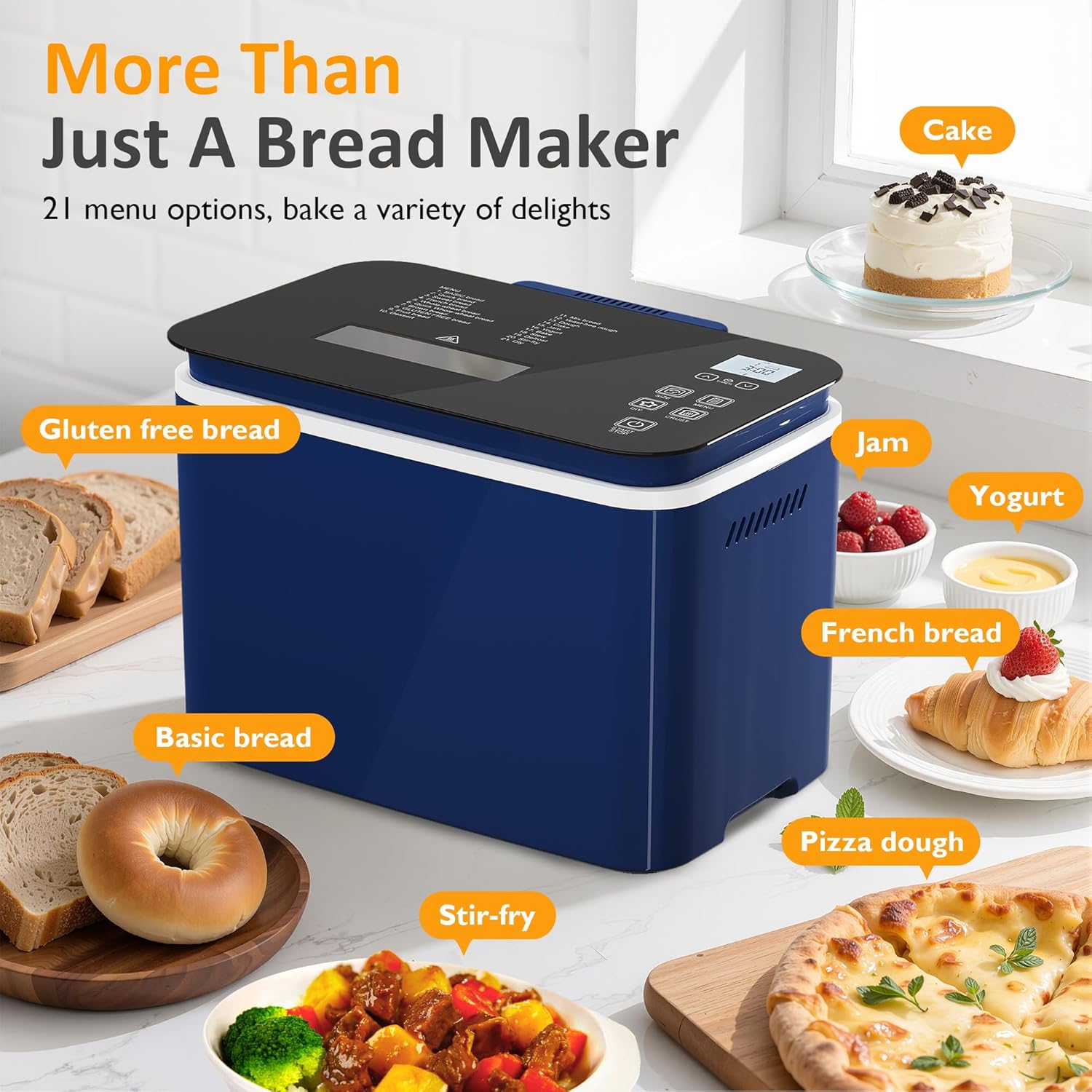
Gambar 5.1: Examples of various programs available on the Sunvivi ZBM001 Bread Maker. This image illustrates the machine's versatility, showing items like gluten-free bread, basic bread, pizza dough, stir-fry, French bread, jam, yogurt, and cake.
Program anu sayogi kalebet: Basic Bread, Sweet Bread, Gluten-Free, Cake, Jam, Yogurt, Stew, Stir-fry, Dough, Kneading, and more.
5.3 Loaf Size and Crust Color Selection
After selecting a program, you can customize the loaf size and crust color.
- Ukuran Roti: Pencét éta UKURAN button to choose between 1.1lb, 1.65lb, or 2.2lb.
- Warna kerak: Pencét éta KERAK tombol pikeun milih kulit Terang, Sedeng, atanapi Poék.

Gambar 5.2: Customization options for the Sunvivi ZBM001 Bread Maker. This image visually demonstrates the three available crust colors (Light, Medium, Dark) and three loaf sizes (1.1lb, 1.65lb, 2.2lb) with suggested serving sizes.
5.4 Delay Timer Function (15-Hour)
The delay timer allows you to program the bread maker to start at a later time, up to 15 hours in advance.
- Pilih program anu dipikahoyong, ukuran roti, sareng warna kulitna.
- Pencét éta TIMER buttons (Up/Down) to set the desired delay time. The displayed time includes the baking cycle duration.
- Pencét éta Mimitian / STOP button to activate the delay timer. The machine will begin counting down and start baking when the set time is reached.

Gambar 5.3: Illustration of the 15-hour delay timer function. This image shows a timeline from PM 6:00 to AM 9:00, demonstrating how to set the timer to wake up to freshly baked bread. It also highlights the 1-hour Keep Warm function and 10-minute Power-off Protection.
5.5 Tetep Fungsi Haneut
After the baking cycle is complete, the bread maker will automatically switch to a 1-hour Keep Warm function to maintain the bread's temperature. This feature ensures your bread remains warm and fresh until you are ready to serve it.
5.6 Mimitian jeung Ngeureunkeun
- Pikeun ngamimitian: After selecting your program and settings, press the Mimitian / STOP button once. The machine will begin operation.
- To Stop/Cancel: To stop an active program or cancel the delay timer, press and hold the Mimitian / STOP button for approximately 3 seconds until a beep sounds and the display resets.
6. Pangropéa jeung beberesih
Regular cleaning and maintenance will prolong the life of your bread maker.
- Cabut colokan: Salawasna cabut colokan alat tina colokan listrik sarta ngidinan pikeun niiskeun sagemblengna saméméh beberesih.
- Bread Pan and Mixing Paddle: Remove the bread pan and mixing paddle. Wash them with warm, soapy water using a soft sponge. Do not use abrasive cleaners or metal scouring pads, as these can damage the non-stick coating. Rinse thoroughly and dry completely.
- Luar: Ngusap bagian luar tukang roti ku lembut, damp lawon. Ulah neuleumkeun unit utama dina cai atawa cairan séjén.
- Udung jeung Viewdina Jandéla: Ngabersihan tutup na viewjandela dina iklanamp lawon. Pikeun noda nekad, make detergent hampang.
- Panyimpenan: Ensure all parts are dry before storing. Store the accessories in the built-in storage compartment.
7. Cara ngungkulan
Upami anjeun mendakan masalah sareng maker roti anjeun, tingal masalah sareng solusi umum ieu:
| Masalah | Mungkin Cukang lantaranana | Solusi |
|---|---|---|
| Roti teu naek | Ragi kadaluwarsa, suhu cai salah, uyah/gula teuing | Check yeast expiration, use lukewarm water (105-115°F), ensure correct ingredient measurements. |
| Roti padet teuing | Too much flour, not enough liquid, old yeast | Ukur bahan sacara saksama, pastikeun ragi seger. |
| Bread collapses in the middle | Too much liquid, too much yeast, high humidity | Kurangan cairan saeutik, kurangan ragi saeutik, sesuaikan resep sareng kalembaban. |
| Mixing paddle stuck in bread | Kajadian normal | Use the provided hook tool to carefully remove the paddle after the bread has cooled slightly. |
| Mesin teu ngamimitian | Not plugged in, program not selected, START/STOP not pressed | Ensure power cord is securely plugged in, select a program, press START/STOP button. |
Lamun masalah persists sanggeus nyobian solusi ieu, mangga ngahubungan rojongan customer.
8. Spésifikasi
| Spésifikasi | Rincian |
|---|---|
| Ngaran produk | Tukang Roti |
| Nomer modél | ZBM001 |
| Warna | Biru |
| Bahan | Aluminium, Stainless Steel |
| Ukuran (L x W x H) | 13.74" x 9.61" x 11.42" |
| Item Beurat | 8.58 pon |
| Maximum Loaf Capacity | 2.2 lb |
| Voltage | 120V |
| Kakuatan | 600W |
| Sertifikasi | ETL |
9. Garansi jeung Rojongan
Your Sunvivi ZBM001 Bread Maker Machine comes with a warranty to ensure your satisfaction and peace of mind.
- Mangsa Garansi: The product is covered by a 1-5 year warranty, depending on specific terms and conditions. Please refer to your purchase documentation for exact details.
- Ngaganti Gratis: Ngarasakeun panggantian gratis salami 365 dinten kanggo masalah anu layak.
For technical assistance, troubleshooting beyond this manual, or warranty claims, please contact Sunvivi customer support through the retailer where you purchased the product or visit the official Sunvivi websitus pikeun inpo kontak.


