1. Bubuka
Hatur nuhun pikeun meuliasing the SENCOR Soundbar SSB 4450BS. This soundbar is designed to deliver a powerful and immersive audio experience for your home entertainment system. This manual provides essential information for the safe and efficient use of your new soundbar, including setup, operation, maintenance, and troubleshooting.
Punten baca manual ieu sacara saksama sateuacan nganggo produk sareng tahan pikeun rujukan ka hareup.
2. Parentah Kasalametan
Pikeun mastikeun operasi anu aman sareng nyegah karusakan, punten perhatikeun pancegahan kaamanan ieu:
- Sumber Daya: Connect the soundbar only to an AC power outlet that matches the voltage specified on the product label. Ensure the power plug is fully inserted.
- Ventilasi: Do not block any ventilation openings. Allow adequate space around the soundbar for proper airflow to prevent overheating.
- Cai sareng Uap: Ulah ngalaan bar sora ka hujan, lembab, ngeclak, atawa cipratan. Ulah nempatkeun objék dieusian ku cairan, kayaning vases, dina alat.
- Sumber Panas: Jauhkeun bar sora tina sumber panas sapertos radiator, register panas, kompor, atanapi aparat sanésna (kalebet ampLiifiers) anu ngahasilkeun panas.
- beberesih: Unplug the soundbar from the power outlet before cleaning. Use a soft, dry cloth. Do not use liquid cleaners or aerosol cleaners.
- Palayanan: Do not attempt to service this product yourself. Refer all servicing to qualified service personnel. Opening or removing covers may expose you to dangerous voltage atawa bahya séjén.
- panempatan: Place the soundbar on a stable, flat surface or mount it securely if using a wall mount (mounting hardware not included).
3. Eusi Paket
Pastikeun yén sadaya item anu didaptarkeun di handap kalebet kana pakét anjeun:
- SENCOR Soundbar SSB 4450BS
- Kadali jauh
- Power Cable (EU plug)
- Manual pamaké
4. Produk Langkungview
4.1 Soundbar Front View

Gambar 1: Hareupeun view of the SENCOR Soundbar SSB 4450BS. The display shows 'bt' indicating Bluetooth mode.
The front panel features the SENCOR logo and a digital display that indicates the current input mode (e.g., 'bt' for Bluetooth, 'OPT' for Optical, 'AUX' for Auxiliary) and volume level.
4.2 Soundbar Rear View (Palabuhan)

Gambar 2: Tukangeun view of the SENCOR Soundbar SSB 4450BS, illustrating the connectivity ports.
The rear panel typically includes various input ports for connecting to your television or other audio sources. These may include HDMI ARC, Optical, and AUX inputs, along with the power input.
4.3 Jauh Jauh
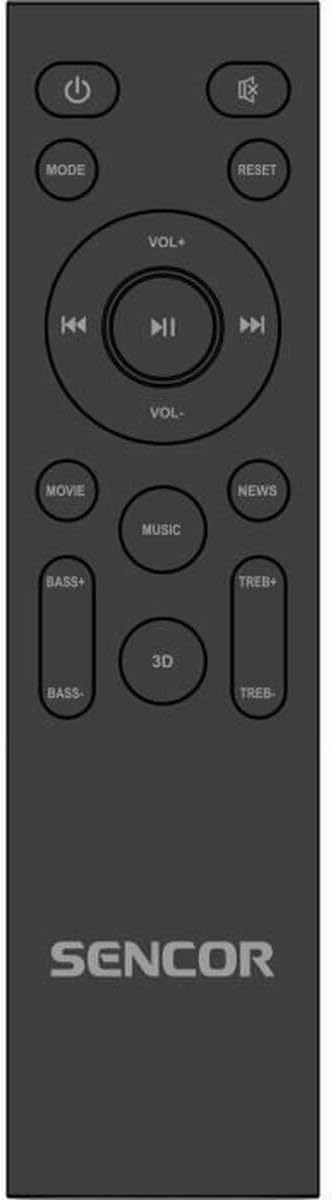
Figure 3: The remote control for the SENCOR Soundbar SSB 4450BS.
The remote control allows you to manage all functions of the soundbar from a distance. Key buttons include:
- Daya (⏻): Ngahurungkeun atanapi mareuman bar sora.
- MODÉ: Cycles through input sources (Bluetooth, Optical, AUX, HDMI ARC).
- VOL +/-: Saluyukeun tingkat polumeu utama.
- ⏮ / ⏸ / ⏭: Playback controls (Previous, Play/Pause, Next) for Bluetooth mode.
- MOVIE / MUSIC / NEWS / 3D: Selects predefined equalizer sound modes.
- BASS +/-: Saluyukeun tingkat bass.
- TREB+/-: Saluyukeun tingkat treble.
- ResET: Resets sound settings to default.
5. Setélan
5.1 Ngabongkar sareng Nempatkeun
- Carefully remove the soundbar and all accessories from the packaging.
- Place the soundbar on a stable, flat surface in front of your TV, ensuring it does not obstruct the TV's remote sensor.
- Alternatively, the soundbar can be wall-mounted (mounting hardware not supplied). Ensure the wall can support the weight of the soundbar.
5.2 Nyambungkeun Daya
- Connect the power cable to the AC IN port on the back of the soundbar.
- Colokkeun tungtung kabel daya anu sanésna kana stop kontak témbok anu cocog.
5.3 Nyambungkeun ka Sumber Audio
Pilih salah sahiji metodeu sambungan ieu:
5.3.1 HDMI ARC Connection (Recommended)
- Connect an HDMI cable (not supplied) from the HDMI ARC port on your TV to the HDMI ARC port on the soundbar.
- Pastikeun fungsi HDMI ARC TV anjeun diaktipkeun dina setélanna.
5.3.2 Sambungan optik
- Connect an optical cable (not supplied) from the OPTICAL OUT port on your TV to the OPTICAL IN port on the soundbar.
- Ensure your TV's audio output is set to 'Optical' or 'PCM'.
5.3.3 Sambungan AUX
- Connect a 3.5mm audio cable (not supplied) from the headphone jack or AUX OUT port on your TV/device to the AUX IN port on the soundbar.
6. Parentah Operasi
6.1 Daya Hurung/Pareuman
Pencét éta Kakuatan (⏻) button on the remote control or the soundbar's control panel to turn the unit on or off.
6.2 Milih Sumber Input
Pencét éta MODÉ button on the remote control repeatedly to cycle through the available input sources: Bluetooth (bt), Optical (OPT), AUX, HDMI ARC.
6.3 Volume Control
Ngagunakeun éta VOL+ jeung VOL- buttons on the remote control to adjust the master volume. The current volume level will be displayed on the soundbar's front panel.
6.4 Nyapasangkeun Bluetooth
- Switch the soundbar to Bluetooth mode by pressing the MODÉ button until 'bt' appears on the display. The 'bt' indicator will flash, signifying pairing mode.
- Aktipkeun Bluetooth dina alat sélulér anjeun (smartphone, tablet, jsb.) teras milarian alat anu sayogi.
- Select 'SENCOR SSB 4450BS' from the list of devices.
- Once paired, the 'bt' indicator will stop flashing and remain solid. You can now play audio from your device through the soundbar.
- Ngagunakeun éta ⏮ (Saméméhna), ⏸ (Maénkeun/Pause), sareng ⏭ (Next) buttons on the remote for media control in Bluetooth mode.
6.5 Sound Modes and Adjustments
Use the dedicated buttons on the remote control to customize your audio experience:
- Pilem: Ningkatkeun dialog sareng épék sora pikeun pilem.
- MUSIK: Ngaoptimalkeun audio pikeun muterkeun musik.
- WARTA: Clarifies speech for news broadcasts or podcasts.
- 3D: Creates a wider, more immersive soundstage.
- BASS +/-: Increases or decreases the low-frequency sound output.
- TREB+/-: Increases or decreases the high-frequency sound output.
- ResET: Resets all sound settings (Bass, Treble, Sound Mode) to their factory defaults.
7. Pangropéa
7.1 beberesih
Pikeun ngajaga penampilan sareng kinerja soundbar anjeun:
- Sok cabut bar sora tina stop kontak sateuacan beberesih.
- Paké lawon lemes, garing, lint bébas ngusap surfaces.
- Ulah make cleaners abrasive, lilin, atawa pangleyur sabab bisa ngaruksak finish.
- Gently clean the speaker grilles with a soft brush or vacuum cleaner with a brush attachment to remove dust.
7.2 Panyimpenan
If you plan to store the soundbar for an extended period, unplug it from the power source and store it in a cool, dry place, preferably in its original packaging to protect it from dust and damage.
8. Cara ngungkulan
If you encounter issues with your SENCOR Soundbar SSB 4450BS, refer to the following table for common problems and solutions:
| Masalah | Mungkin Cukang lantaranana | Solusi |
|---|---|---|
| Taya kakuatan | kabel kakuatan teu disambungkeun; Stopkontak teu aktip | Pastikeun kabel kakuatan disambungkeun aman; Coba colokan listrik anu béda. |
| Taya sora | Incorrect input source selected; Volume too low; Mute activated; Cable connection issue | Press MODE to select correct input; Increase volume; Check if mute is active; Reconnect audio cables securely. |
| Bluetooth teu nyambung | Soundbar not in pairing mode; Device too far; Already connected to another device | Ensure soundbar is in 'bt' pairing mode (flashing 'bt'); Move device closer; Disconnect from other devices. |
| Kadali jauh teu jalan | Batteries depleted; Obstruction between remote and soundbar; Remote sensor blocked | Replace batteries; Remove any obstructions; Ensure remote sensor on soundbar is clear. |
If the problem persists after trying these solutions, please contact SENCOR customer support.
9. Spésifikasi
| Fitur | Spésifikasi |
|---|---|
| Modél | SSB 4450BS |
| merek | SENCOR |
| Speaker Maksimum Kaluaran Power | 200 Watt |
| Ukuran produk (L x W x H) | 100 cm x 17.5 cm x 11 cm (kira-kira 39.4 x 6.9 x 4.3 inci) |
| Item Beurat | 4.4 kg (kira-kira 9.7 lbs) |
| Tipe Pamasangan | Tabletop Gunung |
| Tipe Colokkeun | colokan EU |
| ASIN | B0F2W9C18B |
| EAN / Item Model Number | 8590669354634 |
10. Garansi jeung Rojongan
SENCOR products are manufactured to the highest quality standards. In the unlikely event of a defect, your product is covered by a limited warranty from the date of purchase. Please refer to the warranty card included with your product for specific terms and conditions.
For technical support, service inquiries, or to obtain replacement parts, please visit the official SENCOR website or contact your local SENCOR authorized service center. Keep your proof of purchase for warranty claims.
Websitus: www.sencor.com


