1. Bubuka
Thank you for choosing the KAIDI KD-780 True Wireless Earbuds. These earbuds are designed to provide a high-quality audio experience with advanced features such as Bluetooth 5.3 connectivity, active noise cancellation, and intuitive touch controls. Please read this manual carefully to ensure proper use and maintenance of your device.
2. Eusi Paket
- KAIDI KD-780 True Wireless Earbuds (Left and Right)
- Ngecas Case
- USB to Lightning Charging Cable
- Manual pamaké
3. Produk Langkungview
Familiarize yourself with the components of your KAIDI KD-780 earbuds and charging case.

Image: The KAIDI KD-780 True Wireless Earbuds are shown in their open charging case, alongside a closed charging case. Both are white with the 'KAIDI' logo.
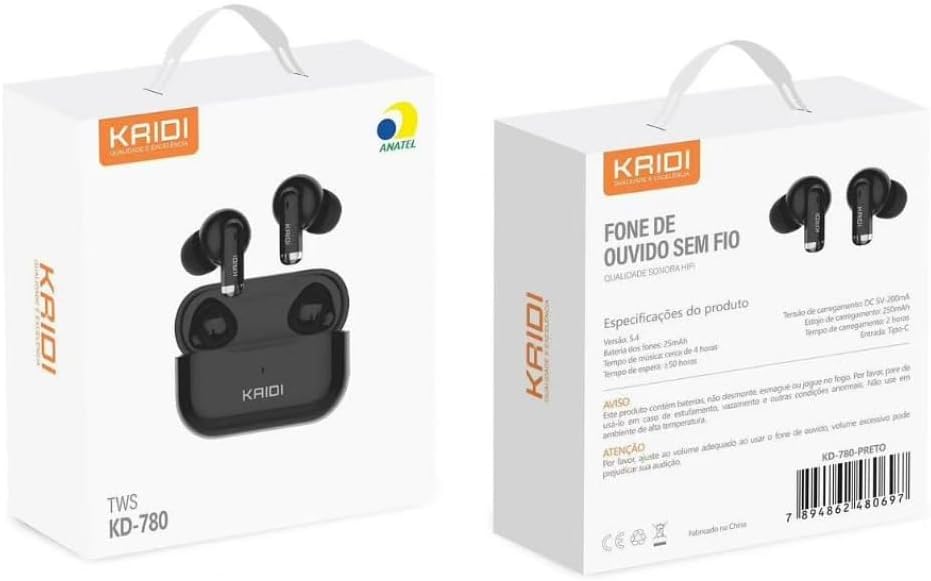
Image: The front and back of the KAIDI KD-780 product box, displaying the earbuds, charging case, and key features in Portuguese.
4. Setélan
4.1. Ngecas Earbuds jeung Case
- Teundeun earbuds kana wadah ngecas. Pastikeun aranjeunna leres seated.
- Connect the USB to Lightning charging cable to the charging port on the case and a power source.
- The indicator light on the case will show charging status. A full charge takes approximately 2 hours for the case.
- The charging case provides multiple extra charges for the earbuds, extending total playback time up to 20 hours.
4.2. Nyapasangkeun sareng Alat Anjeun
Papasangan munggaran:
- Buka wadah ngecas. Earbuds bakal otomatis asup kana mode papasangan.
- Dina smartphone Anjeun atawa alat Bluetooth-diaktipkeun, buka setélan Bluetooth.
- Milarian pikeun available devices and select "KD-780" (or similar name).
- Sakali disambungkeun, anjeun bakal ngadéngé sora konfirmasi, sarta lampu indikator dina kasus nu bisa robah.

Image: A hand holding the open charging case, with a phone screen showing Bluetooth settings and a 'Connected' status, illustrating the one-step pairing process.
Papasangan salajengna:
- Sakali dipasangkeun, earbud bakal otomatis nyambung ka alat anu terakhir dipasangkeun nalika dicabut tina wadah ngecas.
5. Parentah Operasi
5.1. Daya Hurung / Pareum
- Daya Hurung: Buka wadah ngecas, atanapi cabut earbud tina wadahna.
- Pareum listrik: Teundeun earbuds deui kana wadah ngecas sareng tutup tutupna.
5.2. Toél Kontrol
The KD-780 earbuds feature intuitive touch controls. Specific functions may vary slightly depending on your device and operating system.
- Puter / Reureuh: Ketok tunggal dina boh earbud.
- Lagu salajengna: Ketok dua kali dina earbud katuhu.
- Lagu Sateuacanna: Ketok dua kali dina earbud kénca.
- Ngajawab / mungkas Telepon: Ketok tunggal dina boh earbud.
- Nolak Telepon: Pencét jeung tahan boh earbud.
- Aktipkeun Asisten Sora: Ketok tilu kali dina boh earbud.
- Kontrol volume: (Check device settings or app for specific volume control gestures if not default).
5.3. Active Noise Cancellation (ANC)
The KD-780 earbuds feature Active Noise Cancellation to reduce ambient noise for a more immersive listening experience. The feature bullets mention 'Cancelamento de ruído ativo híbrido' indicate this functionality.
- Togél ANC: Press and hold the touch area on either earbud for approximately 2 seconds to switch between ANC On, Transparency Mode, and ANC Off.

Image: A diagram illustrating superior audio, physical noise reduction, and powerful volume, highlighting the sound quality features of the earbuds.
6. Pangropéa
6.1. beberesih
- Anggo lawon anu lemes, garing, henteu lint pikeun ngabersihan earbuds sareng wadah ngecas.
- Ulah make cleaners abrasive, pangleyur, atawa sprays aerosol.
- Keep the charging contacts on both the earbuds and the case clean and dry.
6.2. Panyimpenan
- Simpen earbuds dina wadah ngecas nalika henteu dianggo pikeun ngajagi sareng tetep dicas.
- Avoid storing the device in extreme temperatures or high humidity.
6.3. Tahan cai
The earbuds are resistant to splashes (IPX4 rating), making them suitable for workouts and light rain. However, they are not fully waterproof and should not be submerged in water.
7. Cara ngungkulan
- Earbuds teu dipasangkeun: Ensure both earbuds are in the charging case, open the lid, and check your device's Bluetooth settings. Try forgetting the device and re-pairing.
- Ngan hiji earbud jalan: Lebetkeun deui dua earbud kana wadahna, tutup tutupna, antosan sababaraha detik, teras buka sareng cobian deui. Pastikeun dua earbud parantos dicas.
- Teu aya sora: Check the volume on your device and the earbuds. Ensure the earbuds are properly connected to your device.
- Masalah ngecas: Ensure the charging cable is securely connected and the power source is working. Clean the charging contacts if necessary.
8. Spésifikasi
| Fitur | Rincian |
|---|---|
| Vérsi Bluetooth | 5.3 |
| Ngecas Kapasitas Case | 300 mah |
| Kapasitas Batré Earbud | 30mAh (masing-masing) |
| Waktu Playback | Nepi ka 5 jam (earbuds), nepi ka 20 jam (kalayan wadah ngecas) |
| Waktu Ngecas | Kira-kira. 2 jam |
| Rentang Bluetooth | Nepi ka 10 méter |
| Réspon Frékuénsi | 20 Hz - 20 kHz |
| Tahan cai | IPX4 (tahan cipratan) |
| Tipe Kontrol | Toél |
| Kontrol bising | Pembatalan Noise aktip |
| Tipe Panyambung | Lightning (for charging case) |

Image: A close-up of a microchip labeled '5.3', representing the advanced Bluetooth 5.3 technology for stable and continuous connection.

Image: A comparison graphic showing Bluetooth 5.0 vs. Bluetooth 5.3, highlighting 95% connection speed, stability, and sound quality for 5.3.
9. Video Produk Resmi
9.1. Produk Langkungview: The Best Option for Earbuds
Video: video ieu nyadiakeun leuwihview of the KAIDI KD-780 True Wireless Earbuds, showcasing their design and features. It highlights why they are considered a top choice for wireless audio.
9.2. Product Details: Perfection in Every Detail
Video: This video focuses on the intricate details and craftsmanship of the KAIDI KD-780 Earbuds, emphasizing their premium build and aesthetic appeal.
9.3. Premium Bluetooth Earbuds
Video: Hiji pintonan video promosicasing the KAIDI KD-780 as a premium Bluetooth earbud option, highlighting its features and user experience.
10. Garansi jeung Rojongan
Your KAIDI KD-780 True Wireless Earbuds come with a manufacturer's warranty. Please refer to the warranty card included in your package for specific terms and conditions. For technical support or customer service, please contact your retailer or visit the official KAIDI websitus.
Garansi Pabrikan: 90 poé


