1. Bubuka
This manual provides essential information for the safe and efficient operation of your DOOGEE Blade10 Energy rugged smartphone. Please read this manual thoroughly before using your device to ensure proper functionality and to prevent damage.
The DOOGEE Blade10 Energy is designed for durability and performance, featuring an Android 15 operating system, an octa-core processor, a 6.56-inch HD+ 90Hz display, a 16MP camera, and IP68/IP69K water and dust resistance.
2. Eusi Paket
Pastikeun yén sadaya item aya dina bungkusan:
- DOOGEE Blade 10 Energy rugged phone
- Kabel USB Type-C
- Charger
- Tempered Glass Protective Film (Pre-applied)
- Sleting
- Manual pamaké
- Kartu Garansi
- Kasus pelindung

Image: Contents of the DOOGEE Blade10 Energy retail package, including the phone, charger, cable, and accessories.
3. Tata perenah
Familiarize yourself with the physical components of your smartphone.
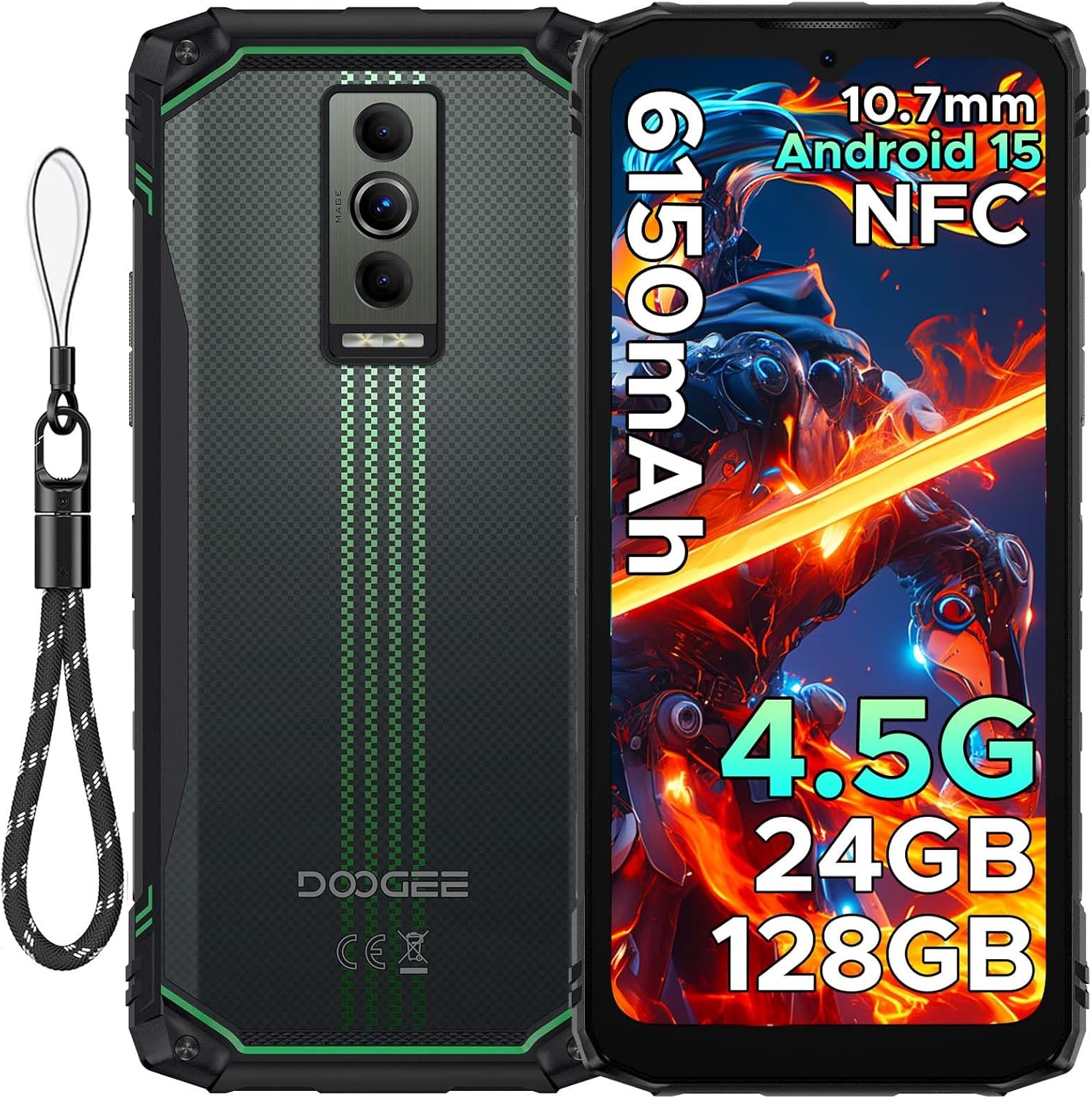
Gambar: Hareup jeung pungkur view of the DOOGEE Blade10 Energy smartphone, highlighting the display, cameras, and side buttons.
- Hareup: 6.56" HD+ Display, 8MP Front Camera
- Tukangeun: 16MP Main Camera, Flashlight
- Sisi: Power Button, Volume Buttons, SIM/MicroSD Card Slot, USB Type-C Port
4. Setélan
4.1. Pamasangan Kartu SIM sareng Kartu MicroSD
- Locate the SIM/MicroSD card slot on the side of the device.
- Paké alat ejector SIM disadiakeun pikeun muka baki.
- Ati-ati nempatkeun kartu Nano-SIM sareng/atanapi kartu MicroSD anjeun kana slot anu ditunjuk. Pastikeun orientasina leres.
- Gently dorong baki deui kana slot nepi ka siram jeung awak telepon.

Image: Close-up of the SIM/MicroSD card tray, illustrating the correct placement of cards.
4.2. Ngecas Awal
Before first use, fully charge your device using the provided Type-C USB cable and charger.
- Sambungkeun kabel Tipe-C kana port ngecas telepon.
- Sambungkeun tungtung kabel anu hiji deui kana carjer, teras colokkeun carjer kana stop kontak.
- Indikator ngecas bakal nembongan dina layar.

Image: The DOOGEE Blade10 Energy connected to its charger via a Type-C cable.
5. Parentah Operasi
5.1. Daya Hurung / Pareum sareng Balikan deui
- Daya Hurung: Pencet jeung tahan tombol Daya dugi layar hurung.
- Pareuman/Ulangi deui: Press and hold the Power button until the power options menu appears. Select "Power off" or "Restart".
5.2. Sistem Operasi Android 15
Your DOOGEE Blade10 Energy runs on Android 15, offering enhanced performance, smarter interactions, and improved privacy features. Navigate through the interface using touch gestures.

Image: Screenshot of the Android 15 home screen and app icons on the DOOGEE Blade10 Energy.
5.3. Fitur tampilan
The 6.56-inch HD+ display with a 90Hz refresh rate provides a smooth visual experience. Widevine L1 support ensures high-definition streaming content playback.

Image: The DOOGEE Blade10 Energy display showcasing vibrant colors and smooth motion.
5.4. Operasi kaméra
Capture photos and videos using the 16MP rear camera and 8MP front camera. The device also features an underwater shooting mode for aquatic environments.

Image: The DOOGEE Blade10 Energy camera interface, highlighting the underwater shooting mode.
5.5. Fitur Kaamanan
Unlock your phone using Face ID for quick and secure access.

Image: An illustration of the Face ID recognition feature in use on the DOOGEE Blade10 Energy.
5.6. Fungsi NFC
The NFC (Near Field Communication) feature allows for contactless payments, data sharing, and card emulation. Enable NFC in your phone's settings to use these functions.

Image: The DOOGEE Blade10 Energy being used for a contactless payment via NFC.
6. Fitur durability
The DOOGEE Blade10 Energy is built to withstand harsh environments with its IP68/IP69K and MIL-STD-810H certifications.
- IP68/IP69K: Provides dustproof and waterproof protection. The phone can withstand immersion in water up to 1.5 meters deep for 30 minutes.
- MIL-STD-810H: Certified for drop resistance up to 1.5 meters.

Image: The DOOGEE Blade10 Energy shown in various rugged scenarios, highlighting its dustproof, drop-proof, and waterproof design.
Video: This video demonstrates the IP68/IP69K waterproof capabilities of the DOOGEE Blade10 Energy.
7. Manajemén batré
The device is equipped with a 6150mAh silicon anode battery for extended usage. It also supports reverse charging.
Image: The DOOGEE Blade10 Energy showcasing its 6150mAh battery and the reverse charging capability with another device.
7.1. Ngecas Balik
To use your phone as a power bank, connect a compatible device to your Blade10 Energy using a USB-C to USB-C cable or a USB-C to the appropriate cable for the other device. Ensure reverse charging is enabled in the settings if it doesn't start automatically.
Video: This video highlights the ultra-thin design and long battery life of the DOOGEE Blade 10 series, including the Blade10 Energy.
8. Konektipitas
- 4.5G Dual SIM: Supports dual SIM cards for flexible network usage.
- GPS: Integrated with Beidou, Galileo, GLONASS, and GPS for accurate positioning.
- Wifi: Supports standard Wi-Fi connectivity.
9. Pangropéa
To ensure the longevity and optimal performance of your DOOGEE Blade10 Energy, follow these maintenance guidelines:
- Jaga alatna tetep bersih ku cara ngusap ku cara lemes, damp lawon. Hindarkeun bahan kimia anu kasar.
- Pastikeun sadaya panutup port ditutup sacara aman nalika alat kakeunaan cai atanapi lebu.
- Hindarkeun ngalaan alat ka suhu anu ekstrim atanapi sinar panonpoé langsung kanggo waktos anu berkepanjangan.
- Jieun cadangan data anjeun sacara rutin pikeun nyegah leungitna.
10. Cara ngungkulan
Upami anjeun ngalaman masalah sareng alat anjeun, tingal solusi umum ieu:
| Masalah | Solusi |
|---|---|
| Alat teu hurung | Pastikeun batréna geus dieusian. Sambungkeun ka carjer sareng antosan sababaraha menit sateuacan nyobian hurung deui. |
| Sinyal jaringan goréng | Pariksa pamasangan kartu SIM. Pindah ka daérah anu jangkauan jaringanana langkung saé. Pareuman terus hurungkeun deui alatna. |
| Layar rampa teu ngaréspon | Pareuman terus hurungkeun deui alatna. Upami masalahna masih aya, laksanakeun reset pabrik (catetan: ieu bakal ngahapus sadaya data). |
| Batré gancang boros | Close unused applications. Reduce screen brightness. Disable unnecessary features like Wi-Fi, Bluetooth, or GPS when not in use. |
11. Spésifikasi
| Fitur | Rincian |
|---|---|
| Ngaran modél | Blade10 Energy |
| Sistem operasi | Android 15 |
| Modél CPU | Mediatek Dimensity 9000 (Octa-Core, 1.8 GHz) |
| Ram | 24 GB (4GB Dasar + 20GB Tambahan) |
| Panyimpenan internal | 128 GB |
| Panyimpenan Expandable | Up to 2 TB (MicroSD/TF card) |
| Ukuran layar | 6.56 inci |
| Resolusi | 720 x 1600 (HD+) |
| Refresh Laju | 90 Hz |
| Kaméra Utama | 16 MP |
| Kaméra hareup | 8 MP |
| Kapasitas batré | 6150 mAh |
| Konektipitas | 4.5G Dual SIM, Wi-Fi, NFC |
| Napigasi | Beidou, Galileo, GLONASS, GPS |
| Daya tahan | IP68/IP69K, MIL-STD-810H |
| Diménsi | 6.45 x 2.98 x 0.33 inci |
| Beurat | 6.9 ons (195 gram) |
12. Garansi jeung Rojongan
Your DOOGEE Blade10 Energy comes with a two-year warranty. For technical support or warranty claims, please refer to the contact information provided on the warranty card included in your package or visit the official DOOGEE support websitus.
The package includes a Warranty Card and a Service Card for your reference.


