1. Bubuka
Thank you for choosing the Infiniity DM56 Sport Smartwatch. This device is designed to enhance your active lifestyle with advanced fitness tracking, health monitoring, and smart connectivity features. Equipped with a vibrant 1.43-inch AMOLED display, built-in GPS, and comprehensive health sensors, the DM56 is your reliable companion for both daily wear and intense workouts.
This manual provides detailed instructions on how to set up, operate, maintain, and troubleshoot your smartwatch to ensure optimal performance and longevity.

Gambar 1.1: Hareupeun view of the Infiniity DM56 Sport Smartwatch, showcasing its round AMOLED display and rugged design.
2. Naon dina Box
Upon opening your Infiniity DM56 Sport Smartwatch package, please ensure all the following items are present:
- Infiniity DM56 Sport Smartwatch
- Kabel Ngecas
- Manual pangguna (dokumén ieu)
3. Setélan
3.1 Ngecas Smartwatch
Before first use, fully charge your DM56 smartwatch. A full charge typically takes approximately 2 hours.
- Connect the magnetic charging cable to the charging contacts on the back of the smartwatch. Ensure the pins align correctly.
- Colokkeun tungtung USB kabel ngecas kana adaptor kakuatan USB standar (5V/1A disarankeun) atawa port USB komputer.
- The watch display will show a charging indicator. Once fully charged, the indicator will change or disappear.
3.2 Masangkeun sareng Smartphone Anjeun
To unlock the full potential of your DM56 smartwatch, you need to pair it with your smartphone via Bluetooth using the dedicated companion application. The DM56 is compatible with Android 5.0+ and iOS 11 and above.
- Unduh Aplikasi: Milarian pikeun the official Infiniity companion app (refer to the packaging or quick start guide for the exact app name) on the Google Play Store (for Android) or Apple App Store (for iOS) and install it.
- Aktipkeun Bluetooth: Pastikeun Bluetooth diaktipkeun dina smartphone Anjeun.
- Buka Aplikasi: Launch the companion app on your smartphone and follow the on-screen instructions to create an account or log in.
- Tambahkeun Alat: Dina aplikasi, arahkeun ka bagian 'Tambahkeun Alat' atanapi 'Pair Alat'. Aplikasi bakal milarian jam tangan pinter anu sayogi.
- Select DM56: Select 'DM56' from the list of found devices. A pairing request may appear on both your phone and the watch. Confirm the pairing on both devices.
- Setup lengkep: Once paired, the app will guide you through initial settings, such as profile information, notification permissions, and data synchronization.
4. Ngoperasikeun Smartwatch
4.1 Napigasi Dasar
The DM56 features a responsive touchscreen and physical buttons for intuitive control.
- Layar cabak: Gesek ka luhur, ka handap, ka kenca, atawa ka katuhu pikeun napigasi ngaliwatan ménu jeung bewara. Ketok pikeun milih item.
- Tombol fisik: The watch has multiple buttons, typically labeled 'SPORT', 'SEL', 'BACK', and a dedicated 'GPS' button. Their functions may vary depending on the current screen or mode.
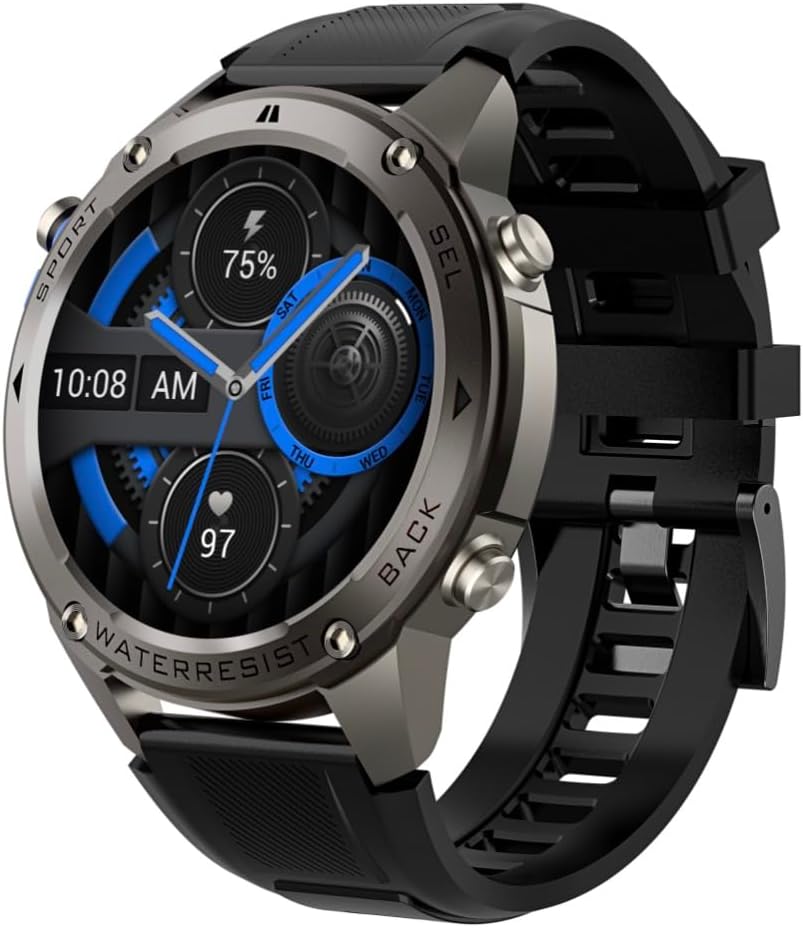
Gambar 4.1: Sisi view of the Infiniity DM56 Sport Smartwatch, highlighting the physical control buttons.
4.2 Fitur tampilan
The 1.43-inch AMOLED display offers vibrant colors and deep blacks with a resolution of 466x466 pixels.
- Tampilan Salawasna Dihurungkeun: The DM56 supports Always-On Display functionality, allowing you to see the time and essential information at a glance without needing to raise your wrist or press a button. This feature can be configured in the watch settings.

Image 4.2: The Infiniity DM56 Sport Smartwatch display, showcasing a typical watch face with various data points.
4.3 Built-in GPS & Compass
The DM56 features dual-frequency GPS (L1+L5) and supports multiple satellite systems (GPS, GLONASS, BDS, Galileo, NAVIC, QZSS) for precise outdoor tracking. A built-in compass further aids navigation.
- Ngalacak GPS: When starting an outdoor activity (e.g., running, cycling), the watch will automatically attempt to acquire a GPS signal. Ensure you are in an open area for faster signal acquisition. Your route, distance, and pace will be recorded.
- Kompas: Access the compass feature from the watch's menu to get real-time directional information.

Image 4.3: The Infiniity DM56 Sport Smartwatch from an angle, highlighting the dedicated GPS button on the side.

Gambar 4.4: A close-up view of the GPS button on the Infiniity DM56 Sport Smartwatch, indicating its function.
4.4 All-Day Health Monitoring
The DM56 is equipped with the VC30F sensor for continuous health monitoring.
- Ngawaskeun Laju haté: Track your heart rate in real-time throughout the day. View your current heart rate on the watch face or in the dedicated heart rate app.
- Ngawaskeun Oksigén Darah (SpO2): Ukur tingkat jenuh oksigén getih anjeun.
- Nyukcruk saré: The watch automatically monitors your sleep patterns, including deep sleep, light sleep, and awake times. View analisis sare anu lengkep dina aplikasi pendamping.
- Nyukcruk Stress: Awasi tingkat setrés anjeun sapanjang dinten.
- Pedometer: Counts your daily steps, distance, and estimated calories burned.
Note: The Infiniity DM56 Smartwatch is NOT A MEDICAL DEVICE. All health monitoring data is for reference only and should not be used for medical diagnosis or treatment.
4.5 Modeu Olahraga
The DM56 offers over 170 customizable sports modes, with 14 built-in modes such as outdoor running, cycling, and swimming. You can add up to 10 additional modes manually via the companion app.
- Ngamimitian Kagiatan: Navigate to the 'Workout' or 'Sports' menu on the watch, select your desired activity, and tap to start.
- Salila Kagiatan: The watch will display real-time metrics such as duration, distance, heart rate, and calories burned.
- Ending Activity: Swipe or press the designated button to pause or end the activity. Your workout data will be saved and synchronized with the app.
4.6 Smart Notifications & Calls
Once paired with your smartphone, the DM56 can receive notifications and handle calls directly on your wrist.
- Bewara: Receive alerts for incoming calls, SMS messages, and app notifications (e.g., social media, email). Configure which app notifications you want to receive in the companion app.
- Make/Answer Call: The DM56 allows you to make and answer calls directly from the watch, utilizing its built-in microphone and speaker. Ensure the watch is connected to your phone via Bluetooth.
5. Pangropéa
5.1 Peunteun waterproof
The DM56 has a 5ATM waterproof rating, meaning it can withstand water pressures equivalent to a depth of 50 meters. This makes it suitable for swimming, showering, and other water-based activities. However, it is not recommended for diving or high-pressure water activities.
- Ulah nepi ka jam tangan kakeunaan cai panas, uap, atawa deterjen anu kuat.
- Saatos kakeunaan cai asin, bilas jam tangan ku cai tawar sareng tegalan sacara saksama.
5.2 Beberesih sareng Perawatan
Pikeun ngajaga penampilan sareng fungsi smartwatch anjeun:
- Rutin ngabersihkeun awak arloji sareng tali kalayan lemes, damp lawon.
- Pastikeun yén kontak ngecas dina tonggong arloji beresih sareng garing sateuacan dicas.
- Ulah make cleaners abrasive atawa pangleyur.
5.3 Optimasi Kahirupan Batré
The DM56 is powered by a 500mAh high-voltage battery, offering extended usage. To maximize battery life:
- Adjust screen brightness to a lower level.
- Limit the use of Always-On Display if not essential.
- Pareuman bewara nu teu perlu.
- Pareuman terus ngawaskeun denyut jantung upami henteu diperyogikeun 24/7.
6. Cara ngungkulan
If you encounter issues with your Infiniity DM56 smartwatch, try the following common solutions:
- Lalajo teu hurung: Pastikeun jam tangan tos dicas pinuh. Sambungkeun kana carjer teras antosan sababaraha menit sateuacan nyobian ngahurungkeun deui.
- Teu tiasa dipasangkeun sareng telepon:
- Pastikeun Bluetooth diaktipkeun dina telepon anjeun sareng jam tangan.
- Pastikeun arlojina aya dina jangkauan Bluetooth telepon anjeun.
- Balikan deui arloji sareng telepon anjeun.
- Hapus cache Bluetooth dina telepon anjeun (Android) atanapi hilap alat sareng pasang deui.
- Pastikeun aplikasi pendamping diropéa ka versi panganyarna.
- Data kaséhatan teu akurat:
- Pastikeun yén arloji dipaké pas dina pigeulang anjeun, henteu ketat teuing atanapi longgar teuing.
- Ngabersihan sénsor dina tonggong arloji.
- Note that environmental factors and individual physiology can affect readings. Remember, it is not a medical device.
- Bewara teu nampi:
- Pariksa setelan bewara dina aplikasi pendamping.
- Ensure the app has necessary permissions on your phone (e.g., notification access).
- Verify that the watch is connected to your phone.
- hirup batré pondok: Tingali Bagian 5.3 kanggo tips optimasi batré.
Upami masalahna teras-terasan saatos nyobian léngkah-léngkah ieu, mangga ngahubungi dukungan palanggan kanggo bantosan salajengna.
7. Spésifikasi
| Fitur | Spésifikasi |
|---|---|
| Nomer modél | DM 56 |
| tampilan | Layar AMOLED 1.43 inci, 466x466 piksel |
| Sénsor | Heart Rate (VC30F), Accelerometer (STK8321), Magnetometer (Compass), Barometer+Altitude (SPL07-03) |
| Konektipitas | Bluetooth 5.3 |
| Kapasitas batré | 500 mah |
| Tingkat Waterproof | 5ATM |
| Kasaluyuan | Android 5.0+ and iOS 11 and above |
| Item Beurat | 3 ons |
| Ukuran Paket | 4.25 x 4.25 x 2.8 inci |
| Sistem operasi | Android Wear 2.7 (Note: This refers to the underlying OS, not necessarily full Android Wear functionality) |
| GPS | Built-in GPS (L1+L5 dual-frequency) |
| Wangun | Buleud |
| Jenis Batré | Nonstandard Battery, Lithium Ion |
8. Garansi jeung Rojongan
The Infiniity DM56 Sport Smartwatch comes with a standard manufacturer's warranty. Please refer to the warranty card included in your product packaging for specific terms and conditions, including warranty duration and coverage details.
For technical support, troubleshooting assistance beyond what is covered in this manual, or warranty claims, please contact Infiniity customer service through the contact information provided on the product packaging or the official Infiniity websitus.
Punten mertahankeun bukti pameseran anjeun pikeun tujuan garansi.


