1. Bubuka
Thank you for choosing the Ewent EW3295 Backlit Wireless Keyboard. This full-size keyboard offers versatile connectivity options, including Bluetooth 5.0 and 2.4GHz wireless, allowing you to connect up to three devices simultaneously. Its slim design, silent keys, and adjustable backlight provide a comfortable and efficient typing experience. This manual provides detailed instructions for setup, operation, and maintenance to ensure optimal performance of your keyboard.

Figure 1.1: Slim and sturdy design of the EW3295 keyboard.
2. Fitur konci
- Wireless Multi-Device Connection: Connect up to 3 devices simultaneously via Bluetooth 5.0 (x2) or wireless 2.4 GHz. Easily switch between devices with just one button.
- Lampu tukang adjustable: The keyboard's backlight is dimmable and can be turned off completely, ideal for various lighting conditions.
- Flat & Quiet Design: Flat, silent keys ensure a comfortable and low-noise typing experience, suitable for quiet environments.
- 12 Konci Multimédia: Quick access to functions like volume control, email, and other operations.
- Batré anu tiasa dicas deui anu awét: Equipped with a 300mAh lithium battery and intelligent energy-saving function for extended use.
- Kasaluyuan lega: Compatible with Windows (XP, 7, 8.1, 10, 11) and Android, suitable for PCs, laptops, and tablets.
- Desain Teguh & Awét: Made of high-density polycarbonate, lightweight yet durable, with a compact design.
- Italian Layout: Features an Italian QWERTY keyboard layout.
3. Eusi Paket
Mangga parios eusi pakét nalika unboxing:
- Ewent EW3295 Backlit Wireless Keyboard
- USB-A 2.4GHz Wireless Receiver
- USB-C kana USB-A kabel Ngecas
- Manual pangguna (dokumén ieu)
4. Setup Guide
4.1 Ngecas kibor
The EW3295 keyboard is equipped with a built-in rechargeable 300mAh lithium battery. Before first use, it is recommended to fully charge the keyboard.
- Locate the USB Type-C charging port on the rear panel of the keyboard.
- Connect one end of the provided USB-C charging cable to the keyboard's USB-C port.
- Connect the other end of the USB-A cable to a USB power source (e.g., computer USB port, USB wall adapter).
- The charging indicator light (if present) will illuminate during charging and turn off when fully charged. A full charge takes less than 1 hour and provides over 1 month of use.

Figure 4.1: Rear panel of the keyboard with charging port and receiver compartment.
4.2 Nyambungkeun kibor
The EW3295 keyboard supports three connection modes: 2.4GHz wireless and two Bluetooth 5.0 channels (BT1, BT2). You can connect up to three devices and switch between them.
4.2.1 2.4GHz Sambungan Wireless
- Locate the USB-A wireless receiver, typically stored in a compartment on the rear panel of the keyboard.
- Plug the USB-A receiver into an available USB port on your computer or device.
- Pencét éta fn+1 keys on the keyboard to switch to 2.4GHz mode. The indicator light for channel 1 will illuminate.
- Kibor kedahna otomatis nyambung ka alat anjeun.

Figure 4.2: Ewent EW3295 keyboard and its USB wireless receiver.
4.2.2 Sambungan Bluetooth (BT1 / BT2)
- Pencét éta fn+2 keys to select Bluetooth channel 1 (BT1) or fn+3 keys to select Bluetooth channel 2 (BT2). The corresponding indicator light will flash, indicating pairing mode.
- On your device (PC, laptop, tablet), enable Bluetooth and search for new devices.
- Select "EW3295" or a similar name from the list of available Bluetooth devices.
- Follow any on-screen prompts to complete the pairing process. Once connected, the indicator light will stop flashing and remain solid.
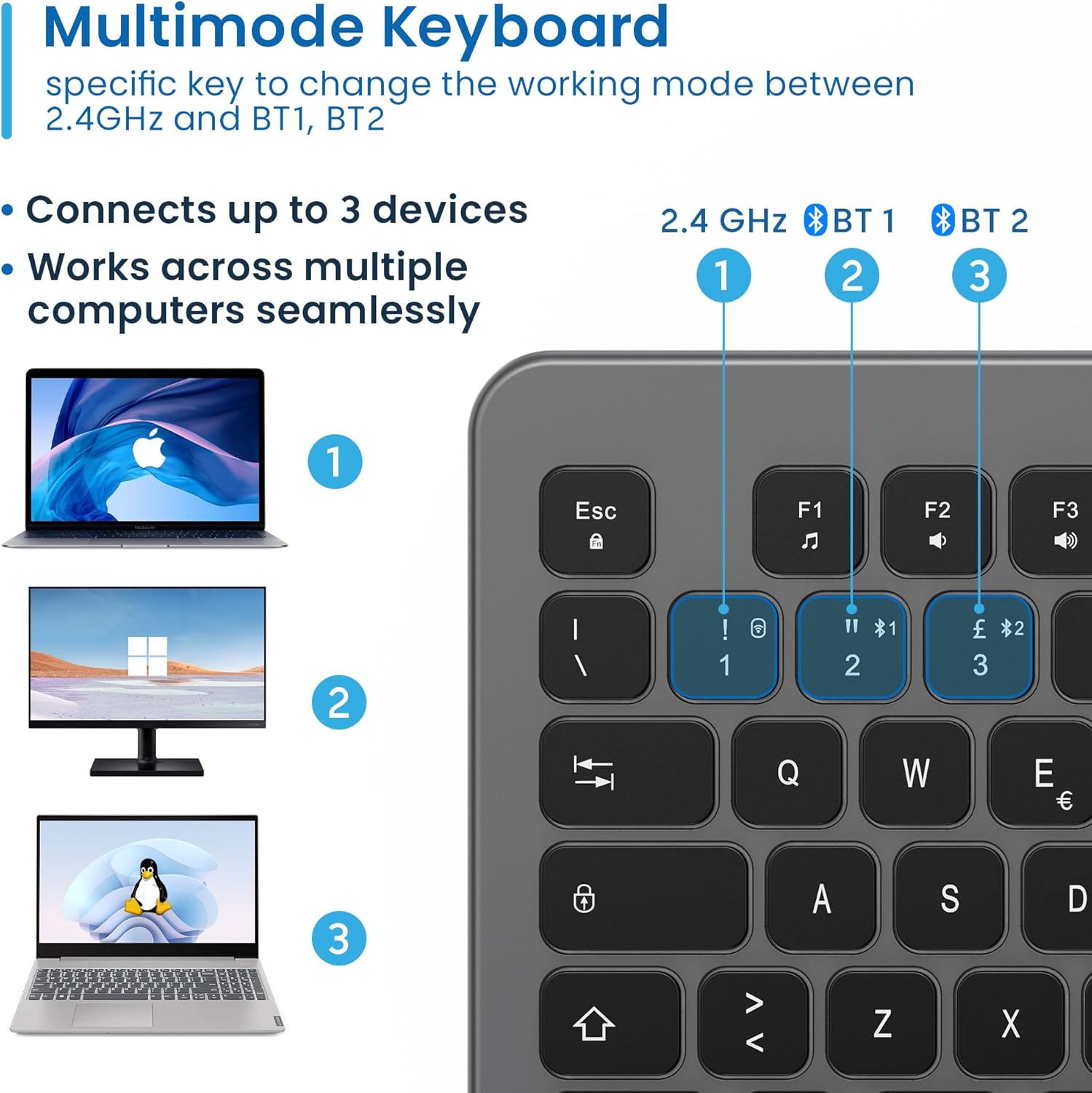
Figure 4.3: Multi-device connectivity options for the EW3295 keyboard.
4.2.3 Ngalihkeun Antara Alat nu Nyambung
Once multiple devices are paired, you can easily switch between them:
- Pencét fn+1 to switch to the 2.4GHz connected device.
- Pencét fn+2 to switch to the Bluetooth 1 connected device.
- Pencét fn+3 to switch to the Bluetooth 2 connected device.
5. Parentah Operasi
5.1 Ngetik Dasar
The EW3295 features a full-size Italian QWERTY layout. Its flat and silent keys provide a comfortable and precise typing experience, reducing noise in quiet environments.

Figure 5.1: Illuminated Italian QWERTY Keyboard Layout.

Figure 5.2: Silent keys for reduced noise.
5.2 Kadali lampu tukang
The keyboard features an adjustable backlight for improved visibility in low-light conditions.
- Lampu tukang ON/OFF: Pencét éta Blok Scorr key (often labeled with a lightbulb icon) to toggle the backlight on or off.
- Backlight Brightness Up: Pencét Fn + Pag ↑ pikeun ngaronjatkeun kacaangan lampu tukang.
- Backlight Brightness Down: Pencét Fn + Pag ↓ pikeun ngurangan kacaangan lampu tukang.
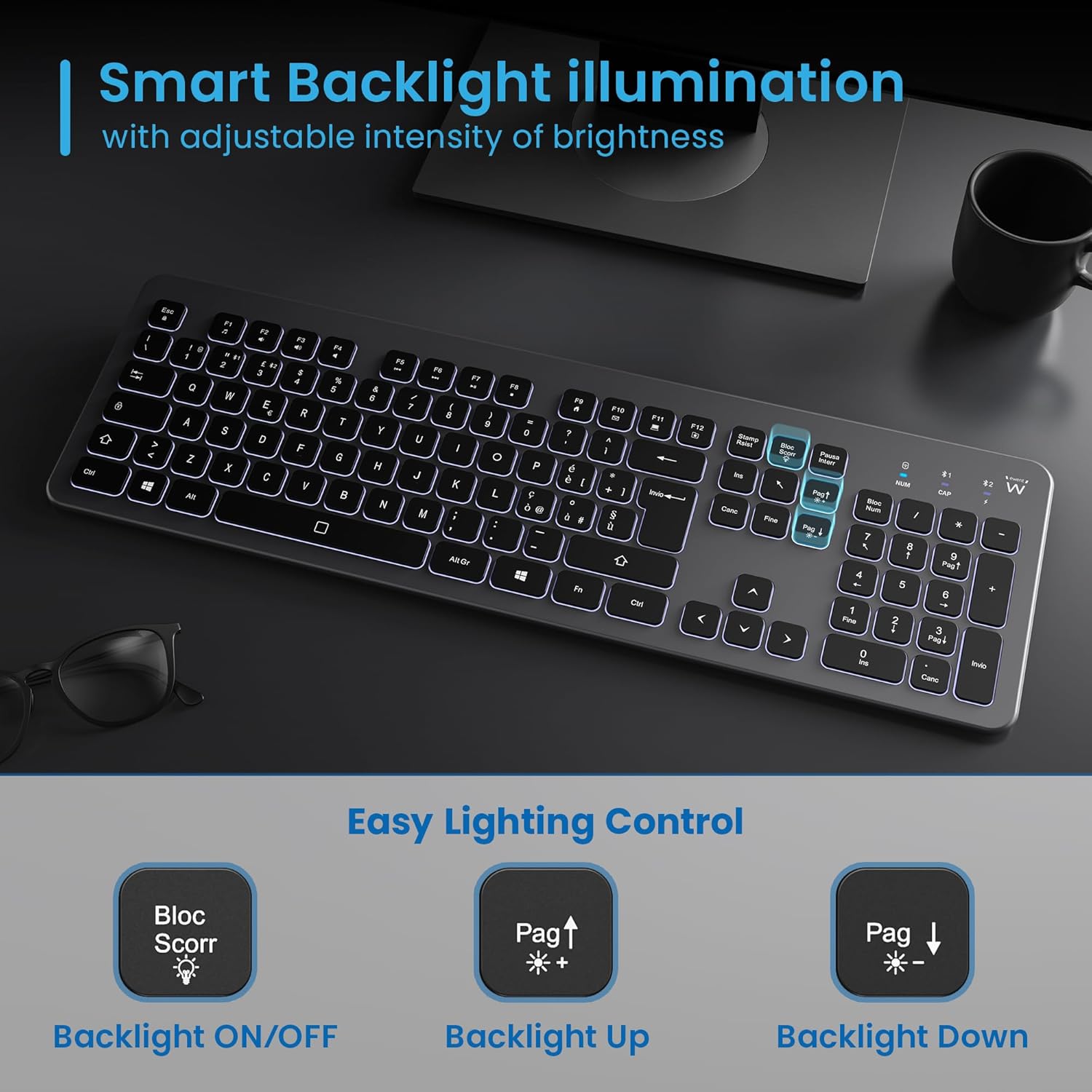
Figure 5.3: Backlight control keys.
5.3 Multimédia kenop
The keyboard includes 12 dedicated multimedia keys (F1-F12) that provide quick access to various functions. To use these functions, press the Fn konci sakaligus jeung F-konci nu dipikahoyong.
| Kombinasi konci | Fungsi |
|---|---|
| Fn + F1 | Pamuter média |
| Fn + F2 | Volume Turun |
| Fn + F3 | Volume Up |
| Fn + F4 | Ngajempékeun |
| Fn + F5 | Lagu saméméhna |
| Fn + F6 | Lagu salajengna |
| Fn + F7 | Play / Reureuh |
| Fn + F8 | Eureun |
| Fn + F9 | Kaca Imah |
| Fn + F10 | Surélék |
| Fn + F11 | Komputer abdi |
| Fn + F12 | Kalkulator |
6. Pangropéa sarta perawatan
Pangropéa anu leres mastikeun umur panjang sareng kinerja optimal keyboard anjeun.
- beberesih: Anggo lawon anu lemes, garing, sareng henteu ngaganggu pikeun ngabersihkeun permukaan kibor. Pikeun kokotor anu bandel, rada diusapampen lawon ku cai atawa hampang, cleaner non-abrasive. Hindarkeun Uap kaleuleuwihan.
- Hindarkeun Cairan: Do not spill liquids on the keyboard. In case of accidental spills, immediately disconnect the keyboard and allow it to dry completely before re-using.
- Panyimpenan: Lamun teu dipaké pikeun période nambahan, nyimpen kibor dina tiis, tempat garing jauh ti sinar panonpoé langsung jeung hawa ekstrim.
- Perawatan batré: To prolong battery life, avoid fully discharging the battery frequently. Charge the keyboard when the low battery indicator appears.
- Panyimpenan Panarima: When transporting the keyboard, store the USB wireless receiver in its dedicated compartment on the rear panel to prevent loss.
7. Cara ngungkulan
If you encounter issues with your EW3295 keyboard, please refer to the following common solutions:
| Masalah | Mungkin Cukang lantaranana | Solusi |
|---|---|---|
| Kibor teu ngaréspon (2.4GHz) | Low battery; Receiver not plugged in; Incorrect channel selected. | Charge the keyboard; Ensure USB receiver is securely plugged in; Press fn+1 to select 2.4GHz mode. |
| Kibor teu ngaréspon (Bluetooth) | Low battery; Bluetooth not enabled on device; Not paired; Incorrect channel selected. | Charge the keyboard; Enable Bluetooth on your device; Re-pair the keyboard (see Section 4.2.2); Press fn+2 or fn+3 to select the correct Bluetooth channel. |
| Lampu tukang teu jalan | Lampu tukang dipareuman; batré lemah. | Pencét Blok Scorr to turn on/off; Increase brightness with Fn + Pag ↑; Charge the keyboard. |
| Konci caket atanapi henteu ngaréspon | Dirt or debris under keys; Physical damage. | Clean the keyboard (see Section 6); If physical damage, contact support. |
| hirup batré pondok | Frequent backlight use; Battery degradation over time. | Reduce backlight brightness or turn it off when not needed; Ensure full charge cycles. |
8. Spésifikasi
| Fitur | Rincian |
|---|---|
| Ngaran modél | Tastiera Wireless Retroilluminata EW3295 |
| Nomer Modél Item | EW3295 |
| merek | Ewent |
| Téhnologi konektipitas | Bluetooth 5.0 (x2), 2.4GHz Wireless |
| Katerangan kibor | Multimedia, Full-size, Italian Layout |
| Alat nu cocog | PC (Windows XP, 7, 8.1, 10, 11), Android |
| Jenis Batré | Batré Litium 300mAh anu tiasa dicas deui |
| Lampu tukang | Inténsitas adjustable |
| Ukuran (L x W x H) | Kira-kira. 432mm x 122mm x 22mm |
| Beurat | Kira-kira. 390g |
| Bahan | High-density Polycarbonate |

Figure 8.1: Keyboard dimensions and weight.
9. Émbaran jaminan
Ewent products are designed and manufactured to the highest quality standards. This product is covered by a limited warranty from the date of purchase. Please refer to the warranty card included with your product or visit the official Ewent website for detailed warranty terms and conditions specific to your region. The warranty typically covers defects in materials and workmanship under normal use.
10. Rojongan Palanggan
For technical support, troubleshooting assistance, or any questions regarding your Ewent EW3295 keyboard, please contact Ewent customer support. You can typically find contact information (phone, email, support portal) on the official Ewent websitus atanapi dina bungkusan produk.
Please have your product model number (EW3295) and purchase details ready when contacting support.


