1. Bubuka
Hatur nuhun pikeun meuliasing the iFFALCON 40S55T 40-inch Full HD Google TV. This manual provides essential information for the safe and efficient use of your television. Please read it thoroughly before operating the device and retain it for future reference.
The iFFALCON 40S55T is a tunerless smart TV designed for streaming content, offering a Full HD display, Google TV operating system, Chromecast built-in, and Dolby Audio for an immersive entertainment experience.
2. Émbaran Kasalametan
Salawasna turutan pancegahan kaamanan dasar nalika nganggo televisi ieu pikeun ngirangan résiko kahuruan, kejutan listrik, sareng tatu.
- Ulah ngalaan TV ka hujan atawa beueus.
- Ulah muka TV casing; ngarujuk sadaya jasa ka tanaga anu mumpuni.
- Pastikeun ventilasi ditangtoskeun sabudeureun TV.
- Jauhkeun TV tina sinar panonpoé langsung, sumber panas, sareng médan magnét anu kuat.
- Use only the power cord and accessories supplied by the manufacturer.
- Cabut colokan TV nalika badai kilat atanapi nalika henteu dianggo kanggo waktos anu lami.
3. Eusi Paket
Pastikeun yén sadaya item aya dina kotak:
- iFFALCON 40S55T 40-inch Full HD Google TV
- Kadali jauh
- Stand TV (2 buah)
- Screws pikeun TV Stand
- Kabel Daya
- Kartu Garansi
- Manual Pitunjuk (dokumén ieu)
4. Setélan
4.1 Ngagantelkeun TV Stand
- Teundeun TV sacara saksama dina tempat anu lemes sareng datar pikeun nyegah karusakan layar.
- Sejajarkeun unggal potongan nangtung sareng slot anu cocog dina handapeun TV.
- Ngamankeun nangtung ngagunakeun screws disadiakeun. Pastikeun aranjeunna tightened pageuh.
4.2 Nyambungkeun Daya
Sambungkeun kabel kakuatan ka input kakuatan TV lajeng nyolok kana stop kontak témbok. TV bakal asup kana mode standby.
4.3 Initial Setup (Google TV & Network)
Saatos dihurungkeun pikeun anu munggaran, TV bakal nungtun anjeun dina prosés setelan awal pikeun Google TV. Ieu kalebet:
- Pilihan basa.
- Nyambungkeun ka jaringan Wi-Fi.
- Signing in with your Google account to access personalized content and apps.
- Narima sarat jeung katangtuan.
4.4 Konéktipitas
The iFFALCON 40S55T offers various connection options for external devices.

Gambar: Leuwihview of the TV's connectivity options, including HDMI, USB, Bluetooth, and Wi-Fi.
- Port HDMI: Connect external devices like gaming consoles, Blu-ray players, or set-top boxes.
- Port USB: Pikeun nyambungkeun alat panyimpenan USB pikeun muterkeun media files.
- Wifi: For wireless internet connection to access streaming services and online features.
- Bluetooth: For connecting wireless headphones, speakers, or other Bluetooth-enabled accessories.
4.5 Tunerless Operation
This TV is designed as a tunerless model, meaning it does not have a built-in tuner for terrestrial (over-the-air) broadcasts. To watch terrestrial, BS, or CS broadcasts, an external tuner is required and must be purchased separately.

Image: The iFFALCON 40S55T TV showcasing its smart features, highlighting its tunerless design and ability to enjoy internet video content without an antenna connection.
5. Ngoperasikeun TV
5.1 Jauh Control Leuwihview
The remote control provides access to all TV functions, including power, volume, channel navigation, and smart TV features. It also supports voice search via 'Hey Google'.

Image: The TV remote control, featuring quick access buttons for popular streaming services and a dedicated microphone button for voice commands.
- Tombol Daya: Ngahurungkeun atawa mareuman TV.
- Tombol Napigasi: Anggo pad arah sareng tombol OK pikeun nganapigasi ménu.
- Tombol Volume/Channel: Adjust volume and change channels (if an external tuner is connected).
- Tombol potong kompas aplikasi: Direct access to popular streaming services like Netflix, YouTube, etc.
- Tombol mikropon: Press and hold to activate 'Hey Google' voice search.
5.2 Fitur Google TV
Your iFFALCON TV runs on Google TV, providing a personalized and integrated entertainment experience.
- Agregasi Eusi: Google TV organizes movies, shows, and live TV from all your apps and subscriptions into one place.
- Rekomendasi Pribadi: Dumasar anjeun viewing history and preferences, Google AI suggests content you might enjoy.
- Pilarian Sora: Use the 'Hey Google' feature on your remote to quickly find content, get information, or control smart home devices.
- Chromecast Diwangun-di: Easily cast content from your smartphone, tablet, or computer directly to your TV screen.

Image: A smartphone screen mirroring content to the iFFALCON TV, demonstrating the Chromecast built-in feature for enjoying mobile content on a larger display.
5.3 Setélan Gambar
The TV incorporates advanced image processing technologies to deliver a superior viewpangalaman.
- AI PQ Processor: TCL's proprietary AiPQ Processor intelligently adjusts image quality at the pixel level, enhancing clarity, color, and contrast for a vivid and realistic picture.
- Full HD (FHD): Experience sharp and detailed images with Full High Definition resolution, offering 200% more detail than standard HD screens.

Image: A visual comparison illustrating the enhanced detail and clarity provided by Full HD resolution compared to standard HD.
- HDR10/HLG Support: Enjoy a wider range of colors and contrast with HDR10 and HLG compatibility, revealing stunning detail in both bright and dark scenes.

Gambar: Acara layar TVcasing the vibrant and detailed picture quality achieved with HDR10/HLG technology.
- Micro dimming: This technology analyzes the image in hundreds of separate zones to adjust brightness and darkness independently, enhancing contrast and picture quality.

Image: A visual representation of Micro Dimming technology, illustrating how it enhances contrast and picture depth by adjusting brightness in specific areas of the screen.
5.4 Sound Settings (Dolby Audio)
The TV features Dolby Audio for clear, rich, and immersive sound.
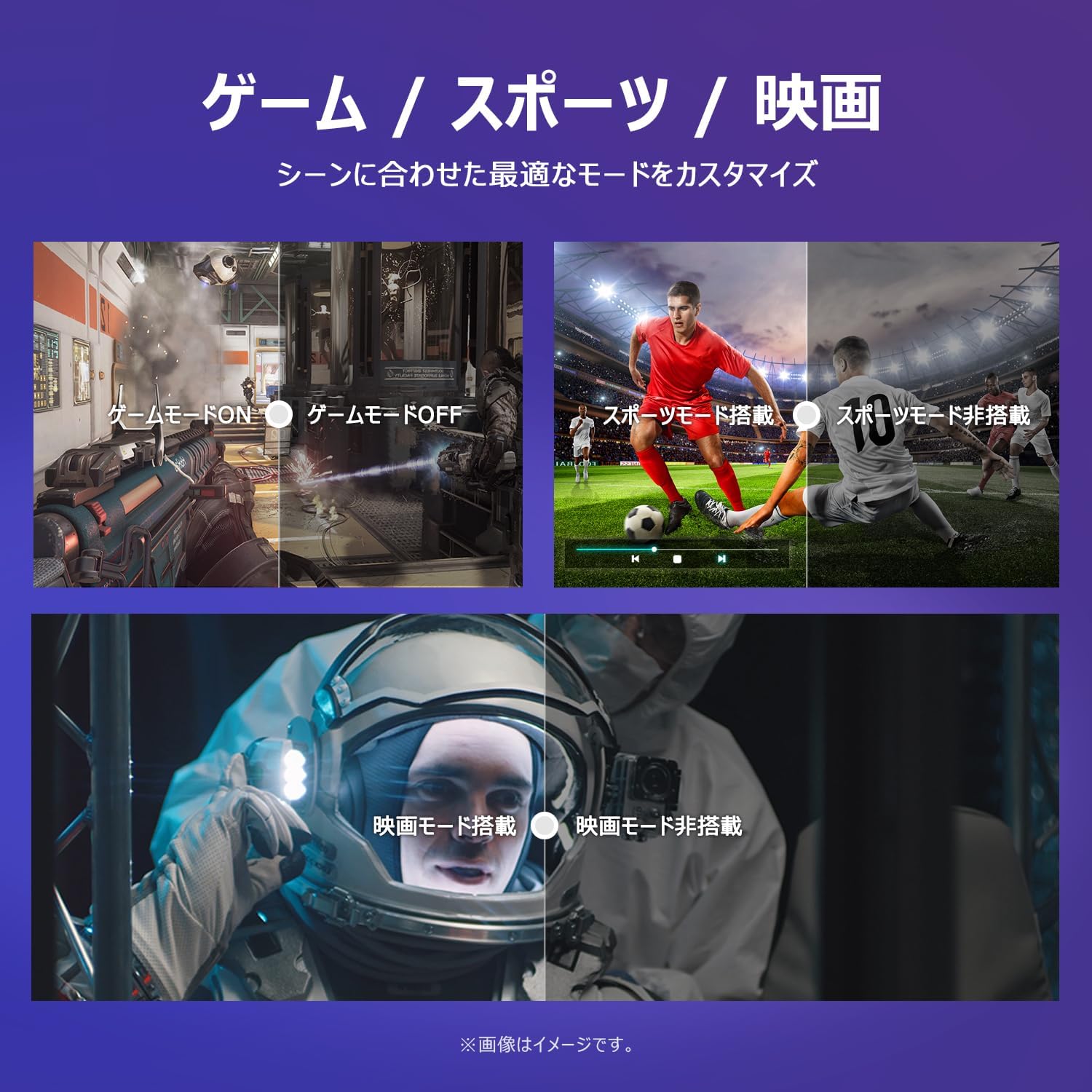
Image: The TV screen with a visual representation of sound, highlighting the immersive audio experience provided by Dolby Audio.
Access the sound settings menu to adjust modes like Standard, Music, Movie, or Custom to suit your preferences.
5.5 Modeu Kaulinan
Activate Game Mode for an optimized gaming experience with reduced input lag.
Image: Visual comparisons demonstrating the optimized settings for Game Mode, Sports Mode, and Movie Mode, adapting the TV's performance to different content types.
The TV also offers dedicated Sports Mode and Movie Mode to enhance viewing for specific content types.
5.6 Setélan Sistim
The quick settings menu allows you to customize frequently used system settings and rearrange their order for intuitive and convenient access.

Gambar: A view of the TV's quick system settings interface, illustrating how users can easily access and customize various functions like brightness, picture mode, and network settings.
6. Pangropéa
Perawatan sareng perawatan anu leres bakal manjangkeun umur televisi anjeun.
- Ngabersihan layar: Ngusap layar nganggo kaén anu lembut sareng teu aya serat. Pikeun tanda nekad, make cleaner layar husus dirancang pikeun TV, dilarapkeun ka lawon, teu langsung kana layar.
- Ngabersihan Casing: Anggo kaen anu lemes sareng garing pikeun ngusap TV casing. Ulah make cleaners abrasive atawa pangleyur.
- Ventilasi: Pastikeun bukaan ventilasi dina tonggong TV teu diblokir pikeun nyegah overheating.
- Kabel listrik: Rutin pariksa kabel kakuatan pikeun karuksakan nanaon. Lamun ruksak, kontak rojongan customer pikeun ngagantian.
7. Cara ngungkulan
If you encounter issues with your TV, refer to the following common problems and solutions. If the problem persists, contact customer support.
| Masalah | Mungkin Cukang lantaranana | Solusi |
|---|---|---|
| Taya kakuatan | kabel kakuatan teu disambungkeun; Stop kontak listrik teu jalan | Ensure power cable is securely plugged in; Test outlet with another device |
| Henteu aya gambar, tapi aya sora | Incorrect input source; External device issue | Press the 'Input' button on the remote to select the correct source; Check external device connections |
| Henteu aya sora, tapi aya gambar | Volume diheureuyan atawa handap teuing; Masalah sistem audio éksternal | Unmute or increase volume; Check audio cable connections to external sound system |
| Kadali jauh teu jalan | Batré béak; Halangan antara remot sareng TV | Replace batteries; Remove any obstructions; Ensure remote is pointed at the TV's IR sensor |
| Teu bisa nyambung ka Wi-Fi | Sandi salah; Masalah router; TV jauh teuing ti router | Verify Wi-Fi password; Restart router; Move TV closer to router or use a Wi-Fi extender |
8. Spésifikasi
Detailed technical specifications for the iFFALCON 40S55T TV:

Image: Dimensional drawing of the iFFALCON 40S55T TV, indicating its physical measurements.
| Fitur | Spésifikasi |
|---|---|
| Ukuran layar | 40 inci |
| Tipe tampilan | VA Liquid Crystal |
| Resolusi | HD lengkep (1920 x 1080) |
| Refresh Laju | 60 Hz |
| Rasio Aspék | 16:9 |
| Babandingan Kontras | 1000:1 |
| Sistem operasi | Google TV |
| Kaluaran Audio | 20 Watts (2.1 channels) |
| Palabuhan HDMI | 2 |
| palabuhan USB | 1 |
| Konéktipitas Wireless | Wi-Fi, Bluetooth |
| Diménsi Produk (W x H x D) | 89.2 x 55.8 x 18.4 cm (kalayan nangtung) |
| Beurat produk | 4.63 kg |
| Cocog pikeun dipasang dina témbok | Sumuhun |
| Kaasup Asesoris | Stand, Remote Control, Warranty Card, Power Cable |
9. Garansi jeung Rojongan
Your iFFALCON 40S55T TV comes with a manufacturer's warranty. Please refer to the included warranty card for specific terms, conditions, and duration of coverage.
For technical support, troubleshooting assistance beyond this manual, or warranty claims, please contact iFFALCON customer service. Contact information can typically be found on the warranty card or the official iFFALCON websitus.
Please have your model number (40S55T) and purchase date ready when contacting support.


