1. Produk Langkungview
The DOOGEE Tab A9 is a 10.1-inch Android 15 tablet designed for versatile use, from productivity to entertainment. It features a quad-core processor, ample memory, and a high-capacity battery, complemented by a suite of accessories for enhanced functionality.
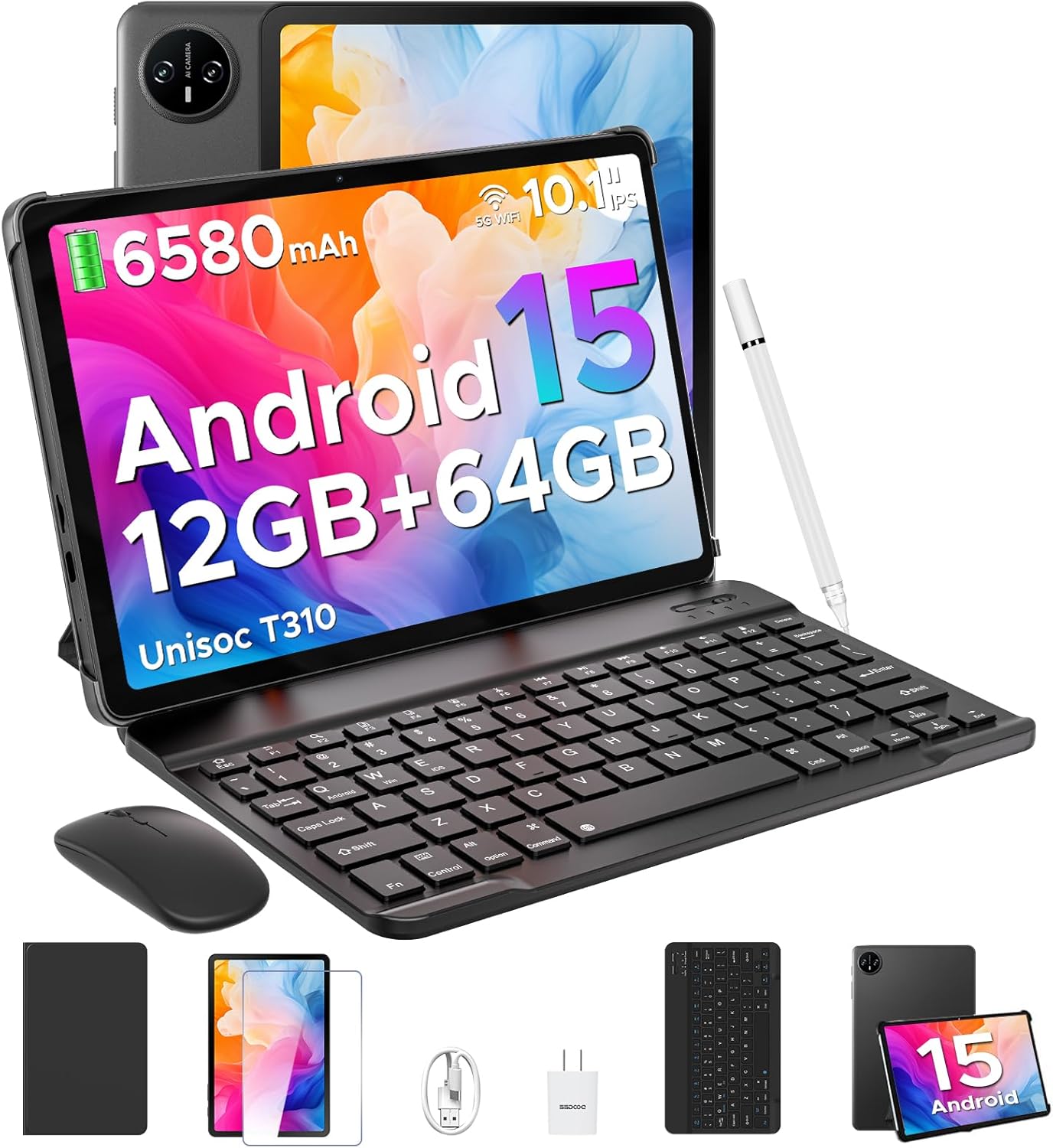
Image 1.1: DOOGEE Tab A9 tablet with its complete accessory kit.
Fitur konci:
- Sistem operasi: Android 15 for enhanced performance and privacy.
- Prosesor: Unisoc T310 Quad-Core, 2.0GHz.
- Mémori & Panyimpenan: 12GB RAM (3GB physical + 9GB virtual) and 64GB internal storage, expandable up to 2TB via microSD.
- tampilan: 10.1-inch IPS HD (1280x800) touchscreen.
- Batré: 6580mAh for extended use.
- Kaméra: Kaméra tukang 8MP sareng kaméra hareup 5MP.
- Konektipitas: 2.4G/5G Dual-band WiFi, Bluetooth 5.0.
- Kaamanan: Muka Muka konci.
- Audio: Dual speakers and 3.5mm headphone jack.
2. Naon Kaasup
Your DOOGEE Tab A9 package includes the following items:

Image 2.1: Contents of the DOOGEE Tab A9 package.
- DOOGEE Tab A9 Tablet
- Keyboard Bluetooth
- Mouse Bluetooth
- Stylus Pen
- Pelindung layar
- Kasus pelindung
- Charger
- Kabel Tipe-C USB
- Manual pamaké
3. Setélan
3.1 Ngecas Awal
Before first use, fully charge your tablet using the provided charger and USB Type-C cable. Connect the cable to the tablet's charging port and the charger to a power outlet. The battery indicator on the screen will show charging status.
3.2 Daya Hurung/Pareuman
- Pikeun Ngahurungkeun: Press and hold the Power button (located on the side of the tablet) until the DOOGEE logo appears.
- Pikeun mareuman: Pencét jeung tahan tombol Daya, teras pilih "Pareuman" tina pilihan nu nembongan dina layar.
- Pikeun ngamimitian deui: Pencét jeung tahan tombol Daya, teras pilih "Balikan deui" tina pilihan.
3.3 Connecting Accessories (Keyboard & Mouse)
The included keyboard and mouse connect via Bluetooth:
- Pastikeun kibor/mouse geus dicas jeung hurung.
- Dina tablet anjeun, buka Setelan > Alat nu disambungkeun > Bluetooth.
- Hurungkeun Bluetooth sareng scan alat anu sayogi.
- Select the keyboard or mouse from the list and follow any on-screen pairing instructions.
3.4 Nyelapkeun Kartu MicroSD
To expand storage, insert a microSD card (up to 2TB, sold separately):
- Panggihan tempat kartu SIM/microSD di sisi tablet.
- Paké alat ejector SIM disadiakeun pikeun muka baki.
- Simpen kartu microSD kana slot anu ditunjuk dina baki.
- Lebetkeun deui baki kana tablet kalayan ati-ati.
4. Parentah Operasi
4.1 Sistem Android 15
Your DOOGEE Tab A9 runs on Android 15, offering improved app launch speeds, system smoothness, and enhanced privacy controls. Explore the intuitive interface and customize settings to your preference.
Video 4.1: Leuwihview of the DOOGEE Tab A9 tablet's features, including its display, speakers, and connectivity.

Image 4.1: The Android 15 system logo, highlighting its intelligent, seamless, and secure features.
4.2 Setélan tampilan
The 10.1-inch IPS HD display offers clear visuals. You can adjust display settings for comfort:
- Modeu Perawatan Panon: Reduces blue light to minimize eye strain. Activate it in Settings > Display > Eye Care Mode.
- Mode poék: Changes the system theme to a darker palette, ideal for low-light environments. Activate it in Settings > Display > Dark Mode.

Image 4.2: Visual representation of the tablet's 10.1-inch IPS HD display and its key specifications.
4.3 Pamakéan kaméra
Capture photos and videos with the tablet's cameras:
- Kaméra pungkur (8MP): Suitable for general photography.
- Kaméra hareup (5MP): Ideal for video calls and selfies.
Open the Camera app from the home screen or app drawer to start. Tap the shutter button to take a photo or switch to video mode to record.

Gambar 4.3: Examples of photos taken with the 8MP main camera.

Image 4.4: The 5MP front camera is suitable for clear video calls.
4.4 Fitur Audio
The tablet is equipped with dual speakers for clear audio output and a 3.5mm audio jack for private listening with headphones.

Image 4.5: Illustration of the tablet's dual speaker system for enhanced audio.
4.5 Konéktipitas
- Wifi: Supports 2.4G and 5G dual-band Wi-Fi for stable and fast internet access. Connect via Setelan > Jaringan & Internét > Wi-Fi.
- Bluetooth 5.0: For connecting wireless peripherals like headphones, speakers, and the included keyboard and mouse. Manage connections in Setelan > Alat nu disambungkeun > Bluetooth.

Image 4.6: Features of the tablet's WiFi 5 connectivity.
4.6 Muka konci raray
Pikeun aksés anu merenah sareng aman, atur Face Unlock:
- Pindah ka Setélan > Kaamanan & privasi > Buka konci raray.
- Turutan parentah dina-layar pikeun ngadaptarkeun beungeut anjeun.
- Ensure you are in a well-lit area during registration for optimal performance.

Image 4.7: The tablet's facial recognition unlock feature in action.
4.7 Multitasking with Split-Screen
Utilize the split-screen feature to run two apps simultaneously:
- Buka aplikasi anu munggaran.
- Gesek ka luhur ti handap layar teras tahan pikeun ngaksés aplikasi anu nembe dibuka.
- Ketok ikon aplikasi di luhur kartu aplikasi anu munggaran teras pilih "Layar pamisah".
- Pilih aplikasi kadua ti aplikasi panganyarna atawa laci aplikasi Anjeun pikeun ngeusian satengah séjén layar.

Image 4.8: Demonstrating efficient split-screen multitasking on the tablet.
4.8 Performance sarta Panyimpenan
The Unisoc T310 Quad-Core processor and 12GB RAM (3GB physical + 9GB virtual) ensure smooth operation for daily tasks and multitasking. The 64GB internal storage provides space for essential apps and files, with expandable storage up to 2TB via microSD card.
Video 4.2: Highlights of the DOOGEE Tab A9's processor, RAM, and storage capabilities.

Image 4.9: Visual representation of the Unisoc T310 Quad-Core processor.

Image 4.10: Illustrates the tablet's memory and storage capacity, including expandable memory.
4.9 Kahirupan batré
The 6580mAh battery, combined with smart battery management, provides all-day usage. Actual battery life may vary based on usage patterns and settings.

Image 4.11: Details on the 6580mAh battery capacity and estimated usage times.
5. Pangropéa
- Apdet parangkat lunak: Rutin pariksa sareng pasang apdet sistem pikeun mastikeun kinerja sareng kaamanan anu optimal. Pindah ka Setélan > Sistem > Apdet sistem.
- beberesih: Anggo lawon anu lemes sareng henteu lint pikeun ngabersihan layar sareng awak tablet. Hindarkeun bahan abrasive atanapi bahan kimia kasar.
- Perawatan batré: Pikeun manjangkeun umur batré, hindari suhu anu ekstrim sareng ulah sering ngantep batréna béak total.
- Manajemén Panyimpenan: Périodik mupus teu perlu files and apps to maintain system speed.
6. Cara ngungkulan
Tingali tabel di handap pikeun masalah umum sareng solusina:
| Masalah | Solusi anu mungkin |
|---|---|
| Tablet teu hurung | Ensure the battery is charged. Connect the charger and try again. If unresponsive, press and hold the Power button for 10-15 seconds to force a restart. |
| Masalah sambungan Wi-Fi | Restart the tablet and your Wi-Fi router. Check Wi-Fi settings to ensure the correct network is selected and the password is entered correctly. |
| Alat Bluetooth teu dipasangkeun | Ensure the Bluetooth device is in pairing mode and within range. Restart both the tablet and the Bluetooth device. Check tablet's Bluetooth settings. |
| kinerja lalaunan | Tutup aplikasi anu teu dianggo. Hapus cache sareng aplikasi samentawis files. Consider uninstalling rarely used apps. Perform a system update if available. |
| Layar teu ngaréspon | Pareuman terus-terusan tablet. Upami masalahna masih aya, pastikeun layarna bersih sareng bébas tina kokotor. |
7. Spésifikasi
| Fitur | Rincian |
|---|---|
| Ngaran modél | Tab A9 |
| Sistem operasi | Android 15 |
| Prosesor | Unisoc T310 Quad-Core, 2 GHz |
| Ram | 12GB (3GB fisik + 9GB virtual) |
| Panyimpenan internal | 64 GB |
| Panyimpenan Expandable | Nepi ka 2TB via kartu MicroSD |
| Ukuran layar | 10.1 inci |
| Resolusi layar | 1280 x 800 pixels (IPS HD) |
| Kaméra tukang | 8 MP |
| Kaméra hareup | 5 MP |
| Kapasitas batré | 6580 mAh |
| Tipe Wireless | 802.11ac, 802.11b, 802.11g, 802.11n (2.4G/5G WiFi) |
| Bluetooth | Bluetooth 5.0 |
| Ukuran (L x W x H) | 9.54 x 6.33 x 0.38 inci |
| Item Beurat | 1.12 pon |
8. Garansi jeung Rojongan
Your DOOGEE Tab A9 tablet comes with a garansi 2 taun jeung rojongan teknis hirupna. For any questions, issues, or support needs, please contact DOOGEE customer service. Refer to the warranty card included in your package for specific terms and conditions.


