Bubuka
This manual provides essential instructions for the safe and effective use of your Panasonic HC-X1200 Camcorder. Please read this manual thoroughly before using the product and retain it for future reference. The Panasonic HC-X1200 is a high-performance camcorder designed for capturing stunning 4K video footage with advanced features for professional and enthusiast users.
fitur konci ngawengku:
- High-quality 4K Recording: Captures stunning 4K video at 60 frames per second, delivering sharp and detailed footage.
- 20x Lensa Zoom Optik: Offers powerful zoom capability without losing image quality.
- Built-in Image Stabilization: Helps reduce camera shake for smoother, more stable video.
- Slot kartu SD ganda: Supports continuous recording with automatic card switching.
- Layar rampa LCD 3.5 inci: Easy-to-use touchscreen for navigating settings and previewdina nembak.
Naon dina Box
Pastikeun yén sadaya item anu didaptarkeun di handap kalebet kana pakét anjeun. Lamun aya item nu leungit atawa ruksak, mangga ngahubungan pangecér Anjeun.
- Panasonic HC-X1200 Camcorder
- adaptor kakuatan / carjer
- Batré Rechargeable
- Kartu Mémori 32GB
- High Speed Memory Card Reader
- Saringan UV
- 2-in-1 Cleaning Pen
- Ngubaran lebu
- Deluxe Starter Kit
- ZeeTech MicroFiber Cleaning Cloth
- Cleaning Kit (general)

Gambar: Hareupeun view of the Panasonic HC-X1200 Camcorder, showing the lens and viewanu mendakan

Image: ZeeTech UV Filter, designed to protect the camcorder lens and reduce haze.

Image: A 2-in-1 cleaning pen, featuring a brush and a carbon cleaning tip for lenses.

Image: A dust blower, used for safely removing dust and debris from camera surfaces and lenses.
Disetél
- Ngeusi batre: Connect the camcorder to the power adapter and plug it into an electrical outlet. The charging indicator will illuminate. Ensure the battery is fully charged before first use.
- Pasang Batré: Open the battery compartment cover on the camcorder. Insert the charged battery, ensuring it clicks into place. Close the cover securely.
- Insert Memory Card(s): The HC-X1200 features dual SD card slots. Open the SD card slot cover. Insert the 32GB memory card (and an optional second card) into the slots until they click. Ensure the cards are inserted in the correct orientation. Close the cover.

Gambar: Sisi view of the camcorder, highlighting the dual SD card slots.
- Attach UV Filter: Carefully screw the UV filter onto the front of the camcorder lens. This protects the lens and can reduce UV light.
- Daya Hurung: Slide the power switch to the "ON" position. The camcorder will start up, and the LCD screen will display the live view.
- Setélan Awal: Follow the on-screen prompts to set the date, time, language, and other initial configurations.
Parentah Operasi
Rekaman Dasar
- Open LCD Screen: Flip open the 3.5-inch LCD touchscreen. This will often power on the camcorder automatically.
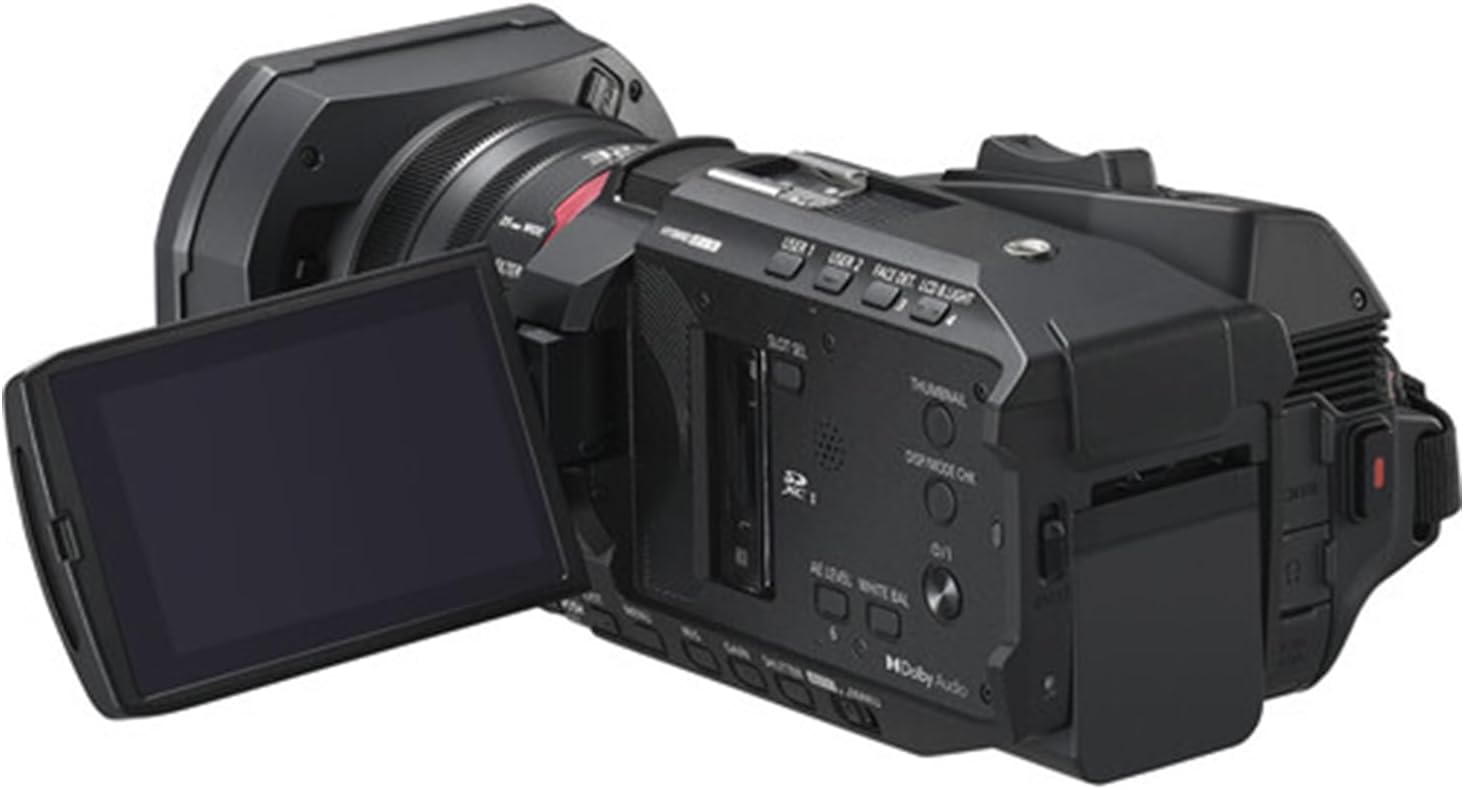
Image: The camcorder with its 3.5-inch LCD touchscreen rotated open for viewing.
- Pilih Modeu Rekaman: Use the menu on the LCD touchscreen to select your desired recording mode (e.g., 4K 60p).
- Saluyukeun Zoom: Use the zoom lever to zoom in or out. The 20x optical zoom allows for clear magnification without loss of quality.
- fokus: The camcorder features autofocus. For manual focus, use the focus ring on the lens barrel.
- Mimitian / Eureun Rekaman: Pencét éta REC ngamimitian / eureun button to begin recording. Press it again to stop.
- Stabilisasi Gambar: The built-in image stabilization system automatically reduces camera shake. Ensure it is enabled in the settings for smoother footage, especially during handheld shooting.
Playback
- Enter Playback Mode: Pencét éta PLAYBACK button or select playback from the menu on the LCD screen.
- Select Video: Use the touchscreen or navigation buttons to select the video you wish to play.
- Puter / Reureuh: Pencét éta MUTER / Reureuh button on the screen to start or pause playback.
Pangropéa
- Ngabersihan lensa: Use the provided 2-in-1 cleaning pen or microfiber cloth to gently clean the lens. For stubborn dust, use the dust blower first. Avoid touching the lens surface with your fingers.
- Ngabersihan awak: Wipe the camcorder body with a soft, dry cloth. For tougher grime, slightly dampen the cloth with water. Do not use solvents or abrasive cleaners.
- Perawatan batré: Store batteries in a cool, dry place. If not using the camcorder for an extended period, remove the battery. Avoid fully discharging the battery frequently to prolong its lifespan.
- Panyimpenan: Store the camcorder in a dry, dust-free environment, away from extreme temperatures and direct sunlight. Use a protective case when transporting.
Pamérésan masalah
| Masalah | Mungkin Cukang lantaranana | Solusi |
|---|---|---|
| Camcorder teu hurung. | Battery is not charged or incorrectly inserted. | Ensure the battery is fully charged and correctly inserted. Check power adapter connection if using AC power. |
| Teu bisa ngarekam video. | Memory card is full, locked, or not inserted correctly. | Check memory card status. Ensure it has free space, is unlocked, and properly inserted. Format the card if necessary (this will erase all data). |
| Video fotage is blurry or shaky. | Focus issue, image stabilization off, or excessive camera movement. | Check focus settings (autofocus or manual). Ensure image stabilization is enabled. Use a tripod or stable surface for recording. |
| Layar LCD kosong. | Camcorder is off, battery is dead, or screen brightness is too low. | Power on the camcorder. Charge or replace the battery. Adjust screen brightness in settings. |
spésifikasi
- merek: Panasonic (Camcorder), ZeeTech (Bundle Provider)
- Ngaran modél: HC-X1200
- Jumlah modél: X1200
- Téknologi Sénsor Poto: MOS
- Resolusi Capture Video: 4K
- Panjang Fokus Maksimum: 98.9 milimeter
- Tipe Mémori Flash: Sdhc
- Format Capture Video: MP4
- Ukuran layar: 3.5 Inci (LCD Layar Toél)
- warna: Hideung
- Batré: 1 Batré Nonstandar diperlukeun (kaasup)
- Komponén Kaasup: Cleaning Kit, 32GB Memory Card, High Speed Memory Card Reader, UV Filter, 2-in-1 Cleaning Pen, Dust Blower, Deluxe Starter Kit, MicroFiber Cleaning Cloth.
- Titimangsa munggaran sadia: 24 April 2025
Garansi sareng Rojongan
The Panasonic HC-X1200 Camcorder is covered by the manufacturer's standard warranty. Please refer to the warranty card included in your original packaging for specific terms and conditions, including warranty period and coverage details.
For technical support, service, or warranty claims, please contact Panasonic customer service or your authorized retailer. Keep your proof of purchase for warranty validation.


