1. Bubuka
This manual provides detailed instructions for the setup, operation, and maintenance of your Transformers GK01 Wireless Mechanical Keyboard. The GK01 is a versatile keyboard featuring tri-mode connectivity (Bluetooth 5.0, 2.4GHz wireless, and USB-C wired), a 101-key layout, RGB backlighting, and hot-swappable switches for a customizable typing experience.

Figure 1.1: Transformers GK01 Wireless Mechanical Keyboard.
2. Eusi Paket
Punten parios yén sadaya barang anu didaptarkeun di handap kalebet kana pakét anjeun:
- Transformers GK01 Wireless Mechanical Keyboard
- USB-C ka USB-A Cable
- Dongle USB Nirkabel 2.4GHz
- 2-in-1 Keycap jeung Pindah Puller
- Manual pangguna (dokumén ieu)
- Saklar Cadangan (2 buah)
- Panutup keyboard
3. Setup jeung Connection
3.1. Tri-Mode Connection Overview
The GK01 keyboard supports three connection modes: USB-C wired, 2.4GHz wireless, and Bluetooth 5.0. You can connect to up to five devices simultaneously and switch between them seamlessly.

Figure 3.1: Tri-Mode Connection Capabilities.
3.2. Sambungan Kabel USB-C
- Panggihan port USB-C dina kibor.
- Sambungkeun hiji tungtung kabel USB-C anu disayogikeun kana kibor.
- Connect the other end of the USB-C cable to an available USB-A port on your computer.
- Kibor bakal otomatis dikenal sareng siap dianggo.
3.3. 2.4GHz Wireless Connection
- Locate the 2.4GHz wireless USB dongle.
- Colokkeun dongle kana port USB-A anu sayogi dina komputer anjeun.
- On the keyboard, ensure the mode switch (usually on the side or back) is set to 2.4GHz mode.
- Kiborna kedah nyambung sacara otomatis. Upami henteu, pencét Fn + Urang Sunda pikeun ngamimitian papasangan.

Figure 3.2: USB-C Port and 2.4GHz Dongle Location.
3.4. Sambungan Bluetooth 5.0
The keyboard supports connecting to up to three Bluetooth devices (BT1, BT2, BT3).
- On the keyboard, set the mode switch to Bluetooth mode.
- To enter pairing mode for a specific Bluetooth channel, press and hold Fn + Q (pikeun BT1), Fn + W (pikeun BT2), atawa Fn + E (for BT3) for 3-5 seconds until the indicator light flashes rapidly.
- On your device (PC, tablet, smartphone), open Bluetooth settings and search for new devices.
- Select "Transformers GK01" from the list of available devices.
- Once connected, the indicator light on the keyboard will stop flashing.
- Pikeun pindah antara alat Bluetooth anu dipasangkeun, pencét waé Fn + Q, Fn + W, atawa Fn + E.
4. Operasi dasar
4.1. Keyboard Layout and Anti-Ghosting
The GK01 features a 101-key layout, providing a full set of keys including a numeric keypad. All keys are equipped with anti-ghosting technology, ensuring that every keystroke is registered accurately, even when multiple keys are pressed simultaneously.
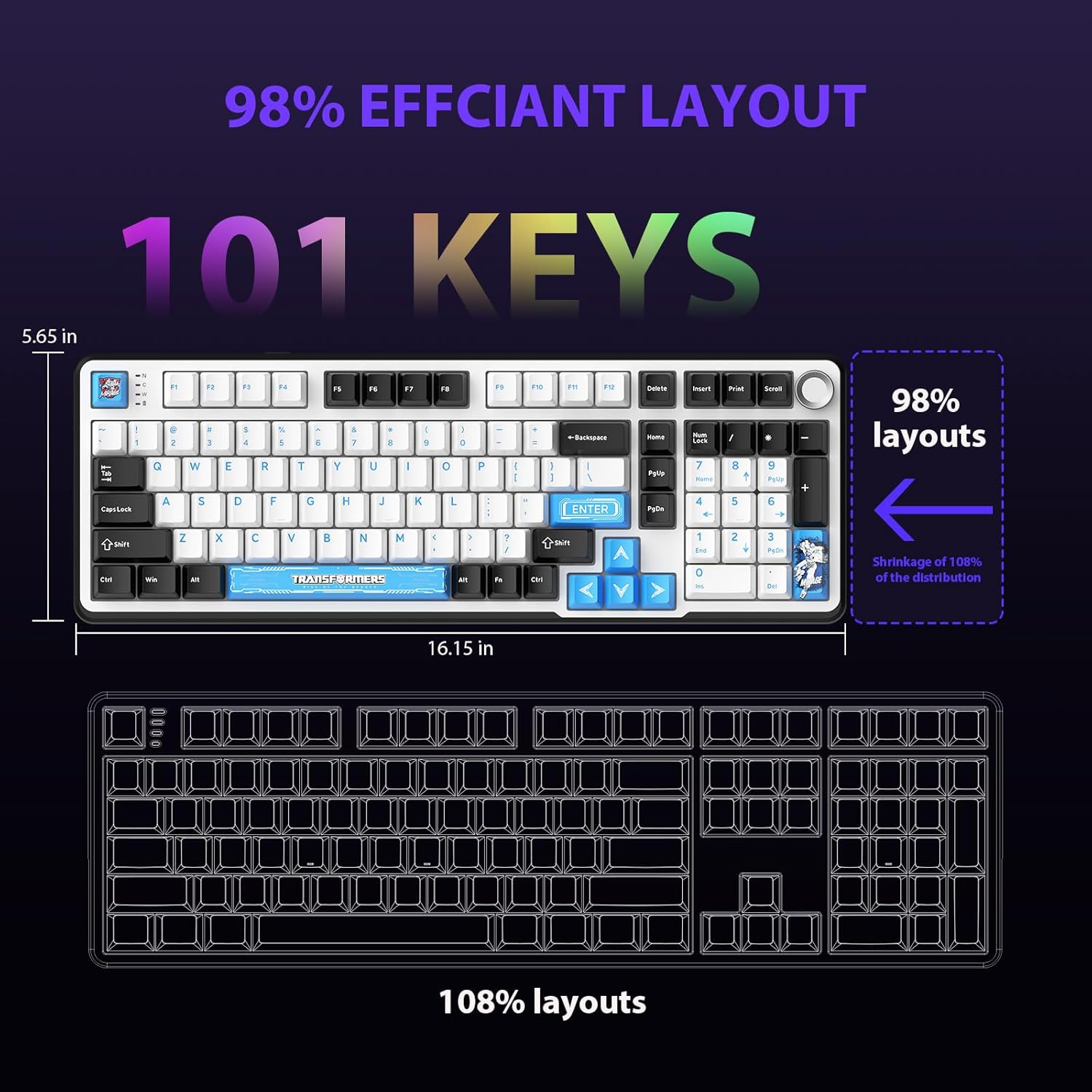
Gambar 4.1: Tata Letak 101-Konci.
4.2. Kenop Kontrol Multimedia
The dedicated knob located on the top right of the keyboard provides convenient multimedia control:
- Puteran saarah jarum jam: Ningkatkeun volume.
- Puterkeun Ngalawan Searah Jarum Jam: Ngurangan volume.
- Pencét Turun: Ngajempékeun/Ngahurungkeun audio.
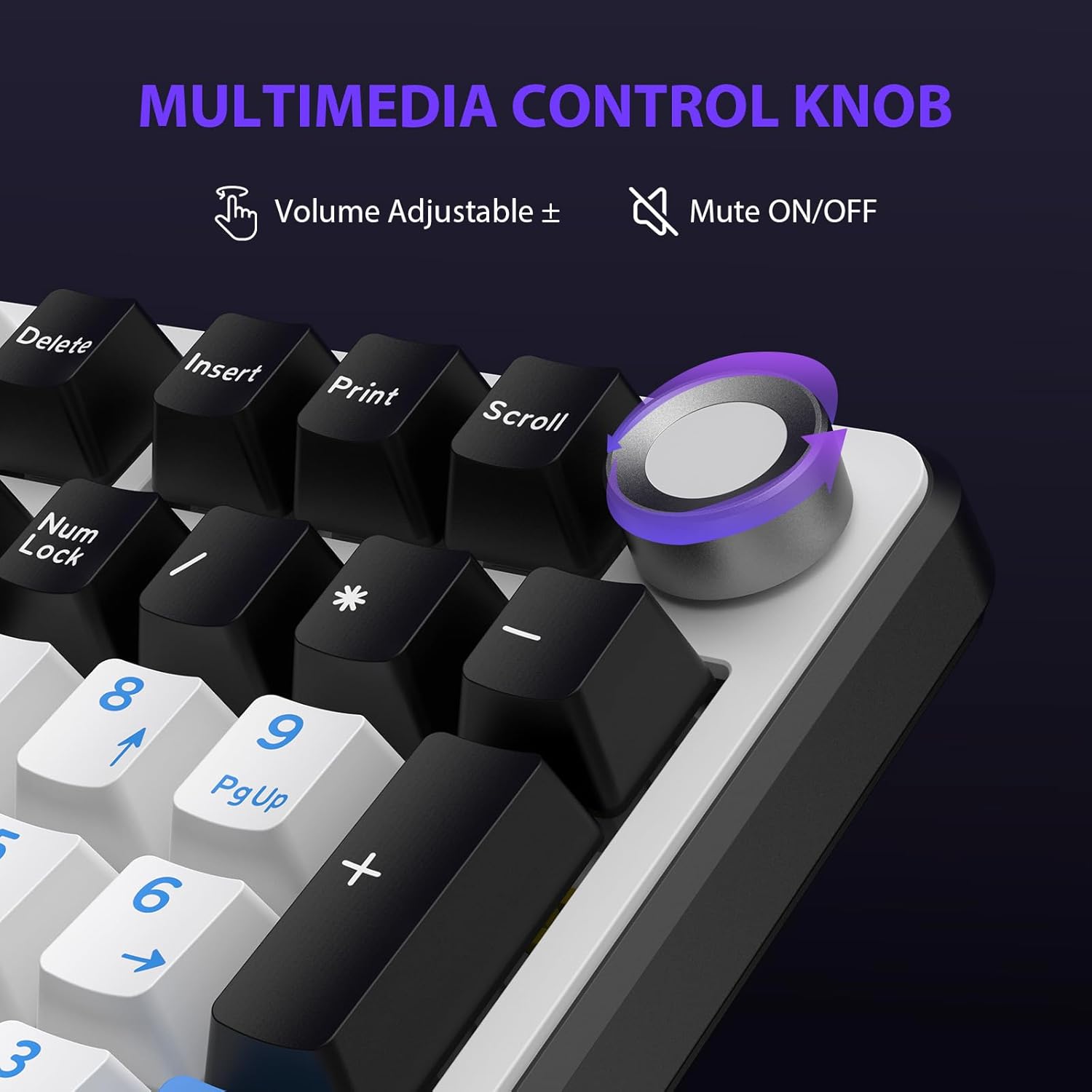
Figure 4.2: Multimedia Control Knob.
4.3. Kontrol Lampu Latar RGB
The GK01 keyboard features 16.8 million color RGB backlighting with various effects.
- Fn + [Right Arrow]: Adjust 5 brightness levels.
- Fn + [Left Arrow]: Adjust 5 speed levels for dynamic effects.
- Fn + [Selapkeun]: Switch between 20 different backlight modes.
- Fn + [Asupkeun]: Switch color order within certain modes.
- Fn + [X]: Turn off light / activate power-saving mode.
- Fn + [Backspace]: Switch color order within certain modes.

Figure 4.3: RGB Backlight Controls.
5. Fitur canggih
5.1. Saklar Panas-Swappable
The GK01 keyboard is equipped with pre-lubricated Cybertron linear switches and supports solder-free hot-swapping. This allows you to easily replace switches with compatible 3-pin or 5-pin mechanical switches without soldering.
Pikeun ngaganti saklar:
- Using the provided 2-in-1 keycap and switch puller, gently remove the keycap from the desired switch.
- Insert the switch puller onto the switch, ensuring it grips the top and bottom clips of the switch.
- Tarik saklarna lalaunan lempeng ka luhur pikeun nyabutna tina PCB.
- Sejajarkeun pin saklar anyar jeung liang dina PCB. Pastikeun pinna lempeng sangkan teu bengkok.
- Pencét saklar anyar pageuh kana tempatna nepi ka ngaklik.
- Pasang deui keycap.

Figure 5.1: Hot-Swappable Switch Replacement.
5.2. Parangkat Lunak anu Tiasa Diprogram
The GK01 supports custom software for advanced customization, including key remapping, macro creation, and detailed RGB lighting effects.
- The software is compatible only with the Windows operating system.
- The keyboard must be connected via USB-C wired mode to use the software.
- For driver download, please visit the official Transformers Keyboard website or refer to the link provided in the product packaging.
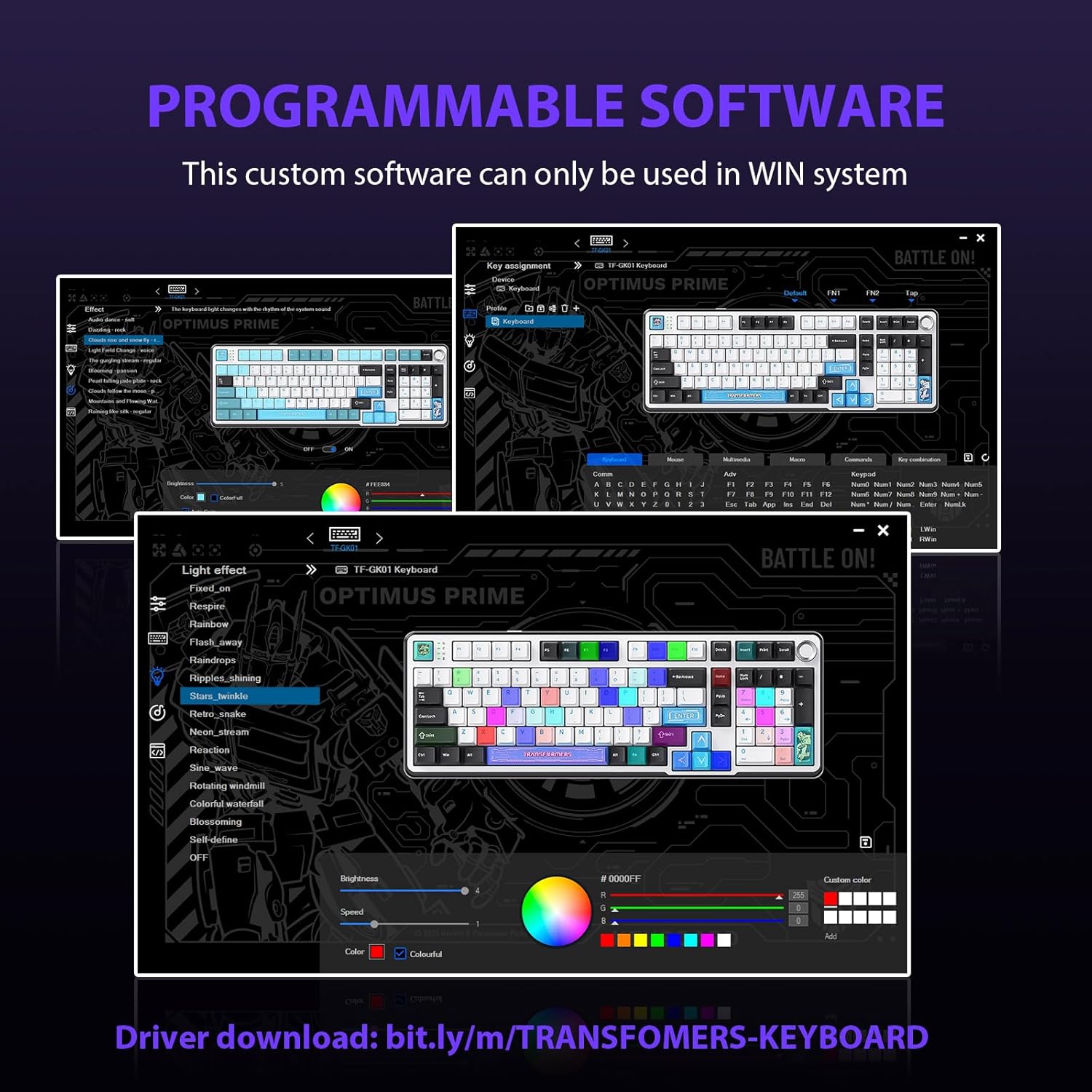
Figure 5.2: Programmable Software Interface.
5.3. Gasket Mounted Structure
The keyboard features a five-layer sound-absorbing and shock-absorbing gasket mounted structure. This design effectively reduces hollow noise and provides a softer, more consistent typing feel by isolating the plate from the case.
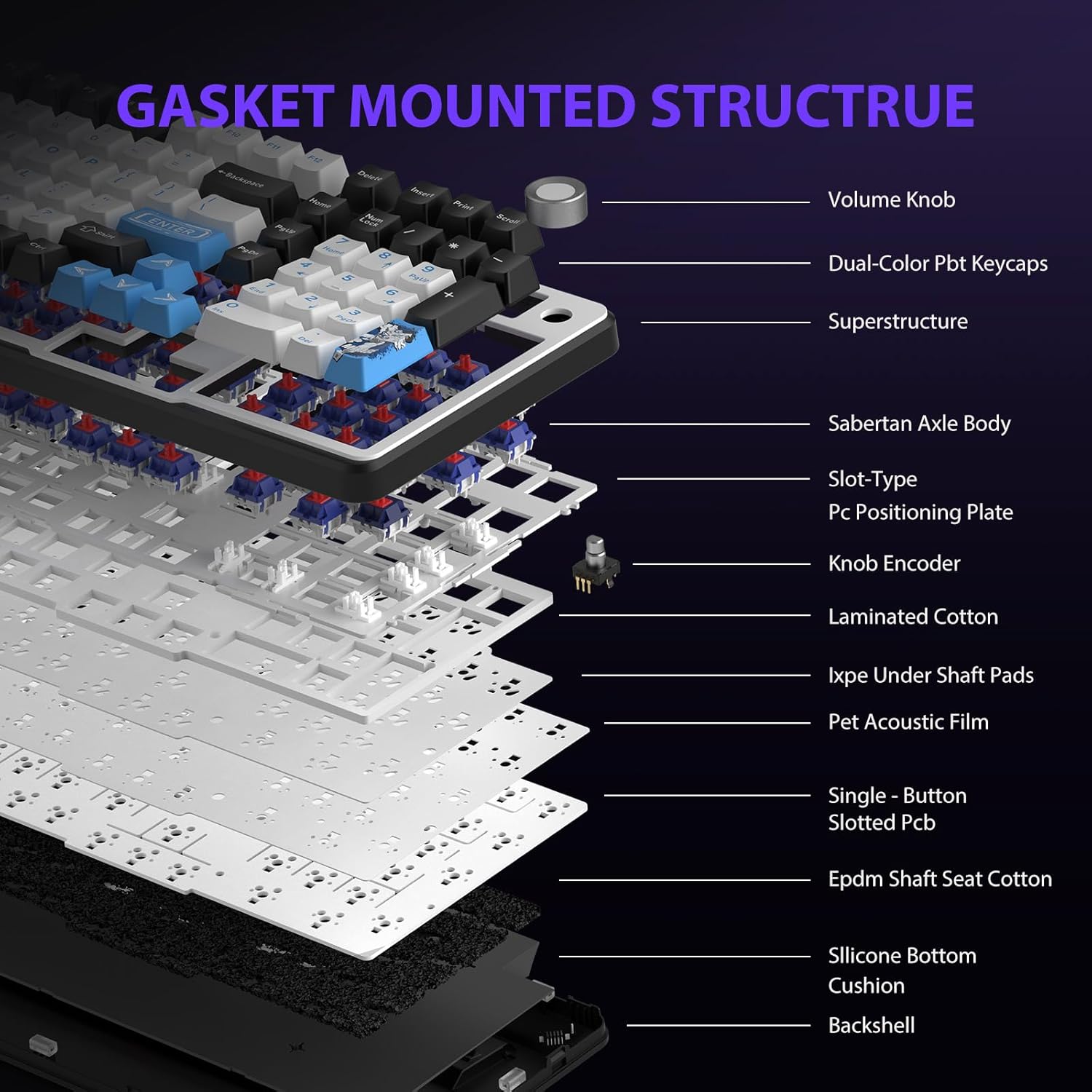
Figure 5.3: Gasket Mounted Structure Components.
6. Manajemén batré
The GK01 keyboard is equipped with a 4000mAh rechargeable battery.
- Ngecas: Connect the keyboard to a USB power source using the provided USB-C cable. The indicator light will show charging status.
- Kahirupan batré: A fully charged battery provides extended usage time. Actual battery life may vary based on usage patterns and RGB lighting intensity.
- Hemat Daya: The keyboard will enter a power-saving sleep mode after a period of inactivity to conserve battery. Press any key to wake it up.
7. Pangropéa
7.1. Ngabersihan kibor
- Cabut sambungan kibor tina sadaya sumber daya sateuacan dibersihkeun.
- Make kaen nu lemes, teu aya lint rada dampku cai atawa solusi beberesih hampang pikeun ngusap keycaps na chassis.
- Pikeun lebu jeung lebu antara keycaps, make hawa dikomprés atawa sikat leutik.
- Hindarkeun ngagunakeun bahan kimia anu kasar atanapi bahan abrasive.
7.2. Keycap and Switch Care
- The PBT keycaps are designed for durability and fade resistance.
- Refer to Section 5.1 for instructions on safely removing and replacing keycaps and switches.
- Ensure the keyboard feet are clean and free of debris for stable placement.

Figure 7.1: Adjustable Keyboard Feet.
8. Cara ngungkulan
| Masalah | Mungkin Cukang lantaranana | Solusi |
|---|---|---|
| Kibor teu ngaréspon dina modeu nirkabel. | Low battery, incorrect mode selected, dongle not connected, Bluetooth not paired. | Charge the keyboard. Ensure the mode switch is set correctly (2.4GHz or BT). Re-insert the 2.4GHz dongle. Re-pair Bluetooth connection. Try wired mode to confirm keyboard functionality. |
| Konci teu kadaptar atanapi ngetik dua kali. | Loose switch, software issue, debris under keycap. | Ensure switches are fully seated. Clean under keycaps. If using programmable software, ensure it's updated or try resetting keyboard settings. |
| Lampu latar RGB teu tiasa dianggo atanapi macét. | Lampu latar pareum, konflik parangkat lunak. | Pencét Fn + X to toggle backlight. Check programmable software settings. |
| Teu bisa nyambung via Bluetooth. | Kibor teu dina modeu pairing, alat Bluetooth pareum, gangguan. | Ensure keyboard is in Bluetooth pairing mode (Fn + Q/W/E long press). Ensure device Bluetooth is on and discoverable. Move closer to the device. |
9. Spésifikasi
| Fitur | Rincian |
|---|---|
| Nomer modél | TF-GK01 |
| Konektipitas | Bluetooth 5.0, Nirkabel 2.4GHz, Kabel USB-C |
| Tipe kibor | Mékanis |
| Tata perenah | 101 Keys (Full-size) |
| Saklar | Pre-lubed Cybertron Linear Switches, Hot-Swappable (3-pin/5-pin compatible) |
| Kancing konci | Heat-sublimated PBT |
| Lampu tukang | RGB (16.8 Million Colors, 20 modes, music rhythm effects via driver) |
| Kapasitas batré | 4000 mah |
| Dimensi produk | 16.15 x 5.65 x 1.63 inci (41.02 x 14.35 x 4.14 cm) |
| Item Beurat | 2.24 pon (1.02 kg) |
| Alat nu cocog | Laptop, PC, Smartphone, Tablet |
| Fitur husus | Anti-Ghosting (all keys), Multimedia Control Knob, Programmable Keys (via software), Rechargeable |
10. Garansi jeung Rojongan
For information regarding warranty coverage, technical support, or service inquiries, please refer to the warranty card included with your product or visit the official Transformers Keyboard websitus.
Pabrikan: Transformers


