Bubuka
This manual provides essential information for the proper setup, operation, and maintenance of your DigiLand MID1057-MX 10.1-inch Android 14 Tablet. Please read this manual thoroughly before using the device to ensure optimal performance and longevity.

Image: DigiLand MID1057-MX Android 14 Tablet.
Disetél
1. Eusi Paket
Pastikeun yén sadaya item aya dina bungkusan:
- DigiLand MID1057-MX Tablet
- Kabel Tipe-C USB
- Adaptor kakuatan
- Kasus pelindung
- Gancang Mimitian Guide
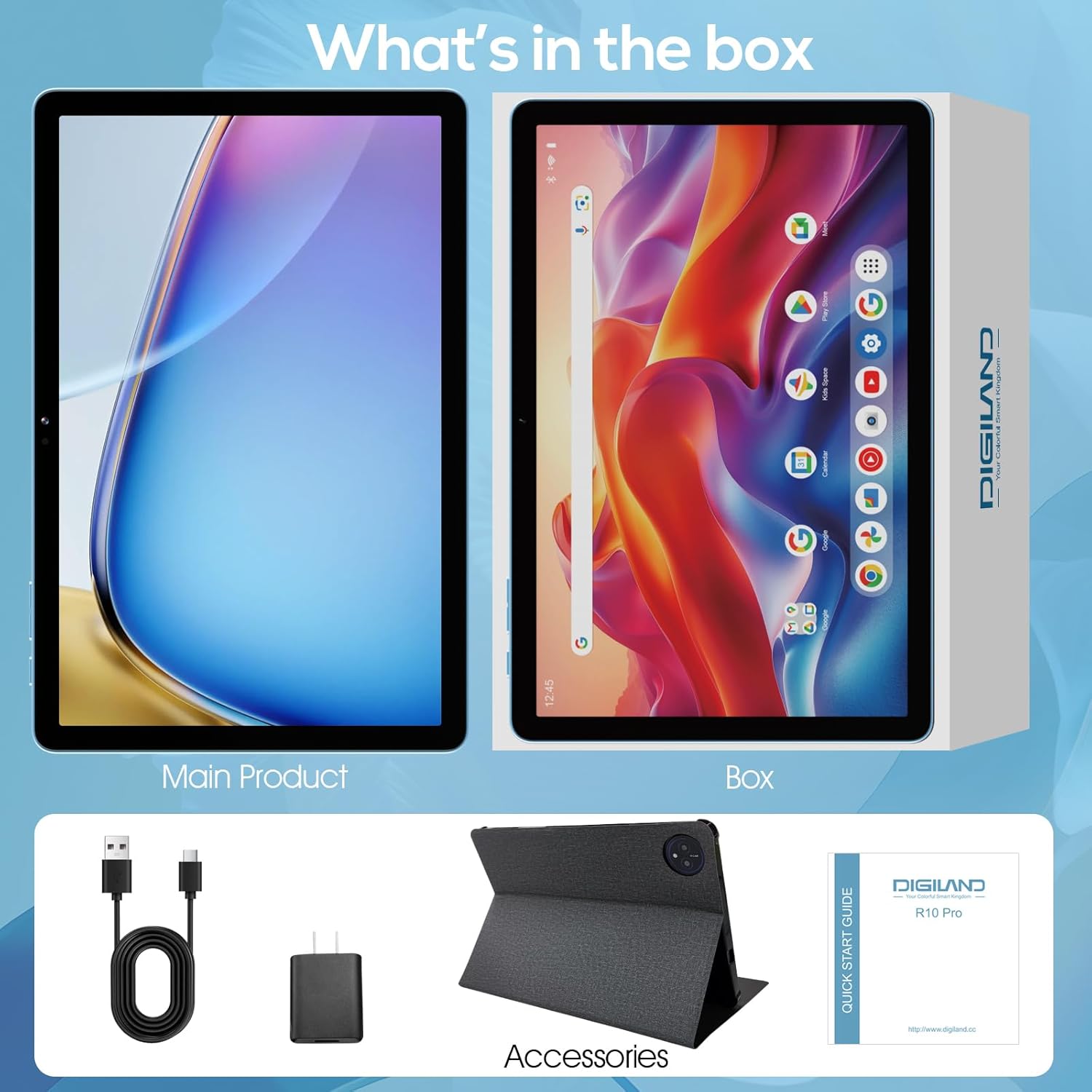
Image: Package contents of the DigiLand MID1057-MX Tablet.
2. Tata perenah
Biasakeun diri anjeun kana fitur fisik tablet:
- Tombol Daya: Perenahna di sisi, dianggo pikeun ngahurungkeun/mareuman alat atanapi ngahudangkeun/ngahurungkeun layar.
- Tombol Volume: Saluyukeun tingkat audio.
- Port USB Tipe-C: Pikeun ngecas sareng mindahkeun data.
- Headset Jack: Pikeun nyambungkeun headphone.
- Slot Kartu MicroSD: For expandable storage (up to 1TB).
- Kaméra hareup: Pikeun nelepon video sareng selfies.
- Kaméra tukang: Pikeun motret poto sareng video.

Gambar: Leuwihview of tablet ports and buttons.
3. Muatan Awal
Before first use, fully charge the tablet. Connect the USB Type-C cable to the tablet's port and the power adapter to a wall outlet. The battery indicator on the screen will show charging status.
4. Daya Hurung / Pareum
- Pikeun Ngahurungkeun: Press and hold the Power button until the DigiLand logo appears.
- Pikeun mareuman: Pencét terus tahan tombol Daya nepi ka menu pilihan daya nembongan, teras pilih "Pareuman".
- Pikeun Saré / Hudang: Pencét sakeudeung tombol Daya.
5. Setup Awal
Saatos dihurungkeun pikeun anu munggaran, turutan pitunjuk dina layar pikeun:
- Pilih basa anjeun.
- Nyambung ka jaringan Wi-Fi.
- Asup jeung akun Google Anjeun atawa jieun nu anyar.
- Setel konci layar sareng fitur kaamanan anu sanésna.
Ngoperasikeun
1. Gerakan Layar Toél
Navigate the tablet using standard Android gestures:
- Ketok: Pilih hiji item atawa buka aplikasi.
- Ketok jeung Tahan: Aksés ménu kontekstual atanapi pindahkeun ikon.
- Gesek: Scroll through pages or navigate between screens.
- Ciwit: Ngazum gede atawa leutik dina gambar na web kaca.
2. Nyambungkeun ka Wi-Fi
- Pindah ka Setélan > Jaringan & internét > Wifi.
- Togél Wi-Fi On.
- Pilih jaringan anu dipikahoyong tina daptar.
- Tulis kecap akses upami dipenta, teras ketok Nyambung.
3. Papasangan Bluetooth
- Pindah ka Setélan > Alat disambungkeun > Bluetooth.
- Pindahkeun Bluetooth On.
- Pastikeun alat Bluetooth anjeun dina mode papasangan.
- Pilih alat tina daptar tur turutan sagala ajakan dina layar pikeun ngalengkepan papasangan.
4. Installing and Uninstalling Applications
- Pasang: Open the Google Play Store app, search for the desired application, and tap Pasang.
- Uninstall: Pindah ka Setélan > Aplikasi > Tempo sadaya aplikasi, select the app, then tap Uninstall.
5. Managing Storage
Your tablet comes with 128GB of internal storage. You can expand this by up to 1TB using a MicroSD card (not included).
- To Insert MicroSD Card: Locate the MicroSD card slot, gently insert the card until it clicks into place.
- To Remove MicroSD Card: Pindah ka Setélan > Panyimpenan, tap on the SD card, and select Ngaluarkeun before physically removing it.

Image: Storage capacity and expansion.
6. Pamakéan kaméra
The tablet features a 13MP rear camera and an 8MP front camera.
- Buka na Kaméra aplikasi.
- Ketok tombol jepret pikeun moto.
- Ketok ikon pidéo pikeun ngarékam pidéo.
- Anggo ikon sakelar kaméra pikeun pindah antara kaméra hareup sareng kaméra tukang.

Image: Dual camera features and examples.
7. Manajemén batré
The 6000mAh battery provides extended usage time. To optimize battery life:
- Atur kacaangan layar ka tingkat anu nyaman.
- Turn off Wi-Fi and Bluetooth when not in use.
- Tutup aplikasi anu henteu dianggo jalan di latar tukang.
- Aktipkeun modeu panghemat batré dina Setélan > Batré.

Gambar: Kapasitas batré sareng perkiraan panggunaan.
Pangropéa
1. Ngabersihan Alat
Anggo lawon anu lemes sareng henteu lint pikeun ngabersihan layar sareng awak tablet. Ulah make bahan kimia kasar atawa bahan abrasive.
2. Apdet parangkat lunak
Regularly check for and install system updates to ensure your tablet has the latest features and security patches. Go to Setélan > Sistim > Pembaruan sistem.
3. Storage Optimization
Périodik ulangview jeung mupus teu perlu files, photos, and applications to free up storage space and maintain performance. Consider moving large media files to an external MicroSD card.
Pamérésan masalah
Tingali tabel di handap pikeun masalah umum sareng solusina:
| Masalah | Solusi anu mungkin |
|---|---|
| Tablet moal hurung | Pastikeun batréna tos dicas. Sambungkeun kana carjer sahenteuna 30 menit, teras cobian hurungkeun deui. |
| Masalah sambungan Wi-Fi | Balikan deui tablet sareng router Wi-Fi anjeun. Poho jaringan dina setélan sareng sambungkeun deui. |
| kinerja lalaunan | Close unused apps. Clear cache for frequently used apps. Check for system updates. Free up storage space. |
| Batré gancang boros | Reduce screen brightness. Disable Wi-Fi/Bluetooth when not in use. Limit background app activity. |
| Aplikasi nabrak atanapi katirisan | Restart the app. Clear the app's cache and data in settings. Reinstall the app. |
spésifikasi
Key technical specifications for the DigiLand MID1057-MX Tablet:
| Fitur | Spésifikasi |
|---|---|
| Modél | MID1057-MX |
| Sistem operasi | Android 14 |
| Ukuran layar | 10.1 inci |
| Resolusi layar | 1280 x 800 pixels (IPS HD) |
| Prosesor | MTK Helio G80 Octa-Core (A523, Cortex A55@1.8 GHz, 22nm) |
| Ram | 12GB (4GB fisik + 8GB ékspansi) |
| Panyimpenan internal | 128GB ROM |
| Panyimpenan Expandable | Up to 1TB via MicroSD card (TF card slot) |
| Kapasitas batré | 6000 mah |
| Kaméra hareup | 8MP |
| Kaméra tukang | 13MP |
| Konektipitas | Dual-band Wi-Fi (2.4G+5G), Bluetooth 5.0, USB Type-C (OTG) |
| Ukuran (L x W x H) | 9.5 x 6.3 x 0.3 inci |
| Item Beurat | 2.79 pounds (485g for tablet only) |

Gambar: Spésifikasi produk anu lengkep.
Garansi sareng Rojongan
1. Émbaran jaminan
Please refer to the warranty card included with your product for specific warranty terms and conditions. DigiLand provides after-sales support to address any product-related concerns.
2. Rojongan Palanggan
For technical assistance, troubleshooting, or any questions regarding your DigiLand MID1057-MX Tablet, please contact DigiLand customer support through the contact information provided in your Quick Start Guide or on the official DigiLand websitus.


