Bubuka

Image: Hamilton 1.1 cu ft Countertop Touchscreen Microwave Oven.
This manual provides essential information for the safe and efficient operation of your Hamilton 1.1 Cu. Ft. Countertop Touchscreen Microwave Oven. Please read this manual thoroughly before use and retain it for future reference.
Parentah Kasalametan penting
Nalika nganggo alat listrik, pancegahan kaamanan dasar kedah diturutan pikeun ngirangan résiko kahuruan, kejutan listrik, sareng tatu pikeun jalma, kalebet ieu:
- Baca sadaya parentah sateuacan nganggo alat.
- Ulah ngajalankeun oven lamun panto atawa segel panto ruksak.
- Ulah panas cair atawa kadaharan séjénna dina wadah disegel sabab bisa ngabeledug.
- Ngan ngawenangkeun barudak ngagunakeun oven tanpa pangawasan lamun parentah nyukupan geus dibikeun ku kituna anak geus bisa ngagunakeun oven dina cara aman tur understands bahaya tina pamakéan teu bener.
- Refer to the "Child Safety Lock" section for specific instructions on this feature.
Fitur produk
- Powerful 1000W output for efficient cooking.
- 10 adjustable power levels for versatile cooking and reheating.
- User-friendly touchscreen control panel with LED display.
- Convenience cooking controls for popular foods (e.g., potatoes, popcorn, frozen dinners, pizza, beverages).
- 8 Smart Sensor auto cooking menus for precise results.
- Integrated child safety lock for enhanced security.
- Sleek white finish with stainless-steel accents.
spésifikasi
| Atribut | Rincian |
|---|---|
| merek | Hamilton |
| Nomer modél | HB8436193153-02 |
| Kapasitas | 1.1 suku kubik |
| Wattage | 1000 watt |
| Voltage | 120 Volt (AC) |
| Diménsi (D x W x H) | 21" x 12" x 19" |
| Tipe Pamasangan | Countertop |
| Bahan (Eksterior) | Baja |
| Bahan (Interior) | Beusi sténless |
| Komponén Kaasup | Kaca Turntable |
Disetél
- Ngabongkar bungkusan: Carefully remove the microwave oven and all packing materials from the carton. Check for any damage, such as dents or a misaligned door. Do not operate if damaged.
- panempatan: Place the microwave on a flat, stable surface that can support its weight. Ensure adequate ventilation by leaving at least 4 inches of space around the sides, back, and top of the oven. Do not block air vents.
- Pamasangan Turntable: Place the turntable ring in the center of the oven cavity. Then, place the glass turntable securely on top of the turntable ring. Ensure it rotates freely.
- Sambungan Daya: Plug the microwave oven into a grounded 120V AC electrical outlet.

Gambar: Interior view of the Hamilton microwave, highlighting the removable glass turntable for easy cleaning.
Parentah Operasi
Operasi Dasar
- Nyetél jam:
- Pencét éta JAM kancing.
- Use the number pads to enter the current time.
- Pencét éta JAM tombol deui pikeun mastikeun.
- Masak gelombang mikro:
- Teundeun dahareun dina wadah microwave-aman dina turntable kaca.
- Nutup panto aman.
- Lebetkeun waktos masak anu dipikahoyong nganggo bantalan nomer.
- Pencét éta TINGKAT kakuatan button to adjust power if needed (default is 100%). Use number pads to select power level (1-10).
- Pencét Mimitian / + 30 SEC pikeun ngamimitian masak.
- Masak Express: For quick cooking, simply press the 1 MIN, 2 MIN, atawa 3 MIN buttons for instant cooking at full power. Press RENGEUT / BATAL to stop or clear settings. Press + 30SEC to add 30 seconds to cooking time.
- Defrosting:
- Pencét éta DEFROST beurat or WAKTU DEFROST kancing.
- Follow the prompts on the LED display to enter weight or time.
- Pencét Mimitian / + 30 SEC.
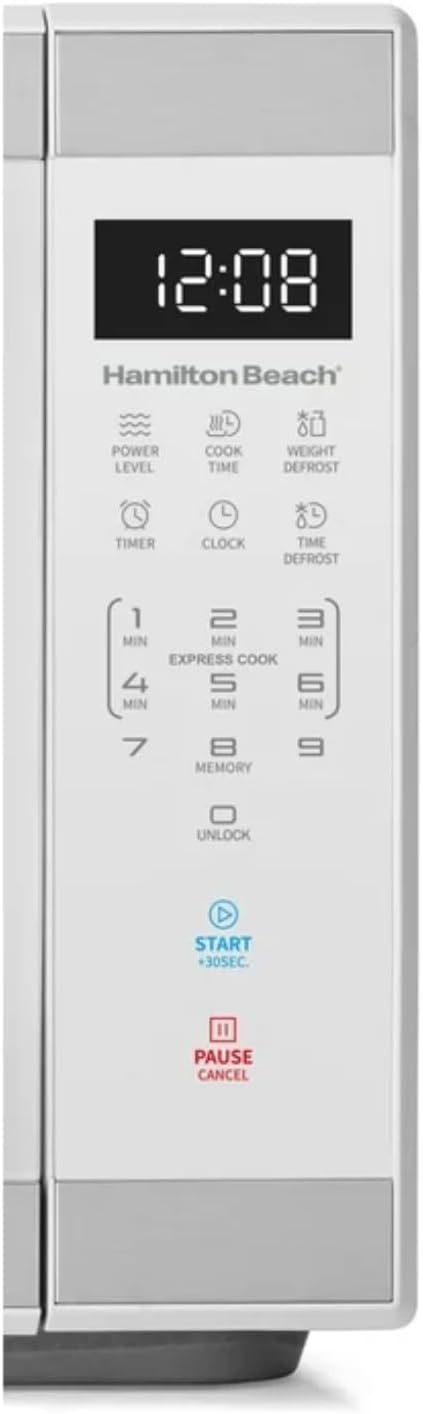
Gambar: Detil view of the intuitive touchscreen control panel and LED display.
Konci Kasalametan Anak
This microwave features a child safety lock to prevent unintended operation. The door automatically locks when cooking starts.
To Open Microwave During or After Use:
- Pencét éta 0/Buka konci or RENGEUT / BATAL pad.
- Grasp the handle and open the door.
To Deactivate the Child Safety Lock:
- Pencét éta 0/Buka konci pad for 3 seconds. The display will indicate "Loc".
- Pencét éta 7 pad.
- Pencét éta 9 pad. The display will show "ULoc".
To re-activate the child safety lock, repeat the above steps.
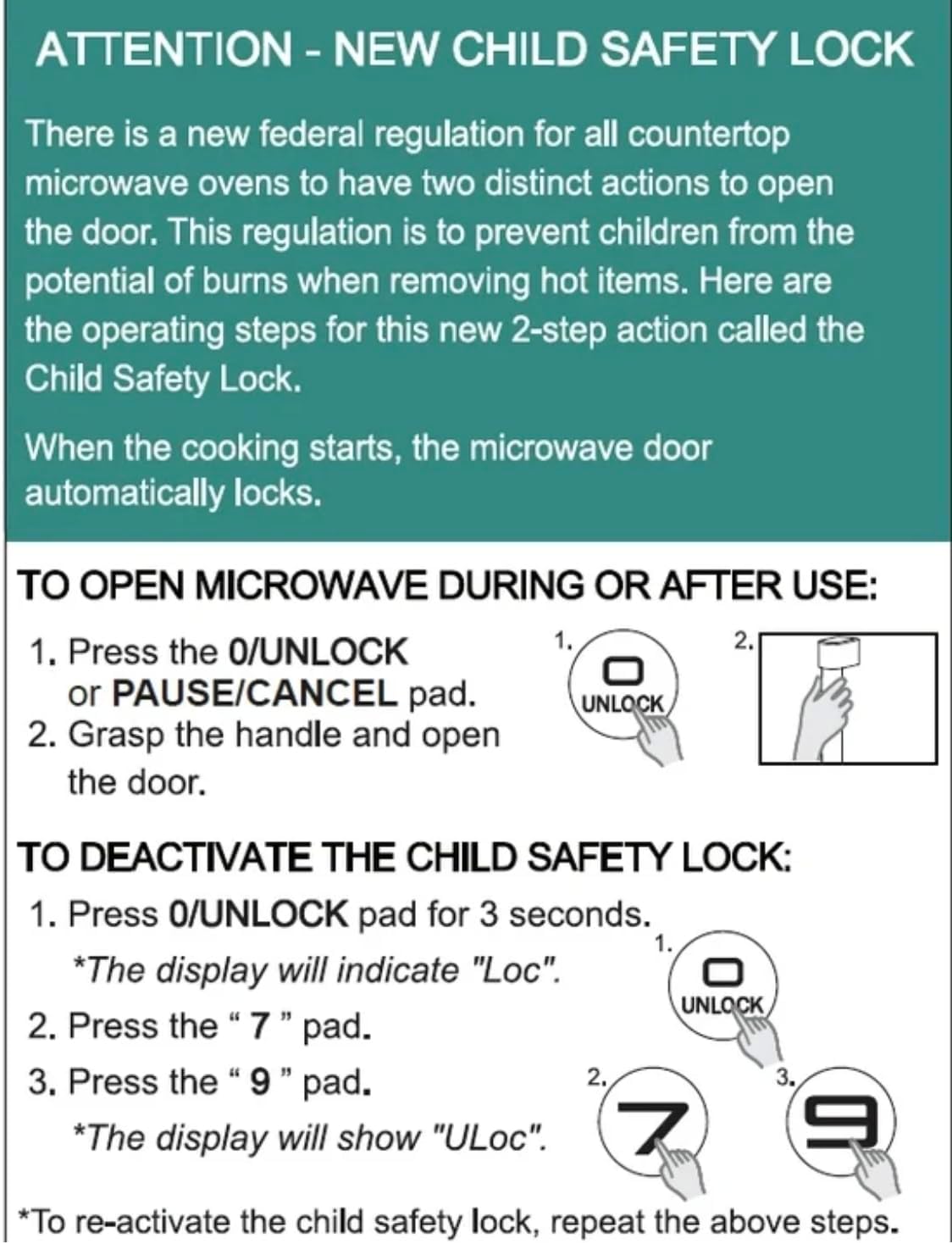
Image: Instructions for the new child safety lock feature, including how to open the door and deactivate the lock.
Pangropéa jeung beberesih
- Beberesih interior: Ngusap jero oven ku damp cloth after each use. For stubborn stains, use a mild detergent. Ensure the interior is dry before next use.
- Bersihan Luar: Ngabersihan beungeut luar ku lemes, damp lawon. Ulah make cleaners abrasive atawa bahan kimia kasar.
- Ngabersihan Turntable: The glass turntable and turntable ring can be removed for cleaning. They are dishwasher safe or can be hand-washed with warm, soapy water.
- Segel panto: Regularly inspect the door seals and surrounding areas for any damage or food residue. Clean as needed to ensure proper sealing.
Pamérésan masalah
| Masalah | Mungkin Cukang lantaranana / Solusi |
|---|---|
| Oven moal ngamimitian. |
|
| Dahareun teu rata. |
|
| Light bulb is out. | Contact customer support for bulb replacement. Do not attempt to replace it yourself. |
| Display shows "Loc". | Child safety lock is activated. Follow instructions in the "Child Safety Lock" section to deactivate. |
Garansi sareng Rojongan
For warranty information or technical support, please refer to the warranty card included with your purchase or contact Hamilton customer service. Keep your proof of purchase for warranty claims.
Palayanan palanggan: Mangga buka produsén urang websitus atanapi tingali bungkus produk anjeun kanggo detil kontak.


